

Hi there
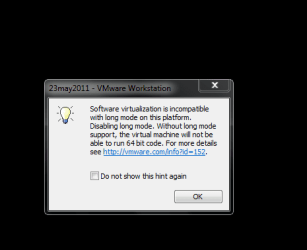
I think this type of message can safely be ignored when running a 32 bit virtual machine on vmware workstation 8.0.1 using a w7 x-64 host.
You get a message when powering on the vm saying Long support is disabled on this platform
Screen shot enclosed
AFAIK this simply reminds the user that the 32 bit VM can't execute 64 bit instructions
(This is NOT the same as running a 64 bit GUEST on a 32 bit Host -- quite possible --I've run W7 and W8 64 bit guests on an XP Host machine without problems too).
Screenshot enc
Cheers
jimbo
I think this type of message can safely be ignored when running a 32 bit virtual machine on vmware workstation 8.0.1 using a w7 x-64 host.
You get a message when powering on the vm saying Long support is disabled on this platform
Screen shot enclosed
AFAIK this simply reminds the user that the 32 bit VM can't execute 64 bit instructions
(This is NOT the same as running a 64 bit GUEST on a 32 bit Host -- quite possible --I've run W7 and W8 64 bit guests on an XP Host machine without problems too).
Screenshot enc
Cheers
jimbo
Attachments
My Computer
- Computer type
- PC/Desktop
- Computer Manufacturer/Model Number
- Custom built, several laptops HP/ASUS
- OS
- Linux CENTOS 7 / various Windows OS'es and servers
- CPU
- Intel i7 Intel i5
- Memory
- 8GB, 16GB
- Graphics Card(s)
- On Motherboard
- Sound Card
- Realtek HD audio
- Monitor(s) Displays
- Apple Cinema display, Samsung LCD
- Screen Resolution
- 1920 X 1080
- Hard Drives
- 4 X 1TB SATA
- Mouse
- Toshiba wireless laser
- Internet Speed
- > 20MB up
