

After my system restored from this issue, VoIP softphone PhonerLite is acting strange. I have it in Startup folder, starting automatically minimized when ever I boot Win7. Up to system restore everything worked fine.
After restoring my system, I get this message every time I boot: VoIP softphone has stopped working. Problem signature is as follows:
Problem Event Name: APPCRASH
Application Name: PhonerLite.exe
Application Version: 1.59.0.0
Application Timestamp: 4a2775f9
Fault Module Name: KERNELBASE.dll
Fault Module Version: 6.1.7100.0
Fault Module Timestamp: 49eea7a7
Exception Code: 0eedfade
Exception Offset: 000098f6
OS Version: 6.1.7100.2.0.0.256.1
Locale ID: 1033
Additional Information 1: 1b02
Additional Information 2: 1b02d6ac792b3e2eaf4f2922d9135efd
Additional Information 3: c6a1
Additional Information 4: c6a1f1ca8bcd6a91a4b7dc2adf6ba37e
When I click "Close the program" in above mentioned dialog, comes this:
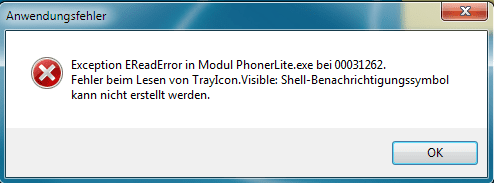
For reasons unknown to me it is in German, I have English system with German language pack for another user account, but I think message is clear to everybody:
Error reading from TrayIcon.Visible:Shell-Notification icon can not be shown. When I click OK and start softphone manually, it starts and works perfectly, tray icon visible where it should be.
Second strange thing is that Paint Shop Pro X2 stopped working completely. It worked fine until issue mentioned above, after that nothing. Have tried uninstalling and reinstalling, nothing works.
Any ideas?
Kari
Edit: Paint Shop Pro X2 problem solved. It works when I run it as an administrator.
After restoring my system, I get this message every time I boot: VoIP softphone has stopped working. Problem signature is as follows:
Problem Event Name: APPCRASH
Application Name: PhonerLite.exe
Application Version: 1.59.0.0
Application Timestamp: 4a2775f9
Fault Module Name: KERNELBASE.dll
Fault Module Version: 6.1.7100.0
Fault Module Timestamp: 49eea7a7
Exception Code: 0eedfade
Exception Offset: 000098f6
OS Version: 6.1.7100.2.0.0.256.1
Locale ID: 1033
Additional Information 1: 1b02
Additional Information 2: 1b02d6ac792b3e2eaf4f2922d9135efd
Additional Information 3: c6a1
Additional Information 4: c6a1f1ca8bcd6a91a4b7dc2adf6ba37e
When I click "Close the program" in above mentioned dialog, comes this:
For reasons unknown to me it is in German, I have English system with German language pack for another user account, but I think message is clear to everybody:
Error reading from TrayIcon.Visible:Shell-Notification icon can not be shown. When I click OK and start softphone manually, it starts and works perfectly, tray icon visible where it should be.
Second strange thing is that Paint Shop Pro X2 stopped working completely. It worked fine until issue mentioned above, after that nothing. Have tried uninstalling and reinstalling, nothing works.
Any ideas?
Kari
Edit: Paint Shop Pro X2 problem solved. It works when I run it as an administrator.
Last edited:
My Computer
At a glance
Windows 10 Pro x64 EN-GB1.6 GHz Intel Core i7-720QM Processor6 GBATI Mobility Radeon HD 5850 Graphics
- Computer type
- Laptop
- Computer Manufacturer/Model Number
- HP ENVY 17-1150eg
- OS
- Windows 10 Pro x64 EN-GB
- CPU
- 1.6 GHz Intel Core i7-720QM Processor
- Memory
- 6 GB
- Graphics Card(s)
- ATI Mobility Radeon HD 5850 Graphics
- Sound Card
- Beats sound system with integrated subwoofer
- Monitor(s) Displays
- 17" laptop display, 22" LED and 32" Full HD TV through HDMI
- Screen Resolution
- 1600*900 (1), 1920*1080 (2&3)
- Hard Drives
- Internal: 2 x 500 GB SATA Hard Disk Drive 7200 rpm
External: 2TB for backups, 3TB USB3 network drive for media
- Cooling
- As Envy runs a bit warm, I have it on a Cooler Master pad
- Keyboard
- Logitech diNovo Media Desktop Laser (bluetooth)
- Mouse
- Logitech Performance Mouse MX
- Internet Speed
- 50/10 Mbps VDSL
- Antivirus
- Windows Defender 4.3.9431.0
- Browser
- Maxthon 3.5.2., IE11
