Voltage reading!

moonbeep

New member
Local time
9:06 PM
Messages
68
Location
Belfast NI
Have used speccy and speedfan and both are showing my +12V at anything between 1.734v and 3.0v,mother board is only new and fitted on Wednesday as a replacement,surely something cant be right?
 

My Computer

Computer Manufacturer/Model Number
Custom Build
OS
Windows 7 Professional x64 SP1
CPU
Q9550 2.83GHZ
Motherboard
Gigabyte GA-G41MT-S2P
Memory
8GB Crucial DDR3-PC12800
Graphics Card(s)
Sapphire HD6870 1GB
Sound Card
Asus Xonar DS
Monitor(s) Displays
28" Hanns-G HZ281
Screen Resolution
1920x1200
Hard Drives
Samsung 320GB
WD 320GB
Seagate External 2.5 500GB
PSU
Corsair TX 650
Case
Coolermaster CM690
Cooling
Corsair H50
Keyboard
Logitech K120
Mouse
Logitech Wireless M305
Internet Speed
20MB Sky,getting 15mb
Other Info
Logitech z523 2.1 speakers
The first thing you want to do is check in the BIOS settings to see what the voltages are there.

Some motherboards don't play nice with speedfan and other software based sensors so that is why you want to check what the motherboard says.

For a definitive test you would want to use a multimeter to measure the voltage on any yellow wire on a spare connector while the computer is running (yellow=12v).

But I highly doubt the PC would even boot with 12v readings that were actually that low!
 

My Computer

Computer type
PC/Desktop
Computer Manufacturer/Model Number
Home Built - Jan 2013
OS
Windows 7 64 Bit Home Premium SP1
CPU
i7-3820
Motherboard
Asus P9X79-PRO - Bios 4608
Memory
GSkill F3-14900CL9Q - 16GB
Graphics Card(s)
EVGA GeForce GTX660 - Driver 352.86
Sound Card
On board Realtek ALC898
Monitor(s) Displays
Acer S271HL
Screen Resolution
1920 x 1080
Hard Drives
#1- Samsung 840 Pro Series
#2- Western Digital WD1002FAEX Sata3 Black
#3- Western Digital WD1002FAEX Sata3 Black
PSU
Corsair CMPSU-850TX-V2 - 850 watt (by Seasonic)
Case
Corsair Obsidian 550D
Cooling
Standard 3 120mm case fans, Cooler Master Hyper 212 EVO
Keyboard
MS KC-0405
Mouse
Intellimouse 5-button
Internet Speed
56 Mbits/Sec (on a good day)
Antivirus
Avast & Malwarebytes
Browser
Firefox
Other Info
Asus DVD - DRW-24B1ST 24X
Reading 12.048V in the Bios,thanks for the advice!
 

My Computer

Computer Manufacturer/Model Number
Custom Build
OS
Windows 7 Professional x64 SP1
CPU
Q9550 2.83GHZ
Motherboard
Gigabyte GA-G41MT-S2P
Memory
8GB Crucial DDR3-PC12800
Graphics Card(s)
Sapphire HD6870 1GB
Sound Card
Asus Xonar DS
Monitor(s) Displays
28" Hanns-G HZ281
Screen Resolution
1920x1200
Hard Drives
Samsung 320GB
WD 320GB
Seagate External 2.5 500GB
PSU
Corsair TX 650
Case
Coolermaster CM690
Cooling
Corsair H50
Keyboard
Logitech K120
Mouse
Logitech Wireless M305
Internet Speed
20MB Sky,getting 15mb
Other Info
Logitech z523 2.1 speakers
Reading 12.048V in the Bios,thanks for the advice!
You might try another program (other than Speedfan), which might produce results that match your BIOS values.

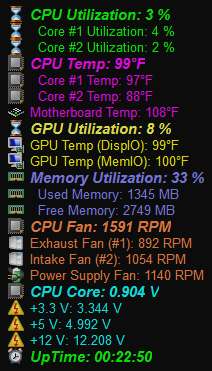
I have long used the highly-regarded [but not free] Everest, which last year became Aida64. At that transition there was a free upgrade license given to the initial 1.50 version of Aida64, which certainly worked fine for "older" hardware that was supported by Everest.

Newer hardware, CPUs, GPUs, sensor chips, motherboards, etc., are supported by ongoing evolution of the new active Aida64 product development team. As that is relevant to me I purchased a new license for Aida64 (current version 1.85) that correctly shows all sensor values for the hardware in several brand new machines (which were not showing with the previous 1.50 initial version).

You could certainly try it using the free 30-day trial period, to see (a) if it measures your voltages properly, and (b) if you like it and want to pay $39 to buy it.

Here is my own customized "OSD" presentation:

005everest.jpg
 

My Computer

Computer type
PC/Desktop
Computer Manufacturer/Model Number
Home-built, two systems (1) and (2)
OS
Windows 7 Pro x64 (1), Win7 Pro X64 (2)
CPU
i5-3350p 3.1Ghz/6MB-cache (1); E8400 3.0Ghz/6MB-cache (2)
Motherboard
ASUS P8Z77-V Pro (1); ASUS P5Q3 (2)
Memory
8GB PC3-12800 DDR3 (1); 4GB PC3-10600 DDR3 (2)
Graphics Card(s)
ATI HD7750 (1), (see TV cards); ATI R7 250 (2)
Sound Card
Realtek ALC892 HD Audio (1); Realtek ALC1200 HD Audio (2)
Monitor(s) Displays
Eizo HD2441W LCD, Eizo S2433W (1); Eizo 24" S2433W (2)
Screen Resolution
1920x1200, 1920x1200 (1); 1920x1200 (2)
Hard Drives
(1) 1TB SATA-II (7200RPM), 2x2TB SATA-III (7200RPM), 250GB SATA-III (10000RPM) for OS; 2x2TB external USB 3.0

(2) 320GB SATA-II (7200RPM), 750GB SATA-II (7200RPM), 150GB SATA-II (10000RPM) for OS; 2TB external USB 3.0
PSU
Nesteq ECS-6001 600W (1); Nesteq ECS-5001 500W (2)
Case
Acousti-Case 360 (1) and (2)
Cooling
Noctua NH-U12P SE2 for CPU, 2x120mm case fans (1) and (2)
Keyboard
IBM PS/2 (1) and (2)
Mouse
Logitech MX Revolution wireless (1); Microsoft wired (2)
Internet Speed
100mbps down / 10mbps up
Antivirus
Microsoft Security Essentials; Malwarebyte Anti-Malware Pro
Browser
Firefox
Other Info
Ceton InfiniTV 4-tuner cablecard-enabled TV card as well as Hauppauge HVR-2250 OTA/ATSC 2-tuner TV card in (1), running under Win7 WMC
HWiNFO will do the same for free.

Have used speccy and speedfan and both are showing my +12V at anything between 1.734v and 3.0v
I can assure you that if your 12v readings were that low, you wouldn't be able to read them. Your PC would be dead. :shock:
 

My Computer

Computer type
PC/Desktop
Computer Manufacturer/Model Number
Built 2/11/2011
OS
Windows 7 Pro-x64
CPU
i7-2600 3.4GHz - 3.8GHz Turbo
Motherboard
Intel DH67BL-B3
Memory
8Gb - 2x4GB, Muskin 991770 PC3-1333
Graphics Card(s)
Integrated Intel HD 2000
Sound Card
Integrated Intel 10.1 HD, RealTek ALC892
Monitor(s) Displays
Asus LCD VH222H, Haier HL24XSL2a
Screen Resolution
1920x1080, 1920x1080
Hard Drives
Crucial SSD C300-128Gb,
Western Digital WD5002AALX - 500Gb,
Western Digital WD7501AALS - 750Gb
PSU
Seasonic 650W 80+ Gold Modular
Case
Rosewill Defender
Cooling
Stock CPU, Four 120mm case fans, PCH fan added
Keyboard
Logitech EX100 Y-RBH94 Wireless
Mouse
Logitech EX100 M-RCE95 Wireless
Internet Speed
3.0/1.5 Mbs
Antivirus
Microsoft Security Essentials
Browser
Microsoft Internet Explorer 11
Other Info
Antec Veris Premier-Multimedia IR Station,
Cyber Accoustics-3602 Speakers,
AFT XM-5U Card Reader,
Hauppauge TV-HVR-2250,
Sony LX300 USB Turntable

My Computer

Computer type
PC/Desktop
OS
Windows 10 Home x64
CPU
INTEL Core i5-750 Quad-Core 3.37GHz
Motherboard
ASUS P7P55D
Memory
HyperX Fury Black Series 8GB (2 x 4GB) 1866Mhz
Graphics Card(s)
EVGA GeForce GTX 750 Superclocked 1GB 128-Bit GDDR5
Monitor(s) Displays
LG 32MA68HY 32" IPS
Screen Resolution
1920 x 1080
Hard Drives
Samsung 840 Evo 120GB, SEAGATE 500GB Barracuda® 7200.12, SATA 3 Gb/s, 7200 RPM, 16MB cache
PSU
ANTEC TruePower New TP-550, 80 PLUS, 550W
Case
ANTEC Three Hundred Illusion
Cooling
COOLER MASTER Hyper 212 Plus, 4 x 120mm 1 x 140mm Noctua's
Internet Speed
85 + Mbps
Antivirus
Avast
Browser
Vivaldi
Suggest d/l OCCT Beta. this is a stress testing tool, but it has a great monitoring feature that opens at startup. No need to use the program, just open it and you will see all your applicable run voltages. It links to version 16 of the beta now BTW :)

http://www.sevenforums.com/overclocking-case-mods/166950-occt-4-0-0-beta-7-a.html

A Guy

Current 12v on OCCT is 1.34v and max is 3.49v,as stated reads 12v in the bios and mother board is new and only fitted by a technician last Wednesday,PC seems to be running fine though!


12v reading just says Trial on AIDA64
 

My Computer

Computer Manufacturer/Model Number
Custom Build
OS
Windows 7 Professional x64 SP1
CPU
Q9550 2.83GHZ
Motherboard
Gigabyte GA-G41MT-S2P
Memory
8GB Crucial DDR3-PC12800
Graphics Card(s)
Sapphire HD6870 1GB
Sound Card
Asus Xonar DS
Monitor(s) Displays
28" Hanns-G HZ281
Screen Resolution
1920x1200
Hard Drives
Samsung 320GB
WD 320GB
Seagate External 2.5 500GB
PSU
Corsair TX 650
Case
Coolermaster CM690
Cooling
Corsair H50
Keyboard
Logitech K120
Mouse
Logitech Wireless M305
Internet Speed
20MB Sky,getting 15mb
Other Info
Logitech z523 2.1 speakers
As stated, your 12 volts could not be that low, or the PC wouldn't work at all. Since multiple programs are reading the voltage wrong, but BIOS is apparently ok, it is the monitoring sensors somehow. You can d/l HWMonitor (it is free), but I suspect it too will have the incorrect readings.

A post at another forum by a former member here seems to say this isn't uncommon, and is a windows issue (see last post in thread).

Sensors reporting incorrect values

A Guy
 

My Computer

Computer type
PC/Desktop
OS
Windows 10 Home x64
CPU
INTEL Core i5-750 Quad-Core 3.37GHz
Motherboard
ASUS P7P55D
Memory
HyperX Fury Black Series 8GB (2 x 4GB) 1866Mhz
Graphics Card(s)
EVGA GeForce GTX 750 Superclocked 1GB 128-Bit GDDR5
Monitor(s) Displays
LG 32MA68HY 32" IPS
Screen Resolution
1920 x 1080
Hard Drives
Samsung 840 Evo 120GB, SEAGATE 500GB Barracuda® 7200.12, SATA 3 Gb/s, 7200 RPM, 16MB cache
PSU
ANTEC TruePower New TP-550, 80 PLUS, 550W
Case
ANTEC Three Hundred Illusion
Cooling
COOLER MASTER Hyper 212 Plus, 4 x 120mm 1 x 140mm Noctua's
Internet Speed
85 + Mbps
Antivirus
Avast
Browser
Vivaldi
As stated, your 12 volts could not be that low, or the PC wouldn't work at all. Since multiple programs are reading the voltage wrong, but BIOS is apparently ok, it is the monitoring sensors somehow. You can d/l HWMonitor (it is free), but I suspect it too will have the incorrect readings.

A post at another forum by a former member here seems to say this isn't uncommon, and is a windows issue (see last post in thread).

Sensors reporting incorrect values

A Guy

HWinfo reports 12v as 11.922v!
 

My Computer

Computer Manufacturer/Model Number
Custom Build
OS
Windows 7 Professional x64 SP1
CPU
Q9550 2.83GHZ
Motherboard
Gigabyte GA-G41MT-S2P
Memory
8GB Crucial DDR3-PC12800
Graphics Card(s)
Sapphire HD6870 1GB
Sound Card
Asus Xonar DS
Monitor(s) Displays
28" Hanns-G HZ281
Screen Resolution
1920x1200
Hard Drives
Samsung 320GB
WD 320GB
Seagate External 2.5 500GB
PSU
Corsair TX 650
Case
Coolermaster CM690
Cooling
Corsair H50
Keyboard
Logitech K120
Mouse
Logitech Wireless M305
Internet Speed
20MB Sky,getting 15mb
Other Info
Logitech z523 2.1 speakers
Interesting. I do believe this is a windows monitoring issue rather then hardware, although the new MB may be what started it. The voltages are clearly correct. I do think it is important that you can monitor voltages and temperatures when necessary. Hopefully HWMonitor will continue to be a program you can count on. Maybe another member will have suggestions why the others reported incorrect voltages. They should be compatible with your new MB. A Guy
 

My Computer

Computer type
PC/Desktop
OS
Windows 10 Home x64
CPU
INTEL Core i5-750 Quad-Core 3.37GHz
Motherboard
ASUS P7P55D
Memory
HyperX Fury Black Series 8GB (2 x 4GB) 1866Mhz
Graphics Card(s)
EVGA GeForce GTX 750 Superclocked 1GB 128-Bit GDDR5
Monitor(s) Displays
LG 32MA68HY 32" IPS
Screen Resolution
1920 x 1080
Hard Drives
Samsung 840 Evo 120GB, SEAGATE 500GB Barracuda® 7200.12, SATA 3 Gb/s, 7200 RPM, 16MB cache
PSU
ANTEC TruePower New TP-550, 80 PLUS, 550W
Case
ANTEC Three Hundred Illusion
Cooling
COOLER MASTER Hyper 212 Plus, 4 x 120mm 1 x 140mm Noctua's
Internet Speed
85 + Mbps
Antivirus
Avast
Browser
Vivaldi
...I do believe this is a windows monitoring issue rather then hardware...
You didn't see the previous post (reply #9).
"HWinfo reports 12v as 11.922v!"
 

My Computer

Computer type
PC/Desktop
Computer Manufacturer/Model Number
Dell Inspiron 660
OS
Windows 7 Home Premium 64bit
CPU
Intel Core i3-3240
Motherboard
Dell 084J0R
Memory
8GB DDR3 SDRAM
Graphics Card(s)
EVGA GeForce GT 620
Sound Card
Intel Panther Point PCH High Definition Audio
Monitor(s) Displays
Acer G205HV
Screen Resolution
1600 x 900
Hard Drives
Sandisk SSD 64GB SDSSDP064G
Seagate HDD 1TB ST1000DM003-1CH162
PSU
Dell 300W
Case
Dell Inspiron
Keyboard
Logitech Wireless K320/B350
Mouse
Microsoft
Internet Speed
25Mbps/4Mbps
Antivirus
Avast
Browser
Mozilla Firefox
From what I have gathered over the years is that the temperature and voltage sensor monitoring chips used on motherboards are very simple and very cheap components. When the chip is good it works well and when it is bad it does not affect system performance, so they just do not warrant any labor-hours to test on a production line. You've got that 5%-10% manufacturing defect chance that your motherboard has a faulty sensor. The argument over whether you can trust them at all has been the subject of many a flame war on newsgroups for years!

There is very little argument that the best way to test voltages is physically, using a digital multimeter.

The tech keeps changing too. It drives software programmers nuts. Ideas like this: Enthusiast System Architecture - Wikipedia, the free encyclopedia can turn a formally reliable piece of software bad in a hurry.

Speedfan begs off with this disclaimer, found in their Frequently Asked Questions section:
Hardware sensor chips are generic devices that can be used to measure voltages from anywhere. The measured voltage must be converted to the range required by the sensor chip. Standard monitoring chips specify which external circuitry must be used in order to measure voltages outside some range. Voltages like 12V, -5V, -12V and some others need this external circuitry. Some manufacturers chose not to follow datasheets. If this is your case, then you will read unusual values from SpeedFan. Since this custom circuitry is not known, SpeedFan does not try to "guess" it as any reading wouldn't be safe. If you get really odd voltage readings, simply enter configuration and uncheck the relevant ones.
And the beat goes on!
 

My Computer

Computer type
PC/Desktop
Computer Manufacturer/Model Number
Home Built - Jan 2013
OS
Windows 7 64 Bit Home Premium SP1
CPU
i7-3820
Motherboard
Asus P9X79-PRO - Bios 4608
Memory
GSkill F3-14900CL9Q - 16GB
Graphics Card(s)
EVGA GeForce GTX660 - Driver 352.86
Sound Card
On board Realtek ALC898
Monitor(s) Displays
Acer S271HL
Screen Resolution
1920 x 1080
Hard Drives
#1- Samsung 840 Pro Series
#2- Western Digital WD1002FAEX Sata3 Black
#3- Western Digital WD1002FAEX Sata3 Black
PSU
Corsair CMPSU-850TX-V2 - 850 watt (by Seasonic)
Case
Corsair Obsidian 550D
Cooling
Standard 3 120mm case fans, Cooler Master Hyper 212 EVO
Keyboard
MS KC-0405
Mouse
Intellimouse 5-button
Internet Speed
56 Mbits/Sec (on a good day)
Antivirus
Avast & Malwarebytes
Browser
Firefox
Other Info
Asus DVD - DRW-24B1ST 24X
...I do believe this is a windows monitoring issue rather then hardware...
You didn't see the previous post (reply #9).
"HWinfo reports 12v as 11.922v!"

I did see that post, it was I that suggested HWMonitor ;) And since BIOS reports 12v, and now HWMonitor only reports an almost correct voltage, it confirms for me that it is a windows monitoring issue. IE: the sensors cannot be monitored correctly. A Guy
 

My Computer

Computer type
PC/Desktop
OS
Windows 10 Home x64
CPU
INTEL Core i5-750 Quad-Core 3.37GHz
Motherboard
ASUS P7P55D
Memory
HyperX Fury Black Series 8GB (2 x 4GB) 1866Mhz
Graphics Card(s)
EVGA GeForce GTX 750 Superclocked 1GB 128-Bit GDDR5
Monitor(s) Displays
LG 32MA68HY 32" IPS
Screen Resolution
1920 x 1080
Hard Drives
Samsung 840 Evo 120GB, SEAGATE 500GB Barracuda® 7200.12, SATA 3 Gb/s, 7200 RPM, 16MB cache
PSU
ANTEC TruePower New TP-550, 80 PLUS, 550W
Case
ANTEC Three Hundred Illusion
Cooling
COOLER MASTER Hyper 212 Plus, 4 x 120mm 1 x 140mm Noctua's
Internet Speed
85 + Mbps
Antivirus
Avast
Browser
Vivaldi
And since BIOS reports 12v, and now HWMonitor only reports an almost correct voltage, it confirms for me that it is a windows monitoring issue. IE: the sensors cannot be monitored correctly. A Guy
I'm disappointed that Aida64's trial version has certain functionality disabled, and in particular apparently the voltages (or at least 12V) is one of those that does not perform as it will in the licensed version. I'd like to share my own license key just for the test on the problem machine, but that would be a no-no.

But if we had at least one (or more) other hardware monitor product (like Aida64) that DID show 12V results on this particular motherboard and PSU (and it would be helpful to see what value displayed), that would be very interesting and informative.

In my experience using Aida64 on a number of different Win7 machines (the most recent just this past week, on a Lenovo K330 IdeaCentre i3 desktop) the sensor voltage readings have never failed to display correctly. I suspect the licensed Aida64 version would, like HWMonitor, show correct 12V voltage values for the current problem machine, but of course that's just speculation. I don't consider Speedfan to be in the same class as these products.

(I am particularly a fan of Aida64 because of its configurable OSD display of lots of hardware information in a small desktop object, as shown by my screenshot earlier. It also has extensive larger system information presentations like HWMonitor if I want to probe very deeply with large open windows, but for a 24/7 desktop "gadget" this little OSD is ideal for me.)

It's just honestly hard for me to believe that this problem is actually rooted in Win7, rather than something odd or unusual in the motherboard hardware or BIOS. I had a problem on my Supermicro C2SBX mobo a few years back with temperatures being reported by Aida64/Everest way off after I upgraded BIOS (because I felt I should "keep current"). Speaking with their tech support, they contended the problem came from Intel, with a new method of reporting temperatures being simply "low, medium or high" rather than the true numeric values. Reverting to the previous BIOS of course fixed the problem and the temperatures were now once again reported accurately... though I really never knew if it was Intel or Supermicro who'd messed up for real in that updated BIOS version. I'm still running just fine with the original prior BIOS version.

I've got to believe it's something like that in the current story.

 

My Computer

Computer type
PC/Desktop
Computer Manufacturer/Model Number
Home-built, two systems (1) and (2)
OS
Windows 7 Pro x64 (1), Win7 Pro X64 (2)
CPU
i5-3350p 3.1Ghz/6MB-cache (1); E8400 3.0Ghz/6MB-cache (2)
Motherboard
ASUS P8Z77-V Pro (1); ASUS P5Q3 (2)
Memory
8GB PC3-12800 DDR3 (1); 4GB PC3-10600 DDR3 (2)
Graphics Card(s)
ATI HD7750 (1), (see TV cards); ATI R7 250 (2)
Sound Card
Realtek ALC892 HD Audio (1); Realtek ALC1200 HD Audio (2)
Monitor(s) Displays
Eizo HD2441W LCD, Eizo S2433W (1); Eizo 24" S2433W (2)
Screen Resolution
1920x1200, 1920x1200 (1); 1920x1200 (2)
Hard Drives
(1) 1TB SATA-II (7200RPM), 2x2TB SATA-III (7200RPM), 250GB SATA-III (10000RPM) for OS; 2x2TB external USB 3.0

(2) 320GB SATA-II (7200RPM), 750GB SATA-II (7200RPM), 150GB SATA-II (10000RPM) for OS; 2TB external USB 3.0
PSU
Nesteq ECS-6001 600W (1); Nesteq ECS-5001 500W (2)
Case
Acousti-Case 360 (1) and (2)
Cooling
Noctua NH-U12P SE2 for CPU, 2x120mm case fans (1) and (2)
Keyboard
IBM PS/2 (1) and (2)
Mouse
Logitech MX Revolution wireless (1); Microsoft wired (2)
Internet Speed
100mbps down / 10mbps up
Antivirus
Microsoft Security Essentials; Malwarebyte Anti-Malware Pro
Browser
Firefox
Other Info
Ceton InfiniTV 4-tuner cablecard-enabled TV card as well as Hauppauge HVR-2250 OTA/ATSC 2-tuner TV card in (1), running under Win7 WMC
The OS shouldn't make any difference. Some of the monitors may not be interpreting the PECI interface data correctly. HWiNFO is probably pretty accurate. It's one of the best monitors I've seen. Here's what mine shows.
 

Attachments

  • MB Volt Check.JPG
    MB Volt Check.JPG
    24 KB · Views: 11

My Computer

Computer type
PC/Desktop
Computer Manufacturer/Model Number
Built 2/11/2011
OS
Windows 7 Pro-x64
CPU
i7-2600 3.4GHz - 3.8GHz Turbo
Motherboard
Intel DH67BL-B3
Memory
8Gb - 2x4GB, Muskin 991770 PC3-1333
Graphics Card(s)
Integrated Intel HD 2000
Sound Card
Integrated Intel 10.1 HD, RealTek ALC892
Monitor(s) Displays
Asus LCD VH222H, Haier HL24XSL2a
Screen Resolution
1920x1080, 1920x1080
Hard Drives
Crucial SSD C300-128Gb,
Western Digital WD5002AALX - 500Gb,
Western Digital WD7501AALS - 750Gb
PSU
Seasonic 650W 80+ Gold Modular
Case
Rosewill Defender
Cooling
Stock CPU, Four 120mm case fans, PCH fan added
Keyboard
Logitech EX100 Y-RBH94 Wireless
Mouse
Logitech EX100 M-RCE95 Wireless
Internet Speed
3.0/1.5 Mbs
Antivirus
Microsoft Security Essentials
Browser
Microsoft Internet Explorer 11
Other Info
Antec Veris Premier-Multimedia IR Station,
Cyber Accoustics-3602 Speakers,
AFT XM-5U Card Reader,
Hauppauge TV-HVR-2250,
Sony LX300 USB Turntable
Back
Top