Volume icon for tray that's not a speaker icon

Caslon

New member
Member
Local time
5:12 AM
Messages
61
I'd like to replace the small windows speaker icon in the taskbar tray. A sound icon with a color bar of some sort. As small as it would be, it would show bars of green yellow and red. If it showed red, it would mean I have my volume set to max using headphones (music). Seeing that the bar is showing red would allow me to reduce my windows volume before I start a game and blast my ears out. Can anyone recommend one?
 

My Computer My Computer

At a glance

Windows 7 Premium
OS
Windows 7 Premium
Anyone know of a replacement for the Windows taskbar tray icon that shows volume?

In other words, at a glance I want to see a more accurate icon. One with light colored bars. I would know to turn down the volume before starting a game if I saw the icon bar in red. Clicking on my desired new icon would work the same as the speaker icon for adjusting the volume.

I want to quick glance my taskbar tray and see what my volume is set at . Something other than a speaker icon.

Sorry, no...I don't want to have to move my mouse cursor to check my Windows sound volume tray icon. I don't think I'm lazy either. Why not be able to just glance at it? Anyone know of a replacement for the Windows taskbar tray of Sound?
 

My Computer My Computer

At a glance

Windows 7 Premium
OS
Windows 7 Premium
It looks like it would be as simple as editing %systemroot%\windows\system32\SndVolSSO.ddl using resource hacker.
Simple enough, only when I go to save changes, it says access is denied. Even after taking full control and ownership of system32 folder and the .dll file, I still am unable to overwrite the original.

So what we need now is someone who knows how to bypass permissions in the system32 folder

PS: once we figure out how to get this working, I'll happily design some .icos for this.
 

My Computer My Computer

At a glance

Win 7 Ultimate 64-bitIntel i716GB Corsair VengenceGigabyte
Computer type
PC/Desktop
Computer Manufacturer/Model Number
Custom
OS
Win 7 Ultimate 64-bit
CPU
Intel i7
Motherboard
MSI MPower
Memory
16GB Corsair Vengence
Graphics Card(s)
Gigabyte

My Computers My Computers

  • At a glance

    Windows 11 Pro x64 [Latest Release and Releas...Ryzen 9 5950X, 3.8 - 5.2 MHz64GB [2 x 32GB] DDR4 3200MHz4GB NVIDIA GEFORCE GTX 1650 Ti
    Computer type
    PC/Desktop
    Computer Manufacturer/Model Number
    ChillBlast - Custom to my design
    OS
    Windows 11 Pro x64 [Latest Release and Release Preview]
    CPU
    Ryzen 9 5950X, 3.8 - 5.2 MHz
    Motherboard
    Asus Prime X570-Pro
    Memory
    64GB [2 x 32GB] DDR4 3200MHz
    Graphics Card(s)
    4GB NVIDIA GEFORCE GTX 1650 Ti
    Sound Card
    On-board SPDIF to 5.1 System + HDMI [5.1 system]
    Monitor(s) Displays
    32" UHD 32 Bit HDR Monitor + 43" UHD 4K 32Bit HDR TV
    Screen Resolution
    2 x 3840 x 2160 @60Hz
    Hard Drives
    1TB M2 SSD OS, 500GB Fast Access SSD, 2 x 8TB Data + Various Externals from 1TB to 4TB, 10TB NAS
    PSU
    NZXT C750 80 PLUS Gold 750W Modular PSU
    Case
    Workstation Case [Matt Black]
    Cooling
    NZXT Kraken X63 280mm CPU Cooler +2x Quiet Case fans
    Keyboard
    Logitech Wireless MX Keys & K400 + others
    Mouse
    Logitech Wireless MX Master 3S
    Internet Speed
    920 MB Down 50 MB Up
    Antivirus
    BitDefender Total Security Pro
    Browser
    Chrome (always run latest Non-Beta)
    Other Info
    Also run ...
    Laptop - Quad 8GB - Windows 10 Pro x64
    Nexus 7 Android tablet x2
    Samsung 10.2" tablet
    Blackview TAB 8 4G Android Tablet c/w Keyboard
    Wacom Intuos Pro Medium Pen Pad
    Wacom Intuos Pro Small Pen Pad
    Wacom Expresskeys Remote
    Loopdeck+ Graphics Controller
    Shuttle Pro v2 Control
  • At a glance

    Windows 11 Pro x64 Latest RPIntel I7 10750H 5.0GHz32GB [2x16GB] DDR4 2933 MHznVidia GTX1650Ti 4 GB GDDR6
    Computer type
    Laptop
    System Manufacturer/Model Number
    Dell XPS 17 10750H
    OS
    Windows 11 Pro x64 Latest RP
    CPU
    Intel I7 10750H 5.0GHz
    Motherboard
    Dell XPS
    Memory
    32GB [2x16GB] DDR4 2933 MHz
    Graphics Card(s)
    nVidia GTX1650Ti 4 GB GDDR6
    Sound Card
    Stock [Realtek] 4 Speaker
    Monitor(s) Displays
    17" IPS UHD+ Infinity Edge Touchscreen
    Screen Resolution
    3840 x 2400
    Hard Drives
    2TB M2 NVMe, 4TB External + various 500GB & 1TB External NVMe (also have access to spinner HDD from
    PSU
    Stock
    Case
    Stock XPS Aluminium & Carbon Fibre
    Cooling
    Stock - Active Fan Control
    Keyboard
    Backlit + Various Logitech
    Mouse
    Stock Track Pad + Logitech MX Trackball
    Internet Speed
    72 MB Down 18MB Up
    Browser
    Chrome
    Other Info
    Also run ...
    Laptop - Quad 8GB - Windows 10 Pro x64
    Nexus 7 Android tablet x2
    10.2" tablet
    Sony Z3 Android Smartphone
    Wacom Intuos Pro Medium Pen Pad
    Wacom Intuos Pro Small Pen Pad
    Wacom Expresskeys Remote
    Loopdeck+ Graphics Controller
    Shuttle Pro v2 Control Pad
    10TB NAS
It looks like it would be as simple as editing %systemroot%\windows\system32\SndVolSSO.ddl using resource hacker.
Simple enough, only when I go to save changes, it says access is denied. Even after taking full control and ownership of system32 folder and the .dll file, I still am unable to overwrite the original.

So what we need now is someone who knows how to bypass permissions in the system32 folder

PS: once we figure out how to get this working, I'll happily design some .icos for this.
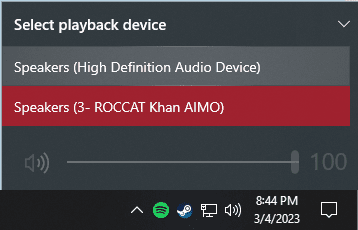
could you possibly make one for when i switch where my sound comes from i.e. speakers for well speakers and a headset for my headphones
you know like when i change it here? I'm not to well versed in this stuff and if you want I could pay you
image.png
 

My Computers My Computers

  • At a glance

    windows 10
    Computer type
    PC/Desktop
    Computer Manufacturer/Model Number
    HP
    OS
    windows 10
  • Computer type
    PC/Desktop
You can try Customizer God which can modify the appropriate .dll file and replace the default icons with custom ones. This should be able to modify the SndVolSSO.dll file directly. An alternative is to copy the file at another folder, modify it and then change ownership of the C:\Windows\System32 folder from TrustedInstaller to Administrators, then grant Administrators full access to the folder and its contents. You may also have to change ownnership to SndVolSSO.dll and grant full access separately to let you replace it. Another trick is to boot with Windows setup, press SHIFT+F10 to open a Command Prompt and replace the file using the appropriate commands, or boot from a WinPE USB or DVD such as Strelec's WinPE and do it from there.
 

My Computer My Computer

At a glance

Windows 7 Ultimate 64-bit (now 11 24H2)Intel Core-i3 3770 3.5GHz16GB DDR3 1600MhznVidia Geforce RTX 3050
Computer type
PC/Desktop
Computer Manufacturer/Model Number
custom
OS
Windows 7 Ultimate 64-bit (now 11 24H2)
CPU
Intel Core-i3 3770 3.5GHz
Motherboard
Asus P8H61
Memory
16GB DDR3 1600Mhz
Graphics Card(s)
nVidia Geforce RTX 3050
Sound Card
Realtek HD audio
Monitor(s) Displays
Sony 19" LCD TV via VGA
Screen Resolution
1440x900
Hard Drives
WD 1TB SATA III SSD
PSU
unknown
Case
unknown
Cooling
Intel's provided with CPU
Antivirus
Windows Defender (Windows 11)
Browser
Microsoft Edge
Other Info
Previously Windows 7 Ultimate, now Windows 11 24H2
You can try Customizer God which can modify the appropriate .dll file and replace the default icons with custom ones. This should be able to modify the SndVolSSO.dll file directly. An alternative is to copy the file at another folder, modify it and then change ownership of the C:\Windows\System32 folder from TrustedInstaller to Administrators, then grant Administrators full access to the folder and its contents. You may also have to change ownnership to SndVolSSO.dll and grant full access separately to let you replace it. Another trick is to boot with Windows setup, press SHIFT+F10 to open a Command Prompt and replace the file using the appropriate commands, or boot from a WinPE USB or DVD such as Strelec's WinPE and do it from there.
Would this change the image when I change what output I have selected
 

My Computers My Computers

  • At a glance

    windows 10
    Computer type
    PC/Desktop
    Computer Manufacturer/Model Number
    HP
    OS
    windows 10
  • Computer type
    PC/Desktop
Yes, if you open the SndVolSSO.dll with Customizer God or other suitable application you will see many icons, depending on the volume level, mute, no audio detected etc. You can change the volume level icons to custom green bars, for example, and then to a red bar for max volume. There are many icons online to download and you also have the option to extract icons from other .dll or .exe files. If you prefer to create your own, there are some applications that can convert a .bmp image to .ico file I use the good old BMP2ICO utility.
 

My Computer My Computer

At a glance

Windows 7 Ultimate 64-bit (now 11 24H2)Intel Core-i3 3770 3.5GHz16GB DDR3 1600MhznVidia Geforce RTX 3050
Computer type
PC/Desktop
Computer Manufacturer/Model Number
custom
OS
Windows 7 Ultimate 64-bit (now 11 24H2)
CPU
Intel Core-i3 3770 3.5GHz
Motherboard
Asus P8H61
Memory
16GB DDR3 1600Mhz
Graphics Card(s)
nVidia Geforce RTX 3050
Sound Card
Realtek HD audio
Monitor(s) Displays
Sony 19" LCD TV via VGA
Screen Resolution
1440x900
Hard Drives
WD 1TB SATA III SSD
PSU
unknown
Case
unknown
Cooling
Intel's provided with CPU
Antivirus
Windows Defender (Windows 11)
Browser
Microsoft Edge
Other Info
Previously Windows 7 Ultimate, now Windows 11 24H2
Back
Top