Volume too loud

saikO

New member
Local time
1:02 AM
Messages
5
I keep reading complaints about Win7 volume being too low. Oddly enough, I find my volume too high. Is there a way to tweak the volume settings for more subtley at lower levels?

I hooked up a set of speakers to my computer that does NOT have hardware volume controls or a remote of any kind. It has worked fine on my other WinXP machine. On my new Win7 computer with realtek onboard audio, I have the volume at 1 and it is too loud. Its fine if I am watching a movie, but I really don't need this high of a volume when I am working at 3 in the morning. I went into control panel to go into the properties for my speakers. I lowered the individual levels for my front/rear/etc speakers. This does nothing to fix the problem because if I lower these levels, I cannot hear anything. I have to raise the volume up to hear anything. Basically, the default levels for my speakers were at 100. @100, my volume was at 1. When I lowered the levels to 24, I had to use volume at 7 before I can hear anything. 0-6 results in no sound from my speakers. If I go lower than 24, I have to raise my volume. If I go higher than 23, say 50, I have to raise my volume. So these levels do not help me at all.

The only "fix" I found was to add enhancement>room correction and add a -10 dB gain to my speakers. Unfortunately, this is not that great of a fix as I cannot go any lower than that not to mention this feels like an artificial fix or something. Any help is very much appreciated.

I have already tried updating my drivers through realtek's website and my manufacturer Gateway. I have already reinstalled OS. Gateway Official Site: Shop - Desktops - FX6803 25 Product Details is my computer. Thanks!
 

My Computer

OS
Windows & Home Premium 64 bit
100= too load
24= too quiet
50= too quiet
did you try 75 ??

I assume that you are using the Realtek control panel to do 'all' this level adjusting.

it would be helpful to know just how many speakers are connected and HOW they are connected
 

My Computer

Computer Manufacturer/Model Number
SALEON model 2.2b
OS
win7 ultimate 32bit
CPU
core2 Extreme QX6850-OCd to 3.15 GHz
Motherboard
ASUS P5G41-M LE
Memory
4 GB
Graphics Card(s)
NVidia 8600 GT
Monitor(s) Displays
23" acer
Hard Drives
one SATA 250GB partitioned equally in half
one SATA 160GB-internal storage
PSU
500W Thermaltake
Case
mini tower
sorry I should have been more specific.

the speakers are 5.1 with 2 front/center/2 rear speakers connecting with the sub which then connects to the PC via green/black/yellow jacks.

Also, I see how what I wrote can be misconstrued. When I lower the speaker levels, I hear nothing on the speakers. I have to raise the main volume to hear anything. When I do raise it enough to hear something, it is the same exact level as any of the other levels I try. I'm trying to say that the min level is always the same no matter how I configure it.

so basically, speaker at 100 with OS volume at 1 is the same as speaker at 24 with OS volume at 7. This is how it is for everything in between as well. 75 would require something like OS volume 3. But all these levels are still producing the same loudness.

I tried changing these settings from Win7's mixers AND realtek's. They both seem to change the same things.
 

My Computer

OS
Windows & Home Premium 64 bit
what is the 'brand' of the speakers?-so I can research them.
and what version Realtek driver and codec?
 

My Computer

Computer Manufacturer/Model Number
SALEON model 2.2b
OS
win7 ultimate 32bit
CPU
core2 Extreme QX6850-OCd to 3.15 GHz
Motherboard
ASUS P5G41-M LE
Memory
4 GB
Graphics Card(s)
NVidia 8600 GT
Monitor(s) Displays
23" acer
Hard Drives
one SATA 250GB partitioned equally in half
one SATA 160GB-internal storage
PSU
500W Thermaltake
Case
mini tower
the speakers are altec lansing ADA995. they were manufactured for DELL however and was meant to be used with their multimedia keyboard (hence the lack of vol controls). The multimedia keyboard is pretty much just the same as the typical keyboard now a days that slide the OS volume.

I have tried the following drivers:
realtek 6.0.1.6045 2/9/2010
realtek 6.0.1.6194 9/6/2010
and a driver that gateway told me to try which I assume is one of the two above, don't remember the driver version.
 

My Computer

OS
Windows & Home Premium 64 bit
have you tried the DELL keyboard on your win 7 machine?

this is a link to the DELL support for this speaker system

Documentation

according to the documentation--DELL may have some available software to run these.

hopefully you can possibly find a download--or IF you still have the DELL machine and disks--it may be on the disk(s)--compatibility may be an issue.
 

My Computer

Computer Manufacturer/Model Number
SALEON model 2.2b
OS
win7 ultimate 32bit
CPU
core2 Extreme QX6850-OCd to 3.15 GHz
Motherboard
ASUS P5G41-M LE
Memory
4 GB
Graphics Card(s)
NVidia 8600 GT
Monitor(s) Displays
23" acer
Hard Drives
one SATA 250GB partitioned equally in half
one SATA 160GB-internal storage
PSU
500W Thermaltake
Case
mini tower
I think that the problem lies with your speakers. Active speakers (i.e. those which contain an amplifier) usually have a volume control to adjust the sound output level. These don't (apart from the sub-woofer). This behaviour of using non-standardised components is typical of Dell. The speakers will have been commisioned by them to only give a satisfactory performance on the system(s) that they are designed for.
 

My Computer

Computer type
PC/Desktop
Computer Manufacturer/Model Number
Dwarf Dwf/11/2012 r09/2013
OS
Windows 8.1 Pro RTM x64
CPU
Intel Core-i5-3570K 4-core @ 3.4GHz (Ivy Bridge) (OC 4.4GHz)
Motherboard
ASRock Z77 Extreme4-M
Memory
4 x 4GB DDR3-1600 Corsair Vengeance CMZ8GX3M2A1600C9B (16GB)
Graphics Card(s)
MSI GeForce GTX770 Gaming OC 2GB
Sound Card
Realtek High Definition on board solution (ALC 898)
Monitor(s) Displays
ViewSonic VA1912w Widescreen (VGA)
Screen Resolution
1440x900
Hard Drives
OCZ Agility 3 SSD 120GB SATA III x2 (RAID 0)
Samsung HD501LJ 500GB SATA II x2
Hitachi HDS721010CLA332 1TB SATA II
Iomega 1.5TB Ext USB 2.0
WD 2.0TB Ext USB 3.0
PSU
XFX Pro Series 850W Semi-Modular
Case
Gigabyte IF233
Cooling
1 x 120mm Front Inlet 1 x 120mm Rear Exhaust
Keyboard
Microsoft Comfort Curve Keyboard 3000 (USB)
Mouse
Microsoft Comfort Mouse 3000 for Business (USB)
Internet Speed
NetGear DG834Gv3 ADSL Modem/Router (Ethernet) ~4.0 Mb/s (O2)
Antivirus
Avast! 8.0.1497
Browser
IE 11
Other Info
Optical Drive: HL-DT-ST BD-RE BH10LS30 SATA Bluray
Lexmark S305 Printer/Scanner/Copier (USB)
WEI Score: 8.1/8.1/8.5/8.5/8.25
Asus Eee PC 1011PX Netbook (Windows 7 x86 Starter)
ive tried the speakers on several different systems all with different sound cards and worked fine. All these systems were running WinXP though. I tried it on a different Win7 machine as well and it worked fine but that computer only had the regular front speaker jack only (green).

I wish the keyboard would fix the issue as I have both the software and keyboard it was meant to go with, but, as I said, the keyboard just changes the volume on the OS.

These speakers, albeit old, work really well :( I wish I had everyone's volume too low problem instead...I was installing SC2 last night and had to mute because it was too loud sigh :(
 

My Computer

OS
Windows & Home Premium 64 bit
I think that the problem lies with your speakers. Active speakers (i.e. those which contain an amplifier) usually have a volume control to adjust the sound output level. These don't (apart from the sub-woofer). This behaviour of using non-standardised components is typical of Dell. The speakers will have been commisioned by them to only give a satisfactory performance on the system(s) that they are designed for.

I was thinking it was the speakers themselves just being too loud. Wish I can easily confirm this and just buy another pair of speakers...just the fact that I had it run fine on 3 different XP machines and my other Win7 machine makes it so hard for me to decide where the fault lies. I tried connecting other speakers to my desktop to see if its my desktop...but of course the other 2 sets of speakers I tried..both have volume control so it kind of made the test moot in point.

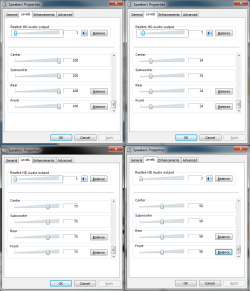
but one thing that really does bother me is why the balance of the speakers are not locked together at times...when I slide the front speaker level back and forth, either L or R will sometimes be set to a different level and end up not emiting any sounds as a result. I'm also wondering why if I lower the individual speaker levels, I HAVE to increase my normal volume to hear anything (which ends up at the same level anyways...). This problem existed for all my speakers. I attached a pic of different settings that all sound the same...1@100 and 1@75 are exactly the same...believe it or not :rolleyes:
 

Attachments

  • sound.png
    sound.png
    36.3 KB · Views: 842

My Computer

OS
Windows & Home Premium 64 bit
Volume too loud with Altec Lansing 5.1 Speakers

I have the same problem. Don't know what to do, sounds like I need to buy a new speaker system from this post. Is there no way to adjust the volume to something lower and more reasonable (I have the setting on 1 and it is still too loud)! I have Windows Vista. Sounds like Windows 7 has the same issue as well.
 

My Computer

OS
Vista
Use NirCmd to set Windows system volume

You can use NirCmd to set your Windows 7 system volume. The command I use is "nircmd.exe setsysvolume 75". You can find a copy of NirCmd on CNet here: NirCmd - CNET Download.com
 

My Computer

Computer type
PC/Desktop
Computer Manufacturer/Model Number
HP
OS
Windows 7
Back
Top