Solved VoodooShield (security) -- has anybody used it ?

bawldiggle

GrayGhost2 ret.
Pro User
VIP
Local time
6:10 AM
Messages
895
Location
Australia
I am currently using Bitdefender I.S. 2016. But in twelve months BD has been auto reinstalled (5 times) when being repaired.
With every reinstall all AV whitelists and preferences are lost requiring a very slow manual relisting of all excecutables and app folders and preferences :mad:.
BD do not have an export-backup feature.:cry:

Malwarebytes are advising against just using their PRO, they are stilling ironing out glitches.

Has anybody used VoodooShield, with or without an AV. According to MalwareTips.com free Bitdefender and VooDooShield play together.

Would appreciate any thoughts or experiences thank you :)

REFERENCES:
voodooshield | MalwareTips.com
Home: VoodooShield - The User-Friendly Toggling Computer Lock.
DDG search: VoodooShield at DuckDuckGo
 

My Computer My Computer

Computer type
PC/Desktop
Computer Manufacturer/Model Number
Toshiba, Lenovo (laptops) + 4 rigs
OS
XP Pro (x86) | 7 HP (x86) & (x64) | 7 Pro (x64)
Hello again mate I use Kaspersky and it saves some of the settings but I am not sure if they would be the ones you want.

Can't tell you much about Voodoo either.
 

My Computer My Computer

Computer type
PC/Desktop
Computer Manufacturer/Model Number
Own build (new) Desk1 / Asus ROG Win 7 / Desk2 1st build
OS
Desk1 7 Home Prem / Desk2 10 Pro / Main lap Asus ROG 10 Pro 2 laptop Toshiba 7 Pro Asus P2520 7 & 10
CPU
Desk1 i5 3750K / Laptop i7 GTX 860M / Desk2 i5 2500
Motherboard
Desk1 Asus P877-V / Desk2 Gigabyte H67 UD3H / Laptop ?
Memory
Desk1 8GB (1866) / Desk2 16GB (1333) / Laptop 8Gb DDR3
Graphics Card(s)
Desk 1& 2NVidia GTX 650 & Laptops on board Intel
Sound Card
Desk 1 & 2 -XONAR DG Realtek High Def audio Laptop
Monitor(s) Displays
Desk 1 Benq HD 2450 / Desk2 Philips 24" / Laptop 17.5"
Screen Resolution
1920x1080 D1 & D2 & Laptop 1
Hard Drives
Desk1 Samsung 120GB 830 SSD
Asus ROG 256GB 850 Pro SSD
Desk2 Samsung 840 256 SSD
Toshiba 120GB EVO
PSU
Desk 1 Corsair HX 1050/ Laptop ? / Desk 2 Corsair HX 650
Case
Desk 1 Cooler HAF XM ? Toshiba laptop / Desk2 Coolermaster
Cooling
Fans on all Desk1 -2 Desk2 - all Coolermasters 5 Laptop ?
Keyboard
Desk 1 MS Sidewinder X6 Desk 2 MS Sidewinder X 4
Mouse
Desk 1&2 - Gigabyte MS 900 gamer - laptop - Logitec wireless
Internet Speed
ADSL2+
Other Info
One other Desktop (tester) and spare Toshba laptop both with SSD's
Running Kaspersky 2016 ISS on all machines config'd identically
Logitec audio stereo systems on each machine (x3)
Canon MG5250MFC
Router/modem TP-Link running WPA2SK
For anybody with a lot of time on their hands Wilders Security have this massive 16,000+ posts thread
a lot of history to get through. I might start back in 2015 and see what the consensus is. :geek:

Lunch time I need the break ;)
 

My Computer My Computer

Computer type
PC/Desktop
Computer Manufacturer/Model Number
Toshiba, Lenovo (laptops) + 4 rigs
OS
XP Pro (x86) | 7 HP (x86) & (x64) | 7 Pro (x64)
Hi John,
I heard Kaspersky do have backup too.
In 2015, I let a local (onshore) K tech onto my laptop to fix their banking feature, and the tech screwed my Toshiba.
No email nor browsing. I had paid for 3 PCs and had only just installed K by a week.

I dumped K $$$ and went back to Bitdefender.
My current concern is K have abandoned their local (OZ) phone support and it is now all offshore and the usual language/accent problems. I rang their (new?) international (English) Help and the tech did not know anything about their backup feature.
Doesn't give me a warm fuzzy feeling.
 

My Computer My Computer

Computer type
PC/Desktop
Computer Manufacturer/Model Number
Toshiba, Lenovo (laptops) + 4 rigs
OS
XP Pro (x86) | 7 HP (x86) & (x64) | 7 Pro (x64)
i tried voodoo shield it doesnt do nothing at all the things you blacklist in the program keep reappearing in task manager even though i clicked on block them kill the process a forum member it wont do that feauture unless i change one setting and that can be be done in preminum only my advice dont bother unless you want to pay for it the amount of features on it isnt worth it for me you need a hips and a good sandbox firewall so i would reccomend spyshelter free comodo firewall with hips for anti virus microsoft essentials would do the trick as long you avoid going onto warez and cracked software sites
 

My Computer My Computer

Computer type
PC/Desktop
Computer Manufacturer/Model Number
dell
OS
windows 7
CPU
intel r
Motherboard
???
Memory
4gb
Graphics Card(s)
none
Hard Drives
ata device
Antivirus
microsoft essentials
Browser
firefox
I've been using the PRO version for a few years.

Check link to VoodooShield User Guide in Post #4 in this thread:

VoodooShield - anyone use this and have comments ? Solved - Windows 7 Help Forums

Configuration is an issue. The free version is really only for evaluation but any user should realise pretty quickly that the PRO version is required for it to work properly.

RE: Whitelist and Command Line blocking backup. To back up you need to copy contents of C:\ProgramData\VoodooShield elsewhere and to restore backup exit VoodooShield and stop the VoodooShield service. Delete the existing contents of C:\ProgramData\VoodooShield and copy the backup into that directory to restore whitelist and command lines.

Relaunch VoodooShield.

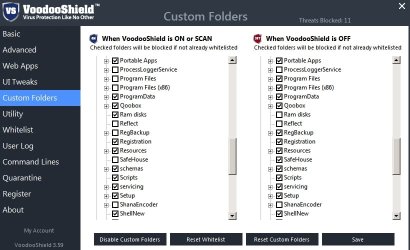
FYI: I find that the Custom Folders option needs to be configured for smooth operation.

VoodooShield Settings.jpg
 

My Computer My Computer

Computer type
Laptop
Computer Manufacturer/Model Number
ASUS
OS
Microsoft Windows 7 Home Premium 64-bit 7601 Multiprocessor Free Service Pack 1
CPU
AMD C-60 APU with Radeon(tm) HD Graphics
Motherboard
ASUSTeK COMPUTER INC. X501U
Memory
4.00 GB
Graphics Card(s)
AMD Radeon HD 6290 Graphics
Sound Card
(1) AMD High Definition Audio Device (2) Realtek High Defi
Screen Resolution
1366 x 768 x 32 bits (4294967296 colors) @ 60 Hz
Hard Drives
Hitachi HTS545050A7E380 SATA Disk Device
Antivirus
Comodo CIS & FW, SecureAplus App Whitelisting, Threatfire
Browser
Cyberfox 64bit, Opera 64bit, Airfox
Other Info
Spy-The-Spy, HitmanPro.Alert, Norton Connect Safe, MJRegWatcher, BitDefender TrafficLight, Voodoo Shield, Zemana AntiMalware
My current concern is K have abandoned their local (OZ) phone support and it is now all offshore and the usual language/accent problems. I rang their (new?) international (English) Help and the tech did not know anything about their backup feature.
Doesn't give me a warm fuzzy feeling.
Yes mate I noticed that too and it really pees me off after supporting them for such a long time plus I notice around where I live it has been withdrawn from the ordinary stock shelves - Office Works for example.

RE: Whitelist and Command Line blocking backup. To back up you need to copy contents of C:\ProgramData\VoodooShield elsewhere and to restore backup exit VoodooShield and stop the VoodooShield service. Delete the existing contents of C:\ProgramData\VoodooShield and copy the backup into that directory to restore whitelist and command lines.
Callender mate would this work for any AV as I said to bawldiggle Kaspersky does save some settings but very basic I might add.

Mind you inview of the support both locally and on their forum I am losing a bit of faith in them to be honest because the support centre is offshore and the forum well one can wait for weeks for an answer.
 

My Computer My Computer

Computer type
PC/Desktop
Computer Manufacturer/Model Number
Own build (new) Desk1 / Asus ROG Win 7 / Desk2 1st build
OS
Desk1 7 Home Prem / Desk2 10 Pro / Main lap Asus ROG 10 Pro 2 laptop Toshiba 7 Pro Asus P2520 7 & 10
CPU
Desk1 i5 3750K / Laptop i7 GTX 860M / Desk2 i5 2500
Motherboard
Desk1 Asus P877-V / Desk2 Gigabyte H67 UD3H / Laptop ?
Memory
Desk1 8GB (1866) / Desk2 16GB (1333) / Laptop 8Gb DDR3
Graphics Card(s)
Desk 1& 2NVidia GTX 650 & Laptops on board Intel
Sound Card
Desk 1 & 2 -XONAR DG Realtek High Def audio Laptop
Monitor(s) Displays
Desk 1 Benq HD 2450 / Desk2 Philips 24" / Laptop 17.5"
Screen Resolution
1920x1080 D1 & D2 & Laptop 1
Hard Drives
Desk1 Samsung 120GB 830 SSD
Asus ROG 256GB 850 Pro SSD
Desk2 Samsung 840 256 SSD
Toshiba 120GB EVO
PSU
Desk 1 Corsair HX 1050/ Laptop ? / Desk 2 Corsair HX 650
Case
Desk 1 Cooler HAF XM ? Toshiba laptop / Desk2 Coolermaster
Cooling
Fans on all Desk1 -2 Desk2 - all Coolermasters 5 Laptop ?
Keyboard
Desk 1 MS Sidewinder X6 Desk 2 MS Sidewinder X 4
Mouse
Desk 1&2 - Gigabyte MS 900 gamer - laptop - Logitec wireless
Internet Speed
ADSL2+
Other Info
One other Desktop (tester) and spare Toshba laptop both with SSD's
Running Kaspersky 2016 ISS on all machines config'd identically
Logitec audio stereo systems on each machine (x3)
Canon MG5250MFC
Router/modem TP-Link running WPA2SK
Will it work with any AV? I suppose some AV's might need to be configured to allow VS.

VoodooShield isn't an AV. It just checks any new non whitelisted process or command line that attempts to run with a file safety report plus VS's own AI report to help the user to determine if the file should be blocked.

If you ask me the biggest issue is configuration. If you can't get your head around it then you can't use it.

It would be best to read the user guide before considering using it.

Comments: Configuration is an issue along with knowing when to switch modes. You need to know how to edit VS whitelist and VS command lines (command lines accept wildcards) and you also probably need to understand the custom folders option to avoid problems.

VoodooShield User Guide (PDF) - direct download link
 

My Computer My Computer

Computer type
Laptop
Computer Manufacturer/Model Number
ASUS
OS
Microsoft Windows 7 Home Premium 64-bit 7601 Multiprocessor Free Service Pack 1
CPU
AMD C-60 APU with Radeon(tm) HD Graphics
Motherboard
ASUSTeK COMPUTER INC. X501U
Memory
4.00 GB
Graphics Card(s)
AMD Radeon HD 6290 Graphics
Sound Card
(1) AMD High Definition Audio Device (2) Realtek High Defi
Screen Resolution
1366 x 768 x 32 bits (4294967296 colors) @ 60 Hz
Hard Drives
Hitachi HTS545050A7E380 SATA Disk Device
Antivirus
Comodo CIS & FW, SecureAplus App Whitelisting, Threatfire
Browser
Cyberfox 64bit, Opera 64bit, Airfox
Other Info
Spy-The-Spy, HitmanPro.Alert, Norton Connect Safe, MJRegWatcher, BitDefender TrafficLight, Voodoo Shield, Zemana AntiMalware
Yes mate I noticed that too and it really pees me off after supporting them for such a long time plus I notice around where I live it has been withdrawn from the ordinary stock shelves - Office Works for example.


Callender mate would this work for any AV as I said to bawldiggle Kaspersky does save some settings but very basic I might add.

Okay I misunderstood. I thought you were asking about VoodooShield but you actually want to backup Kaspersky whitelist.

I know nothing about Kaspersky AV but you could look here:

C:\ProgramData\Kaspersky

Then see if there are any databases that look like they contain whitelists. Those would be the ones to back up. As for restoring them I'm not sure on how to shut down Kaspersky to overwrite or replace files in that location but you could try exiting the program and stopping any Kaspersky service then attempt to replace the files.
 

My Computer My Computer

Computer type
Laptop
Computer Manufacturer/Model Number
ASUS
OS
Microsoft Windows 7 Home Premium 64-bit 7601 Multiprocessor Free Service Pack 1
CPU
AMD C-60 APU with Radeon(tm) HD Graphics
Motherboard
ASUSTeK COMPUTER INC. X501U
Memory
4.00 GB
Graphics Card(s)
AMD Radeon HD 6290 Graphics
Sound Card
(1) AMD High Definition Audio Device (2) Realtek High Defi
Screen Resolution
1366 x 768 x 32 bits (4294967296 colors) @ 60 Hz
Hard Drives
Hitachi HTS545050A7E380 SATA Disk Device
Antivirus
Comodo CIS & FW, SecureAplus App Whitelisting, Threatfire
Browser
Cyberfox 64bit, Opera 64bit, Airfox
Other Info
Spy-The-Spy, HitmanPro.Alert, Norton Connect Safe, MJRegWatcher, BitDefender TrafficLight, Voodoo Shield, Zemana AntiMalware
VoodooShield isn't an AV. It just checks any new non whitelisted process or command line that attempts to run with a file safety report plus VS's own AI report to help the user to determine if the file should be blocked.

Thanks mate I should have Googled it to see what it was first:o

I'll taker a look at the Kaspersky stuff too. Pity their local support and forum are darn slow all the same.
 

My Computer My Computer

Computer type
PC/Desktop
Computer Manufacturer/Model Number
Own build (new) Desk1 / Asus ROG Win 7 / Desk2 1st build
OS
Desk1 7 Home Prem / Desk2 10 Pro / Main lap Asus ROG 10 Pro 2 laptop Toshiba 7 Pro Asus P2520 7 & 10
CPU
Desk1 i5 3750K / Laptop i7 GTX 860M / Desk2 i5 2500
Motherboard
Desk1 Asus P877-V / Desk2 Gigabyte H67 UD3H / Laptop ?
Memory
Desk1 8GB (1866) / Desk2 16GB (1333) / Laptop 8Gb DDR3
Graphics Card(s)
Desk 1& 2NVidia GTX 650 & Laptops on board Intel
Sound Card
Desk 1 & 2 -XONAR DG Realtek High Def audio Laptop
Monitor(s) Displays
Desk 1 Benq HD 2450 / Desk2 Philips 24" / Laptop 17.5"
Screen Resolution
1920x1080 D1 & D2 & Laptop 1
Hard Drives
Desk1 Samsung 120GB 830 SSD
Asus ROG 256GB 850 Pro SSD
Desk2 Samsung 840 256 SSD
Toshiba 120GB EVO
PSU
Desk 1 Corsair HX 1050/ Laptop ? / Desk 2 Corsair HX 650
Case
Desk 1 Cooler HAF XM ? Toshiba laptop / Desk2 Coolermaster
Cooling
Fans on all Desk1 -2 Desk2 - all Coolermasters 5 Laptop ?
Keyboard
Desk 1 MS Sidewinder X6 Desk 2 MS Sidewinder X 4
Mouse
Desk 1&2 - Gigabyte MS 900 gamer - laptop - Logitec wireless
Internet Speed
ADSL2+
Other Info
One other Desktop (tester) and spare Toshba laptop both with SSD's
Running Kaspersky 2016 ISS on all machines config'd identically
Logitec audio stereo systems on each machine (x3)
Canon MG5250MFC
Router/modem TP-Link running WPA2SK
@ Callendar :)
Thank you for your suggestions ... good advice.

It looks like the free version is very limited and as you suggest ... better well prepared with the PRO version.
I am going to give VS a try (clone backup in reserve) ... along with Free Bitdefender ;)

At $20 /yr / PC is not unreasonable ... having paid more (per pc) for 5 pack AV 's.
VS has been around for a good number of years now and the Wilders Security VoodooShield thread indicates it has settled down in the last few years.

I am not allergic to paying a developer for a well designed project
One program I use all day everyday is worth every cent of the $20 outright purchase (1/10th cent per day for the past 4 years.) Just upgraded after 4 years, still $20.

I do understand that some members are very strapped for cash.
 

My Computer My Computer

Computer type
PC/Desktop
Computer Manufacturer/Model Number
Toshiba, Lenovo (laptops) + 4 rigs
OS
XP Pro (x86) | 7 HP (x86) & (x64) | 7 Pro (x64)
Back
Top