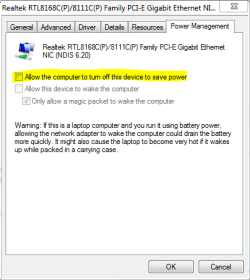
I am running Windows 7 Ultimate with Windows Virtual PC. I've created 2 VPCs (one with XP and one with Win7 32bit).
On both I have the Networking->Adatper 1 set to the active NIC on my host machine (I have 2 NICs but only 1 has a wire plugged in), though my problem also occurs if I use Shared Netoworking too.
I can access the internet fine from a VPC, but when I close or hibernate it, put the host to sleep, and then wake the host back up I'm unable to see anything except the host from the VPC.
Only after I reboot the host do I get full networking back for the VPCs.
Does anyone know if there is something I could do after waking up the host to get the VPCs back to full network access?
Thanks.
On both I have the Networking->Adatper 1 set to the active NIC on my host machine (I have 2 NICs but only 1 has a wire plugged in), though my problem also occurs if I use Shared Netoworking too.
I can access the internet fine from a VPC, but when I close or hibernate it, put the host to sleep, and then wake the host back up I'm unable to see anything except the host from the VPC.
Only after I reboot the host do I get full networking back for the VPCs.
Does anyone know if there is something I could do after waking up the host to get the VPCs back to full network access?
Thanks.
My Computer
- OS
- Windows 7 Ultimate