vpn dns problem

rucciva

New member
Local time
6:40 AM
Messages
13
hi there, i have a problem here

my campus has an intranet network and a vpn. to connect to internet, first i have to connect to the intranet and then connect to vpn. But the problem is when connecting to vpn, i cannot connet to internet although im connectec to vpn. when i try to diagnose, it keeps saying the DNS server didn't respone. And actually after i connect to vpn, i cannot acces all local address on the intranet...

so, how do i solve this,,, any idea please...
thanks b4
(sorry for my bad english)
 

My Computer

Computer Manufacturer/Model Number
Toshiba a205-s583
OS
Windows 7 Ultimate 32bit
CPU
Dual Core
Memory
1 Gb
Graphics Card(s)
intel
oh , forgot to say this. when i try to cennect to vpn with my linux box, or windows xp, the problem didn't exist at all.

and some of my friend using windows 7 also have this problem, but some of them did'nt have this problem. this what makes me confuse
 

My Computer

Computer Manufacturer/Model Number
Toshiba a205-s583
OS
Windows 7 Ultimate 32bit
CPU
Dual Core
Memory
1 Gb
Graphics Card(s)
intel
There is going to be a setting under the vpn connection that is labeled something like "use default gate way" turn that off and reconnect.
 

My Computer

Computer Manufacturer/Model Number
SMN-Productions
OS
Windows 7 x86/x64, Server 2008r2, Web Server 2008
CPU
i7 v2 3930K Steping stone 2
Motherboard
ASUS Rampage IV Extreme
Memory
G.SKILL Ripjaws Z Series 32GB
Graphics Card(s)
AMD HD 5770
Monitor(s) Displays
Acer 21" and Samsung 20"
Hard Drives
Patriot Pyro 80GB
PSU
1000 Watt
Case
HAF-X
Cooling
4 Fans
Keyboard
Black Widow Ultimate
There is going to be a setting under the vpn connection that is labeled something like "use default gate way" turn that off and reconnect.

thanks for replying,
i've already do that, and it only solve the cannot access local source on the intranet, the dns problem haven't fixed
 

My Computer

Computer Manufacturer/Model Number
Toshiba a205-s583
OS
Windows 7 Ultimate 32bit
CPU
Dual Core
Memory
1 Gb
Graphics Card(s)
intel
Are you pulling an ip from your vpn connection?
 

My Computer

Computer Manufacturer/Model Number
SMN-Productions
OS
Windows 7 x86/x64, Server 2008r2, Web Server 2008
CPU
i7 v2 3930K Steping stone 2
Motherboard
ASUS Rampage IV Extreme
Memory
G.SKILL Ripjaws Z Series 32GB
Graphics Card(s)
AMD HD 5770
Monitor(s) Displays
Acer 21" and Samsung 20"
Hard Drives
Patriot Pyro 80GB
PSU
1000 Watt
Case
HAF-X
Cooling
4 Fans
Keyboard
Black Widow Ultimate

My Computer

Computer Manufacturer/Model Number
Toshiba a205-s583
OS
Windows 7 Ultimate 32bit
CPU
Dual Core
Memory
1 Gb
Graphics Card(s)
intel
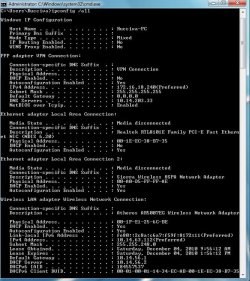
Run an ipconfig /all once you're connected to the vpn, take a screenshot of your ethernet/wireless (whichever you're using) settings and vpn adapter settings, and post them up.
 

My Computer

OS
XP / Win7 x64 Pro
CPU
Intel Quad-Core Q9450 @ 3.2GHz
Motherboard
Asus P5-E
Memory
2x2GB GSkill DDR2
Graphics Card(s)
NVIDIA GeForce 8600 GTS (EVGA)
Monitor(s) Displays
Dell 2408WFP
Screen Resolution
1920x1200
With VPN's and windows 7, it helps to designate the VPN's DNS server address in the Ipv4 properties of the adaptor you are connecting to the VPN with, you just type in which ever DNS the VPN is using where it says DNS in the IPv4 properties window. I've seen this come up a few times before and that seems to be the fix.
 
Last edited:

My Computer

Computer type
PC/Desktop
Computer Manufacturer/Model Number
Home built
OS
Windows 7 Ult, Windows 8.1 Pro,
CPU
Q9650-4.275GHz, E8600 4.5GHz, E6750-3.8GHz
Motherboard
Evga 780i FTW
Memory
G.Skill PC2 9600 1200Mhz 5 5 5 15 2T
Graphics Card(s)
GTX480
Sound Card
Asus Xonar D2
Monitor(s) Displays
HannsG
Screen Resolution
1680X1050
Hard Drives
GSkill Phoenix Pro 120GB SSD
PSU
ThermalTake Toughpower 1000Watt modular
Case
ThermalTake XaserV
Cooling
Xigmatek S1283
Keyboard
Logitech G15
Mouse
Logitech G9
Internet Speed
T1
Run an ipconfig /all once you're connected to the vpn, take a screenshot of your ethernet/wireless (whichever you're using) settings and vpn adapter settings, and post them up.

ipconfig 1.jpg

ipconfig 2.jpg

these are the ipconfig /all result,,, the image divided by 2
thanks...
 

My Computer

Computer Manufacturer/Model Number
Toshiba a205-s583
OS
Windows 7 Ultimate 32bit
CPU
Dual Core
Memory
1 Gb
Graphics Card(s)
intel
With VPN's and windows 7, it helps to designate the VPN's DNS server address in the Ipv4 properties of the adaptor you are connecting to the VPN with, you just type in which ever DNS the VPN is using where it says DNS in the IPv4 properties window. I've seen this come up a few times before and that seems to be the fix.

say that these are the dns server

10.14.203.33
10.14.203.7

did you mean i have to put this in the network configuration manually ...???
thanks
 

My Computer

Computer Manufacturer/Model Number
Toshiba a205-s583
OS
Windows 7 Ultimate 32bit
CPU
Dual Core
Memory
1 Gb
Graphics Card(s)
intel
With VPN's and windows 7, it helps to designate the VPN's DNS server address in the Ipv4 properties of the adaptor you are connecting to the VPN with, you just type in which ever DNS the VPN is using where it says DNS in the IPv4 properties window. I've seen this come up a few times before and that seems to be the fix.

say that these are the dns server

10.14.203.33
10.14.203.7

did you mean i have to put this in the network configuration manually ...???
thanks

Yes, for some reason many have had to do this to connect properly to a VPN server. You just type them in where is says DNS servers in your IPv4 properties window. You can probably type them into your advanced TCP/ip window which would allow you to type in info for each network you need to connect too.
 

My Computer

Computer type
PC/Desktop
Computer Manufacturer/Model Number
Home built
OS
Windows 7 Ult, Windows 8.1 Pro,
CPU
Q9650-4.275GHz, E8600 4.5GHz, E6750-3.8GHz
Motherboard
Evga 780i FTW
Memory
G.Skill PC2 9600 1200Mhz 5 5 5 15 2T
Graphics Card(s)
GTX480
Sound Card
Asus Xonar D2
Monitor(s) Displays
HannsG
Screen Resolution
1680X1050
Hard Drives
GSkill Phoenix Pro 120GB SSD
PSU
ThermalTake Toughpower 1000Watt modular
Case
ThermalTake XaserV
Cooling
Xigmatek S1283
Keyboard
Logitech G15
Mouse
Logitech G9
Internet Speed
T1
With VPN's and windows 7, it helps to designate the VPN's DNS server address in the Ipv4 properties of the adaptor you are connecting to the VPN with, you just type in which ever DNS the VPN is using where it says DNS in the IPv4 properties window. I've seen this come up a few times before and that seems to be the fix.

say that these are the dns server

10.14.203.33
10.14.203.7

did you mean i have to put this in the network configuration manually ...???
thanks

Yes, for some reason many have had to do this to connect properly to a VPN server. You just type them in where is says DNS servers in your IPv4 properties window. You can probably type them into your advanced TCP/ip window which would allow you to type in info for each network you need to connect too.

sorry but it doesn't work, the problem still occur,, any other ideas ???
 

My Computer

Computer Manufacturer/Model Number
Toshiba a205-s583
OS
Windows 7 Ultimate 32bit
CPU
Dual Core
Memory
1 Gb
Graphics Card(s)
intel
Please do an ipconfig /all and show us your VPN adapter and ethernet/wireless (whichever you're using) settings.
 

My Computer

OS
XP / Win7 x64 Pro
CPU
Intel Quad-Core Q9450 @ 3.2GHz
Motherboard
Asus P5-E
Memory
2x2GB GSkill DDR2
Graphics Card(s)
NVIDIA GeForce 8600 GTS (EVGA)
Monitor(s) Displays
Dell 2408WFP
Screen Resolution
1920x1200

My Computer

Computer Manufacturer/Model Number
Toshiba a205-s583
OS
Windows 7 Ultimate 32bit
CPU
Dual Core
Memory
1 Gb
Graphics Card(s)
intel
The dns servers for the VPN need to be the DNS servers for the location you are connecting to.
 

My Computer

Computer Manufacturer/Model Number
SMN-Productions
OS
Windows 7 x86/x64, Server 2008r2, Web Server 2008
CPU
i7 v2 3930K Steping stone 2
Motherboard
ASUS Rampage IV Extreme
Memory
G.SKILL Ripjaws Z Series 32GB
Graphics Card(s)
AMD HD 5770
Monitor(s) Displays
Acer 21" and Samsung 20"
Hard Drives
Patriot Pyro 80GB
PSU
1000 Watt
Case
HAF-X
Cooling
4 Fans
Keyboard
Black Widow Ultimate
The dns servers for the VPN need to be the DNS servers for the location you are connecting to.

well sory, but im a noob in vpn connection so i didnt understand wheres the right dns for me.

when i look at my friend's laptop, i see 3 dns,,
10.14.203.7 & 10.14.201.3 for the wireless or ethernet adapter

and
10.14.203.33 for the ppp adapter,,

i have already set my connection manually but it didn't work
 

My Computer

Computer Manufacturer/Model Number
Toshiba a205-s583
OS
Windows 7 Ultimate 32bit
CPU
Dual Core
Memory
1 Gb
Graphics Card(s)
intel
remove the vpn.
re-add it.
and the proper details should automatically add themselves
 

My Computer

Computer Manufacturer/Model Number
SMN-Productions
OS
Windows 7 x86/x64, Server 2008r2, Web Server 2008
CPU
i7 v2 3930K Steping stone 2
Motherboard
ASUS Rampage IV Extreme
Memory
G.SKILL Ripjaws Z Series 32GB
Graphics Card(s)
AMD HD 5770
Monitor(s) Displays
Acer 21" and Samsung 20"
Hard Drives
Patriot Pyro 80GB
PSU
1000 Watt
Case
HAF-X
Cooling
4 Fans
Keyboard
Black Widow Ultimate
remove the vpn.
re-add it.
and the proper details should automatically add themselves

i have do that many time, but the problem still occur....
 

My Computer

Computer Manufacturer/Model Number
Toshiba a205-s583
OS
Windows 7 Ultimate 32bit
CPU
Dual Core
Memory
1 Gb
Graphics Card(s)
intel
Have you contacted your schools it department?
 

My Computer

Computer Manufacturer/Model Number
SMN-Productions
OS
Windows 7 x86/x64, Server 2008r2, Web Server 2008
CPU
i7 v2 3930K Steping stone 2
Motherboard
ASUS Rampage IV Extreme
Memory
G.SKILL Ripjaws Z Series 32GB
Graphics Card(s)
AMD HD 5770
Monitor(s) Displays
Acer 21" and Samsung 20"
Hard Drives
Patriot Pyro 80GB
PSU
1000 Watt
Case
HAF-X
Cooling
4 Fans
Keyboard
Black Widow Ultimate

Turn the "use default gateway" back on now that you've manually added the DNS entries.

On a separate note, does your school require that you register your laptop or MAC address before being able to use the VPN client? Or is there a website you must navigate to in order to begin access once on the VPN?
 

My Computer

OS
XP / Win7 x64 Pro
CPU
Intel Quad-Core Q9450 @ 3.2GHz
Motherboard
Asus P5-E
Memory
2x2GB GSkill DDR2
Graphics Card(s)
NVIDIA GeForce 8600 GTS (EVGA)
Monitor(s) Displays
Dell 2408WFP
Screen Resolution
1920x1200
Back
Top