
I'm running into a problem with connecting to network drives over a VPN. The common difference is whether or not the computer is part of the domain by default.
1) Computers connecting to VPN using local account on computer: Prompted for a domain login when attempting to use the network drives. Can get in.
2) Computers connecting to VPN using a domain account (but on another network): Unable to connect. Specific error changed based on below info.
A) Computer logged on and connected to an outside network. Never connected to domain network: Can't find folder error.
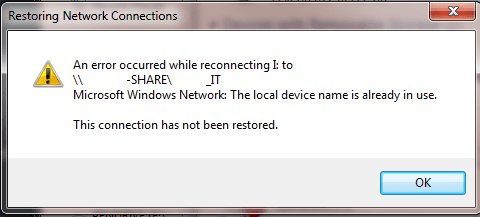
B) Connects to domain network at some point before connecting to an outside network and using VPN: Might be in use error, attached.
1) Computers connecting to VPN using local account on computer: Prompted for a domain login when attempting to use the network drives. Can get in.
2) Computers connecting to VPN using a domain account (but on another network): Unable to connect. Specific error changed based on below info.
A) Computer logged on and connected to an outside network. Never connected to domain network: Can't find folder error.
B) Connects to domain network at some point before connecting to an outside network and using VPN: Might be in use error, attached.
Attachments
My Computer
- OS
- Windows 7 Home Premium and Pro x64

