VPN "No Network Access", ipv4 not connected

win7use

New member
Local time
9:31 PM
Messages
26
Location
Maryland, Sir George Calvert founder
Hi,
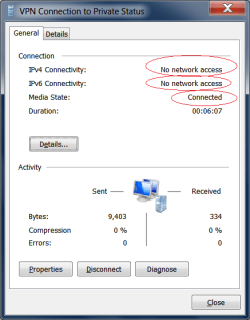
I set up vpn and it appears to be working, but can't access the network. I am getting the notify connected but ipv4/6 "no network access" message. Tried several different settings, fyi PPTP has been opened on the firewall. Any suggestions on how to get network access? Using native (no 3rd party software) ms PPTP to connect a win7 to a vista computer. thanks.
 

Attachments

  • vpn2.png
    vpn2.png
    13.3 KB · Views: 198

My Computer My Computer

At a glance

win 7 home premium
OS
win 7 home premium
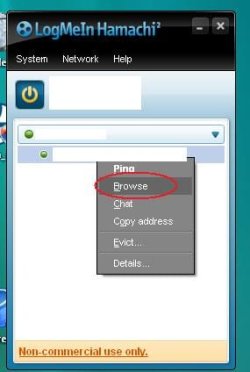
Got vpn working:D, but not with Microsoft. Went with hamachi vpn free version works on my vista as vpn server (sort of-guess its not a true server program for user since you go thru hamachi's servers) & windows 7 as client (its windows 7 tested). took 2 minutes to set up. Painless, amazing app. Firewall & router and multiple os's proved too much for ms pptp. I can even access my usb hard drive from 2000 miles away!!! So far no problems.:D Has anyone had any issues with hamachi? little concerned about privacy & security.

so easy to use. It open ports & takes care of all firewall bs. Just right click your vpn computer hit "browse" and you're in from anywhere in the world. (ip adresses whited out) for simplicity even beats anything i've seen on a mac.
 

Attachments

  • vpn4.jpg
    vpn4.jpg
    15.4 KB · Views: 146
Last edited:

My Computer My Computer

At a glance

win 7 home premium
OS
win 7 home premium
Thanks for the info.
 

My Computer My Computer

At a glance

Windows 7 Ultimate 64BitGenuineIntel Intel(R) Core(TM) DuoCore T2400 ...2.00 GBMobile Intel(R) 945 Express Chipset
Computer Manufacturer/Model Number
Lenovo ThinkPad T60
OS
Windows 7 Ultimate 64Bit
CPU
GenuineIntel Intel(R) Core(TM) DuoCore T2400 @ 1.83GHz
Motherboard
Intel(R) 82801G (ICH7 Family)
Memory
2.00 GB
Graphics Card(s)
Mobile Intel(R) 945 Express Chipset
Sound Card
SoundMAX Integrated Digital HD Audio
Monitor(s) Displays
ThinkPad Display
Screen Resolution
1400x1050
Hard Drives
100Gb SATA
Keyboard
Standard Keyboard
Mouse
HID-compliant Mouse
Internet Speed
Cable Broadband - 54Mbps
Other Info
Intel(R) PRO/1000 PL Network Connection
11a/b/g Wireless LAN Mini PCI Express Adapter
Fixed it, heres how

I had this problem and went out and purchased a new lan card and it didnt work... plus i followed instructions from this site
updated vista, now ipv4 and ipv6 not connected - Tech Support Guy Forums

TCP/IP stack repair options for use with Vista or Window 7.

Start, All Programs\Accessories and right click on Command Prompt, select "Run as Administrator" to open a command prompt.

In the command prompt window that opens, type type the following commands:

Reset WINSOCK entries to installation defaults: netsh winsock reset catalog

Reset IPv4 TCP/IP stack to installation defaults. netsh int ipv4 reset reset.log

Reset IPv6 TCP/IP stack to installation defaults. netsh int ipv6 reset reset.log

None of those worked, but heres what did!!! I found this out by myself...

AVG 2011 had a packet filter driver running and this stopped all internet access so showing those two IP4 and IP6 not connected. Once the check box for this filter driver was unticked and apply pressed, hey presto all net activity came back.

So what I would suggest is go into this place and untick any but the most essential drivers for your network card...

Control Panel, network and sharing centre, CHANGE ADAPTER SETTINGS

double click the adapter you appear to be using, ie your LAN card of your WIFI card

A window appears... click properties

A window appears witha tab "networking" and "the connection uses the following items..." Untick them all... and press ok...

Then go back into properties and reselect just these:
CLIENT FOR MICROSOFT NETWORKS - YES
INTERNET PROTOCOL VERSION 4 = YES

PRESS OK

GO AND SEE IF YOU CAN GET NET RUNNING... IT MAY BE A BIT SLOW AT FIRST...

If you net is working... go back in and one by one click on those unticked boxes to renable and work out which ones is making the net go bye bye... and leave that one UNTICKED...

Then tick all of then except that one thats stopping your net.

Thats it. Good luck.

What ever is the one that is unticked still is probably a bad driver. Note its name and which software it seems to be connected to... like mine was AVG packet Filter Driver... and uninstall AVG and reinstall it... or in your case uninstall whatever software that driver came from... may be an antivirus or may be something else... and reinstall it. If it plays up, consider using a different piece of software made by someone else.

truthseekers.... a PC engineer!

 

My Computer My Computer

At a glance

XP 32
OS
XP 32
I know this is an old post, but I have this exact same problem. I setup VPN and get no ipv4 or ipv6 connectivity, my dialog box looks exactly like the one pictured in this thread. I tried the above posters solution of disabiling everything except the two services and it still did not work. I also tried it with windows firewall turned off, other than that I have no anti virus currently on the computer. I'm going through a Linksys E4200 router, if it makes a difference. However, the router has PTPP VPN pass through enabled and I port forwarded the 1723 and 47 ports to the correct PC.
 

My Computer My Computer

At a glance

Windows 7 Home Premium x64i5Nvidia gt330m Optimus
Computer Manufacturer/Model Number
Toshiba
OS
Windows 7 Home Premium x64
CPU
i5
Graphics Card(s)
Nvidia gt330m Optimus
Hard Drives
Intel 120gb SSD
I'm having similar issues. I'm connected to it from my iPhone, and I have an IP address that I setup (range: 192.168.2.1 - 192.168.2.10). I can ping my iPhone (LTE connection) from my home computer, but no other traffic seems to be going back and forth.

The status window for the remote connection says that IPv4 connectivity is not connected and the duration is always 00:00:00. Send/received packages, compression, and errors are all at 0.

Any ideas?
 

My Computer My Computer

At a glance

Windows 8 Professional x64Intel Core i7-2600K @ 4.0GHz8GB (2x4GB) G.SKILL Ripjaws X DDR3 1600SAPPHIRE 7950
Computer type
PC/Desktop
Computer Manufacturer/Model Number
Custom build
OS
Windows 8 Professional x64
CPU
Intel Core i7-2600K @ 4.0GHz
Motherboard
MSI Z68A-GD80
Memory
8GB (2x4GB) G.SKILL Ripjaws X DDR3 1600
Graphics Card(s)
SAPPHIRE 7950
Monitor(s) Displays
Acer P244W
Screen Resolution
1920x1080
Hard Drives
120GB Kingston 3K HyperX SSD
1TB Seagate Barracuda HDD
PSU
Rosewill Xtreme 750W
Case
Enermax Hoplite ST (White)
Cooling
Cooler Master Hyper 212+
Keyboard
Microsoft Wireless Comfort Keyboard 5000
Mouse
GX-Gaming Maurus
Internet Speed
20/2
Browser
Google Chrome
Back
Top