VPN Server software...Please recommend

My Computer

Computer type
PC/Desktop
Computer Manufacturer/Model Number
Home built
OS
Windows 7 Ult, Windows 8.1 Pro,
CPU
Q9650-4.275GHz, E8600 4.5GHz, E6750-3.8GHz
Motherboard
Evga 780i FTW
Memory
G.Skill PC2 9600 1200Mhz 5 5 5 15 2T
Graphics Card(s)
GTX480
Sound Card
Asus Xonar D2
Monitor(s) Displays
HannsG
Screen Resolution
1680X1050
Hard Drives
GSkill Phoenix Pro 120GB SSD
PSU
ThermalTake Toughpower 1000Watt modular
Case
ThermalTake XaserV
Cooling
Xigmatek S1283
Keyboard
Logitech G15
Mouse
Logitech G9
Internet Speed
T1
what i am looking for is to have the vpn server on my vista desktop that stays at home, and the client on my windows 7 laptop that roams with me. Do I need 3rd party software to do this? Or can I do this with installed windows7/vista (looks possible)? thanks for all your help..
any more links to show me how to, that one was great?
Vista VPN Server


sorry, one other question, once set up will I be able to test vpn if I am on LAN, ie can I test the vpn over the Internet from lan if both comps are on it. do i need to go to the library or outside my network to test? thanks..
 
Last edited:

My Computer

OS
win 7 home premium
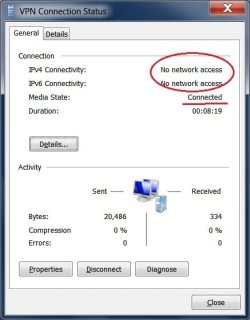
thanks chev65. very helpful..sorry about bolts fan too... I set up the vpn, I am getting vpn properties "connected" but "no network access." I have network discovery & file sharing "on". Any idea how I can access network anyone? also after vpn connects my internet connection fails... thanks
 

Attachments

  • vpn.jpg
    vpn.jpg
    30.2 KB · Views: 394
Last edited:

My Computer

OS
win 7 home premium
Fix for the loss of internet connection while using VPN.

For the issue of losing your internet connection while using the VPN, here's how to fix:

  1. On the client computer:
  2. Go to the Network & Sharing Center
  3. Left hand side, click Change Adapter Settings
  4. Right click your VPN client connection, and choose Properties
  5. Go the the network tab, then highlight "Internet Protocol Version 4 (TCP/IPv4)" and click the 'Properties" button.
  6. Click on the 'Advanced' button.
  7. Disable the 'Use default gateway on remote network' check box.


I had this same issue this week, fixed it for me.

Good Luck.
K.
 

My Computer

OS
Win 7 Home Premium
Back
Top