VS 2008 installation problem in Windows 7 64 bit

Maddy

New member
Local time
4:45 PM
Messages
2
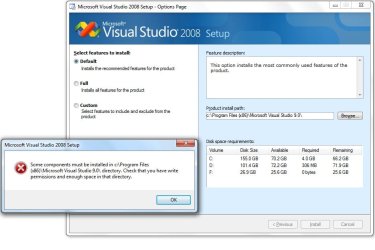
I am not able to install visual studio 2008 in windows 7 64 bit. The installation stops after I select the path for installation giving the attached error and does not let me proceed. The path is same as mentioned in the error but installation does not proceed.
Kindly help.
 

Attachments

  • VS error.jpg
    VS error.jpg
    59.8 KB · Views: 274

My Computer

OS
Windows 7
I am not able to install visual studio 2008 in windows 7 64 bit. The installation stops after I select the path for installation giving the attached error and does not let me proceed. The path is same as mentioned in the error but installation does not proceed.
Kindly help.
Hi Maddy, welcome to Windows 7 Support Forums.
Is your C:\ drive set using permissions?
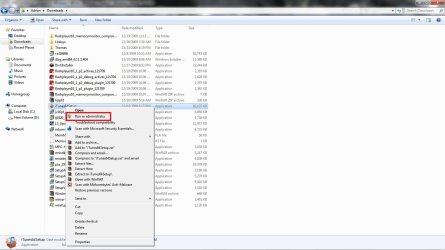
Also I suggest you install visual basic using administrator option.
 

My Computer

Computer Manufacturer/Model Number
Custom Build
OS
Windows 7 7600 1 X64
CPU
AMD PHENOM II X 550 PROCESSOR 3.1 ghz
Motherboard
ASUS M4A78-TE
Memory
Corsair 4 gig ddr 3
Graphics Card(s)
ati radeon 3300
Sound Card
ati hd
Monitor(s) Displays
syncmaster 2033sw
Screen Resolution
1600X900 60 hz refresh
Hard Drives
twin_seagates SATA's 1 TB & 500 Gig, hitachi_slimline 160 gig
PSU
antec_550 watt
Case
cooler master GLite
Cooling
stock_heat sink
Internet Speed
20mbs up/ 1.5mbs down
Other Info
favorite child "stewie"
favorite dog "brian"
Run as Admin

Maddy, right click on installation.
 

Attachments

  • admin.jpg
    admin.jpg
    110.2 KB · Views: 144

My Computer

Computer Manufacturer/Model Number
Custom Build
OS
Windows 7 7600 1 X64
CPU
AMD PHENOM II X 550 PROCESSOR 3.1 ghz
Motherboard
ASUS M4A78-TE
Memory
Corsair 4 gig ddr 3
Graphics Card(s)
ati radeon 3300
Sound Card
ati hd
Monitor(s) Displays
syncmaster 2033sw
Screen Resolution
1600X900 60 hz refresh
Hard Drives
twin_seagates SATA's 1 TB & 500 Gig, hitachi_slimline 160 gig
PSU
antec_550 watt
Case
cooler master GLite
Cooling
stock_heat sink
Internet Speed
20mbs up/ 1.5mbs down
Other Info
favorite child "stewie"
favorite dog "brian"
Thanks for the replies. But the fact of the matter is that i am the administrator. As an administrator i think i should have all the permissions.
Also if i view the properties of Program Files(x86) folder it shows as a read only folder. I tried to uncheck that but it does not let me.
 

My Computer

OS
Windows 7
Problem during VS 2008 installtion - web authoring tool

Hi!!
This is my first post to this forum. I m new for windows 7.

I am trying to install vs 2008 on windows 7.
getting error - web authoring tool - error code 123 : Filename, directory name or volume label name syntax is in correct.

My system is having 2 GB RAM.

Please guide me to solve this problem.
 

My Computer

OS
windows 7
Back
Top