Solved W-7 on Solid State Drive now in conflict with hard drives?

idahjo

New member
Member
VIP
Local time
12:26 AM
Messages
165
OK; I'm over my head here... any help?
Have an entertainment computer with W-7 Ultimate (x64) that was working like a champ; prior to the introduction of a Samsung 840 120GB Solid State Drive. [Before the switch over] It has/had a 1.5T HD with the system on it (NTFS) and a 3T HD (GPT- to get the full 3T).

Samsung included a "Magic" program that says: 'Samsung's new Smart Data Migration software takes the guesswork and headache out of moving your operating system to your new SSD." It was not the easy job I anticipated and I wound up resetting my bios to [ON-CHIP SATA TYPE- AHCI] for it to be able to recognize the new SDD.

Wound up reinstalling W-7 x64 and now the computer will not recognize either the NTFS drive or the GPT drive (loaded with data)... as a matter of fact the W-7 program will not load now with the GPT HD hooked up. Disconnect it and it starts fine. The NTFS HD had an Acronis safe-zone on it and with just it hooked up, the system would not load ..and an Acronis warning was stopping it. I had previously removed the partitions and reformatted the drive (NTFS) thinking that I had cleaned it but apparently the safe-zone remained. I am now in the process of wiping the disk and presenting it as 'unallocated space' to see if the SSD System will recognize it.

I have a hunch the solution is not that complicated, it's just waaaay over my pay grade! :huh:
Any help please?
 

My Computer My Computer

At a glance

Microsoft Windows 7 Ultimate 64-bit 7601 Mult...AMD Phenom(tm) II X3 720 Processor4.00 GBATI Radeon HD 4800 Series
Computer type
PC/Desktop
Computer Manufacturer/Model Number
Custom Build
OS
Microsoft Windows 7 Ultimate 64-bit 7601 Multiprocessor Free Service Pack 1
CPU
AMD Phenom(tm) II X3 720 Processor
Motherboard
Gigabyte Technology Co., Ltd. GA-MA785GPMT-UD2H
Memory
4.00 GB
Graphics Card(s)
ATI Radeon HD 4800 Series
Sound Card
(1) AMD High Definition Audio Device (2) Realtech H/D Audio
Screen Resolution
DELL 2405FPW (1920 x 1200 ) @ 75 Hz
Hard Drives
(1) Samsung SSD 840 Series ATA Device (2) WDC WD400BD-75MRA1 ATA Device
PSU
700w Kingwin Mach-1
Antivirus
Avast
Browser
Firefox
Thanks for getting back to me. I can run the system with only the SSD (C-drive) connected. If I shut it down and reconnected either of the other two drives it would not boot up. So, at this point it is not possible to run the machine with either of the two HDDs connected. Currently loading updates to the W-7 x64 Ultimate program and wiping the 1.5T drive. Guess it will be morning before these two tasks are completed.

Just wondering if resetting the Bios [ON-CHIP SATA TYPE- AHCI] to make the SSD function had an effect on the NTFS and the GPT formatted HDDs and/or if there is another Bios setting that needs changing?
Thanks again!
 

My Computer My Computer

At a glance

Microsoft Windows 7 Ultimate 64-bit 7601 Mult...AMD Phenom(tm) II X3 720 Processor4.00 GBATI Radeon HD 4800 Series
Computer type
PC/Desktop
Computer Manufacturer/Model Number
Custom Build
OS
Microsoft Windows 7 Ultimate 64-bit 7601 Multiprocessor Free Service Pack 1
CPU
AMD Phenom(tm) II X3 720 Processor
Motherboard
Gigabyte Technology Co., Ltd. GA-MA785GPMT-UD2H
Memory
4.00 GB
Graphics Card(s)
ATI Radeon HD 4800 Series
Sound Card
(1) AMD High Definition Audio Device (2) Realtech H/D Audio
Screen Resolution
DELL 2405FPW (1920 x 1200 ) @ 75 Hz
Hard Drives
(1) Samsung SSD 840 Series ATA Device (2) WDC WD400BD-75MRA1 ATA Device
PSU
700w Kingwin Mach-1
Antivirus
Avast
Browser
Firefox
What was the previous SATA controller setting in BIOS?

Often stray boot code can interfere with OS boot so test this by running Clean Command on the HD you are wiping. Will it allow the SSD to boot then?

Go over the other BIOS settings closely to see if another one changed when resetting to defaults.
 
On-Chip SATA controller was/is enabled
On-Chip SATA type- was Native IDE (SSD according to Samsung requires reset to AHCI)
- changed to AHCI ... Allowed computer to recognize the SSD and fresh W-7 install;
but, now the NTFS and the GPT HDDs are in conflict with the SSD.
 

My Computer My Computer

At a glance

Microsoft Windows 7 Ultimate 64-bit 7601 Mult...AMD Phenom(tm) II X3 720 Processor4.00 GBATI Radeon HD 4800 Series
Computer type
PC/Desktop
Computer Manufacturer/Model Number
Custom Build
OS
Microsoft Windows 7 Ultimate 64-bit 7601 Multiprocessor Free Service Pack 1
CPU
AMD Phenom(tm) II X3 720 Processor
Motherboard
Gigabyte Technology Co., Ltd. GA-MA785GPMT-UD2H
Memory
4.00 GB
Graphics Card(s)
ATI Radeon HD 4800 Series
Sound Card
(1) AMD High Definition Audio Device (2) Realtech H/D Audio
Screen Resolution
DELL 2405FPW (1920 x 1200 ) @ 75 Hz
Hard Drives
(1) Samsung SSD 840 Series ATA Device (2) WDC WD400BD-75MRA1 ATA Device
PSU
700w Kingwin Mach-1
Antivirus
Avast
Browser
Firefox
Hi there
BEFORE boot does the BIOS show ALL the HDD's (including the SSD)

Can you post a screenshot --- take a pic with mobile phone and upload that via the phone to the forum if you can't access another computer.

Then let's go from there. - The BIOS HDD descriptions will help in solving this problem.

I suspect somewhere the BOOT has got screwed up - I'm booting successfully from an SSD (same brand as yours) with 6 other HDD's -- set as DYNAMIC disks and spanned ( one set of 3 * 2TB disks is Spanned as a 6TB disk) -- no problems whatsoever.

The GPT partitions shouldn't cause problems as they are on separate devices to the SSD.

In general also don't use those "Easy Migration" software thingeys --usually they end up as being "Not so easy" --you are better off copying the system partition via something like Acronis or Free Macrium. (If you clone your OS this way - don't forget to copy also the small reserved / boot partition too if it exists). Then DELETE the OS and reserved partitions from the original SOURCE DISKS.

Backup though the original OS in case you get stuck so you can always restore and try again later.

Cheers
jimbo
 

My Computer My Computer

At a glance

Linux CENTOS 7 / various Windows OS'es and se...Intel i7 Intel i58GB, 16GBOn Motherboard
Computer type
PC/Desktop
Computer Manufacturer/Model Number
Custom built, several laptops HP/ASUS
OS
Linux CENTOS 7 / various Windows OS'es and servers
CPU
Intel i7 Intel i5
Memory
8GB, 16GB
Graphics Card(s)
On Motherboard
Sound Card
Realtek HD audio
Monitor(s) Displays
Apple Cinema display, Samsung LCD
Screen Resolution
1920 X 1080
Hard Drives
4 X 1TB SATA
Mouse
Toshiba wireless laser
Internet Speed
> 20MB up
The SSD should also run in IDE mode. Did you try that. The performance may be a tiny bit slower but there is really no reason that IDE should not work.
 

My Computer My Computer

At a glance

Vista, Windows7, Mint Mate, Zorin, Windows 8from 1.6GHz Duo to i7
Computer Manufacturer/Model Number
HP, Dell, Gateway, Toshiba - 4 laptops and 2 desktops
OS
Vista, Windows7, Mint Mate, Zorin, Windows 8
CPU
from 1.6GHz Duo to i7
Monitor(s) Displays
2x HP w2207
Hard Drives
5x HDD, 7x SSD, 12x Externals
Keyboard
with trackball - no mices
Mouse
Trackball mice
Internet Speed
DSL 6000

Sorry for the delay...
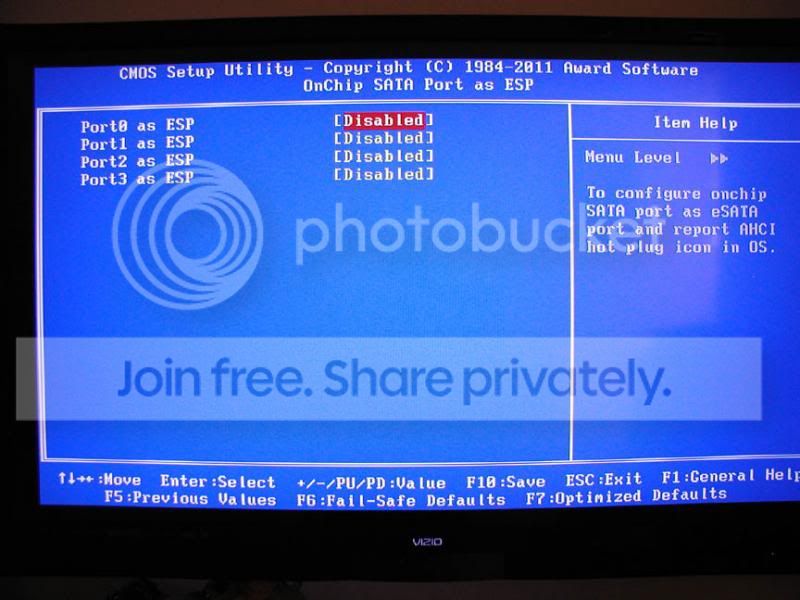
Wondering if the 'Ports as ESP' could be the problem? Hesitated to fool with something I MIGHT screw-up:o
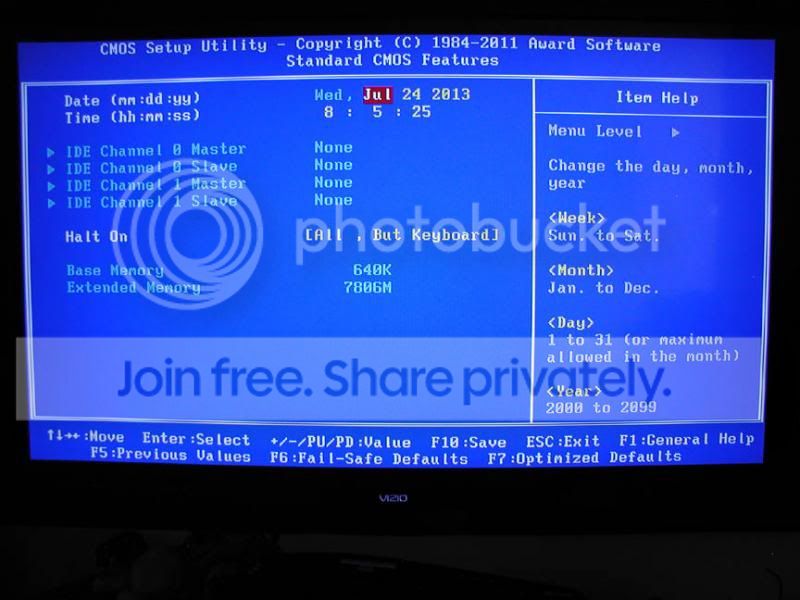
OK; here are the screenshots:
cmossetuputility_zps7082c6b1.jpg

cmoss-esp_zpse3c8ac99.jpg


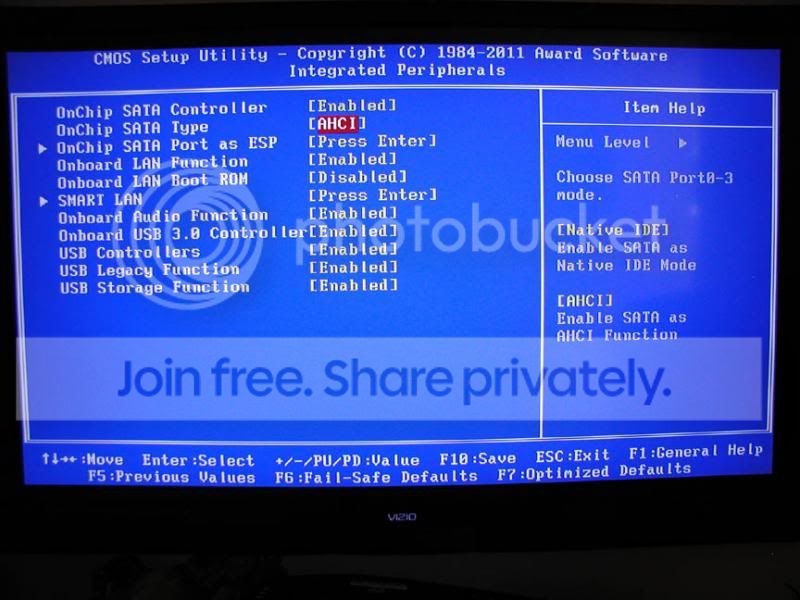
satatype-ahci_zps057e758c.jpg
 

My Computer My Computer

At a glance

Microsoft Windows 7 Ultimate 64-bit 7601 Mult...AMD Phenom(tm) II X3 720 Processor4.00 GBATI Radeon HD 4800 Series
Computer type
PC/Desktop
Computer Manufacturer/Model Number
Custom Build
OS
Microsoft Windows 7 Ultimate 64-bit 7601 Multiprocessor Free Service Pack 1
CPU
AMD Phenom(tm) II X3 720 Processor
Motherboard
Gigabyte Technology Co., Ltd. GA-MA785GPMT-UD2H
Memory
4.00 GB
Graphics Card(s)
ATI Radeon HD 4800 Series
Sound Card
(1) AMD High Definition Audio Device (2) Realtech H/D Audio
Screen Resolution
DELL 2405FPW (1920 x 1200 ) @ 75 Hz
Hard Drives
(1) Samsung SSD 840 Series ATA Device (2) WDC WD400BD-75MRA1 ATA Device
PSU
700w Kingwin Mach-1
Antivirus
Avast
Browser
Firefox
The SSD should also run in IDE mode. Did you try that. The performance may be a tiny bit slower but there is really no reason that IDE should not work.

whs; I was considering this. Going to wait a bit to see what shakes out, Thanks!

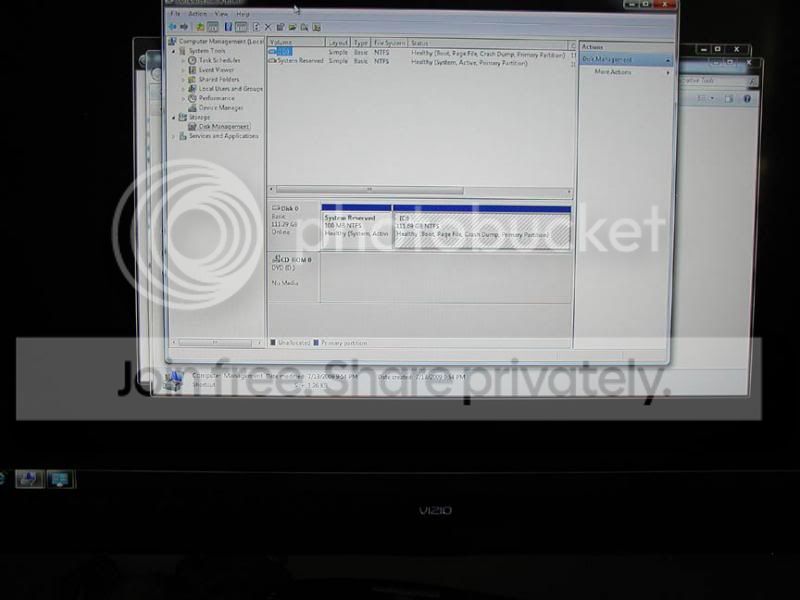
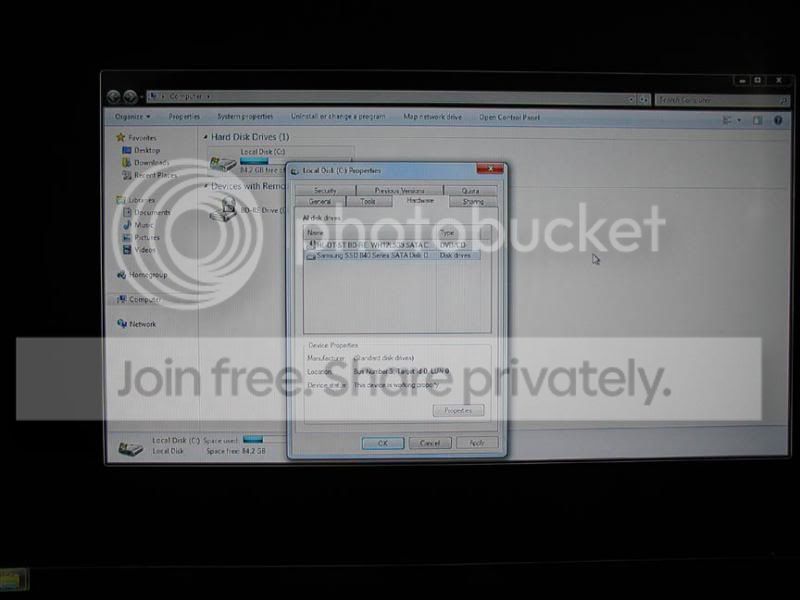
GREG/JIMBO; Thru the CHKDISK I see the C-drive is not recognized as an SSD...

ALSO; with the 1.5T drive deep cleaned and 'unallocated' hooked up; the system fails to load [stopping at "loading operating system...]. Unplug it and the system on the SSD loads fine. Just does not like the company I guess :confused:
 

My Computer My Computer

At a glance

Microsoft Windows 7 Ultimate 64-bit 7601 Mult...AMD Phenom(tm) II X3 720 Processor4.00 GBATI Radeon HD 4800 Series
Computer type
PC/Desktop
Computer Manufacturer/Model Number
Custom Build
OS
Microsoft Windows 7 Ultimate 64-bit 7601 Multiprocessor Free Service Pack 1
CPU
AMD Phenom(tm) II X3 720 Processor
Motherboard
Gigabyte Technology Co., Ltd. GA-MA785GPMT-UD2H
Memory
4.00 GB
Graphics Card(s)
ATI Radeon HD 4800 Series
Sound Card
(1) AMD High Definition Audio Device (2) Realtech H/D Audio
Screen Resolution
DELL 2405FPW (1920 x 1200 ) @ 75 Hz
Hard Drives
(1) Samsung SSD 840 Series ATA Device (2) WDC WD400BD-75MRA1 ATA Device
PSU
700w Kingwin Mach-1
Antivirus
Avast
Browser
Firefox
Here are a couple more shots...
Do I enable ALL ports to ESP? Keep in mind that the system will not boot with either of the HDDs connected. IS IT OK TO HOT- PLUG ONE IN WITH THE SYSTEM RUNNG IN AND ESP ENABLED FOR THE SATA PORT IT IS PLUGGED INTO? (caps just to be sure we understand each other..)

P7240206_zpsf6675541.jpg


P7240205_zpsd05e0be7.jpg
 

My Computer My Computer

At a glance

Microsoft Windows 7 Ultimate 64-bit 7601 Mult...AMD Phenom(tm) II X3 720 Processor4.00 GBATI Radeon HD 4800 Series
Computer type
PC/Desktop
Computer Manufacturer/Model Number
Custom Build
OS
Microsoft Windows 7 Ultimate 64-bit 7601 Multiprocessor Free Service Pack 1
CPU
AMD Phenom(tm) II X3 720 Processor
Motherboard
Gigabyte Technology Co., Ltd. GA-MA785GPMT-UD2H
Memory
4.00 GB
Graphics Card(s)
ATI Radeon HD 4800 Series
Sound Card
(1) AMD High Definition Audio Device (2) Realtech H/D Audio
Screen Resolution
DELL 2405FPW (1920 x 1200 ) @ 75 Hz
Hard Drives
(1) Samsung SSD 840 Series ATA Device (2) WDC WD400BD-75MRA1 ATA Device
PSU
700w Kingwin Mach-1
Antivirus
Avast
Browser
Firefox
Just to make it clear here for my muddled mind... I have a GIGABYTE mother board here with 4-on board SATA plugs; SATA 0-1-2-3. Does it matter which drive is plugged into what? And, should all ports be enabled to ESP, or which ones?
 

My Computer My Computer

At a glance

Microsoft Windows 7 Ultimate 64-bit 7601 Mult...AMD Phenom(tm) II X3 720 Processor4.00 GBATI Radeon HD 4800 Series
Computer type
PC/Desktop
Computer Manufacturer/Model Number
Custom Build
OS
Microsoft Windows 7 Ultimate 64-bit 7601 Multiprocessor Free Service Pack 1
CPU
AMD Phenom(tm) II X3 720 Processor
Motherboard
Gigabyte Technology Co., Ltd. GA-MA785GPMT-UD2H
Memory
4.00 GB
Graphics Card(s)
ATI Radeon HD 4800 Series
Sound Card
(1) AMD High Definition Audio Device (2) Realtech H/D Audio
Screen Resolution
DELL 2405FPW (1920 x 1200 ) @ 75 Hz
Hard Drives
(1) Samsung SSD 840 Series ATA Device (2) WDC WD400BD-75MRA1 ATA Device
PSU
700w Kingwin Mach-1
Antivirus
Avast
Browser
Firefox
I figured it out. Will post what I did after I proof it a bit.
THANKS ALL!
 

My Computer My Computer

At a glance

Microsoft Windows 7 Ultimate 64-bit 7601 Mult...AMD Phenom(tm) II X3 720 Processor4.00 GBATI Radeon HD 4800 Series
Computer type
PC/Desktop
Computer Manufacturer/Model Number
Custom Build
OS
Microsoft Windows 7 Ultimate 64-bit 7601 Multiprocessor Free Service Pack 1
CPU
AMD Phenom(tm) II X3 720 Processor
Motherboard
Gigabyte Technology Co., Ltd. GA-MA785GPMT-UD2H
Memory
4.00 GB
Graphics Card(s)
ATI Radeon HD 4800 Series
Sound Card
(1) AMD High Definition Audio Device (2) Realtech H/D Audio
Screen Resolution
DELL 2405FPW (1920 x 1200 ) @ 75 Hz
Hard Drives
(1) Samsung SSD 840 Series ATA Device (2) WDC WD400BD-75MRA1 ATA Device
PSU
700w Kingwin Mach-1
Antivirus
Avast
Browser
Firefox
Great News! Yes, let us know for sure as this will help others too.

You guys are great! It is comforting to be able to dig into my computers and know help is near.
Also, Samsung's support fellow I spoke to was no-wait and very helpful. He confirmed that what I was seeing was a correct install on the WIndows-7 program for the system SSD device (whew!) The Magician software they provide seems to work great for tuning their SSD when the user has no knowledge of optimal settings. However, their 'magical' program to make the OP move from the HDD to the new SSD was a total funk for me.... guess a fresh install never hurts anyone, eh? ;) One thing you want to do first is to change the BIOS from NATIVE IDE to AHCI or it will not recognize the SSD.

The BIOS solution was this:
1) Be sure the ON CHIP SATA has been changed to AHCI
2) CMOS Setup Utility- set from DISABLED to ESP for the SATA plugs that connect the HDDs

The 1.5T HDD that was NTFS had an ACRONIS safe zone set up on it previously and the removal of the partitions apparently did not prevent the program remnants from halting the OS from loading after the new SSD had the fresh install on it. Would guess that was why the SSD would start only with no other drives connected. This drive had a 3-hour 'wipe' and was set up as MBR. After that the SSD picked it up first time.

The 3T HDD set up as GPT would not pick up on a connected-start up; so with the ESP enabled for it's SATA plug, after a disconnected restart it was hot-plugged into it's SATA and it was also picked up.

All appears to be working perfectly again and there is a noticeably quicker boot-up time. If some of my references are a bit sophomoric, pardon me, I just dig into my computers thru necessity. Thanks again all, God bless!
 

My Computer My Computer

At a glance

Microsoft Windows 7 Ultimate 64-bit 7601 Mult...AMD Phenom(tm) II X3 720 Processor4.00 GBATI Radeon HD 4800 Series
Computer type
PC/Desktop
Computer Manufacturer/Model Number
Custom Build
OS
Microsoft Windows 7 Ultimate 64-bit 7601 Multiprocessor Free Service Pack 1
CPU
AMD Phenom(tm) II X3 720 Processor
Motherboard
Gigabyte Technology Co., Ltd. GA-MA785GPMT-UD2H
Memory
4.00 GB
Graphics Card(s)
ATI Radeon HD 4800 Series
Sound Card
(1) AMD High Definition Audio Device (2) Realtech H/D Audio
Screen Resolution
DELL 2405FPW (1920 x 1200 ) @ 75 Hz
Hard Drives
(1) Samsung SSD 840 Series ATA Device (2) WDC WD400BD-75MRA1 ATA Device
PSU
700w Kingwin Mach-1
Antivirus
Avast
Browser
Firefox
Back
Top