I have search the forums for a full answer to this but havent found anything.
I tried to install W7 64 bit to a new SSD drive. it took about 6-7 hours and wasnt successfully. After following some advise on these forums I took out 2 of my 4 gig and the install took 20 mins.
If i go back to the full 4 gig W7 will not boot up. It is fine with 3 gig.
How do I get it to boot with the full 4 gig (other 64bit will be wasted)
The memory is 4 x 1 gig OCZ memory (bought as a set) 4-4-4-15.
MSI (Micro Star) MS-7350 (P6N SLI-FI) Motherboard
CPU Family: Intel(R) Core(TM)2 CPU 6420 @ 2.13GHz Model 15, Stepping 6 CPU Speed: 2133 MHz
Maximum Memory Capacity: 8192MB Currently Installed Memory: 3GB Available Memory Slots: 1 Total Memory Slots: 4 Dual Channel Support: Yes CPU Manufacturer: GenuineIntel HDD Intel x25-m SSD
Samsung 830 120GB SSD
Intel 320 120GB SSD
Western Digital Caviar Black WD7501AALS 750GB 7200 RPM SATA 3.0Gb/s
Western Digital Caviar Black WD6401AALS 640GB 7200 RPM SATA 3.0Gb/s
PSU
COOLER MASTER Silent Pro RS850-AMBAJ3-US 850W Modular
You may have a bad stick of RAM or a bad DIMM on the motherboard. Download and burn Memtesr86+ to a CD, then boot the CD and run several passes with one stick in the same DIMM to start sorting if something is bad, it will take a while so be patient and let it work.
I have swapped around the ram I have so i know that it boots up with all of them as long as there is only 3 stick in at any one time. having said that i will still run the tests
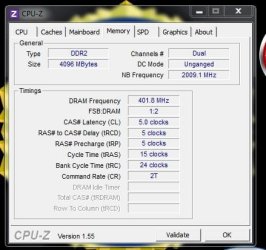
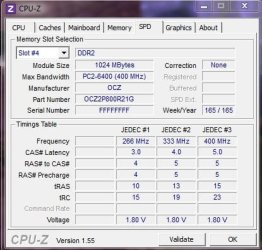
Can you run CPU-Z & post a snip of the memory reading ?
rb:
Attachments
Cpu_Z_Memory.JPG
44.7 KB
· Views: 5
cpu-z_1.55-64bits-en.zip
866.6 KB
· Views: 3
Cpu_Z_Memory_01.JPG
36.8 KB
· Views: 3
My Computer
At a glance
Win7 Enterprise, Win7 x86 (Ult 7600), Win7 x6...AMD fx8350 4ghz, AMD-32 2400mhz, AMD-64 3200m...2gb, 4gb on the Ult 7600, 4gb on Technet RTM,...Draw my own Graphics, several nVidia cards
Computer type
PC/Desktop
Computer Manufacturer/Model Number
Built them myself, Science Experiments !
OS
Win7 Enterprise, Win7 x86 (Ult 7600), Win7 x64 Ult 7600, TechNet RTM on AMD x64 (2.8Ghz)
6 pata Ide HD's & 2 Sata HD's
added 80gb external on Ult 7600 computer,
numerous extra 1tb, 2TB, 3Tb SATA HD's
A collection of ext HD Docks w/ HDs
PSU
430w, 550w, 600w, 700, 800, etc
Case
All Generic Full Towers
Cooling
Open Air & a few fans, some w/ colored LEDs
Keyboard
Compaq & Dell recycled from GoodWill
Mouse
Made in China Optical Wired Mouse
Internet Speed
Fast Cable InterNet
Antivirus
AVG Free on 24 different Desktops, NO Problems!
Browser
IE 8 is preferred, but use FireFox sometimes
Other Info
Linksys Routers, switches, & Hubs
Too Many USB Flash Drives to count, Biggest is 64GB !
Eight computers in my home network.
Sixteen computers at my business network.
Linked via TeamViewer !
Lots of old used spare computer parts everywhere!
I thought I should add to this that the machine was fine with all slots filled when booting into XP on a different hard drive. (althought it didnt see the 4 gig, the system booted okay)
The bois bootup see all the memory, it just when you get to the start windows logo screen it hangs.
Maybe you need to update the BIOS to support Windows 7. Usually there are BIOS updates to support new OS when they come out. Follow my link above to make sure you have the latest BIOS installed.
If the BIOS update doesn't help then I would next call OCZ tech support and have them help you figure out what is wrong.
I personally buy Kingston because they back their RAM for life and work with you to test and troubleshoot until any issue is resolved. Hopefully OCZ is similar - seems I recall good reports from users here.



 rb:
rb: