Solved W7/64 freeze after few seconds; strange items in WMI

Fenichel

New member
Local time
2:57 PM
Messages
21
Location
West Vancouver, BC
A week ago (April 1st, possibly pertinent), my computer became inoperable in Normal Mode. A few seconds after my desktop appears, the mouse continues to control the on-screen cursor, but no input from mouse or keyboard is recognized, and the only exit is a hardware reset. I am now in Safe Mode. Multiple diagnostic attempts have failed to find the problem. Various AV scans have found nothing.
The Event View shows that during each boot, these items
Code:
SQLServerEventProvider
    InvProv
    SQLServerEventProvider
    ActiveScriptEventConsumer
    CommandLineEventConsumer
    LogFileEventConsumer
    WpcClamperProv
    MS_NT_EVENTLOG_EVENT_PROVIDER
    HiPerfCooker_v1
are registered with the Windows Management Interface; they didn't used to be, and I think they are the problem. I also see that the only Restore Point on my system now is one that was created a few seconds after midnight on April 1st.
In another sevenforums thread, I found this sequence
Code:
Change startup type of Window Management Instrumentation (WMI) Service to disabled
     Stop the WMI Service; you may need to stop IP Helper Service first or other dependent services before it allows you to stop WMI Service
     Rename the repository folder: C:\WINDOWS\system32\wbem\Repository to Repository.old
     Open a CMD Prompt with elevated privileges
     CD windows\system32\wbem
     for /f %s in ('dir /b /s *.dll') do regsvr32 /s %s
     Set the WMI Service type back to Automatic and start WMI Service
     cd /d c:\ ((go to the root of the c drive, this is important))
     for /f %s in ('dir /s /b *.mof *.mfl') do mofcomp %s
     Reboot the server
to run in Safe Mode. The first few times I did this, the next Normal Mode boot would succeed, but then even this method stopped working, so I am stuck in Safe Mode.
Any suggestions will be welcome.
 

My Computer My Computer

At a glance

Windows 7/64 Pro SP1Intel i5-6600K16 GBnVidia
Computer type
PC/Desktop
Computer Manufacturer/Model Number
custom build
OS
Windows 7/64 Pro SP1
CPU
Intel i5-6600K
Motherboard
GigaByte Z170X-UD3
Memory
16 GB
Graphics Card(s)
nVidia
Monitor(s) Displays
HP LP3065 (2)
Screen Resolution
1600x2560
Hard Drives
1 SSD, 2 HDD
Antivirus
Kaspersky
Browser
FF
Have you run sfc /SCANNOW from an elevated command prompt in Safe Mode? Run it three times to see if it catches everything.

It sounds like you've been had by a trojan or some kind of malware. The trick is finding it.
 

My Computer My Computer

At a glance

Win 7 Pro x64/Win 10 Pro x64 dual bootAMD FX 8350 Vishera @ 420016 GB Mushkin Blackline DDR3-2400 @ 1866 (9-1...XFX Radeon R9 280 Double D Black Edition
Computer type
PC/Desktop
Computer Manufacturer/Model Number
Mellon Labs (custom build)
OS
Win 7 Pro x64/Win 10 Pro x64 dual boot
CPU
AMD FX 8350 Vishera @ 4200
Motherboard
ASUS M5A97 R2.0
Memory
16 GB Mushkin Blackline DDR3-2400 @ 1866 (9-10-10-10-31)
Graphics Card(s)
XFX Radeon R9 280 Double D Black Edition
Sound Card
Realtek HD Audio on MB. Sounds great.
Monitor(s) Displays
Acer 24", Acer 22"
Screen Resolution
3840 x 1080
Hard Drives
1 x Mushkin Chronos 120 GB SSD (Win 10)
1 x Samsung 850 EVO 250 GB SSD (Win 7)
1 x WD 1TB SATA Blue
1 x WD 1TB SATA Green
PSU
Corsair TX-750
Case
CoolerMaster HAF 912+
Cooling
Coolermaster Seidon 240M Liquid AIO. 6 case fans
Keyboard
Logitech G710+
Mouse
Logitech G500s
Internet Speed
Much better since I got fiber, but still way overpriced.
Antivirus
MSE, Malware Bytes for scanning
Browser
Firefox
Other Info
Corsair VOID USB headphones.

A Mellon Labs X-1 - LCD Smartie driven system status display.

Brought to you by the letter E
Yes, I think it's malware. You can see my results from sfc; the three files are the results of one run, not 3, broken into 3 files because of the forum's limits on uploaded file size.
The more telling result comes from chkdsk. I ran it with the /f argument at boot time, then without the argument while running in safe mode. As you see, I have an MFT problem, not fixed by chkdsk. I wish there were a way to fix this without scrubbing the disk, but I am not hopeful.
 

Attachments

My Computer My Computer

At a glance

Windows 7/64 Pro SP1Intel i5-6600K16 GBnVidia
Computer type
PC/Desktop
Computer Manufacturer/Model Number
custom build
OS
Windows 7/64 Pro SP1
CPU
Intel i5-6600K
Motherboard
GigaByte Z170X-UD3
Memory
16 GB
Graphics Card(s)
nVidia
Monitor(s) Displays
HP LP3065 (2)
Screen Resolution
1600x2560
Hard Drives
1 SSD, 2 HDD
Antivirus
Kaspersky
Browser
FF
how to reload a selectively-updated Windows 7/64

I said in the last message that chkdsk had found a telltale Master File Table problem, and that was true. I ran it at boot time with the /F option, its results passed by too fast to read, then I ran it from the (Safe Mode) desktop without the /F, and it showed an unfixed MFT error. Then I ran it again from the desktop, this time piping it to the text file that I uploaded for the forum. I didn't look at the text file, assuming that it would show the same MFT problem, but of course it doesn't. Now, FWIW, I have determined with other software that the MFT, whether or not it is sound, is identical to its mirror copy. I don't know what's going on.

I am not looking forward to reloading Windows, but I think I'll have to do that. Just reloading from the DVD doesn't take much time, but there are any number of wanted updates and a small number of distinctly unwanted updates that I'll need to be alert to avoid, and then there'll be a few days of reinstalling all my applications.

I vaguely remember hearing of DVDs that provided Windows 7/64 in a moderately-updated state, speeding up the reloading process by at least a few hours. Are people on this forum familiar with those?
 

My Computer My Computer

At a glance

Windows 7/64 Pro SP1Intel i5-6600K16 GBnVidia
Computer type
PC/Desktop
Computer Manufacturer/Model Number
custom build
OS
Windows 7/64 Pro SP1
CPU
Intel i5-6600K
Motherboard
GigaByte Z170X-UD3
Memory
16 GB
Graphics Card(s)
nVidia
Monitor(s) Displays
HP LP3065 (2)
Screen Resolution
1600x2560
Hard Drives
1 SSD, 2 HDD
Antivirus
Kaspersky
Browser
FF
I vaguely remember hearing of DVDs that provided Windows 7/64 in a moderately-updated state, speeding up the reloading process by at least a few hours. Are people on this forum familiar with those?
I think you're thinking of a Windows ISO with some of the updates slip-streamed into it. I would highly recommend avoiding these types of ISOs, because they often come from questionable sources and are often riddled with malware.

That's not to say that you couldn't make your own slip-streamed copy with the updates that you want to include. I just don't know how to do it, personally.

But take heart and stay tuned, I've asked some more experienced members of the forum to look into this thread and perhaps offer some advice
 

My Computer My Computer

At a glance

Win 7 Pro x64/Win 10 Pro x64 dual bootAMD FX 8350 Vishera @ 420016 GB Mushkin Blackline DDR3-2400 @ 1866 (9-1...XFX Radeon R9 280 Double D Black Edition
Computer type
PC/Desktop
Computer Manufacturer/Model Number
Mellon Labs (custom build)
OS
Win 7 Pro x64/Win 10 Pro x64 dual boot
CPU
AMD FX 8350 Vishera @ 4200
Motherboard
ASUS M5A97 R2.0
Memory
16 GB Mushkin Blackline DDR3-2400 @ 1866 (9-10-10-10-31)
Graphics Card(s)
XFX Radeon R9 280 Double D Black Edition
Sound Card
Realtek HD Audio on MB. Sounds great.
Monitor(s) Displays
Acer 24", Acer 22"
Screen Resolution
3840 x 1080
Hard Drives
1 x Mushkin Chronos 120 GB SSD (Win 10)
1 x Samsung 850 EVO 250 GB SSD (Win 7)
1 x WD 1TB SATA Blue
1 x WD 1TB SATA Green
PSU
Corsair TX-750
Case
CoolerMaster HAF 912+
Cooling
Coolermaster Seidon 240M Liquid AIO. 6 case fans
Keyboard
Logitech G710+
Mouse
Logitech G500s
Internet Speed
Much better since I got fiber, but still way overpriced.
Antivirus
MSE, Malware Bytes for scanning
Browser
Firefox
Other Info
Corsair VOID USB headphones.

A Mellon Labs X-1 - LCD Smartie driven system status display.

Brought to you by the letter E
Exactly what security programs were used to scan the computer?

Just exactly what Windows 7 are you using?

Do you have any backups or Clones?

Do others have access to your computer?

Jack
 

My Computer My Computer

At a glance

Windows 10 Pro. 64/ version 1709 Windows 7 Pr...Intel i7-6800K @ 4.3Corsair Platinum 16 gig @2400EVGA GTX 1070 OC
Computer type
PC/Desktop
Computer Manufacturer/Model Number
Home made Desktop
OS
Windows 10 Pro. 64/ version 1709 Windows 7 Pro/64
CPU
Intel i7-6800K @ 4.3
Motherboard
ASUS X-99 Deluxe II
Memory
Corsair Platinum 16 gig @2400
Graphics Card(s)
EVGA GTX 1070 OC
Monitor(s) Displays
Asus 27" LED LCD/VE278Q
Screen Resolution
1920-1080 or 1280-720 HDMI
Hard Drives
INTEL SSD 730-240 Gb Sata 3.0/
PSU
EVGA Platium 1200W
Case
Phanteks Luxe Tempered Glass 8 fans/ one radiator
Cooling
XSPC/ Water Cooled CPU
Keyboard
Das 4 Professional
Mouse
Logitech M705/MX Anywhere 2-S
Internet Speed
100 mbits
Antivirus
Microsoft Security Essentials/ Malwarebytes Premium 3.0/ SAS
Browser
I.E. 11 default/Firefox/ ISP Time Warner Cable/Spectrum
Other Info
LG BluRay Burner/
Sound system-KLipsch-THX/
Icy Dock ssd Hot Swap bays.
Exactly what security programs were used to scan the computer?
Kaspersky, MSE
Just exactly what Windows 7 are you using?
7/64 SP1, up to date with updates through last fall, when I lost confidence in my ability to keep MS from forcing Windows 10 on me
Do you have any backups or Clones?
I have good backups of all my data, but no clone that would allow for painless scrub-and-reload.
Do others have access to your computer?
No.
Also, you should know that I have probably found the original source of my problem, but not how to fix it. Yesterday I tried to write a new DVD of my recent data, and the DVD writer complained during the pre-write caching phase that one file had a bad handle. The DVD writer (Nero), thought this was non-critical, so I let it go ahead. During the write phase, Nero froze, possibly trying to copy this file, and I had to stop it from the Task Manager.
The file in question was I2CDEV.cpp, a file I had extracted from a GitHub ZIP file 8 months ago. Its claimed size on my disk was 56K, probably much bigger than it legitimately should be, and it showed up green (encrypted) in Windows Explorer. I can imagine ways of hiding malware between the declared EOF and the actual end of an ASCII file like <xxx>.cpp, although I'd never heard of this as a means of malpropagation before. I deleted this file; I'm sure I have it on a backup somewhere, if anyone wants it for forensic purposes.
 

My Computer My Computer

At a glance

Windows 7/64 Pro SP1Intel i5-6600K16 GBnVidia
Computer type
PC/Desktop
Computer Manufacturer/Model Number
custom build
OS
Windows 7/64 Pro SP1
CPU
Intel i5-6600K
Motherboard
GigaByte Z170X-UD3
Memory
16 GB
Graphics Card(s)
nVidia
Monitor(s) Displays
HP LP3065 (2)
Screen Resolution
1600x2560
Hard Drives
1 SSD, 2 HDD
Antivirus
Kaspersky
Browser
FF
Good going Fenichel you found a problem.
It might not be a infection. Just might be a corrupt file.

These two programs I recommend using when needed to verify their are not bad guys are hanging around.

Malwarebytes and Eset free online scan.

Jack
 

My Computer My Computer

At a glance

Windows 10 Pro. 64/ version 1709 Windows 7 Pr...Intel i7-6800K @ 4.3Corsair Platinum 16 gig @2400EVGA GTX 1070 OC
Computer type
PC/Desktop
Computer Manufacturer/Model Number
Home made Desktop
OS
Windows 10 Pro. 64/ version 1709 Windows 7 Pro/64
CPU
Intel i7-6800K @ 4.3
Motherboard
ASUS X-99 Deluxe II
Memory
Corsair Platinum 16 gig @2400
Graphics Card(s)
EVGA GTX 1070 OC
Monitor(s) Displays
Asus 27" LED LCD/VE278Q
Screen Resolution
1920-1080 or 1280-720 HDMI
Hard Drives
INTEL SSD 730-240 Gb Sata 3.0/
PSU
EVGA Platium 1200W
Case
Phanteks Luxe Tempered Glass 8 fans/ one radiator
Cooling
XSPC/ Water Cooled CPU
Keyboard
Das 4 Professional
Mouse
Logitech M705/MX Anywhere 2-S
Internet Speed
100 mbits
Antivirus
Microsoft Security Essentials/ Malwarebytes Premium 3.0/ SAS
Browser
I.E. 11 default/Firefox/ ISP Time Warner Cable/Spectrum
Other Info
LG BluRay Burner/
Sound system-KLipsch-THX/
Icy Dock ssd Hot Swap bays.
Kaspersky, MSE
7/64 SP1, up to date with updates through last fall, when I lost confidence in my ability to keep MS from forcing Windows 10 on me
I have good backups of all my data, but no clone that would allow for painless scrub-and-reload.
No.
Also, you should know that I have probably found the original source of my problem, but not how to fix it. Yesterday I tried to write a new DVD of my recent data, and the DVD writer complained during the pre-write caching phase that one file had a bad handle. The DVD writer (Nero), thought this was non-critical, so I let it go ahead. During the write phase, Nero froze, possibly trying to copy this file, and I had to stop it from the Task Manager.
The file in question was I2CDEV.cpp, a file I had extracted from a GitHub ZIP file 8 months ago. Its claimed size on my disk was 56K, probably much bigger than it legitimately should be, and it showed up green (encrypted) in Windows Explorer. I can imagine ways of hiding malware between the declared EOF and the actual end of an ASCII file like <xxx>.cpp, although I'd never heard of this as a means of malpropagation before. I deleted this file; I'm sure I have it on a backup somewhere, if anyone wants it for forensic purposes.

While I don't want to rub salt into your present problem, it is good example of why you should run regular operating system back up images. If you had a recent image you could have reinstalled it & been back working again in very short time.

You have said that you have your data backed up to DVDs, which is certainly a start, but DVD are a messy way of backing up data.

A lot of members including myself use Macrium Reflect to create system images on a regular basis. A correctly done image backs up Windows, all your data as well as any installed programs.

It's best to back up to a hard drive, either an internal one or preferably an external one, as it's not a good idea to have the back up drive connected to the computer all the time as there is a possibility of a bad virus infection hitting your main system as well as the internal back up drive.

So you can give this some thought, have a look at this Macrium website. There is a free version & some paid version.

Macrium Reflect Free | Macrium Software
 

My Computer My Computer

At a glance

Windows 7 Home Premium 64 bit sp1Intel i5 3570 3.4Ghz Ivy Bridge SKT 1155 quad...G-Skill Rip Jaws 16Gb (8x2) DDR3 -1600 PC3 12...Gigabyte NVIDIA GT610 1Gb DDR3 810/1200 PCI-E...
Computer type
PC/Desktop
Computer Manufacturer/Model Number
Self built using existing case
OS
Windows 7 Home Premium 64 bit sp1
CPU
Intel i5 3570 3.4Ghz Ivy Bridge SKT 1155 quad core
Motherboard
Gigabyte Z77-HD3 SKT 1155 2xSata 3, 4x USB 3.0
Memory
G-Skill Rip Jaws 16Gb (8x2) DDR3 -1600 PC3 12800 CL 10 red
Graphics Card(s)
Gigabyte NVIDIA GT610 1Gb DDR3 810/1200 PCI-E 2.0 Silent
Sound Card
NVIDIA High Definition & Realtech High Definition Audio
Monitor(s) Displays
2 x Philips 226V4L 16:9 aspect ratio
Screen Resolution
1920 x 1080 HD
Hard Drives
Samsung 840 Pro 256gb SSD, SATA 3.
Hitachi Touro Portable 1tb, USB 3.0 HDD used for image b/ups.
PSU
Corsair VS450
Case
Codeng
Cooling
PSU fan & CPU fan
Keyboard
Logitech
Mouse
Logitech Wireless trackball M570
Internet Speed
Wireless 3G. 3mg down & 550kb up.
Antivirus
Bitdefender Internet Security 2020
Browser
Opera (Current Version) & Firefox
Other Info
MS Office 2013 Pro. Davis weather station software. MGE Nova 600 avr UPS.
I didn't describe my whole backup system; DVDs are a small part of it. I also use CrashPlan to provide minute-by-minute backup of data.
I hadn't thought about cloning before, but I'm glad that Layback Bear and (more forcefully) you brought it up. I will be looking into when I'm back to some sort of steady state.
 

My Computer My Computer

At a glance

Windows 7/64 Pro SP1Intel i5-6600K16 GBnVidia
Computer type
PC/Desktop
Computer Manufacturer/Model Number
custom build
OS
Windows 7/64 Pro SP1
CPU
Intel i5-6600K
Motherboard
GigaByte Z170X-UD3
Memory
16 GB
Graphics Card(s)
nVidia
Monitor(s) Displays
HP LP3065 (2)
Screen Resolution
1600x2560
Hard Drives
1 SSD, 2 HDD
Antivirus
Kaspersky
Browser
FF
I use Macrium Reflect to make backup's and Clones.
They are install on external ssd's.

I used one the other day because of a infection. As a matter of fact I'm on the Clone at the present time. It works like the older install, except without the infection. Just like it was designed to do.

Jack
 

My Computer My Computer

At a glance

Windows 10 Pro. 64/ version 1709 Windows 7 Pr...Intel i7-6800K @ 4.3Corsair Platinum 16 gig @2400EVGA GTX 1070 OC
Computer type
PC/Desktop
Computer Manufacturer/Model Number
Home made Desktop
OS
Windows 10 Pro. 64/ version 1709 Windows 7 Pro/64
CPU
Intel i7-6800K @ 4.3
Motherboard
ASUS X-99 Deluxe II
Memory
Corsair Platinum 16 gig @2400
Graphics Card(s)
EVGA GTX 1070 OC
Monitor(s) Displays
Asus 27" LED LCD/VE278Q
Screen Resolution
1920-1080 or 1280-720 HDMI
Hard Drives
INTEL SSD 730-240 Gb Sata 3.0/
PSU
EVGA Platium 1200W
Case
Phanteks Luxe Tempered Glass 8 fans/ one radiator
Cooling
XSPC/ Water Cooled CPU
Keyboard
Das 4 Professional
Mouse
Logitech M705/MX Anywhere 2-S
Internet Speed
100 mbits
Antivirus
Microsoft Security Essentials/ Malwarebytes Premium 3.0/ SAS
Browser
I.E. 11 default/Firefox/ ISP Time Warner Cable/Spectrum
Other Info
LG BluRay Burner/
Sound system-KLipsch-THX/
Icy Dock ssd Hot Swap bays.
For what it is worth I agree with what the others are saying and personally that chkdsk I always run with the /r switch which unless I am terribly mistaken goes through the /f during the chkdsk operation.
With the Kaspersky I find that it will pick up a lot of stuff in a basically non Windows based program ie FF and Thunderbird. So what would be interesting to know is at what levels of security/sensitivity you have set in the KISS too I find using high level settings in Web Antivirus and Mail Antivirus settings for example do tend to make the KISS overly sensitive to what else goes on with Windows.
But this is only my two cents worth and what the others are saying and advising ie imaging is so important and me I do mine on regular basis and for the tie it takes it is not worth the grief.
 

My Computer My Computer

At a glance

Desk1 7 Home Prem / Desk2 10 Pro / Main lap A...Desk1 i5 3750K / Laptop i7 GTX 860M / Desk2 i...Desk1 8GB (1866) / Desk2 16GB (1333) / Laptop...Desk 1& 2NVidia GTX 650 & Laptops on board Intel
Computer type
PC/Desktop
Computer Manufacturer/Model Number
Own build (new) Desk1 / Asus ROG Win 7 / Desk2 1st build
OS
Desk1 7 Home Prem / Desk2 10 Pro / Main lap Asus ROG 10 Pro 2 laptop Toshiba 7 Pro Asus P2520 7 & 10
CPU
Desk1 i5 3750K / Laptop i7 GTX 860M / Desk2 i5 2500
Motherboard
Desk1 Asus P877-V / Desk2 Gigabyte H67 UD3H / Laptop ?
Memory
Desk1 8GB (1866) / Desk2 16GB (1333) / Laptop 8Gb DDR3
Graphics Card(s)
Desk 1& 2NVidia GTX 650 & Laptops on board Intel
Sound Card
Desk 1 & 2 -XONAR DG Realtek High Def audio Laptop
Monitor(s) Displays
Desk 1 Benq HD 2450 / Desk2 Philips 24" / Laptop 17.5"
Screen Resolution
1920x1080 D1 & D2 & Laptop 1
Hard Drives
Desk1 Samsung 120GB 830 SSD
Asus ROG 256GB 850 Pro SSD
Desk2 Samsung 840 256 SSD
Toshiba 120GB EVO
PSU
Desk 1 Corsair HX 1050/ Laptop ? / Desk 2 Corsair HX 650
Case
Desk 1 Cooler HAF XM ? Toshiba laptop / Desk2 Coolermaster
Cooling
Fans on all Desk1 -2 Desk2 - all Coolermasters 5 Laptop ?
Keyboard
Desk 1 MS Sidewinder X6 Desk 2 MS Sidewinder X 4
Mouse
Desk 1&2 - Gigabyte MS 900 gamer - laptop - Logitec wireless
Internet Speed
ADSL2+
Other Info
One other Desktop (tester) and spare Toshba laptop both with SSD's
Running Kaspersky 2016 ISS on all machines config'd identically
Logitec audio stereo systems on each machine (x3)
Canon MG5250MFC
Router/modem TP-Link running WPA2SK
Just to give you all a progress report: MalwareBytes found some strange-looking registry entries (not just GUIDs, which are always strange), and these (see attachment) were quarantined. Eset is doing an end-to-end scan, and has about 400 GB of stuff to go through. So far (1 hour 16 minutes, 580K items checked), it has found 12 files it doesn't like, but I won't know what they are until it's done.

When Eset finishes, I'll probably accept all of its quarantine recommendations, but before trying another Normal-mode boot I'll be back here for last-minute advice. Since starting this thread, I've made some parallel attempts to find the problem, and in some ways I seem to have made things worse.

  1. I had had only about 13% free space on my C: drive, so I extended it.
  2. In my first Normal-mode boot after this expansion, the freeze didn't happen until after close to a minute after the desktop appeared. I don't know if the volume-expansion had anything to do with this. In any event, I now had time to get into ProcMon and ask for a bootlog.
  3. On the next Normal-mode boot, I expected ProcMon to tell me it had a boot log waiting, but it didn't. I saved the log it did have (probably useless non-boot stuff), and you can see it, if you wish, on my Web site here.
  4. I tried to do another ProcMon run, thinking that I might have missed some part of the boot-log-capturing procedure (ProcMon is not a program I am at all familiar with). I set it up, rebooted, and during the reboot encountered an AVGUI error. I pushed ahead, but now I have no Normal-mode desktop. Instead, there is an all-cream screen (no task bar, no Start menu) with a tiny white legend claiming (falsely) that my copy of Windows is not a legal one.
 

Attachments

My Computer My Computer

At a glance

Windows 7/64 Pro SP1Intel i5-6600K16 GBnVidia
Computer type
PC/Desktop
Computer Manufacturer/Model Number
custom build
OS
Windows 7/64 Pro SP1
CPU
Intel i5-6600K
Motherboard
GigaByte Z170X-UD3
Memory
16 GB
Graphics Card(s)
nVidia
Monitor(s) Displays
HP LP3065 (2)
Screen Resolution
1600x2560
Hard Drives
1 SSD, 2 HDD
Antivirus
Kaspersky
Browser
FF
Now I did ask if you have any really hard settings in the Kaspersky so have you?? If that MBAM is a free one then ok but if it is a real time / paid for then again Kaspersky does not like playing with other AV's like that.
 

My Computer My Computer

At a glance

Desk1 7 Home Prem / Desk2 10 Pro / Main lap A...Desk1 i5 3750K / Laptop i7 GTX 860M / Desk2 i...Desk1 8GB (1866) / Desk2 16GB (1333) / Laptop...Desk 1& 2NVidia GTX 650 & Laptops on board Intel
Computer type
PC/Desktop
Computer Manufacturer/Model Number
Own build (new) Desk1 / Asus ROG Win 7 / Desk2 1st build
OS
Desk1 7 Home Prem / Desk2 10 Pro / Main lap Asus ROG 10 Pro 2 laptop Toshiba 7 Pro Asus P2520 7 & 10
CPU
Desk1 i5 3750K / Laptop i7 GTX 860M / Desk2 i5 2500
Motherboard
Desk1 Asus P877-V / Desk2 Gigabyte H67 UD3H / Laptop ?
Memory
Desk1 8GB (1866) / Desk2 16GB (1333) / Laptop 8Gb DDR3
Graphics Card(s)
Desk 1& 2NVidia GTX 650 & Laptops on board Intel
Sound Card
Desk 1 & 2 -XONAR DG Realtek High Def audio Laptop
Monitor(s) Displays
Desk 1 Benq HD 2450 / Desk2 Philips 24" / Laptop 17.5"
Screen Resolution
1920x1080 D1 & D2 & Laptop 1
Hard Drives
Desk1 Samsung 120GB 830 SSD
Asus ROG 256GB 850 Pro SSD
Desk2 Samsung 840 256 SSD
Toshiba 120GB EVO
PSU
Desk 1 Corsair HX 1050/ Laptop ? / Desk 2 Corsair HX 650
Case
Desk 1 Cooler HAF XM ? Toshiba laptop / Desk2 Coolermaster
Cooling
Fans on all Desk1 -2 Desk2 - all Coolermasters 5 Laptop ?
Keyboard
Desk 1 MS Sidewinder X6 Desk 2 MS Sidewinder X 4
Mouse
Desk 1&2 - Gigabyte MS 900 gamer - laptop - Logitec wireless
Internet Speed
ADSL2+
Other Info
One other Desktop (tester) and spare Toshba laptop both with SSD's
Running Kaspersky 2016 ISS on all machines config'd identically
Logitec audio stereo systems on each machine (x3)
Canon MG5250MFC
Router/modem TP-Link running WPA2SK
From you log.

PUP.Optional.Conduit, C:\USERS\ROBERT R. FENICHEL\APPDATA\ROAMING\MOZILLA\FIREFOX\PROFILES\702QQ0Q4.DEFAULT\PREFS.JS, Replaced, [522], [301520],1.0.1694
Conduit is very worrisome.

I have always removed all PUP's found by Malwarebytes and or Eset. Never had any problems.

Malwarebytes 3.0 Trial version will act just like the paid for version until the time expires.

I have been running Malwarebytes 3.0 Premium along side MSE for about a week and have had no problems.
I have no idea if it runs well with other anti virus programs. Malwarebytes says it okay with other anti virus programs but one will just have to test to make sure.

TFC by Old Timer doesn't get along with Malwarebytes 3.0. I had to remove TFC.

If I don't have any problems with Malwarebytes 3.0 for about another week I will upgrade my other system to 3.0.

Jack
 

My Computer My Computer

At a glance

Windows 10 Pro. 64/ version 1709 Windows 7 Pr...Intel i7-6800K @ 4.3Corsair Platinum 16 gig @2400EVGA GTX 1070 OC
Computer type
PC/Desktop
Computer Manufacturer/Model Number
Home made Desktop
OS
Windows 10 Pro. 64/ version 1709 Windows 7 Pro/64
CPU
Intel i7-6800K @ 4.3
Motherboard
ASUS X-99 Deluxe II
Memory
Corsair Platinum 16 gig @2400
Graphics Card(s)
EVGA GTX 1070 OC
Monitor(s) Displays
Asus 27" LED LCD/VE278Q
Screen Resolution
1920-1080 or 1280-720 HDMI
Hard Drives
INTEL SSD 730-240 Gb Sata 3.0/
PSU
EVGA Platium 1200W
Case
Phanteks Luxe Tempered Glass 8 fans/ one radiator
Cooling
XSPC/ Water Cooled CPU
Keyboard
Das 4 Professional
Mouse
Logitech M705/MX Anywhere 2-S
Internet Speed
100 mbits
Antivirus
Microsoft Security Essentials/ Malwarebytes Premium 3.0/ SAS
Browser
I.E. 11 default/Firefox/ ISP Time Warner Cable/Spectrum
Other Info
LG BluRay Burner/
Sound system-KLipsch-THX/
Icy Dock ssd Hot Swap bays.

My Computer My Computer

At a glance

Desk1 7 Home Prem / Desk2 10 Pro / Main lap A...Desk1 i5 3750K / Laptop i7 GTX 860M / Desk2 i...Desk1 8GB (1866) / Desk2 16GB (1333) / Laptop...Desk 1& 2NVidia GTX 650 & Laptops on board Intel
Computer type
PC/Desktop
Computer Manufacturer/Model Number
Own build (new) Desk1 / Asus ROG Win 7 / Desk2 1st build
OS
Desk1 7 Home Prem / Desk2 10 Pro / Main lap Asus ROG 10 Pro 2 laptop Toshiba 7 Pro Asus P2520 7 & 10
CPU
Desk1 i5 3750K / Laptop i7 GTX 860M / Desk2 i5 2500
Motherboard
Desk1 Asus P877-V / Desk2 Gigabyte H67 UD3H / Laptop ?
Memory
Desk1 8GB (1866) / Desk2 16GB (1333) / Laptop 8Gb DDR3
Graphics Card(s)
Desk 1& 2NVidia GTX 650 & Laptops on board Intel
Sound Card
Desk 1 & 2 -XONAR DG Realtek High Def audio Laptop
Monitor(s) Displays
Desk 1 Benq HD 2450 / Desk2 Philips 24" / Laptop 17.5"
Screen Resolution
1920x1080 D1 & D2 & Laptop 1
Hard Drives
Desk1 Samsung 120GB 830 SSD
Asus ROG 256GB 850 Pro SSD
Desk2 Samsung 840 256 SSD
Toshiba 120GB EVO
PSU
Desk 1 Corsair HX 1050/ Laptop ? / Desk 2 Corsair HX 650
Case
Desk 1 Cooler HAF XM ? Toshiba laptop / Desk2 Coolermaster
Cooling
Fans on all Desk1 -2 Desk2 - all Coolermasters 5 Laptop ?
Keyboard
Desk 1 MS Sidewinder X6 Desk 2 MS Sidewinder X 4
Mouse
Desk 1&2 - Gigabyte MS 900 gamer - laptop - Logitec wireless
Internet Speed
ADSL2+
Other Info
One other Desktop (tester) and spare Toshba laptop both with SSD's
Running Kaspersky 2016 ISS on all machines config'd identically
Logitec audio stereo systems on each machine (x3)
Canon MG5250MFC
Router/modem TP-Link running WPA2SK
In Safe Mode, I am not sure how to access my Kaspersky settings. I have the paid, full version of Kaspersky.
 

My Computer My Computer

At a glance

Windows 7/64 Pro SP1Intel i5-6600K16 GBnVidia
Computer type
PC/Desktop
Computer Manufacturer/Model Number
custom build
OS
Windows 7/64 Pro SP1
CPU
Intel i5-6600K
Motherboard
GigaByte Z170X-UD3
Memory
16 GB
Graphics Card(s)
nVidia
Monitor(s) Displays
HP LP3065 (2)
Screen Resolution
1600x2560
Hard Drives
1 SSD, 2 HDD
Antivirus
Kaspersky
Browser
FF
I have a question for the clone-experienced contributors. When I first thought about cloning, quite a few years ago, I thought that it couldn't work. My thought was that most disk drives have a few unusable sectors here and there, identified to prevent their being allocated, but straight copying of one HDD onto another would not take proper account of the receiving HDD's bad sectors. Now, obviously my thinking was wrong, but what did I miss?
 

My Computer My Computer

At a glance

Windows 7/64 Pro SP1Intel i5-6600K16 GBnVidia
Computer type
PC/Desktop
Computer Manufacturer/Model Number
custom build
OS
Windows 7/64 Pro SP1
CPU
Intel i5-6600K
Motherboard
GigaByte Z170X-UD3
Memory
16 GB
Graphics Card(s)
nVidia
Monitor(s) Displays
HP LP3065 (2)
Screen Resolution
1600x2560
Hard Drives
1 SSD, 2 HDD
Antivirus
Kaspersky
Browser
FF
SuperAntiSpyware found lots of tracking cookies, but only 2 files of interest. One was Borland's Package Collection Editor; this dates from 2002, and I strongly suspect that it's a false positive. The other is Unlocker, that I use only every year or so to get rid of files that appear to be open by nonexistent userrs. I haven't used either of these for a very long time.

I can't find any trace of Conduit on my machine, but I haven't used any specialized tools to find it.

In view of the bizarre difficulty I had when I last tried to get into Normal mode (see message #13), is there anything I should do before trying again?
 

My Computer My Computer

At a glance

Windows 7/64 Pro SP1Intel i5-6600K16 GBnVidia
Computer type
PC/Desktop
Computer Manufacturer/Model Number
custom build
OS
Windows 7/64 Pro SP1
CPU
Intel i5-6600K
Motherboard
GigaByte Z170X-UD3
Memory
16 GB
Graphics Card(s)
nVidia
Monitor(s) Displays
HP LP3065 (2)
Screen Resolution
1600x2560
Hard Drives
1 SSD, 2 HDD
Antivirus
Kaspersky
Browser
FF
Ok mate have just tried it out in safe mode on my tester as I have never used safe mode for disabling it.

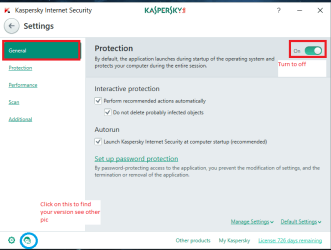
Now get into safe mode Start > All programs > open the Kaspersky program listing >open the Kaspersky GUI > click on Settings (lower left) of GUI > go to the General tab > then turn off that other button to activate Protection > it will open a small window asking you to choose how long you want ti pause the pritection > do that and if you have protected the Settings it will ask you to type the password for that > then Enter.

The prog rm will switch off for that allocated time. It is a good idea to add a permission viw=a your own password to change settings in case someone inadvertently or maliciously tries to reset the level of protection with in your AV.

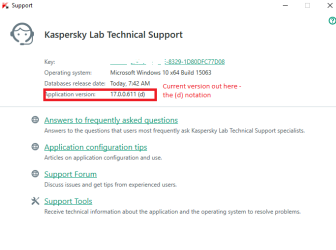
Just tip make sure you have the current edition of the program by clicking on the small icon in blue circle. You should do that after each install or major updates after a reboot from those updates - not the malware database ones.

Pics are of my small 10 laptop but will look the same in 7/
 

Attachments

  • KISS 1.PNG
    KISS 1.PNG
    18.6 KB · Views: 1
  • KISS 2.PNG
    KISS 2.PNG
    14 KB · Views: 31

My Computer My Computer

At a glance

Desk1 7 Home Prem / Desk2 10 Pro / Main lap A...Desk1 i5 3750K / Laptop i7 GTX 860M / Desk2 i...Desk1 8GB (1866) / Desk2 16GB (1333) / Laptop...Desk 1& 2NVidia GTX 650 & Laptops on board Intel
Computer type
PC/Desktop
Computer Manufacturer/Model Number
Own build (new) Desk1 / Asus ROG Win 7 / Desk2 1st build
OS
Desk1 7 Home Prem / Desk2 10 Pro / Main lap Asus ROG 10 Pro 2 laptop Toshiba 7 Pro Asus P2520 7 & 10
CPU
Desk1 i5 3750K / Laptop i7 GTX 860M / Desk2 i5 2500
Motherboard
Desk1 Asus P877-V / Desk2 Gigabyte H67 UD3H / Laptop ?
Memory
Desk1 8GB (1866) / Desk2 16GB (1333) / Laptop 8Gb DDR3
Graphics Card(s)
Desk 1& 2NVidia GTX 650 & Laptops on board Intel
Sound Card
Desk 1 & 2 -XONAR DG Realtek High Def audio Laptop
Monitor(s) Displays
Desk 1 Benq HD 2450 / Desk2 Philips 24" / Laptop 17.5"
Screen Resolution
1920x1080 D1 & D2 & Laptop 1
Hard Drives
Desk1 Samsung 120GB 830 SSD
Asus ROG 256GB 850 Pro SSD
Desk2 Samsung 840 256 SSD
Toshiba 120GB EVO
PSU
Desk 1 Corsair HX 1050/ Laptop ? / Desk 2 Corsair HX 650
Case
Desk 1 Cooler HAF XM ? Toshiba laptop / Desk2 Coolermaster
Cooling
Fans on all Desk1 -2 Desk2 - all Coolermasters 5 Laptop ?
Keyboard
Desk 1 MS Sidewinder X6 Desk 2 MS Sidewinder X 4
Mouse
Desk 1&2 - Gigabyte MS 900 gamer - laptop - Logitec wireless
Internet Speed
ADSL2+
Other Info
One other Desktop (tester) and spare Toshba laptop both with SSD's
Running Kaspersky 2016 ISS on all machines config'd identically
Logitec audio stereo systems on each machine (x3)
Canon MG5250MFC
Router/modem TP-Link running WPA2SK
Back
Top