
Solved W7/64 themes were working but now stall on first frame

Gorham

New member
Member
Local time
5:53 PM
Messages
59
Location
Gorham, Maine
Greetings from Maine!

I've had my Dell Optiplex 990 for several months and have been using the very lovely VikiTech themes packages all along. Suddenly last week, I noticed the desktop images weren't changing. I went in to customization panel and they all look normal *until* one is selected. Then it switches to a single image and no longer shows the slide show. The sound files work fine.

By the way, this happens whether it's VikiTech, Microsoft or any other theme package.

I've tried searching on as many terms as my brain can come up with but to no avail. I'd be amazed if I'm the first person this has ever happened to and while I'd rather no one else has had to cope with it, I do hope someone has ideas as to what I might do.

I've tried to think what might have started conflicting with it but haven't been successful as yet. I'll keep on working from that end and post here if something clicks.

Many thanks for the help.
 

Attachments
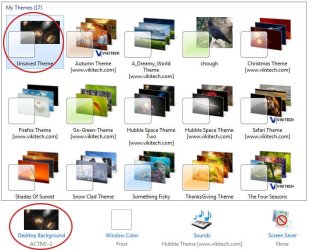
  • themes.jpg
    themes.jpg
    68.6 KB · Views: 4

My Computer My Computer

At a glance

Windows 7 Professional 64bitIntel Core i3-2020 @ 3.3GHz3.00 GBIntel HD Graphics Family
Computer Manufacturer/Model Number
Dell Optiplex 990
OS
Windows 7 Professional 64bit
CPU
Intel Core i3-2020 @ 3.3GHz
Memory
3.00 GB
Graphics Card(s)
Intel HD Graphics Family
Sound Card
Realtek High Definition Audio (integrated)
Monitor(s) Displays
Dell P2411H Analog (flat screen)
Screen Resolution
1920 x 1080
Hard Drives
300 GB SATA (Internal)
300 GB SATA (External) x 2
LaCie d2 quadra 500 GB
FreeAgency GoFlex Drive (NTFS) 2 TB
PSU
Yup
Case
Black
Cooling
2 fans
Keyboard
Microsoft ComfortCurve 2000
Mouse
Microsoft Optical
Internet Speed
Apparently a variable. Supposed to be cable modem speed.

My Computer My Computer

At a glance

Win 7 Pro x64 / Win 10 ProIntel(R) Core(TM) i7-3630QM CPU @ 2.40GHz12 GB(1) Intel(R) HD Graphics 4000 (2) NVIDIA GeFo...
Computer type
Laptop
Computer Manufacturer/Model Number
Sager NP9170
OS
Win 7 Pro x64 / Win 10 Pro
CPU
Intel(R) Core(TM) i7-3630QM CPU @ 2.40GHz
Motherboard
CLEVO P170EM
Memory
12 GB
Graphics Card(s)
(1) Intel(R) HD Graphics 4000 (2) NVIDIA GeForce GTX 675M
Sound Card
(1) Realtek High Definition Audio (2) Intel(R) Display Aud
Monitor(s) Displays
17.3
Screen Resolution
1920x1080
Hard Drives
(1) Samsung 860 EVO 500GB(OS) (1) Samsung 860 EVO 500GB(Data)
Keyboard
Backlite
Antivirus
MSE, Malwarebytes Pro
Browser
Firefox
Other Info
DESKTOP: Custom-built.
OS: Win 10 Pro x64.
CASE: Rosewill R5.
CPU: Intel I5 4670K CPU @ 3.40GHz.
CPU COOLER: Cool Master Hyper 212 EVO.
MOTHERBOARD: Asus Z87-A.
MEMORY: Kingston HyperX 2x4 GB.
GPU: Nvidia Geforce 650 TI.
PSU: Corsair TX750.
DRIVES: (1) Samsung 840 120 GB SSD (2) Western Digital blue 500 GB 7200 RPM.
Bongo, I wrote a probably too detailed response and clicked post reply. Don't know where it went. But your post did solve it. I went to the MS site and that put me back on the track of looking for conflicting applications. I sorted my program files directories to date and found the culprit. It was Active Desktop Calendar; uninstalling it (using Revo) immediately gave me back my themes. Turns out there was a much older thread that had the same solution. I hadn't searched under desktop background and that's where that one was. Anyway, problem solved and thanks.

PS. Ah. I *do* know where my post went. Or didn't. I clicked the post reply button *above* my post and that of course led me to a blank box waiting for ... my response. Lesson learned. Thanks again.
 
Last edited:

My Computer My Computer

At a glance

Windows 7 Professional 64bitIntel Core i3-2020 @ 3.3GHz3.00 GBIntel HD Graphics Family
Computer Manufacturer/Model Number
Dell Optiplex 990
OS
Windows 7 Professional 64bit
CPU
Intel Core i3-2020 @ 3.3GHz
Memory
3.00 GB
Graphics Card(s)
Intel HD Graphics Family
Sound Card
Realtek High Definition Audio (integrated)
Monitor(s) Displays
Dell P2411H Analog (flat screen)
Screen Resolution
1920 x 1080
Hard Drives
300 GB SATA (Internal)
300 GB SATA (External) x 2
LaCie d2 quadra 500 GB
FreeAgency GoFlex Drive (NTFS) 2 TB
PSU
Yup
Case
Black
Cooling
2 fans
Keyboard
Microsoft ComfortCurve 2000
Mouse
Microsoft Optical
Internet Speed
Apparently a variable. Supposed to be cable modem speed.
You're welcome, good to hear it's all sorted out.
Jerry
 

My Computer My Computer

At a glance

Win 7 Pro x64 / Win 10 ProIntel(R) Core(TM) i7-3630QM CPU @ 2.40GHz12 GB(1) Intel(R) HD Graphics 4000 (2) NVIDIA GeFo...
Computer type
Laptop
Computer Manufacturer/Model Number
Sager NP9170
OS
Win 7 Pro x64 / Win 10 Pro
CPU
Intel(R) Core(TM) i7-3630QM CPU @ 2.40GHz
Motherboard
CLEVO P170EM
Memory
12 GB
Graphics Card(s)
(1) Intel(R) HD Graphics 4000 (2) NVIDIA GeForce GTX 675M
Sound Card
(1) Realtek High Definition Audio (2) Intel(R) Display Aud
Monitor(s) Displays
17.3
Screen Resolution
1920x1080
Hard Drives
(1) Samsung 860 EVO 500GB(OS) (1) Samsung 860 EVO 500GB(Data)
Keyboard
Backlite
Antivirus
MSE, Malwarebytes Pro
Browser
Firefox
Other Info
DESKTOP: Custom-built.
OS: Win 10 Pro x64.
CASE: Rosewill R5.
CPU: Intel I5 4670K CPU @ 3.40GHz.
CPU COOLER: Cool Master Hyper 212 EVO.
MOTHERBOARD: Asus Z87-A.
MEMORY: Kingston HyperX 2x4 GB.
GPU: Nvidia Geforce 650 TI.
PSU: Corsair TX750.
DRIVES: (1) Samsung 840 120 GB SSD (2) Western Digital blue 500 GB 7200 RPM.
Back
Top