Solved W7 64bit thumbnails, is there a fix yet?

richieb666

New member
Local time
10:49 PM
Messages
5
Hi all.
I know there have been several threads already made with many and varied ideas to try and fix this but none have worked yet and i wondered if there was a MS fix out yet?

I have tried a lot of things to try and fix this issue but nothing has worked yet.
Unticked show only icons not thumbs in folder view.
Tried two different reg edits.
Enabled thumbs for logged in user and all users.
Tried the file association fix.
Tried the default program fix.
Tried vlc player and div-x.
Tried klite and another codec pack.
Changed power options.
Been through system properties and performance changes.

Oddly .mov thumbs show ok but they are the only ones that show.

I would expect MS to know there is an issue, but have they acknowledged it and worked out the problem yet, would be nice to know.

Thnx in advance, Richie.
 

My Computer My Computer

At a glance

Windows 7 HP 64bitQ6600 @3.6Ghz4Gb Corsair DominatorNvidia 570Gtx
OS
Windows 7 HP 64bit
CPU
Q6600 @3.6Ghz
Motherboard
Asus P5Q Deluxe
Memory
4Gb Corsair Dominator
Graphics Card(s)
Nvidia 570Gtx
Sound Card
Xfi fatality
Monitor(s) Displays
Dell
Hard Drives
OCZ SSD 120Gb
3x 250Gb Hdd
PSU
Corsair 750w
Case
Corsair
Cooling
WC
Hello Richie, and welcome to Seven Forums.

Could you give us more details about your issue along with a screenshot?

In the mean time, you might see if resetting the thumbnail cache may help.
 

My Computer My Computer

At a glance

64-bit Windows 11 Pro for WorkstationsIntel i7-8700K OC'd to 5 GHz64 GB (4x16GB) G.SKILL TridentZ RGB DDR4 3600...ASUS ROG-STRIX-GTX1080TI-O11G-GAMING
Computer type
PC/Desktop
Computer Manufacturer/Model Number
Self built custom
OS
64-bit Windows 11 Pro for Workstations
CPU
Intel i7-8700K OC'd to 5 GHz
Motherboard
ASUS ROG Maximus XI Formula Z390
Memory
64 GB (4x16GB) G.SKILL TridentZ RGB DDR4 3600 MHz
Graphics Card(s)
ASUS ROG-STRIX-GTX1080TI-O11G-GAMING
Sound Card
Integrated
Monitor(s) Displays
2 x Samsung Odyssey G7 27"
Screen Resolution
2560x1440
Hard Drives
1TB Samsung 990 PRO M.2,
4TB Samsung 990 PRO PRO M.2,
TerraMaster F8 SSD Plus NAS
PSU
Seasonic Prime Titanium 850W
Case
Thermaltake Core P3
Cooling
Corsair Hydro H115i
Keyboard
Logitech wireless K800
Mouse
Logitech MX Master 4
Internet Speed
2 Gb/s Download and 100 Mb/s Upload
Antivirus
Malwarebyte Anti-Malware Premium
Browser
Google Chrome
Other Info
Logitech Z625 speaker system,
Logitech BRIO 4K Pro webcam,
HP Color LaserJet Pro MFP M477fdn,
APC SMART-UPS RT 1000 XL - SURT1000XLI,
Galaxy S23 Plus phone
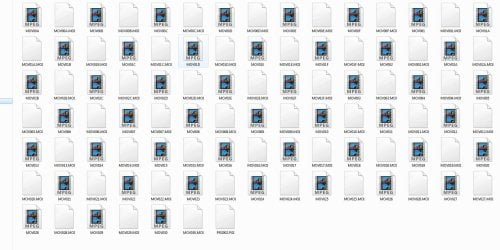
OK hopefully attached a screenie of what i see in every folder that has any movies in it.
I did try and reset the cache but to no avail.

These movies are .MOD files from my cam but all bar .MOV are the same icons
 

Attachments

  • Capture.JPG
    Capture.JPG
    163.3 KB · Views: 50

My Computer My Computer

At a glance

Windows 7 HP 64bitQ6600 @3.6Ghz4Gb Corsair DominatorNvidia 570Gtx
OS
Windows 7 HP 64bit
CPU
Q6600 @3.6Ghz
Motherboard
Asus P5Q Deluxe
Memory
4Gb Corsair Dominator
Graphics Card(s)
Nvidia 570Gtx
Sound Card
Xfi fatality
Monitor(s) Displays
Dell
Hard Drives
OCZ SSD 120Gb
3x 250Gb Hdd
PSU
Corsair 750w
Case
Corsair
Cooling
WC

My Computer My Computer

At a glance

Windows 7 Ultimate 64biti7 2600k16GB (4x4) corsair vengeanceIntel HD3000 iGPU / AMD HD6870 1024MB
Computer Manufacturer/Model Number
Selfbuilt
OS
Windows 7 Ultimate 64bit
CPU
i7 2600k
Motherboard
asus P8Z68-V LE
Memory
16GB (4x4) corsair vengeance
Graphics Card(s)
Intel HD3000 iGPU / AMD HD6870 1024MB
Sound Card
bitstreamed to an Onkyo 609
Monitor(s) Displays
Asus VE278 27" LED / Bravia EX7 60" LED
Screen Resolution
native 1080p x2
Hard Drives
4x 2TB int. + 2x 2TB external and a SSD for the boot drive.
PSU
650w Antec
Case
NZXT tempest evo
Cooling
air/stock
Keyboard
Dell
Mouse
logitech m505
Internet Speed
dual: cable/blackberry tether for travel use
Other Info
BD re-writer //
asus notebook G73Jw
Thank you Shark. I hope that helps. :)
 

My Computer My Computer

At a glance

64-bit Windows 11 Pro for WorkstationsIntel i7-8700K OC'd to 5 GHz64 GB (4x16GB) G.SKILL TridentZ RGB DDR4 3600...ASUS ROG-STRIX-GTX1080TI-O11G-GAMING
Computer type
PC/Desktop
Computer Manufacturer/Model Number
Self built custom
OS
64-bit Windows 11 Pro for Workstations
CPU
Intel i7-8700K OC'd to 5 GHz
Motherboard
ASUS ROG Maximus XI Formula Z390
Memory
64 GB (4x16GB) G.SKILL TridentZ RGB DDR4 3600 MHz
Graphics Card(s)
ASUS ROG-STRIX-GTX1080TI-O11G-GAMING
Sound Card
Integrated
Monitor(s) Displays
2 x Samsung Odyssey G7 27"
Screen Resolution
2560x1440
Hard Drives
1TB Samsung 990 PRO M.2,
4TB Samsung 990 PRO PRO M.2,
TerraMaster F8 SSD Plus NAS
PSU
Seasonic Prime Titanium 850W
Case
Thermaltake Core P3
Cooling
Corsair Hydro H115i
Keyboard
Logitech wireless K800
Mouse
Logitech MX Master 4
Internet Speed
2 Gb/s Download and 100 Mb/s Upload
Antivirus
Malwarebyte Anti-Malware Premium
Browser
Google Chrome
Other Info
Logitech Z625 speaker system,
Logitech BRIO 4K Pro webcam,
HP Color LaserJet Pro MFP M477fdn,
APC SMART-UPS RT 1000 XL - SURT1000XLI,
Galaxy S23 Plus phone
ok an update ...

Installed shark007 as described in the instructions, got most of my thumbs back now but missing .wmv and also .mp4 thumbs, for some reason they still only show the icon.

and just to mention in case I didn't that I previously tried safe mode 'minimal' and had no thumbs there either.

But this is a good start to getting everything working again! thnx guys :)
 

My Computer My Computer

At a glance

Windows 7 HP 64bitQ6600 @3.6Ghz4Gb Corsair DominatorNvidia 570Gtx
OS
Windows 7 HP 64bit
CPU
Q6600 @3.6Ghz
Motherboard
Asus P5Q Deluxe
Memory
4Gb Corsair Dominator
Graphics Card(s)
Nvidia 570Gtx
Sound Card
Xfi fatality
Monitor(s) Displays
Dell
Hard Drives
OCZ SSD 120Gb
3x 250Gb Hdd
PSU
Corsair 750w
Case
Corsair
Cooling
WC
Richie,

In Default Programs, double check to make sure that Windows Media Player is set with all of it's default associations.
 

My Computer My Computer

At a glance

64-bit Windows 11 Pro for WorkstationsIntel i7-8700K OC'd to 5 GHz64 GB (4x16GB) G.SKILL TridentZ RGB DDR4 3600...ASUS ROG-STRIX-GTX1080TI-O11G-GAMING
Computer type
PC/Desktop
Computer Manufacturer/Model Number
Self built custom
OS
64-bit Windows 11 Pro for Workstations
CPU
Intel i7-8700K OC'd to 5 GHz
Motherboard
ASUS ROG Maximus XI Formula Z390
Memory
64 GB (4x16GB) G.SKILL TridentZ RGB DDR4 3600 MHz
Graphics Card(s)
ASUS ROG-STRIX-GTX1080TI-O11G-GAMING
Sound Card
Integrated
Monitor(s) Displays
2 x Samsung Odyssey G7 27"
Screen Resolution
2560x1440
Hard Drives
1TB Samsung 990 PRO M.2,
4TB Samsung 990 PRO PRO M.2,
TerraMaster F8 SSD Plus NAS
PSU
Seasonic Prime Titanium 850W
Case
Thermaltake Core P3
Cooling
Corsair Hydro H115i
Keyboard
Logitech wireless K800
Mouse
Logitech MX Master 4
Internet Speed
2 Gb/s Download and 100 Mb/s Upload
Antivirus
Malwarebyte Anti-Malware Premium
Browser
Google Chrome
Other Info
Logitech Z625 speaker system,
Logitech BRIO 4K Pro webcam,
HP Color LaserJet Pro MFP M477fdn,
APC SMART-UPS RT 1000 XL - SURT1000XLI,
Galaxy S23 Plus phone
but missing .wmv and also .mp4 thumbs,

some video player has most likely removed the original registry keys for those formats. The registry file I have attached will replace the NATIVE keys missing from your registry. You will need to reboot to see the effects.
 

Attachments

My Computer My Computer

At a glance

Windows 7 Ultimate 64biti7 2600k16GB (4x4) corsair vengeanceIntel HD3000 iGPU / AMD HD6870 1024MB
Computer Manufacturer/Model Number
Selfbuilt
OS
Windows 7 Ultimate 64bit
CPU
i7 2600k
Motherboard
asus P8Z68-V LE
Memory
16GB (4x4) corsair vengeance
Graphics Card(s)
Intel HD3000 iGPU / AMD HD6870 1024MB
Sound Card
bitstreamed to an Onkyo 609
Monitor(s) Displays
Asus VE278 27" LED / Bravia EX7 60" LED
Screen Resolution
native 1080p x2
Hard Drives
4x 2TB int. + 2x 2TB external and a SSD for the boot drive.
PSU
650w Antec
Case
NZXT tempest evo
Cooling
air/stock
Keyboard
Dell
Mouse
logitech m505
Internet Speed
dual: cable/blackberry tether for travel use
Other Info
BD re-writer //
asus notebook G73Jw
ok i checked default programs and they are set to media player.
I ran the .reg file, but still no luck.
 

My Computer My Computer

At a glance

Windows 7 HP 64bitQ6600 @3.6Ghz4Gb Corsair DominatorNvidia 570Gtx
OS
Windows 7 HP 64bit
CPU
Q6600 @3.6Ghz
Motherboard
Asus P5Q Deluxe
Memory
4Gb Corsair Dominator
Graphics Card(s)
Nvidia 570Gtx
Sound Card
Xfi fatality
Monitor(s) Displays
Dell
Hard Drives
OCZ SSD 120Gb
3x 250Gb Hdd
PSU
Corsair 750w
Case
Corsair
Cooling
WC
I do not know if it will help for wmv files but for mp4,
access [Icaros Thumbnailing] on the 64bit Config TAB installed by the codecs
click Deactivate, add mp4 to the optional filetypes list (maintain the formatting)
and you could also try adding wmv, then click, Activate.
 

My Computer My Computer

At a glance

Windows 7 Ultimate 64biti7 2600k16GB (4x4) corsair vengeanceIntel HD3000 iGPU / AMD HD6870 1024MB
Computer Manufacturer/Model Number
Selfbuilt
OS
Windows 7 Ultimate 64bit
CPU
i7 2600k
Motherboard
asus P8Z68-V LE
Memory
16GB (4x4) corsair vengeance
Graphics Card(s)
Intel HD3000 iGPU / AMD HD6870 1024MB
Sound Card
bitstreamed to an Onkyo 609
Monitor(s) Displays
Asus VE278 27" LED / Bravia EX7 60" LED
Screen Resolution
native 1080p x2
Hard Drives
4x 2TB int. + 2x 2TB external and a SSD for the boot drive.
PSU
650w Antec
Case
NZXT tempest evo
Cooling
air/stock
Keyboard
Dell
Mouse
logitech m505
Internet Speed
dual: cable/blackberry tether for travel use
Other Info
BD re-writer //
asus notebook G73Jw
I do not know if it will help for wmv files but for mp4,
access [Icaros Thumbnailing] on the 64bit Config TAB installed by the codecs
click Deactivate, add mp4 to the optional filetypes list (maintain the formatting)
and you could also try adding wmv, then click, Activate.

Mr Shark.......your a flippin superstar!!!!!!!!!!!!!!!!!!!!!!!!!!!!!!!!!!!:party:

Went into the Icaros and deactivated, then added ;.wmv;.mp4 and reactivated,
and all my thumbs are back and fully visible!!
Thanks so much for helping sort this out, been driving me mad for quite some time and had resigned myself to wait for a MS fix.

Again thanks for the help and support!
 

My Computer My Computer

At a glance

Windows 7 HP 64bitQ6600 @3.6Ghz4Gb Corsair DominatorNvidia 570Gtx
OS
Windows 7 HP 64bit
CPU
Q6600 @3.6Ghz
Motherboard
Asus P5Q Deluxe
Memory
4Gb Corsair Dominator
Graphics Card(s)
Nvidia 570Gtx
Sound Card
Xfi fatality
Monitor(s) Displays
Dell
Hard Drives
OCZ SSD 120Gb
3x 250Gb Hdd
PSU
Corsair 750w
Case
Corsair
Cooling
WC
I found how to change Icons to Thumbs in Win 7 64bit

I searched Google endlessly for changing icons in Win Explore to thumbs and got no help. It turned out that
in control panel - systems - advanced system settings ( upper left ) opens up "system properties". Under this is " advanced " and "performance " and then "visual effects " with a bunch of unticked options. Halfway down is " show thumbnails instead of icons " which has the same sizing properties as the icons. I spent weeks trying to get here. I just hope this is not just for my edition of Win 7.

http://www.sevenforums.com/tutorials/11738-thumbnail-previews-enable-disable.html
 

My Computer My Computer

At a glance

Win7 64 Home PremiumAMD6 Gb
Computer type
Laptop
Computer Manufacturer/Model Number
HP
OS
Win7 64 Home Premium
CPU
AMD
Memory
6 Gb
Browser
WORLD, ORCA, SLIMBROWSER, MAXTHON, CHROME, PALE MOON
Back
Top