W7 Changing/adding profiles at random

win7go

Closed as requested
Local time
6:54 AM
Messages
46
Hi Members
My partner and teacher has a school laptop. It has obviously a school login and a personal login.
She seems to have trouble with the school login profile. It is now a half a dozen times that the profile changed(added new ones) without she having "obviously" changing/added it. She would not even know anything about it, except that things like the installed windows mail disapeared and her internet browser loosing her bookmarks.
I have installed Mozyhome on her local logon profile to backup those couple of things.
The IT person blames me that Mozy is interfering? I doubt that as I have Mozy for a few years now on XP Pro.
Would someone be able to shed light how she could stop those new profiles happening or what I could tell to the IT person?
Thanks
 

My Computer

Computer type
PC/Desktop
Computer Manufacturer/Model Number
MBP
OS
W7/VM
CPU
int Core 2 duo
Motherboard
MBP 4.1
Memory
3.0gb
Graphics Card(s)
GEForce 8600M GT
The simplest thing to do is uninstall Mozyhome. If the problem does not happen then that's the problem. If it does then let the school IT folks handle it.
 

My Computer

Computer type
PC/Desktop
Computer Manufacturer/Model Number
Lenovo IdeaCenter 450
OS
Windows 10 Pro X64
CPU
Intel Quad Core i7-4770 @ 3.4Ghz
Memory
16.0GB PC3-12800 DDR3 SDRAM 1600 MHz
Graphics Card(s)
Intel Integrated HD Graphics
Sound Card
Realtek HD Audio
Monitor(s) Displays
HP 22" LCD
Screen Resolution
1680 x 1050
Hard Drives
250GB Samsung EVO SATA-3 SSD
2TB Seagate ST2000DM001 SATA-2
1.5TB Seagate ST3150041AS SATA
Keyboard
Dell USB
Mouse
Lenovo USB
Internet Speed
Cable via Road Runner 3MB Upload, 30MB Download
Antivirus
Windows Defender, MBAM Pro, MBAE
Browser
Seamonkey
Other Info
UEFI/GPT
PLDS DVD-RW DH16AERSH
The simplest thing to do is uninstall Mozyhome. .....
Hmm...thanks.
I'll might try that.
Just got an answer from Mozy Support:
[FONT=&quot]"I've seen it on machines without Mozy.[/FONT]
[FONT=&quot]Mozy won't start backups until the user is logged in."[/FONT]
 

My Computer

Computer type
PC/Desktop
Computer Manufacturer/Model Number
MBP
OS
W7/VM
CPU
int Core 2 duo
Motherboard
MBP 4.1
Memory
3.0gb
Graphics Card(s)
GEForce 8600M GT
You'll always get blamed for problems if you mess with a business/school machine that has IT support.

Simply tell them that you want the problem fixed and you want a new machine unless/until then. If they won't help you then they are not doing their job.
 
...If they won't help you then they are not doing their job.
Exactly, thanks.
Its seems their behaviour scares my partner. She freely admits that she is not and IT wizzard and so their behaviour is rather fom the top down.
 

My Computer

Computer type
PC/Desktop
Computer Manufacturer/Model Number
MBP
OS
W7/VM
CPU
int Core 2 duo
Motherboard
MBP 4.1
Memory
3.0gb
Graphics Card(s)
GEForce 8600M GT
Hi again

This profile story goes on and on.
Again by logging in at the school the change password query came up as they have to change their passwords frequently. My partner was just to quick and clicked yes for the password change without having entered anything. A new desktop came up and her Outlook and web browser(FF)had disappeared.
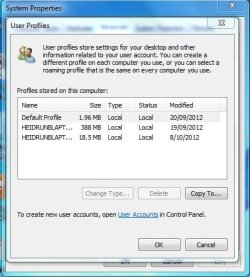
Attached is an image showing the profiles. How can I change the profiles(to the 19.09.2012 profile). The IT person at the school said that he would not know how to do this so I'll have a go with some help(hopefully) from here.

Thanks
 

Attachments

  • Profiles.JPG
    Profiles.JPG
    41.7 KB · Views: 7

My Computer

Computer type
PC/Desktop
Computer Manufacturer/Model Number
MBP
OS
W7/VM
CPU
int Core 2 duo
Motherboard
MBP 4.1
Memory
3.0gb
Graphics Card(s)
GEForce 8600M GT
Am I allowed to bump this thread as I'm still stuck with helping my wife's problem?
 

My Computer

Computer type
PC/Desktop
Computer Manufacturer/Model Number
MBP
OS
W7/VM
CPU
int Core 2 duo
Motherboard
MBP 4.1
Memory
3.0gb
Graphics Card(s)
GEForce 8600M GT
I would try booting into the WIn7 installer System Recovery Options which doesn't require a password to run System Restore from the Recovery Options list.
gregrocker, thanks
As we can boot into a user which even has administrator rights I'm not sure what we would achieve with a system restore? Would that change anything to the profiles? Also I would have to be careful with a System Restore as the teachers have all their work on drive C:.
The IT person at the school admitted that he would not know how to fix this!
 

My Computer

Computer type
PC/Desktop
Computer Manufacturer/Model Number
MBP
OS
W7/VM
CPU
int Core 2 duo
Motherboard
MBP 4.1
Memory
3.0gb
Graphics Card(s)
GEForce 8600M GT
You can rescue your data at any time by copying it out externally from the good profile or using Copy & Paste - in Windows Recovery Console or Paragon Rescue CD Free Edition 11.0 Free.

If this problem began after you have a Restore Point then that may be the way to resolve it.

You seem to be limited by what you can do by your IT dept which should handle this for you.

Normally with a bad profile if a new one can be established which works then you can migrate to the new one and delete the old one. If the new one has problems then I'd consider a Repair Install or Clean Reinstall - Factory OEM Windows 7.

But you should clear this with your IT department, which has all of our hands tied until they act.
 
....
Normally with a bad profile if a new one can be established which works then you can migrate to the new one
gregrocker

It is the case that the new profile works except that a few things are not there like; firefox and her bookmarks and Outlook 2010, just to name two of those. So would I copy over the the 'old' profile to the new one?
Not that I'm going to do that, just as a question. I'll leave it up to the IT's.
Thanks
 

My Computer

Computer type
PC/Desktop
Computer Manufacturer/Model Number
MBP
OS
W7/VM
CPU
int Core 2 duo
Motherboard
MBP 4.1
Memory
3.0gb
Graphics Card(s)
GEForce 8600M GT
I would copy only the data she needs and no settings which can be corrupt.

Reinstall any programs that are not available to the new profile.

Once you're sure everything is there you can delete the old profile, placing its files on the desktop for awhile so you have access to them until you're sure you have everything.
 
Back
Top