
Solved W7 HP 64-bit upgrade install stuck on compatibility check for drivers

doylekm

New member
Local time
6:29 PM
Messages
8
Location
UK
I've been having some issues with my Windows Home Premium 64-bit OS recently (eg, explorer.exe crashing) and have decided to do a repair install following the instructions in this forum.

I have downloaded the appropriate SP1 ISO image (my current version is also SP1), verified the image, written it to a DVD and started the install process. Everything goes fine until the compatibility check when it reports that there is a driver issue preventing Windows from upgrading.

It tells me to install updated drivers for a device: Storage controllers: Adaptec AHA-2903CU PCI SCSI Controller. See screenshot below:
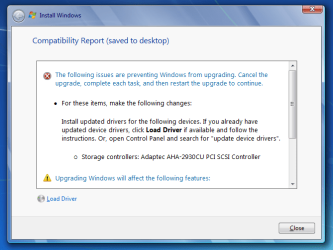
W7upgrade.PNG

Now I recall having some difficulty getting some drivers for this interface when I first installed Windows some time ago, but I have a driver installed at the moment and Windows reports that no better driver is available.

I have tried to use the Load Driver function in the Compatibility Report window to point to a driver but it does not seem to recognize anything as a valid driver, reporting that 'No signed drivers were found...' (see screenshot).
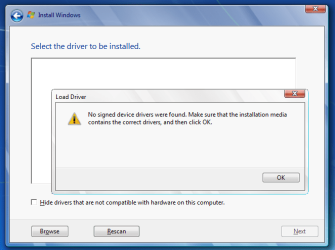
W7upgrade2.PNG

I'm wondering firstly, why the install would be reporting a problem when I have a valid driver already in use in the same version of Windows and secondly, if I need to give it the driver again, what file is it looking for?

Any help to get me past this point would be much appreciated.
 

My Computer My Computer

At a glance

Windows Home Premium 64-bitIntel i7 8604GbATI Radeon HD5450
Computer type
PC/Desktop
Computer Manufacturer/Model Number
Carillon AC-1
OS
Windows Home Premium 64-bit
CPU
Intel i7 860
Motherboard
AsRock P5 Pro
Memory
4Gb
Graphics Card(s)
ATI Radeon HD5450
Sound Card
E-MU 0404
Monitor(s) Displays
2 x HannsG HW191
Screen Resolution
1440x990
Hard Drives
Hitachi 500Gb 7K2000
Hitachi 320Gb P7K500
PSU
Emermax Pro82+
Case
Carillon AC1
Cooling
Scythe Big Shuriken
Keyboard
Microsoft Wired Keyboard 600
Mouse
Microsoft USB Basic Optical Mouse v2.0
Antivirus
Windows Defender
Browser
Chrome

My Computer My Computer

At a glance

Windows 7 Home Premium 32-Bit - Build 7600 SP1Intel Core i3-2120 3.30GhzKingston 4 GB DDR3 1333 mhzAMD Radeon HD6670
Computer type
PC/Desktop
Computer Manufacturer/Model Number
Custom Build
OS
Windows 7 Home Premium 32-Bit - Build 7600 SP1
CPU
Intel Core i3-2120 3.30Ghz
Motherboard
Asus P8Z68-V LX Intel Z68 Socket H2 ATX
Memory
Kingston 4 GB DDR3 1333 mhz
Graphics Card(s)
AMD Radeon HD6670
Sound Card
Sound Blaster Audigy SE 24-Bit
Monitor(s) Displays
Asus VE228
Screen Resolution
1440 X 900
Hard Drives
OCZ Vertex 3 120 GB Sata 3 SSD ==
Kingston SH103/S3 120 G Hyper X 120 GB SSD ==
Western Digital 500 GB Caviar Green 7200 RPM ==
PSU
Corsair CX600M == 600 Watt
Case
NZXT Apollo - Silver with Clear Side Panel
Cooling
Three 120 mm Fans
Keyboard
Microsoft Natural 4000
Mouse
Microsoft Custom Optical 3000
Internet Speed
AT&T Fiber Optic Wireless Network
Antivirus
Microsoft Security Essentials
Browser
Chrome
Other Info
120 mm Blue LED Fan -- Three Blue LED Lazer Light Sticks
Yes that's the link I used and I tried the install from a DVD created from the downloaded and verified X17-58997.iso file. I've tried a couple of times with the same result.
 

My Computer My Computer

At a glance

Windows Home Premium 64-bitIntel i7 8604GbATI Radeon HD5450
Computer type
PC/Desktop
Computer Manufacturer/Model Number
Carillon AC-1
OS
Windows Home Premium 64-bit
CPU
Intel i7 860
Motherboard
AsRock P5 Pro
Memory
4Gb
Graphics Card(s)
ATI Radeon HD5450
Sound Card
E-MU 0404
Monitor(s) Displays
2 x HannsG HW191
Screen Resolution
1440x990
Hard Drives
Hitachi 500Gb 7K2000
Hitachi 320Gb P7K500
PSU
Emermax Pro82+
Case
Carillon AC1
Cooling
Scythe Big Shuriken
Keyboard
Microsoft Wired Keyboard 600
Mouse
Microsoft USB Basic Optical Mouse v2.0
Antivirus
Windows Defender
Browser
Chrome
What are the exact issues you're having motivating you to want to Repair Install.

Uncheck everything in msconfig>Startup and >Services after Hiding All MS Services. Turn off your AV and try again.

The prompt for drivers is almost always a bad installer on actual Win7 installs which could apply here, so I would try another ISO anyway writing to stick to also try another method, from the box in Repair Install tutorial which provides the media and tool.
 
Thanks for the advice. I have tried another download of the ISO and run it from a new DVD but I get the same result. I came to this point after trying a lot of other things including a clean boot, checking for malware, sfc /scannow, checking memory, disks and checking out shell extension issues.

Symptoms I have seen which got me started on this track were:

1) Windows Gadgets would report an issue at start-up then close - eventually turned it off
2) Opening certain directories would cause Windows Explorer to crash (most often with exception code 0xc0000374)
3) Right-clicking Computer > Properties form the Start menu to display system information would immediately crash explorer.exe

After trying all the other things I decided to try the Windows Upgrade Install.

The above symptoms do not occur in Safe mode. The Computer/Properties issue occurs in both the two user profiles I have on the machine. The directory issue seems to be isolated to my main user account and only to occur when accessing a directory with one file type in.

Hope this helps to clarify the situation a little better.
 

My Computer My Computer

At a glance

Windows Home Premium 64-bitIntel i7 8604GbATI Radeon HD5450
Computer type
PC/Desktop
Computer Manufacturer/Model Number
Carillon AC-1
OS
Windows Home Premium 64-bit
CPU
Intel i7 860
Motherboard
AsRock P5 Pro
Memory
4Gb
Graphics Card(s)
ATI Radeon HD5450
Sound Card
E-MU 0404
Monitor(s) Displays
2 x HannsG HW191
Screen Resolution
1440x990
Hard Drives
Hitachi 500Gb 7K2000
Hitachi 320Gb P7K500
PSU
Emermax Pro82+
Case
Carillon AC1
Cooling
Scythe Big Shuriken
Keyboard
Microsoft Wired Keyboard 600
Mouse
Microsoft USB Basic Optical Mouse v2.0
Antivirus
Windows Defender
Browser
Chrome
Have you scanned for infection using Malwarebytes and SuperAntiSpyware, also in http://www.sevenforums.com/tutorials/220165-troubleshooting-steps-windows-7-a.html ?

Did System File Checker find irreparable files?

Test the hardware from same tutorial.

Try flash stick option with another fresh ISO and tool provided to write to stick from Reinstall tutorial below. Compare the steps in that tutorial to the install you did, especially how drivers are handled in Win7 as forcing a bunch of drivers Win7 doesn't want like it's XP can cause problems not seen in Safe Mode. I'd even consider doing it over if it varies much from the steps, tools and methods in the tutorial which have helped over a million users get a perfect install without a single complaint.
 
Last edited:
I ran Malaware bytes and it found nothing. SFC did not find any issues either. I also ran a memory test during boot-up and all passed OK. However, it is possible I missed something so I will retry the process again using the links you provided.

Thanks again for your advice.
 

My Computer My Computer

At a glance

Windows Home Premium 64-bitIntel i7 8604GbATI Radeon HD5450
Computer type
PC/Desktop
Computer Manufacturer/Model Number
Carillon AC-1
OS
Windows Home Premium 64-bit
CPU
Intel i7 860
Motherboard
AsRock P5 Pro
Memory
4Gb
Graphics Card(s)
ATI Radeon HD5450
Sound Card
E-MU 0404
Monitor(s) Displays
2 x HannsG HW191
Screen Resolution
1440x990
Hard Drives
Hitachi 500Gb 7K2000
Hitachi 320Gb P7K500
PSU
Emermax Pro82+
Case
Carillon AC1
Cooling
Scythe Big Shuriken
Keyboard
Microsoft Wired Keyboard 600
Mouse
Microsoft USB Basic Optical Mouse v2.0
Antivirus
Windows Defender
Browser
Chrome

My Computer My Computer

At a glance

Windows 7 Home Premium 32-Bit - Build 7600 SP1Intel Core i3-2120 3.30GhzKingston 4 GB DDR3 1333 mhzAMD Radeon HD6670
Computer type
PC/Desktop
Computer Manufacturer/Model Number
Custom Build
OS
Windows 7 Home Premium 32-Bit - Build 7600 SP1
CPU
Intel Core i3-2120 3.30Ghz
Motherboard
Asus P8Z68-V LX Intel Z68 Socket H2 ATX
Memory
Kingston 4 GB DDR3 1333 mhz
Graphics Card(s)
AMD Radeon HD6670
Sound Card
Sound Blaster Audigy SE 24-Bit
Monitor(s) Displays
Asus VE228
Screen Resolution
1440 X 900
Hard Drives
OCZ Vertex 3 120 GB Sata 3 SSD ==
Kingston SH103/S3 120 G Hyper X 120 GB SSD ==
Western Digital 500 GB Caviar Green 7200 RPM ==
PSU
Corsair CX600M == 600 Watt
Case
NZXT Apollo - Silver with Clear Side Panel
Cooling
Three 120 mm Fans
Keyboard
Microsoft Natural 4000
Mouse
Microsoft Custom Optical 3000
Internet Speed
AT&T Fiber Optic Wireless Network
Antivirus
Microsoft Security Essentials
Browser
Chrome
Other Info
120 mm Blue LED Fan -- Three Blue LED Lazer Light Sticks
Thanks. I'll check that out.
 

My Computer My Computer

At a glance

Windows Home Premium 64-bitIntel i7 8604GbATI Radeon HD5450
Computer type
PC/Desktop
Computer Manufacturer/Model Number
Carillon AC-1
OS
Windows Home Premium 64-bit
CPU
Intel i7 860
Motherboard
AsRock P5 Pro
Memory
4Gb
Graphics Card(s)
ATI Radeon HD5450
Sound Card
E-MU 0404
Monitor(s) Displays
2 x HannsG HW191
Screen Resolution
1440x990
Hard Drives
Hitachi 500Gb 7K2000
Hitachi 320Gb P7K500
PSU
Emermax Pro82+
Case
Carillon AC1
Cooling
Scythe Big Shuriken
Keyboard
Microsoft Wired Keyboard 600
Mouse
Microsoft USB Basic Optical Mouse v2.0
Antivirus
Windows Defender
Browser
Chrome
I ran through a battery of tests again including RAM test, hard drive test, SFC scan, Malwarebytes scan, unplugged devices and checked temperatures - all reported no issues. I also disabled the SCSI interface that was being reported in the compatibility check.

However, after running the checks I tried the upgrade install again and this time it did not report the driver error. I ran through the upgrade and it has fixed the various issues (eg, explorer crashes, gadget crashes) I was seeing. I need to fix the driver issue - but that is secondary to having a stable Windows platform.

Thanks to bigmck and gregrocker for your help in getting me past this issue.
 

My Computer My Computer

At a glance

Windows Home Premium 64-bitIntel i7 8604GbATI Radeon HD5450
Computer type
PC/Desktop
Computer Manufacturer/Model Number
Carillon AC-1
OS
Windows Home Premium 64-bit
CPU
Intel i7 860
Motherboard
AsRock P5 Pro
Memory
4Gb
Graphics Card(s)
ATI Radeon HD5450
Sound Card
E-MU 0404
Monitor(s) Displays
2 x HannsG HW191
Screen Resolution
1440x990
Hard Drives
Hitachi 500Gb 7K2000
Hitachi 320Gb P7K500
PSU
Emermax Pro82+
Case
Carillon AC1
Cooling
Scythe Big Shuriken
Keyboard
Microsoft Wired Keyboard 600
Mouse
Microsoft USB Basic Optical Mouse v2.0
Antivirus
Windows Defender
Browser
Chrome
Glad you got things corrected.
 

My Computer My Computer

At a glance

Windows 7 Home Premium 32-Bit - Build 7600 SP1Intel Core i3-2120 3.30GhzKingston 4 GB DDR3 1333 mhzAMD Radeon HD6670
Computer type
PC/Desktop
Computer Manufacturer/Model Number
Custom Build
OS
Windows 7 Home Premium 32-Bit - Build 7600 SP1
CPU
Intel Core i3-2120 3.30Ghz
Motherboard
Asus P8Z68-V LX Intel Z68 Socket H2 ATX
Memory
Kingston 4 GB DDR3 1333 mhz
Graphics Card(s)
AMD Radeon HD6670
Sound Card
Sound Blaster Audigy SE 24-Bit
Monitor(s) Displays
Asus VE228
Screen Resolution
1440 X 900
Hard Drives
OCZ Vertex 3 120 GB Sata 3 SSD ==
Kingston SH103/S3 120 G Hyper X 120 GB SSD ==
Western Digital 500 GB Caviar Green 7200 RPM ==
PSU
Corsair CX600M == 600 Watt
Case
NZXT Apollo - Silver with Clear Side Panel
Cooling
Three 120 mm Fans
Keyboard
Microsoft Natural 4000
Mouse
Microsoft Custom Optical 3000
Internet Speed
AT&T Fiber Optic Wireless Network
Antivirus
Microsoft Security Essentials
Browser
Chrome
Other Info
120 mm Blue LED Fan -- Three Blue LED Lazer Light Sticks
Back
Top