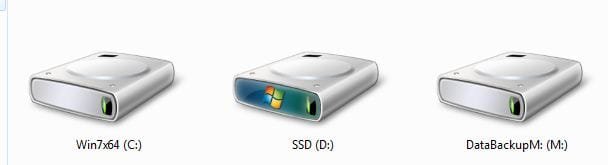
After a couple of days I am pretty close to getting this accomplished. Did a Macrium image, D/L Macrium WinPE and ran from boot. Could not locate the image so attempted restart with CD out of drive. Puter would not start and "hung" (one small flash of the bios screen) then a black screen, the graphics card fan was in hipper speed???? Non related I know. Unplugged all HDD's and SSD, bios was now back, slowly plugged them back in and normal start. Did another image, WinPE was able to find it now and was able to write the image to the SSD. No problems, boots etc and everything seems normal except the SSD is assigned D:. The original HDD remains C:. This is causing one problem, all Microsoft Office Apps will not start from either the task bar or the start menu. Probably because of the drive lettering mixup??? Error "The windows Installer service could not be accessed" Other non MS Office apps run normal. In the past when I changed the boot drive, it assumed the C:, and the previous drive would "trade" Drive letters. How can I get this auto-switch to function again.?? Tx
Attachments
W7Part.JPG
67.6 KB
· Views: 14
xyz.JPG
15.2 KB
· Views: 11
My Computer
Computer type
PC/Desktop
Computer Manufacturer/Model Number
Self Build
OS
Windows 7 Professional X64 Service Pack 1
CPU
AMD Phenom II X4 955 3.20GHz
Motherboard
Gigabyte GA-MA790X-UD4P
Memory
8G
Graphics Card(s)
GX550 Ti
Sound Card
On board
Monitor(s) Displays
Asus VW246H & Syncmaster 2243swx
Screen Resolution
1920x1080 & 1920x1080
Hard Drives
M4-CT128 SSD2, Samsung 840 256GB, 1 WDC 1TB
PSU
Corsair TX750W-V2
Case
Antec
Cooling
2 120mm fan
Keyboard
Microsoft Wireless 3050
Mouse
Microsoft Wireless 5000
Internet Speed
72/6Mbs (Cable)
Other Info
Asus AC1900 router, 8 port Trendnet Switch - Logitech Webcam Pro 9000
Did you tell Macrium to assign C or Auto to the image, include MBR and Track 0? That's the only reason I can think of why Win7 would not see itself as C as it will always do when installed from boot or re-imaged without requesting another drive letter.
You might want to try directly cloning using the premium Acronis cloning suite which comes free with any WD or Seagate HD in the mix. The imaging suite is also better, and the Manual on downloads page is clear.
You may need to study Macrium - Image your system manual more in depth to get it to assume C after reimaging. If it won't start it requires marking Active to run Startup Repair - Run 3 Separate Times with all other HD's unplugged and Win7 set first to boot in BIOS setup.
Could be when you created the Image you only imaged the C drive and not the complete drive. Doing that will not copy over the System Reserve partition and your system is still booting from the drive that contains the Sys Reserve partition.
Could be when you created the Image you only imaged the C drive and not the complete drive. Doing that will not copy over the System Reserve partition and your system is still booting from the drive that contains the Sys Reserve partition.
Tx. The entire disk had an image for it. (2 partitions) Formated the SSD for one simple partition. Both (SR & OS) installed with no reported problems from Macirum. When I booted from the SSD, screen was light blue and in the bottom corner, it said that this was not a genuine windows copy!
I tried my old friend Casper, cloned the C: to E: (SSD) and I am running off of the SSD C: now. The original C: is now E: as expected
Attachments
now.JPG
11.8 KB
· Views: 2
My Computer
Computer type
PC/Desktop
Computer Manufacturer/Model Number
Self Build
OS
Windows 7 Professional X64 Service Pack 1
CPU
AMD Phenom II X4 955 3.20GHz
Motherboard
Gigabyte GA-MA790X-UD4P
Memory
8G
Graphics Card(s)
GX550 Ti
Sound Card
On board
Monitor(s) Displays
Asus VW246H & Syncmaster 2243swx
Screen Resolution
1920x1080 & 1920x1080
Hard Drives
M4-CT128 SSD2, Samsung 840 256GB, 1 WDC 1TB
PSU
Corsair TX750W-V2
Case
Antec
Cooling
2 120mm fan
Keyboard
Microsoft Wireless 3050
Mouse
Microsoft Wireless 5000
Internet Speed
72/6Mbs (Cable)
Other Info
Asus AC1900 router, 8 port Trendnet Switch - Logitech Webcam Pro 9000

 I am pretty close to getting this accomplished. Did a Macrium image, D/L Macrium WinPE and ran from boot. Could not locate the image so attempted restart with CD out of drive. Puter would not start and "hung" (one small flash of the bios screen) then a black screen, the graphics card fan was in hipper speed???? Non related I know. Unplugged all HDD's and SSD, bios was now back, slowly plugged them back in and normal start. Did another image, WinPE was able to find it now and was able to write the image to the SSD. No problems, boots etc and everything seems normal except the SSD is assigned D:. The original HDD remains C:. This is causing one problem, all Microsoft Office Apps will not start from either the task bar or the start menu. Probably because of the drive lettering mixup??? Error "The windows Installer service could not be accessed" Other non MS Office apps run normal. In the past when I changed the boot drive, it assumed the C:, and the previous drive would "trade" Drive letters. How can I get this auto-switch to function again.?? Tx


 The original C: is now E: as expected