W7 Indexing Options question

iKerry

New member
Local time
9:09 AM
Messages
22
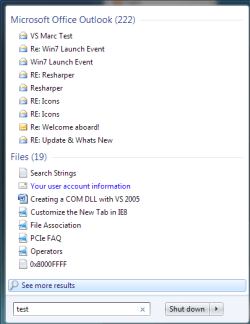
When I press the Start button and enter, say, "test" a word that is in many of my documents, nothing appears above as it used to with Vista.

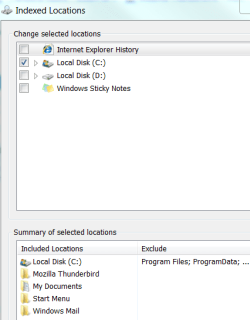
Perhaps I have Indexing Options set incorrectly? (see attachment)

Suggestion please,

Thanks,

Kerry
Windows 7 Home Premium
 

Attachments
  • w7indexingoptions.PNG
    w7indexingoptions.PNG
    38.3 KB · Views: 24

My Computer

Computer Manufacturer/Model Number
MSI
OS
Windows 7 Home Premium
CPU
INtel 3.0
Motherboard
MSI
Memory
2 GB
Mine shows IE also checked.
 

My Computer

Computer type
PC/Desktop
Computer Manufacturer/Model Number
Dell XPS 420
OS
Windows 10, Home Clean Install
CPU
Intel Core2 processsor Q8200(2.33Ghz 1333FSB) Quad Core Tech
Motherboard
Dell
Memory
6 gb
Graphics Card(s)
ATI Radeon 256MB HD3650
Sound Card
Intergrated 7.1 Channel Audio
Monitor(s) Displays
Dell SP2009W 20"
Hard Drives
640 GB Serial ATA Hard drive
Cooling
Fan
Keyboard
Dell USB Keyboard
Mouse
Dell Premium Optical USB
Internet Speed
DSL 2.85
Just tried it, same results, it won't find text within a document. I haven't touched any settings since install.
 

My Computer

Computer Manufacturer/Model Number
Lenovo ThinkPad T400
OS
7 x64
CPU
P8600 2.4Ghz Core 2 Duo
Memory
4096
Graphics Card(s)
3470HD Hybrid
Monitor(s) Displays
14.4"
Screen Resolution
1440 x 900
Hard Drives
60GB OCZ Vertex Turbo + 160GB 5400
Internet Speed
15Mbps
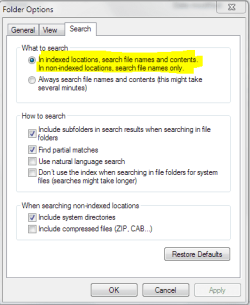
Works fine here. In folder options, Search tab, do you have the option to search file contents for indexed files?

Otherwise, in the start menu preferences I also checked search public folders. Cant think of anything else.
 

Attachments

  • Search Settings.PNG
    Search Settings.PNG
    31.3 KB · Views: 15
  • Search for TEST.png
    Search for TEST.png
    25.2 KB · Views: 11

My Computer

Computer Manufacturer/Model Number
Dell Dimension E520
OS
Windows 7 Ultimate (x86)
CPU
Intel 2.20 Dual Core
Memory
4 GB
Graphics Card(s)
nVidia 9400 GT (512 MB)
Sound Card
Sigmatel C Major HD
Monitor(s) Displays
22" Samsung 2232 bw
Screen Resolution
1680x1050
Mouse
Microsoft Arc
Other Info
Wacom Graphire 4 (6x8) Tablet
Got the search working but now I can't find Thunderbird email content.

Thanks all,

Kerry
 

My Computer

Computer Manufacturer/Model Number
MSI
OS
Windows 7 Home Premium
CPU
INtel 3.0
Motherboard
MSI
Memory
2 GB
Tell us how you fixed search, so we all can learn.
 

My Computer

Computer type
PC/Desktop
Computer Manufacturer/Model Number
Dell XPS 420
OS
Windows 10, Home Clean Install
CPU
Intel Core2 processsor Q8200(2.33Ghz 1333FSB) Quad Core Tech
Motherboard
Dell
Memory
6 gb
Graphics Card(s)
ATI Radeon 256MB HD3650
Sound Card
Intergrated 7.1 Channel Audio
Monitor(s) Displays
Dell SP2009W 20"
Hard Drives
640 GB Serial ATA Hard drive
Cooling
Fan
Keyboard
Dell USB Keyboard
Mouse
Dell Premium Optical USB
Internet Speed
DSL 2.85
I had Dennis Nazarenko's VistaStartMenu 3.4 installed. It's a great little utility that makes the Start menu easier to use. Apparently there's a bug with VSM and Windows 7 and so it affected the W7 Search programs and files feature. I uninstalled VSM and the W7 search works fine except for indexing TB's emails.

I just upgrade TB 2.0.0.23 to TB3.RC1 but W7 search still doesn't search TB's emails.

Now I'm using GoogleDesktop and it searches TB's email just fine. I'm certain that eventually one day we will have just one search field that works for everything.

Kerry
 

My Computer

Computer Manufacturer/Model Number
MSI
OS
Windows 7 Home Premium
CPU
INtel 3.0
Motherboard
MSI
Memory
2 GB
Back
Top