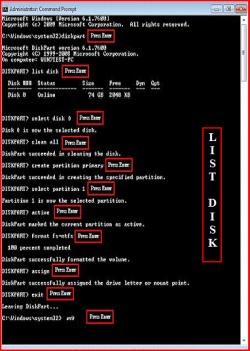
OK,
My config is HP G6 1075 SA with W7 Home Premium 64 bit pre-installed. It was working well until last week when I decided to install Debian Linux. I am no N00B to Linux and have installed it probably 100s of times. Debian installed and booted well but Windows BSODed with an error 0x0000225 cannot access drive. I formatted C and attempted to reinstall Windows 7 but it is unable to detect the HDD. I accept terms of license and move on to the point of choosing disks but nothing shows up. (There is an option to choose drivers. Where do I locate them? The HP website isn't helpful and I can't even find my product let aside the drivers)
I have already tried :
1. Partitioning an NTFS file system in Debian. Doesnt show.
2. Deleting a partition in Debian and attempt to see the free space in W7 Installer. Didn't work.
3. Try to do the BIOS setting thing (Change SATA option from AHCI to compatible or something). I could find no such setting in BIOS. The BIOS was severely limited with only option of switching on fan.
What do I do ?
The chipset is Intel HM55 if that helps and harddrive is SATA 5400 rpm 500GB.
My config is HP G6 1075 SA with W7 Home Premium 64 bit pre-installed. It was working well until last week when I decided to install Debian Linux. I am no N00B to Linux and have installed it probably 100s of times. Debian installed and booted well but Windows BSODed with an error 0x0000225 cannot access drive. I formatted C and attempted to reinstall Windows 7 but it is unable to detect the HDD. I accept terms of license and move on to the point of choosing disks but nothing shows up. (There is an option to choose drivers. Where do I locate them? The HP website isn't helpful and I can't even find my product let aside the drivers)
I have already tried :
1. Partitioning an NTFS file system in Debian. Doesnt show.
2. Deleting a partition in Debian and attempt to see the free space in W7 Installer. Didn't work.
3. Try to do the BIOS setting thing (Change SATA option from AHCI to compatible or something). I could find no such setting in BIOS. The BIOS was severely limited with only option of switching on fan.
What do I do ?
The chipset is Intel HM55 if that helps and harddrive is SATA 5400 rpm 500GB.
My Computer
At a glance
Windows 7 64 Bit
- OS
- Windows 7 64 Bit