w7 mess up my xp folder order

drugo

New member
Member
VIP
Local time
2:13 PM
Messages
476
Hi
i have 2 hard disks
i have w7 on one hard disk
in the second i have xp

well when i boot w7 it messes up my xp folders order
weird

i mean for example a folder , i set with xp to be ordered by name , and view thumb

i boot w7 , after when i boot xp this folder is not more orderrd by name and the view is different

i have alway to reset the xp folders and re-order them

is theree a way to avoid this?
thanks


My Computer My Computer

Computer type
PC/Desktop
OS
windows 7 ultimate 64bit
If you follow this tutorial HERE and set the folders up the same order as in XP you may have them the same .
you could set the folder view to the same as xp by setting the folder view.
In windows 7 open a window click Organise and select "Folder and search options"/ select the view tab check or uncheck the views to match your xp folders apply and hopefully they will stay the same when you view in xp or win 7 . i dont have xp so i cant check .
 

My Computer My Computer

Computer Manufacturer/Model Number
Hewlett packard/p6512uk
OS
Microsoft Windows 7 Home Premium 64-bit 7600
CPU
IIx4 amd athelon 635 processor
Motherboard
FOXCONN 2AA9
Memory
2x2gb
Graphics Card(s)
ati radeon HD 5450
Sound Card
(1) Realtek High Definition Audio (2) AMD High Definition
Monitor(s) Displays
samsung lcd tv 32"
Screen Resolution
1360x 768
Hard Drives
(1) WDC WD10 01FAES-60Z2A0 SATA Disk Device (2) Maxtor OneTouch USB Device (3) ST310003 33AS USB Device (4) WD My Book 1111 USB Device
PSU
?
Cooling
air!
Keyboard
wireless hp
Mouse
wireless Hp,optical
Internet Speed
1.10mb/s
Antivirus
MSE
Browser
Firefox
you could set the folder view to the same as xp by setting the folder view.
In windows 7 open a window click Organise and select "Folder and search options"/ select the view tab check or uncheck the views to match your xp folders apply and hopefully they will stay the same when you view in xp or win 7 . i dont have xp so i cant check .

sorry how can i do it?
in xp every folder has a different order and settings
i did not find a option to sync
 

My Computer My Computer

Computer type
PC/Desktop
OS
windows 7 ultimate 64bit
If you follow this tutorial HERE and set the folders up the same order as in XP you may have them the same .
you could set the folder view to the same as xp by setting the folder view.
In windows 7 open a window click Organise and select "Folder and search options"/ select the view tab check or uncheck the views to match your xp folders apply and hopefully they will stay the same when you view in xp or win 7 . i dont have xp so i cant check .


thanks
i do it
but may i ask a question ?
is there a option in w7 do "disable store folder visualize" don't know in english sorry
but in xp there is a option to store the settings for every folder

where is in w7?
 

My Computer My Computer

Computer type
PC/Desktop
OS
windows 7 ultimate 64bit
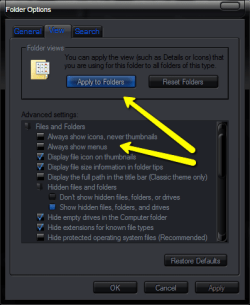
Ok what to do is set the folder to look how you want I.e thumbnails or not, folder size etc then select organize /folder and search options /view tab then click the button
 

Attachments

  • 2010-09-27_1140.png
    2010-09-27_1140.png
    15.7 KB · Views: 5

My Computer My Computer

Computer Manufacturer/Model Number
Hewlett packard/p6512uk
OS
Microsoft Windows 7 Home Premium 64-bit 7600
CPU
IIx4 amd athelon 635 processor
Motherboard
FOXCONN 2AA9
Memory
2x2gb
Graphics Card(s)
ati radeon HD 5450
Sound Card
(1) Realtek High Definition Audio (2) AMD High Definition
Monitor(s) Displays
samsung lcd tv 32"
Screen Resolution
1360x 768
Hard Drives
(1) WDC WD10 01FAES-60Z2A0 SATA Disk Device (2) Maxtor OneTouch USB Device (3) ST310003 33AS USB Device (4) WD My Book 1111 USB Device
PSU
?
Cooling
air!
Keyboard
wireless hp
Mouse
wireless Hp,optical
Internet Speed
1.10mb/s
Antivirus
MSE
Browser
Firefox
Ok what to do is set the folder to look how you want I.e thumbnails or not, folder size etc then select organize /folder and search options /view tab then click the button


thanks nice skin !!!


did not know i can change w7 skin !
i guess it's a new visual style
 

My Computer My Computer

Computer type
PC/Desktop
OS
windows 7 ultimate 64bit
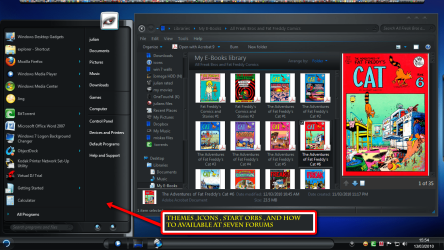
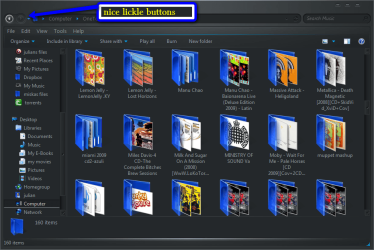
Oh yes! be sure to check out the customization threads and the post your desktop threads you will see a whole range of different themes,it can be a complicated process so tread carefully , message me if you have any questions.
heres an example i have changed it slightly but still have a dark theme
 

Attachments

  • 2010-03-13_1555.png
    2010-03-13_1555.png
    204.5 KB · Views: 6
  • 2010-03-17_1712.png
    2010-03-17_1712.png
    87.5 KB · Views: 4

My Computer My Computer

Computer Manufacturer/Model Number
Hewlett packard/p6512uk
OS
Microsoft Windows 7 Home Premium 64-bit 7600
CPU
IIx4 amd athelon 635 processor
Motherboard
FOXCONN 2AA9
Memory
2x2gb
Graphics Card(s)
ati radeon HD 5450
Sound Card
(1) Realtek High Definition Audio (2) AMD High Definition
Monitor(s) Displays
samsung lcd tv 32"
Screen Resolution
1360x 768
Hard Drives
(1) WDC WD10 01FAES-60Z2A0 SATA Disk Device (2) Maxtor OneTouch USB Device (3) ST310003 33AS USB Device (4) WD My Book 1111 USB Device
PSU
?
Cooling
air!
Keyboard
wireless hp
Mouse
wireless Hp,optical
Internet Speed
1.10mb/s
Antivirus
MSE
Browser
Firefox
Back
Top