
Hello. I have a Z77 mobo with a new SDD and a HDD from the old PC. At first I installed W7 to the SDD and I could only boot into it when I disconnected the HDD. When I started PC, the logo was shown for a second or so, and then it went into repair mode, the "preparing installation files" progress bar ran twice and the system booted into GRUB that was left on the HDD. I've tinkered in BIOS a lot trying to fix this, but to no avail.
Now I've decided to also install Linux (OpenSUSE 12.2) to the SDD, and hoped that GRUB2 would solve my problems. Nope, it didn't detect my W7 at all! (however, it did detect the two(?) old W7 mount points from the HDD). I couldn't even get to boot it by forcing "Windows Boot Manager" from BIOS. I tried to fix this with DVD repair, at first I couldn't get it to work by launching the DVD in UEFI mode, the other one worked, but it only messed up my GRUB2 and I couldn't boot to either system. After some unsuccesful tinkering with bootrec, I found this thread and followed what OP and the best answer guy did, which sums up roughly to this:
Then, Windows Repair detected my installation and said it fixed the problem. Now I still can't boot into my system normally (again, it reboots after "Windows is loading files"), however, I can get it to boot after the timeout ("Press any key to boot from DVD") from W7 installation disk! I have no idea what's going on.
Here is a screenshot from diskmgmt:
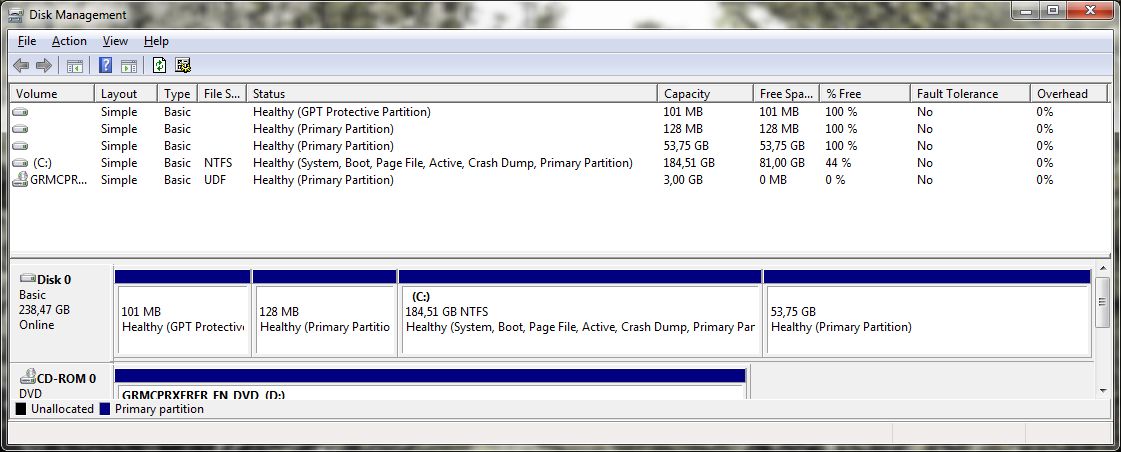
The strange thing is the 128MB partition - I suppose this could have been MSR partition, while gparted shows it's a Linux partition! Is this possible, that OpenSUSE installer messed it up?
Any help would be greatly appreciated!
Also:
Now I've decided to also install Linux (OpenSUSE 12.2) to the SDD, and hoped that GRUB2 would solve my problems. Nope, it didn't detect my W7 at all! (however, it did detect the two(?) old W7 mount points from the HDD). I couldn't even get to boot it by forcing "Windows Boot Manager" from BIOS. I tried to fix this with DVD repair, at first I couldn't get it to work by launching the DVD in UEFI mode, the other one worked, but it only messed up my GRUB2 and I couldn't boot to either system. After some unsuccesful tinkering with bootrec, I found this thread and followed what OP and the best answer guy did, which sums up roughly to this:
Code:
C:\> bootsect /nt60 C: /force
C:\> diskpart
DISKPART> select disk 1
DISKPART> select partition 3
DISKPART> active
DISKPART> extend filesystem
DISKPART> exit
C:\> bootrec /rebuildbcdHere is a screenshot from diskmgmt:
The strange thing is the 128MB partition - I suppose this could have been MSR partition, while gparted shows it's a Linux partition! Is this possible, that OpenSUSE installer messed it up?
Any help would be greatly appreciated!
Also:
Code:
C:\Windows\system32>bcdedit /v

Windows Boot Manager
--------------------
identifier              {9dea862c-5cdd-4e70-acc1-f32b344d4795}
device                  partition=C:
path                    \bootmgr
description             Windows Boot Manager
locale                  en-US
default                 {a2d81753-0084-11e2-876a-e3fdd9956fab}
displayorder            {a2d81753-0084-11e2-876a-e3fdd9956fab}
timeout                 30

Windows Boot Loader
-------------------
identifier              {a2d81753-0084-11e2-876a-e3fdd9956fab}
device                  partition=C:
path                    \Windows\system32\winload.exe
description             Windows 7 Professional
locale                  en-US
osdevice                partition=C:
systemroot              \Windows
resumeobject            {41181bc9-0032-11e2-aed6-806e6f6e6963}
My Computer
- OS
- Windows 7 Professional x64

