W7 Prof PROGRAM SETTINGS error

karthurk

New member
Local time
3:55 PM
Messages
48
Hello, I have a student licensed windows 7 professional edition and apparantle every time I shutdown my PC almost none of my settings are saved, by settings I mean my Photoshop interface settings, cache settings, my winamp settings, word custom settings, every setting that you do after you install a program, almost every program is back to it's original state just after installation, that is really weird and I am clueless,

any ideas?

Thanks!!!!
 

My Computer

Computer Manufacturer/Model Number
Intel
OS
W7 X64 Ultimate, OSX, Linux
CPU
Intel Core i3 540M
Motherboard
Intel DH55TC
Memory
2GB Kingston DDR3 @ 1333MHz
Graphics Card(s)
nVidia gForce 250GTs, 512MB
Sound Card
OnBoard
Monitor(s) Displays
2xBenq E2200HDA
Screen Resolution
1920x1080
Hard Drives
Linux - 160GB WD 8MB Cache 7200rpm
OSX - 320GB Seagate Barracuda 16MB Cache 7200rpm
W7 - 80GB Seagate Barracude 8MB Cache 7200rpm
PSU
Antec 700W
Case
Cooler Master MidTower
Cooling
Standard
Keyboard
DeLux
Mouse
Logitech Wireless
Internet Speed
LAN/T1
It sounds like a registry problem. Are you using anything like Reg Cleaner? If so that is probably the cause. In any event, if I am right you must make the adjustment in your registry. Others here are much more profiecient in this area and will tell you how. In lieu of that you may have to use your Window 7 DVD to do a repair install. When you do correct the problem, I suggest that you download one program at a time, and use it for a while. Just in case one of them is the problem, you can ascertain the offender.
 

My Computer

Computer type
PC/Desktop
Computer Manufacturer/Model Number
Dell XPS 420
OS
Windows 10, Home Clean Install
CPU
Intel Core2 processsor Q8200(2.33Ghz 1333FSB) Quad Core Tech
Motherboard
Dell
Memory
6 gb
Graphics Card(s)
ATI Radeon 256MB HD3650
Sound Card
Intergrated 7.1 Channel Audio
Monitor(s) Displays
Dell SP2009W 20"
Hard Drives
640 GB Serial ATA Hard drive
Cooling
Fan
Keyboard
Dell USB Keyboard
Mouse
Dell Premium Optical USB
Internet Speed
DSL 2.85
Go to Start > Run, and type Regedit.

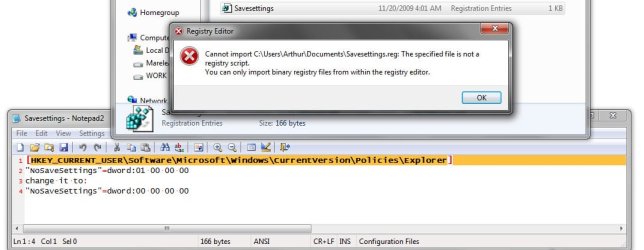
Copy and paste the following lines between the quotes, into Notepad, choose All Files from the drop down menu, name the file Savesettings,reg. you have t manually type the .reg extension, Make sure you save in in ANSI format.

Now double-click on the ,reg file to merge it into the registry

Look for this key in the registry:
Windows Registry Editor Version 5.00

[HKEY_CURRENT_USER\Software\Microsoft\Windows\CurrentVersion\Policies\Explorer]
"NoSaveSettings"=dword:01 00 00 00
change it to:
"NoSaveSettings"=dword:00 00 00 00

You might have to create the Policies key
 

My Computer

Computer Manufacturer/Model Number
Cheap $399.00 E-Machine
OS
Windows 7 Pro & Vista Home Premium
CPU
Athlon 64 3800+ (Orleans) 2.40GHz
Motherboard
Winfast
Memory
2GB DDR2 RAM DIMM
Graphics Card(s)
NVIDIA GeForce 8500 GT 512 MB memory HDMI out
Sound Card
creative X-Fi Exteme 7..1 channel
Monitor(s) Displays
Acer V223W 22" widescreen DVI
Screen Resolution
1680x1050
Hard Drives
WDC WD5 500GB
WDC WD25 250GB
PSU
OCZ 550 watt
Case
Gateway
Cooling
2 fans
Keyboard
Dell
Mouse
Sony Vaio
Internet Speed
18MB/s down - .72MB /s up
It doesn't work, it is really weird, sometimes my settings are kept, other times no...


I have no registry cleaner program installed.

I will try to add manually the entries

EDIT: I am an idiot, I see that in that file I pasted only crap ... my bad, anyhow ... the entry explorer is not there, I am goind to add the entries manually
 

Attachments

  • gigwa.jpg
    gigwa.jpg
    53.6 KB · Views: 29

My Computer

Computer Manufacturer/Model Number
Intel
OS
W7 X64 Ultimate, OSX, Linux
CPU
Intel Core i3 540M
Motherboard
Intel DH55TC
Memory
2GB Kingston DDR3 @ 1333MHz
Graphics Card(s)
nVidia gForce 250GTs, 512MB
Sound Card
OnBoard
Monitor(s) Displays
2xBenq E2200HDA
Screen Resolution
1920x1080
Hard Drives
Linux - 160GB WD 8MB Cache 7200rpm
OSX - 320GB Seagate Barracuda 16MB Cache 7200rpm
W7 - 80GB Seagate Barracude 8MB Cache 7200rpm
PSU
Antec 700W
Case
Cooler Master MidTower
Cooling
Standard
Keyboard
DeLux
Mouse
Logitech Wireless
Internet Speed
LAN/T1
Make sure you save in in ANSI format.
 

My Computer

Computer Manufacturer/Model Number
Cheap $399.00 E-Machine
OS
Windows 7 Pro & Vista Home Premium
CPU
Athlon 64 3800+ (Orleans) 2.40GHz
Motherboard
Winfast
Memory
2GB DDR2 RAM DIMM
Graphics Card(s)
NVIDIA GeForce 8500 GT 512 MB memory HDMI out
Sound Card
creative X-Fi Exteme 7..1 channel
Monitor(s) Displays
Acer V223W 22" widescreen DVI
Screen Resolution
1680x1050
Hard Drives
WDC WD5 500GB
WDC WD25 250GB
PSU
OCZ 550 watt
Case
Gateway
Cooling
2 fans
Keyboard
Dell
Mouse
Sony Vaio
Internet Speed
18MB/s down - .72MB /s up
I added everything manually, two restarts so far, no loss of settings. Hope it Works, THANKS A LOT!!!
 

My Computer

Computer Manufacturer/Model Number
Intel
OS
W7 X64 Ultimate, OSX, Linux
CPU
Intel Core i3 540M
Motherboard
Intel DH55TC
Memory
2GB Kingston DDR3 @ 1333MHz
Graphics Card(s)
nVidia gForce 250GTs, 512MB
Sound Card
OnBoard
Monitor(s) Displays
2xBenq E2200HDA
Screen Resolution
1920x1080
Hard Drives
Linux - 160GB WD 8MB Cache 7200rpm
OSX - 320GB Seagate Barracuda 16MB Cache 7200rpm
W7 - 80GB Seagate Barracude 8MB Cache 7200rpm
PSU
Antec 700W
Case
Cooler Master MidTower
Cooling
Standard
Keyboard
DeLux
Mouse
Logitech Wireless
Internet Speed
LAN/T1
No problem, if it worked after 2 restarts you should be fine.
 

My Computer

Computer Manufacturer/Model Number
Cheap $399.00 E-Machine
OS
Windows 7 Pro & Vista Home Premium
CPU
Athlon 64 3800+ (Orleans) 2.40GHz
Motherboard
Winfast
Memory
2GB DDR2 RAM DIMM
Graphics Card(s)
NVIDIA GeForce 8500 GT 512 MB memory HDMI out
Sound Card
creative X-Fi Exteme 7..1 channel
Monitor(s) Displays
Acer V223W 22" widescreen DVI
Screen Resolution
1680x1050
Hard Drives
WDC WD5 500GB
WDC WD25 250GB
PSU
OCZ 550 watt
Case
Gateway
Cooling
2 fans
Keyboard
Dell
Mouse
Sony Vaio
Internet Speed
18MB/s down - .72MB /s up
Back
Top