W7 resets bootable flag on HDD

tadeas

New member
Local time
3:47 PM
Messages
8
Hello,
I have four partitions on my HDD with Windows 7 on the second one. I want the boot flag ( Boot flag - Wikipedia, the free encyclopedia ) on the first partition and only on it. It contains a menu, that gives me a choice of what OS to boot. Whenever I boot Windows 7 from the second partition, it resets the boot flag to the second partition only and thus I can't get back.

How do I tell Windows 7 not to do this?
Alternatively, is there a way to reset it manually from within Windows 7 so I don't have to boot a rescue CD?

(looking forward to UEFI, when the rescue CDs won't boot...)
 

My Computer My Computer

Computer Manufacturer/Model Number
Lenovo T420
OS
Ultimate x64
CPU
Core i7
Memory
4GB
Graphics Card(s)
Intel GMA HD3000, Nvidia Quadro NVS 4200
Monitor(s) Displays
built-in panel 1600x900
Last edited:

My Computer My Computer

Computer Manufacturer/Model Number
HP Pavilion Elite 495UK
OS
Windows 7 Ultimate SP1 64-Bit
CPU
Intel Core i7 870 @ 2.93GHz
Motherboard
MSI 2A9C (CPU1)
Memory
8Gb Dual-Channel DDR3 @ 664MHz
Graphics Card(s)
nVidia GeForce GTX 460 1024MB dedicated RAM
Sound Card
Realtek HD Audio
Monitor(s) Displays
HP2310i
Screen Resolution
1920 x 1080
Hard Drives
1x1954GB Hitachi HDS22020ALA 330 (RAID), 1x1954GB Hitachi External for backup and storage
PSU
460W
Case
HP Elite
Cooling
Air cooled
Keyboard
Logitech K750 solar-powered keyboard
Mouse
Logitech Wireless M180 mouse
Internet Speed
2Mb
Other Info
Pure Avanti Flow Internet Radio with iPod Dock, 64Gb iPod, HP USB Speakers, Sony MDR-V500 Headphones, Sony Vaio F-Series Laptop
Thank you for your quick answer!

I'll try the tutorial, I'm sorry that I didn't find it myself, I've probably used wrong queries on Google :-) . I'll report back, thanks again!
 

My Computer My Computer

Computer Manufacturer/Model Number
Lenovo T420
OS
Ultimate x64
CPU
Core i7
Memory
4GB
Graphics Card(s)
Intel GMA HD3000, Nvidia Quadro NVS 4200
Monitor(s) Displays
built-in panel 1600x900
So I've tried the How To, but I've run into these issues:
1) The OS selection box didn't list anything (I don't have any CD with drivers, so the suggested "Load drivers" solution didn't help).
2) When I proceeded anyway, the bcdedit failed:
Code:
[B]> bcdedit /export C:\BCD_Backup
[/B]The store export operation failed.
The system cannot find the file specified
I'm not sure what do you mean by "fully-expanded disk management layout". I can provide fdisk info, it should show the same information:

Code:
   Device Boot      Start         End      Blocks   Id  System
/dev/sda1            2048    97656831    48827392   83  Linux
/dev/sda2   *    97656832   292968447    97655808    7  HPFS/NTFS/exFAT
/dev/sda3       292968448   308592639     7812096   82  Linux swap / Solaris
/dev/sda4       308592640   976771071   334089216   83  Linux
As you can see, sda2 has the boot flag. I can reset it to sda1 with fdisk, but when I start Windows 7 again, it automatically resets it to sda2.
 

My Computer My Computer

Computer Manufacturer/Model Number
Lenovo T420
OS
Ultimate x64
CPU
Core i7
Memory
4GB
Graphics Card(s)
Intel GMA HD3000, Nvidia Quadro NVS 4200
Monitor(s) Displays
built-in panel 1600x900
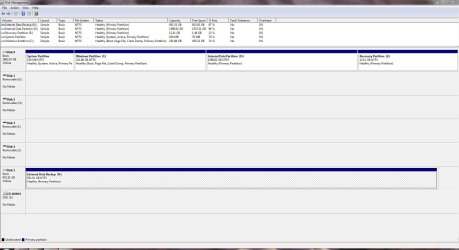
This is what I was hoping for.

DM.JPG

To get into Disk Management is Start>Control Panel>System & Security>Administrative Tools>Create & Format Hard Disk Partitions

However, I suspect your problem is related to Linux and as I know nothing about it, you may have to wait for others who have used it to post a solution for you.
 

My Computer My Computer

Computer Manufacturer/Model Number
HP Pavilion Elite 495UK
OS
Windows 7 Ultimate SP1 64-Bit
CPU
Intel Core i7 870 @ 2.93GHz
Motherboard
MSI 2A9C (CPU1)
Memory
8Gb Dual-Channel DDR3 @ 664MHz
Graphics Card(s)
nVidia GeForce GTX 460 1024MB dedicated RAM
Sound Card
Realtek HD Audio
Monitor(s) Displays
HP2310i
Screen Resolution
1920 x 1080
Hard Drives
1x1954GB Hitachi HDS22020ALA 330 (RAID), 1x1954GB Hitachi External for backup and storage
PSU
460W
Case
HP Elite
Cooling
Air cooled
Keyboard
Logitech K750 solar-powered keyboard
Mouse
Logitech Wireless M180 mouse
Internet Speed
2Mb
Other Info
Pure Avanti Flow Internet Radio with iPod Dock, 64Gb iPod, HP USB Speakers, Sony MDR-V500 Headphones, Sony Vaio F-Series Laptop
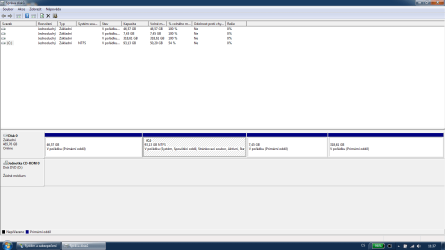
Here's the screenshot. I'm sorry for the language, I don't have a clue how to switch it to English. One of the notes to C: is "Spouštěcí oddíl", i.e. "bootable partition". This is what I need to change. I want the first partition to be the bootable partition. When I change it via fdisk it works fine, but as soon as I start W7, it's back to C: .

It doesn't have anything to do with Linux. It can be OS X on the first partiotion, or W XP, Solaris, or even another instance of W7. The only issue is that W7 on the second partition changes the bootable flag.
 

Attachments

  • partitions.png
    partitions.png
    21.5 KB · Views: 27
Last edited:

My Computer My Computer

Computer Manufacturer/Model Number
Lenovo T420
OS
Ultimate x64
CPU
Core i7
Memory
4GB
Graphics Card(s)
Intel GMA HD3000, Nvidia Quadro NVS 4200
Monitor(s) Displays
built-in panel 1600x900

My Computer My Computer

Computer Manufacturer/Model Number
HP Pavilion Elite 495UK
OS
Windows 7 Ultimate SP1 64-Bit
CPU
Intel Core i7 870 @ 2.93GHz
Motherboard
MSI 2A9C (CPU1)
Memory
8Gb Dual-Channel DDR3 @ 664MHz
Graphics Card(s)
nVidia GeForce GTX 460 1024MB dedicated RAM
Sound Card
Realtek HD Audio
Monitor(s) Displays
HP2310i
Screen Resolution
1920 x 1080
Hard Drives
1x1954GB Hitachi HDS22020ALA 330 (RAID), 1x1954GB Hitachi External for backup and storage
PSU
460W
Case
HP Elite
Cooling
Air cooled
Keyboard
Logitech K750 solar-powered keyboard
Mouse
Logitech Wireless M180 mouse
Internet Speed
2Mb
Other Info
Pure Avanti Flow Internet Radio with iPod Dock, 64Gb iPod, HP USB Speakers, Sony MDR-V500 Headphones, Sony Vaio F-Series Laptop
Great! Diskpart is what I've been looking for. I've successfully changed the boot flag from the second partition to the first. However when I start Windows again, it changes the boot flags again :-/ .
But at least I don't have to boot from a CD :) .

So if there's no way to prevent Windows from doing that, what is the easiest way to automate this? I don't know anything about scripting Windows :( .
 

My Computer My Computer

Computer Manufacturer/Model Number
Lenovo T420
OS
Ultimate x64
CPU
Core i7
Memory
4GB
Graphics Card(s)
Intel GMA HD3000, Nvidia Quadro NVS 4200
Monitor(s) Displays
built-in panel 1600x900
Like I said, now that you've changed the boot flag from your C drive to the system reserved partition, you need to run a startup repair three times with a reboot between each one.

This tutorial explains how: http://www.sevenforums.com/tutorials/681-startup-repair.html

This tutorial explains why it is sometimes necessary to carry out the startup repair three times: http://www.sevenforums.com/tutorials/105541-startup-repair-run-3-separate-times.html

This tutorial explains how to create a system repair disc if you don't have one or don't have a Windows 7 DVD to boot into: http://www.sevenforums.com/tutorials/2083-system-repair-disc-create.html
 

My Computer My Computer

Computer Manufacturer/Model Number
HP Pavilion Elite 495UK
OS
Windows 7 Ultimate SP1 64-Bit
CPU
Intel Core i7 870 @ 2.93GHz
Motherboard
MSI 2A9C (CPU1)
Memory
8Gb Dual-Channel DDR3 @ 664MHz
Graphics Card(s)
nVidia GeForce GTX 460 1024MB dedicated RAM
Sound Card
Realtek HD Audio
Monitor(s) Displays
HP2310i
Screen Resolution
1920 x 1080
Hard Drives
1x1954GB Hitachi HDS22020ALA 330 (RAID), 1x1954GB Hitachi External for backup and storage
PSU
460W
Case
HP Elite
Cooling
Air cooled
Keyboard
Logitech K750 solar-powered keyboard
Mouse
Logitech Wireless M180 mouse
Internet Speed
2Mb
Other Info
Pure Avanti Flow Internet Radio with iPod Dock, 64Gb iPod, HP USB Speakers, Sony MDR-V500 Headphones, Sony Vaio F-Series Laptop
Code:
   Device Boot      Start         End      Blocks   Id  System
/dev/sda1            2048    97656831    48827392   83  Linux
/dev/sda2   *    97656832   292968447    97655808    7  HPFS/NTFS/exFAT
/dev/sda3       292968448   308592639     7812096   82  Linux swap / Solaris
/dev/sda4       308592640   976771071   334089216   83  Linux


Windows can not boot from a Linux partition.

What are you trying to do?
 

My Computer My Computer

OS
ME/XP/Vista/Win7
I'm trying to persuade the MBR (that is from Windows) to always boot sda1 where is GRUB that gives me a choice of OS's. I can do this easily via fdisk from a live CD or via diskpart, however when I boot Windows again, it always resets the bootable flag to sda2, so I cannot boot to GRUB and have to use fdisk/diskpart again.

Anyway, after setting sda1 as active when I run Startup Repair, it fails: "Startup Repair cannot repair this computer automatically". bcdedit fails with the same message as above.
 

My Computer My Computer

Computer Manufacturer/Model Number
Lenovo T420
OS
Ultimate x64
CPU
Core i7
Memory
4GB
Graphics Card(s)
Intel GMA HD3000, Nvidia Quadro NVS 4200
Monitor(s) Displays
built-in panel 1600x900
Do what to dual boot Linux & Windows?
 

My Computer My Computer

OS
ME/XP/Vista/Win7
Windows can not boot from a Linux partition.
Right, it cannot. But GRUB can call another boot loader via chainloader.
 

My Computer My Computer

Computer Manufacturer/Model Number
Lenovo T420
OS
Ultimate x64
CPU
Core i7
Memory
4GB
Graphics Card(s)
Intel GMA HD3000, Nvidia Quadro NVS 4200
Monitor(s) Displays
built-in panel 1600x900
OMG, I'm an idiot. I was booting W7 with this command:
Code:
rootnoverify (hd0, 1)
makeactive
chainloader +1
...that (obviously) made hd0,1, i.e. /dev/sda2, i.e. C: active on every boot. Removing this line solved the problem.

I apologize to everyone for bothering you with such a stupidity, that even couldn't be solved from Windows. Thank you for your patience!
 
Last edited:

My Computer My Computer

Computer Manufacturer/Model Number
Lenovo T420
OS
Ultimate x64
CPU
Core i7
Memory
4GB
Graphics Card(s)
Intel GMA HD3000, Nvidia Quadro NVS 4200
Monitor(s) Displays
built-in panel 1600x900
You're very welcome.

Thanks for the update. Now I know a little more about Linux. :)
 

My Computer My Computer

Computer Manufacturer/Model Number
HP Pavilion Elite 495UK
OS
Windows 7 Ultimate SP1 64-Bit
CPU
Intel Core i7 870 @ 2.93GHz
Motherboard
MSI 2A9C (CPU1)
Memory
8Gb Dual-Channel DDR3 @ 664MHz
Graphics Card(s)
nVidia GeForce GTX 460 1024MB dedicated RAM
Sound Card
Realtek HD Audio
Monitor(s) Displays
HP2310i
Screen Resolution
1920 x 1080
Hard Drives
1x1954GB Hitachi HDS22020ALA 330 (RAID), 1x1954GB Hitachi External for backup and storage
PSU
460W
Case
HP Elite
Cooling
Air cooled
Keyboard
Logitech K750 solar-powered keyboard
Mouse
Logitech Wireless M180 mouse
Internet Speed
2Mb
Other Info
Pure Avanti Flow Internet Radio with iPod Dock, 64Gb iPod, HP USB Speakers, Sony MDR-V500 Headphones, Sony Vaio F-Series Laptop
Back
Top