Solved W7 setup Error!, DVD from MS will Not Load

Alexey2912

New member
Member
VIP
Local time
11:29 AM
Messages
1,351
Location
Honolulu
Hi there,

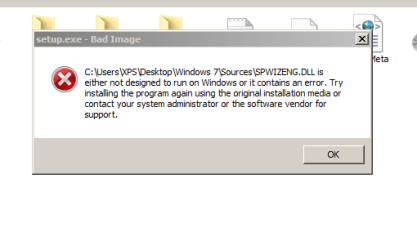
1. W7 setup gives 2 errors when run on a live system (using the MS agent downloaded DVD or any other W7 DVD), have posted a thread earlier in other section activation and updates.

2. Just finished remote session with the 4th MS agent level 2 and they failed.

3. W7 DVD downloaded by the agent won't let boot for a clean install, displaying the 3rd error, all 3 am posting.

Hoping that some one could provide a solution, am stuck.

Thanks.
 

Attachments
  • Error.PNG
    Error.PNG
    18.3 KB · Views: 24
  • Error 1.PNG
    Error 1.PNG
    92.8 KB · Views: 26
Last edited:

My Computers

System One System Two

  • Computer type
    Laptop
    Computer Manufacturer/Model Number
    Dell
    OS
    W7 Pro 32bit
    CPU
    Intel(R) Core(TM)2 CPU T7200 @ 2.00GHz
    Motherboard
    Dell Inc. 0CF456
    Memory
    4.00 GB
    Graphics Card(s)
    NVIDIA GTX 7980 512 MB
    Sound Card
    (1) HD Pro Webcam C910 (2) Bluetooth Stereo Audio (3) Si
    Hard Drives
    SSD
    Browser
    Brave
  • Computer type
    PC/Desktop
    System Manufacturer/Model Number
    Dell XPS Special Edition 8940
    OS
    W10 Pro
    CPU
    core i7 11th gen, 11700, 2.5-4.9 GHZ
    Memory
    32 GBB, 2 X16 GB @2933 MHz.
    Graphics Card(s)
    NVIDIA GeForce RTX 3070 8GB GDDR6
    Monitor(s) Displays
    Dell UltraSharp 32 4K monitor.
    Hard Drives
    1. 1TB M.2 PCIe NVMe SSD.

    2. 1TB 7200 rpm 3.5" SATA Hard Drive.
    PSU
    500W.
    Case
    Mineral White Bezel Chassis.
Boot error using W7 DVD...used a cell cam.. Hope it's easily visible

I'd appreciate some expert assistance, am caught between the devil and deep sea lol.

Thanks again!

PS: I don't want to do another fruitless 5th session....
 

Attachments

  • IMG_20200111_102429.jpg
    IMG_20200111_102429.jpg
    1.2 MB · Views: 2
Last edited:

My Computers

System One System Two

  • Computer type
    Laptop
    Computer Manufacturer/Model Number
    Dell
    OS
    W7 Pro 32bit
    CPU
    Intel(R) Core(TM)2 CPU T7200 @ 2.00GHz
    Motherboard
    Dell Inc. 0CF456
    Memory
    4.00 GB
    Graphics Card(s)
    NVIDIA GTX 7980 512 MB
    Sound Card
    (1) HD Pro Webcam C910 (2) Bluetooth Stereo Audio (3) Si
    Hard Drives
    SSD
    Browser
    Brave
  • Computer type
    PC/Desktop
    System Manufacturer/Model Number
    Dell XPS Special Edition 8940
    OS
    W10 Pro
    CPU
    core i7 11th gen, 11700, 2.5-4.9 GHZ
    Memory
    32 GBB, 2 X16 GB @2933 MHz.
    Graphics Card(s)
    NVIDIA GeForce RTX 3070 8GB GDDR6
    Monitor(s) Displays
    Dell UltraSharp 32 4K monitor.
    Hard Drives
    1. 1TB M.2 PCIe NVMe SSD.

    2. 1TB 7200 rpm 3.5" SATA Hard Drive.
    PSU
    500W.
    Case
    Mineral White Bezel Chassis.
Alexey2912

You cannot boot either DVD/CD, USB, into Windows or Windows safe mode?
Do any of the <F> keys work?

First 2 screenshots are corrupt image
Last appears to be a corrupt image restored to disk, but you say boot from DVD? weird!!!
Do any of the boot media work on another system?
Beginning to sound as though your bios is corrupt too.

Can't say I've run across the same or similar issue before. I'm retired.

B nice if you had another SSD or HDD you could connect to the mobo and test.
 

My Computer

Computer type
PC/Desktop
Computer Manufacturer/Model Number
HP Desktop & Compaq Laptop
OS
Win 10 x64, Linux Lite, Win 7 x64, BlackArch, & Kali
Hard Drives
Samsung 850 Pro 256Gb,
Hitachi HDD 1Tb,
Crucial MX SSD 250Gb
Segate 3Tb USB 3.0 Ext. Backup HDD
Internet Speed
150Mbps dn, 20Mbps up
Antivirus
Avast Free, Malwarebytes Anti-Exploit & Anti-Ransomware
Browser
Firefox, Chrome, Opera, & VPN
Alexey2912

You cannot boot either DVD/CD, USB, into Windows or Windows safe mode?
Do any of the <F> keys work?

First 2 screenshots are corrupt image
Last appears to be a corrupt image restored to disk, but you say boot from DVD? weird!!!
Do any of the boot media work on another system?
Beginning to sound as though your bios is corrupt too.

Can't say I've run across the same or similar issue before. I'm retired.

B nice if you had another SSD or HDD you could connect to the mobo and test.


Hi there Snick,

Thanks for replying.

1. All F keys function fine. F2, F8, F12.
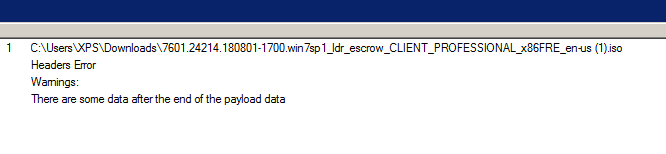
2. I have downloaded this several times alone and with MS support and even now from this provided link (https://go.microsoft.com/fwlink/?linkid=2037952&clcid=0x409), after your question checked while extracting 7 zip gives an error which am attaching.Any idea why am getting this error, or any fix?
3. OEM W7 DVD runs setup with none issues but doesn't contain SP1.
4. All boot media work fine on this same lap, except this.....strange?
5. Neither the support nor I had this idea about the error, till now after completion of download.
6. MS intention was and is now to run this iso as diagnostic tool to see why windows update is displaying an error.
7. I fail to understand why this error, I get none with other MS products or Windows.......
8. And yes the OS/system is clean none malware etc.

Thanks again for the input.
Hoping to hear your expert thoughts.
Have a peaceful weekend night!
Regards!
 

Attachments

  • Download Error.PNG
    Download Error.PNG
    5.3 KB · Views: 24
Last edited:

My Computers

System One System Two

  • Computer type
    Laptop
    Computer Manufacturer/Model Number
    Dell
    OS
    W7 Pro 32bit
    CPU
    Intel(R) Core(TM)2 CPU T7200 @ 2.00GHz
    Motherboard
    Dell Inc. 0CF456
    Memory
    4.00 GB
    Graphics Card(s)
    NVIDIA GTX 7980 512 MB
    Sound Card
    (1) HD Pro Webcam C910 (2) Bluetooth Stereo Audio (3) Si
    Hard Drives
    SSD
    Browser
    Brave
  • Computer type
    PC/Desktop
    System Manufacturer/Model Number
    Dell XPS Special Edition 8940
    OS
    W10 Pro
    CPU
    core i7 11th gen, 11700, 2.5-4.9 GHZ
    Memory
    32 GBB, 2 X16 GB @2933 MHz.
    Graphics Card(s)
    NVIDIA GeForce RTX 3070 8GB GDDR6
    Monitor(s) Displays
    Dell UltraSharp 32 4K monitor.
    Hard Drives
    1. 1TB M.2 PCIe NVMe SSD.

    2. 1TB 7200 rpm 3.5" SATA Hard Drive.
    PSU
    500W.
    Case
    Mineral White Bezel Chassis.
Alexey2912,
That 7zip message is not an issue, same happens when I use 7zip on win7 iso
At this point I'd say the ISO from the download link is corrupt being that the OEM you have version you have runs.
Need known good Win7_Pro_SP1_English_x32.iso
We could hook up with team viewer, which is permitted by forum rules.
Up 2 U!
TeamViewer: The Remote Desktop Software

Bill
 
Last edited:

My Computer

Computer type
PC/Desktop
Computer Manufacturer/Model Number
HP Desktop & Compaq Laptop
OS
Win 10 x64, Linux Lite, Win 7 x64, BlackArch, & Kali
Hard Drives
Samsung 850 Pro 256Gb,
Hitachi HDD 1Tb,
Crucial MX SSD 250Gb
Segate 3Tb USB 3.0 Ext. Backup HDD
Internet Speed
150Mbps dn, 20Mbps up
Antivirus
Avast Free, Malwarebytes Anti-Exploit & Anti-Ransomware
Browser
Firefox, Chrome, Opera, & VPN
Hi

Interesting that only THAT DVD fais, run chkdsk /r - as you've tried multiple attempts

from admin command prompt, run this

bcdedit

please do it 3X
first in a normal boot state
then with the CD inserted, still with SSD as primary boot
and then after the error message

they should be different,

\windows\system32\winload.exe
\windows\system32\boot\winload.exe


Windows Boot Manager
--------------------
identifier {bootmgr}
device partition=C:
description Windows Boot Manager
locale en-US
inherit {globalsettings}
default {current}


Windows Boot Loader
-------------------
identifier {current}
device partition=C:
path \Windows\system32\winload.exe
description Microsoft Windows Vista
locale en-US
inherit {bootloadersettings}
osdevice partition=C:
systemroot \Windows


Roy
 

My Computer

Computer type
PC/Desktop
Computer Manufacturer/Model Number
medionl/Aspire 6930G/acer x55a
OS
W7 home premium 32bit/W7HP 64bit/w10 tp insider ring
CPU
E5300 dual core
Motherboard
medion MS7366
Memory
3gb
Graphics Card(s)
Nvidia Geforce 7100 Nforce 630i
Monitor(s) Displays
avixc
Internet Speed
n (isp resticted to 72)
Antivirus
mse/pands
Browser
palemoon
Other Info
Belkin Fd7050 n USB using Railink RT2870 drivers, more upto date
Alexey2912,
That 7zip message is not an issue, same happens when I use 7zip on win7 iso
At this point I'd say the ISO from the download link is corrupt being that the OEM you have version you have runs.
Need known good Win7_Pro_SP1_English_x32.iso
We could hook up with team viewer, which is permitted by forum rules.
Up 2 U!
TeamViewer: The Remote Desktop Software

Bill


Hello again,

1. I agree since I downloaded at least 5 times from the link and get the same error.
2. Don't get that from my OEM one, but when tried to troubleshoot it displays that you have a newer version installed.
3. Any links to download a legit W7 with SP1? Without a legit W7 SP1 iso it cannot be fixed...
4. Thanks for your offer, I'd let you know.


Thanks again Bill.
Regards!
Alex.
 

My Computers

System One System Two

  • Computer type
    Laptop
    Computer Manufacturer/Model Number
    Dell
    OS
    W7 Pro 32bit
    CPU
    Intel(R) Core(TM)2 CPU T7200 @ 2.00GHz
    Motherboard
    Dell Inc. 0CF456
    Memory
    4.00 GB
    Graphics Card(s)
    NVIDIA GTX 7980 512 MB
    Sound Card
    (1) HD Pro Webcam C910 (2) Bluetooth Stereo Audio (3) Si
    Hard Drives
    SSD
    Browser
    Brave
  • Computer type
    PC/Desktop
    System Manufacturer/Model Number
    Dell XPS Special Edition 8940
    OS
    W10 Pro
    CPU
    core i7 11th gen, 11700, 2.5-4.9 GHZ
    Memory
    32 GBB, 2 X16 GB @2933 MHz.
    Graphics Card(s)
    NVIDIA GeForce RTX 3070 8GB GDDR6
    Monitor(s) Displays
    Dell UltraSharp 32 4K monitor.
    Hard Drives
    1. 1TB M.2 PCIe NVMe SSD.

    2. 1TB 7200 rpm 3.5" SATA Hard Drive.
    PSU
    500W.
    Case
    Mineral White Bezel Chassis.
Hi

Interesting that only THAT DVD fais, run chkdsk /r - as you've tried multiple attempts

from admin command prompt, run this

bcdedit

please do it 3X
first in a normal boot state
then with the CD inserted, still with SSD as primary boot
and then after the error message

they should be different,

\windows\system32\winload.exe
\windows\system32\boot\winload.exe


Windows Boot Manager
--------------------
identifier {bootmgr}
device partition=C:
description Windows Boot Manager
locale en-US
inherit {globalsettings}
default {current}


Windows Boot Loader
-------------------
identifier {current}
device partition=C:
path \Windows\system32\winload.exe
description Microsoft Windows Vista
locale en-US
inherit {bootloadersettings}
osdevice partition=C:
systemroot \Windows


Roy


Thanks Roy,

I'll do what you have suggested and keep you posted.

Regards!
Alex.
 

My Computers

System One System Two

  • Computer type
    Laptop
    Computer Manufacturer/Model Number
    Dell
    OS
    W7 Pro 32bit
    CPU
    Intel(R) Core(TM)2 CPU T7200 @ 2.00GHz
    Motherboard
    Dell Inc. 0CF456
    Memory
    4.00 GB
    Graphics Card(s)
    NVIDIA GTX 7980 512 MB
    Sound Card
    (1) HD Pro Webcam C910 (2) Bluetooth Stereo Audio (3) Si
    Hard Drives
    SSD
    Browser
    Brave
  • Computer type
    PC/Desktop
    System Manufacturer/Model Number
    Dell XPS Special Edition 8940
    OS
    W10 Pro
    CPU
    core i7 11th gen, 11700, 2.5-4.9 GHZ
    Memory
    32 GBB, 2 X16 GB @2933 MHz.
    Graphics Card(s)
    NVIDIA GeForce RTX 3070 8GB GDDR6
    Monitor(s) Displays
    Dell UltraSharp 32 4K monitor.
    Hard Drives
    1. 1TB M.2 PCIe NVMe SSD.

    2. 1TB 7200 rpm 3.5" SATA Hard Drive.
    PSU
    500W.
    Case
    Mineral White Bezel Chassis.
Hello Roy,

1. chksdk /r, volume is clean.

2. Results of bcdedit....

a. Normal state.
b. With DVD.
c. With error.
d. With error from the 2nd DVD.

Hope it helps.

Thanks.
Regards!
Alex.


Microsoft Windows [Version 6.1.7601]
Copyright (c) 2009 Microsoft Corporation. All rights reserved.

C:\Users\XPS>bcdedit

Windows Boot Manager
--------------------
identifier {bootmgr}
device partition=\Device\HarddiskVolume1
description Windows Boot Manager
locale en-US
inherit {globalsettings}
default {current}
resumeobject {acd7edca-b483-11e6-bc5d-c9269035f051}
displayorder {current}
toolsdisplayorder {memdiag}
timeout 30

Windows Boot Loader
-------------------
identifier {current}
device partition=C:
path \Windows\system32\winload.exe
description Windows 7
locale en-US
inherit {bootloadersettings}
recoverysequence {acd7edcc-b483-11e6-bc5d-c9269035f051}
recoveryenabled Yes
osdevice partition=C:
systemroot \Windows
resumeobject {acd7edca-b483-11e6-bc5d-c9269035f051}
nx OptIn

C:\Users\XPS>bcdedit

Windows Boot Manager
--------------------
identifier {bootmgr}
device partition=\Device\HarddiskVolume1
description Windows Boot Manager
locale en-US
inherit {globalsettings}
default {current}
resumeobject {acd7edca-b483-11e6-bc5d-c9269035f051}
displayorder {current}
toolsdisplayorder {memdiag}
timeout 30

Windows Boot Loader
-------------------
identifier {current}
device partition=C:
path \Windows\system32\winload.exe
description Windows 7
locale en-US
inherit {bootloadersettings}
recoverysequence {acd7edcc-b483-11e6-bc5d-c9269035f051}
recoveryenabled Yes
osdevice partition=C:
systemroot \Windows
resumeobject {acd7edca-b483-11e6-bc5d-c9269035f051}
nx OptIn

C:\Users\XPS>bcdedit

Windows Boot Manager
--------------------
identifier {bootmgr}
device partition=\Device\HarddiskVolume1
description Windows Boot Manager
locale en-US
inherit {globalsettings}
default {current}
resumeobject {acd7edca-b483-11e6-bc5d-c9269035f051}
displayorder {current}
toolsdisplayorder {memdiag}
timeout 30

Windows Boot Loader
-------------------
identifier {current}
device partition=C:
path \Windows\system32\winload.exe
description Windows 7
locale en-US
inherit {bootloadersettings}
recoverysequence {acd7edcc-b483-11e6-bc5d-c9269035f051}
recoveryenabled Yes
osdevice partition=C:
systemroot \Windows
resumeobject {acd7edca-b483-11e6-bc5d-c9269035f051}
nx OptIn

C:\Users\XPS>bcdedit

Windows Boot Manager
--------------------
identifier {bootmgr}
device partition=\Device\HarddiskVolume1
description Windows Boot Manager
locale en-US
inherit {globalsettings}
default {current}
resumeobject {acd7edca-b483-11e6-bc5d-c9269035f051}
displayorder {current}
toolsdisplayorder {memdiag}
timeout 30

Windows Boot Loader
-------------------
identifier {current}
device partition=C:
path \Windows\system32\winload.exe
description Windows 7
locale en-US
inherit {bootloadersettings}
recoverysequence {acd7edcc-b483-11e6-bc5d-c9269035f051}
recoveryenabled Yes
osdevice partition=C:
systemroot \Windows
resumeobject {acd7edca-b483-11e6-bc5d-c9269035f051}
nx OptIn

C:\Users\XPS>
 

My Computers

System One System Two

  • Computer type
    Laptop
    Computer Manufacturer/Model Number
    Dell
    OS
    W7 Pro 32bit
    CPU
    Intel(R) Core(TM)2 CPU T7200 @ 2.00GHz
    Motherboard
    Dell Inc. 0CF456
    Memory
    4.00 GB
    Graphics Card(s)
    NVIDIA GTX 7980 512 MB
    Sound Card
    (1) HD Pro Webcam C910 (2) Bluetooth Stereo Audio (3) Si
    Hard Drives
    SSD
    Browser
    Brave
  • Computer type
    PC/Desktop
    System Manufacturer/Model Number
    Dell XPS Special Edition 8940
    OS
    W10 Pro
    CPU
    core i7 11th gen, 11700, 2.5-4.9 GHZ
    Memory
    32 GBB, 2 X16 GB @2933 MHz.
    Graphics Card(s)
    NVIDIA GeForce RTX 3070 8GB GDDR6
    Monitor(s) Displays
    Dell UltraSharp 32 4K monitor.
    Hard Drives
    1. 1TB M.2 PCIe NVMe SSD.

    2. 1TB 7200 rpm 3.5" SATA Hard Drive.
    PSU
    500W.
    Case
    Mineral White Bezel Chassis.
The only time I don't get an error is when I run W7 setup from a DVD without SP1.....
 

My Computers

System One System Two

  • Computer type
    Laptop
    Computer Manufacturer/Model Number
    Dell
    OS
    W7 Pro 32bit
    CPU
    Intel(R) Core(TM)2 CPU T7200 @ 2.00GHz
    Motherboard
    Dell Inc. 0CF456
    Memory
    4.00 GB
    Graphics Card(s)
    NVIDIA GTX 7980 512 MB
    Sound Card
    (1) HD Pro Webcam C910 (2) Bluetooth Stereo Audio (3) Si
    Hard Drives
    SSD
    Browser
    Brave
  • Computer type
    PC/Desktop
    System Manufacturer/Model Number
    Dell XPS Special Edition 8940
    OS
    W10 Pro
    CPU
    core i7 11th gen, 11700, 2.5-4.9 GHZ
    Memory
    32 GBB, 2 X16 GB @2933 MHz.
    Graphics Card(s)
    NVIDIA GeForce RTX 3070 8GB GDDR6
    Monitor(s) Displays
    Dell UltraSharp 32 4K monitor.
    Hard Drives
    1. 1TB M.2 PCIe NVMe SSD.

    2. 1TB 7200 rpm 3.5" SATA Hard Drive.
    PSU
    500W.
    Case
    Mineral White Bezel Chassis.
Win 10 setup IF run also gives none errors.....
 

My Computers

System One System Two

  • Computer type
    Laptop
    Computer Manufacturer/Model Number
    Dell
    OS
    W7 Pro 32bit
    CPU
    Intel(R) Core(TM)2 CPU T7200 @ 2.00GHz
    Motherboard
    Dell Inc. 0CF456
    Memory
    4.00 GB
    Graphics Card(s)
    NVIDIA GTX 7980 512 MB
    Sound Card
    (1) HD Pro Webcam C910 (2) Bluetooth Stereo Audio (3) Si
    Hard Drives
    SSD
    Browser
    Brave
  • Computer type
    PC/Desktop
    System Manufacturer/Model Number
    Dell XPS Special Edition 8940
    OS
    W10 Pro
    CPU
    core i7 11th gen, 11700, 2.5-4.9 GHZ
    Memory
    32 GBB, 2 X16 GB @2933 MHz.
    Graphics Card(s)
    NVIDIA GeForce RTX 3070 8GB GDDR6
    Monitor(s) Displays
    Dell UltraSharp 32 4K monitor.
    Hard Drives
    1. 1TB M.2 PCIe NVMe SSD.

    2. 1TB 7200 rpm 3.5" SATA Hard Drive.
    PSU
    500W.
    Case
    Mineral White Bezel Chassis.
How did you "burn" the iso file to the DVD?
Did you disable your Antivirus?
On your DVD burning software, did you run on a lower rate? Did you set to do a check after burning?
 

My Computers

System One System Two

  • Computer type
    PC/Desktop
    Computer Manufacturer/Model Number
    custom build
    OS
    Windows 7 HP 64
    CPU
    i5 6600K - 800MHz to 4200MHz
    Motherboard
    GA-Z170-HD3P
    Memory
    4+4G GSkill DDR4 3000
    Graphics Card(s)
    IG - Intel 530
    Monitor(s) Displays
    Samsung 226BW
    Screen Resolution
    1680x1050
    Hard Drives
    (1) -1 SM951 – 128GB M.2 AHCI PCIe SSD drive for Windows 7 and Lubuntu
    (2) -1 WD SATA 3 - 1T for Data
    (3) -1 WD SATA 3 - 1T for backup
    PSU
    Thermaltake 450W TR2 gold
    Keyboard
    Old and good Chicony mechanical keyboard
    Mouse
    Logitech mX performance - 9 buttons (had to disable some)
    Internet Speed
    500Mb/s
    Browser
    Firefox 64
    Other Info
    TinyWall firewall
  • Computer type
    Laptop
    System Manufacturer/Model Number
    Asus Q550LF
    OS
    Windows 7 Pro
    CPU
    i7-4500U 800MHz to 3.0GHz
    Motherboard
    Asus Q550LF
    Memory
    (4+4)G DDR3 1600
    Graphics Card(s)
    IG intel 4400 + NVIDIA GeForce GT 745M
    Sound Card
    Realtek
    Monitor(s) Displays
    LG Display LP156WF4-SPH1
    Screen Resolution
    1920 x 1080
    Hard Drives
    BX500 120G SSD for Windows and programs +
    1T HDD for data
    Internet Speed
    500 Mb/s
    Browser
    Firefox
    Other Info
    TinyWall firewall

My Computer

Computer type
PC/Desktop
Computer Manufacturer/Model Number
HP Desktop & Compaq Laptop
OS
Win 10 x64, Linux Lite, Win 7 x64, BlackArch, & Kali
Hard Drives
Samsung 850 Pro 256Gb,
Hitachi HDD 1Tb,
Crucial MX SSD 250Gb
Segate 3Tb USB 3.0 Ext. Backup HDD
Internet Speed
150Mbps dn, 20Mbps up
Antivirus
Avast Free, Malwarebytes Anti-Exploit & Anti-Ransomware
Browser
Firefox, Chrome, Opera, & VPN
How did you "burn" the iso file to the DVD?
Did you disable your Antivirus?
On your DVD burning software, did you run on a lower rate? Did you set to do a check after burning?

1. Burned it using ImgBurn.
2. Correct, AV disabled.
3. Correct, 1X and verify.

The iso even when not burned and extracted on the desktop gives the same error.

Thanks.
 

My Computers

System One System Two

  • Computer type
    Laptop
    Computer Manufacturer/Model Number
    Dell
    OS
    W7 Pro 32bit
    CPU
    Intel(R) Core(TM)2 CPU T7200 @ 2.00GHz
    Motherboard
    Dell Inc. 0CF456
    Memory
    4.00 GB
    Graphics Card(s)
    NVIDIA GTX 7980 512 MB
    Sound Card
    (1) HD Pro Webcam C910 (2) Bluetooth Stereo Audio (3) Si
    Hard Drives
    SSD
    Browser
    Brave
  • Computer type
    PC/Desktop
    System Manufacturer/Model Number
    Dell XPS Special Edition 8940
    OS
    W10 Pro
    CPU
    core i7 11th gen, 11700, 2.5-4.9 GHZ
    Memory
    32 GBB, 2 X16 GB @2933 MHz.
    Graphics Card(s)
    NVIDIA GeForce RTX 3070 8GB GDDR6
    Monitor(s) Displays
    Dell UltraSharp 32 4K monitor.
    Hard Drives
    1. 1TB M.2 PCIe NVMe SSD.

    2. 1TB 7200 rpm 3.5" SATA Hard Drive.
    PSU
    500W.
    Case
    Mineral White Bezel Chassis.
teamviewer with me!

I appreciate the generous offer, care to PM when would be the best time for you.

Thanks.


MS agent level 2, called asking about the error and confirmed all. Wanted to do a remote session to which replied busy now maybe tomorrow.
 

My Computers

System One System Two

  • Computer type
    Laptop
    Computer Manufacturer/Model Number
    Dell
    OS
    W7 Pro 32bit
    CPU
    Intel(R) Core(TM)2 CPU T7200 @ 2.00GHz
    Motherboard
    Dell Inc. 0CF456
    Memory
    4.00 GB
    Graphics Card(s)
    NVIDIA GTX 7980 512 MB
    Sound Card
    (1) HD Pro Webcam C910 (2) Bluetooth Stereo Audio (3) Si
    Hard Drives
    SSD
    Browser
    Brave
  • Computer type
    PC/Desktop
    System Manufacturer/Model Number
    Dell XPS Special Edition 8940
    OS
    W10 Pro
    CPU
    core i7 11th gen, 11700, 2.5-4.9 GHZ
    Memory
    32 GBB, 2 X16 GB @2933 MHz.
    Graphics Card(s)
    NVIDIA GeForce RTX 3070 8GB GDDR6
    Monitor(s) Displays
    Dell UltraSharp 32 4K monitor.
    Hard Drives
    1. 1TB M.2 PCIe NVMe SSD.

    2. 1TB 7200 rpm 3.5" SATA Hard Drive.
    PSU
    500W.
    Case
    Mineral White Bezel Chassis.
Hi

Nothing wrong with those
Snick
when your Tw'ing
check the boot folder
my winload 616kb product version 6 1 7601 24538

Roy
 

My Computer

Computer type
PC/Desktop
Computer Manufacturer/Model Number
medionl/Aspire 6930G/acer x55a
OS
W7 home premium 32bit/W7HP 64bit/w10 tp insider ring
CPU
E5300 dual core
Motherboard
medion MS7366
Memory
3gb
Graphics Card(s)
Nvidia Geforce 7100 Nforce 630i
Monitor(s) Displays
avixc
Internet Speed
n (isp resticted to 72)
Antivirus
mse/pands
Browser
palemoon
Other Info
Belkin Fd7050 n USB using Railink RT2870 drivers, more upto date
torchwood
Always a pleasure to hear from you Roy!

Bill
 

My Computer

Computer type
PC/Desktop
Computer Manufacturer/Model Number
HP Desktop & Compaq Laptop
OS
Win 10 x64, Linux Lite, Win 7 x64, BlackArch, & Kali
Hard Drives
Samsung 850 Pro 256Gb,
Hitachi HDD 1Tb,
Crucial MX SSD 250Gb
Segate 3Tb USB 3.0 Ext. Backup HDD
Internet Speed
150Mbps dn, 20Mbps up
Antivirus
Avast Free, Malwarebytes Anti-Exploit & Anti-Ransomware
Browser
Firefox, Chrome, Opera, & VPN
Link from M$

Win 7 HP - SP1 64 bits
Win 7 HP - SP1 32 bits

The links are valid for 24 hours (Links expire: 1/15/2020 1:34:43 PM UTC)

Download them NOW.

Its a HP not Pro.
All Win 7 installation disks has all versions. To make it universal you must delete /sources/ei.cfg
To remove the ei.cfg from the iso file, use the eicfg_removal_utility (attached)
It will ask what version you want to install
410706d1578937467t-question-re-clean-re-install-windows-7-professional-editions-win7.jpg
 

Attachments

Last edited:

My Computers

System One System Two

  • Computer type
    PC/Desktop
    Computer Manufacturer/Model Number
    custom build
    OS
    Windows 7 HP 64
    CPU
    i5 6600K - 800MHz to 4200MHz
    Motherboard
    GA-Z170-HD3P
    Memory
    4+4G GSkill DDR4 3000
    Graphics Card(s)
    IG - Intel 530
    Monitor(s) Displays
    Samsung 226BW
    Screen Resolution
    1680x1050
    Hard Drives
    (1) -1 SM951 – 128GB M.2 AHCI PCIe SSD drive for Windows 7 and Lubuntu
    (2) -1 WD SATA 3 - 1T for Data
    (3) -1 WD SATA 3 - 1T for backup
    PSU
    Thermaltake 450W TR2 gold
    Keyboard
    Old and good Chicony mechanical keyboard
    Mouse
    Logitech mX performance - 9 buttons (had to disable some)
    Internet Speed
    500Mb/s
    Browser
    Firefox 64
    Other Info
    TinyWall firewall
  • Computer type
    Laptop
    System Manufacturer/Model Number
    Asus Q550LF
    OS
    Windows 7 Pro
    CPU
    i7-4500U 800MHz to 3.0GHz
    Motherboard
    Asus Q550LF
    Memory
    (4+4)G DDR3 1600
    Graphics Card(s)
    IG intel 4400 + NVIDIA GeForce GT 745M
    Sound Card
    Realtek
    Monitor(s) Displays
    LG Display LP156WF4-SPH1
    Screen Resolution
    1920 x 1080
    Hard Drives
    BX500 120G SSD for Windows and programs +
    1T HDD for data
    Internet Speed
    500 Mb/s
    Browser
    Firefox
    Other Info
    TinyWall firewall

My Computer

Computer type
PC/Desktop
Computer Manufacturer/Model Number
HP Desktop & Compaq Laptop
OS
Win 10 x64, Linux Lite, Win 7 x64, BlackArch, & Kali
Hard Drives
Samsung 850 Pro 256Gb,
Hitachi HDD 1Tb,
Crucial MX SSD 250Gb
Segate 3Tb USB 3.0 Ext. Backup HDD
Internet Speed
150Mbps dn, 20Mbps up
Antivirus
Avast Free, Malwarebytes Anti-Exploit & Anti-Ransomware
Browser
Firefox, Chrome, Opera, & VPN
Link from M$

Win 7 HP - SP1 64 bits
Win 7 HP - SP1 32 bits

The links are valid for 24 hours (Links expire: 1/15/2020 1:34:43 PM UTC)

Download them NOW.

Its a HP not Pro.
All Win 7 installation disks has all versions. To make it universal you must delete /sources/ei.cfg
To remove the ei.cfg from the iso file, use the eicfg_removal_utility (attached)
It will ask what version you want to install
410706d1578937467t-question-re-clean-re-install-windows-7-professional-editions-win7.jpg


Thanks Megahertz, shall download it now. Appreciate it!
 

My Computers

System One System Two

  • Computer type
    Laptop
    Computer Manufacturer/Model Number
    Dell
    OS
    W7 Pro 32bit
    CPU
    Intel(R) Core(TM)2 CPU T7200 @ 2.00GHz
    Motherboard
    Dell Inc. 0CF456
    Memory
    4.00 GB
    Graphics Card(s)
    NVIDIA GTX 7980 512 MB
    Sound Card
    (1) HD Pro Webcam C910 (2) Bluetooth Stereo Audio (3) Si
    Hard Drives
    SSD
    Browser
    Brave
  • Computer type
    PC/Desktop
    System Manufacturer/Model Number
    Dell XPS Special Edition 8940
    OS
    W10 Pro
    CPU
    core i7 11th gen, 11700, 2.5-4.9 GHZ
    Memory
    32 GBB, 2 X16 GB @2933 MHz.
    Graphics Card(s)
    NVIDIA GeForce RTX 3070 8GB GDDR6
    Monitor(s) Displays
    Dell UltraSharp 32 4K monitor.
    Hard Drives
    1. 1TB M.2 PCIe NVMe SSD.

    2. 1TB 7200 rpm 3.5" SATA Hard Drive.
    PSU
    500W.
    Case
    Mineral White Bezel Chassis.
Back
Top