

Hi there
I've finally ended my experiments with W8 apart from on one virtual machine and as my nice shiny new laptop has arrived want to re-install W7 again from scratch.
I could re-image from an Acronis "Universal restore" image which supports different hardware and it's a legit W7 Enterprise version with a VL license but I decided with a brand new system to install from scratch.
No basic problems with the installs but even using the SP1 system as a base there were about 150 updates or over 1 GB (and then some more after applying these updates). Office 2010 also needed nearly 1GB of updates as well.
Anyway it took about 3 iterations of check for updates, install, reboot, check for updates, install reboot etc until it's all finally OK and running great.
For all sorts of reasons we KNOW W8 won't make it into the workplace while W7 is beginning to replace all those XP systems. Checking for all the updates and needing several iterations as explained above is not a mega problem for an individual user --just costs a lot of time and download space, but imagine having to install this on several 1000 computers --Ok I know they can make a "deployable image" and load it on to client desktops but these days more companies use laptops which don't always have the same hardware either so this stuff is much more work than it needs to be.
So C'mon peeps at Redwood -- how about SP2 for W7 --it was in the pipeline anyway until somebody decided to suspend developing SP2 for a proper workable user OS in favour of an OS largely suited for Mobile phones and tablets with it's incredibly dated "Metro looking" system -- didn't like the look in 1996 when AOL came out with a similar looking GUI and it hasn't improved on W8 either.
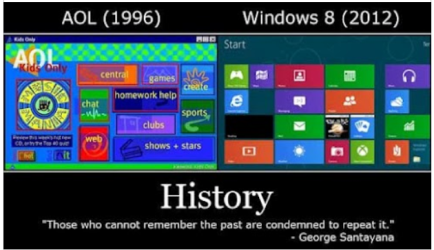
For those who haven't seen it --sure it's been displayed on this Forum before but a quick refresh for those who haven't seen it. AOL circa 1996 and W8 2012. !!!!
cheers
jimbo
I've finally ended my experiments with W8 apart from on one virtual machine and as my nice shiny new laptop has arrived want to re-install W7 again from scratch.
I could re-image from an Acronis "Universal restore" image which supports different hardware and it's a legit W7 Enterprise version with a VL license but I decided with a brand new system to install from scratch.
No basic problems with the installs but even using the SP1 system as a base there were about 150 updates or over 1 GB (and then some more after applying these updates). Office 2010 also needed nearly 1GB of updates as well.
Anyway it took about 3 iterations of check for updates, install, reboot, check for updates, install reboot etc until it's all finally OK and running great.
For all sorts of reasons we KNOW W8 won't make it into the workplace while W7 is beginning to replace all those XP systems. Checking for all the updates and needing several iterations as explained above is not a mega problem for an individual user --just costs a lot of time and download space, but imagine having to install this on several 1000 computers --Ok I know they can make a "deployable image" and load it on to client desktops but these days more companies use laptops which don't always have the same hardware either so this stuff is much more work than it needs to be.
So C'mon peeps at Redwood -- how about SP2 for W7 --it was in the pipeline anyway until somebody decided to suspend developing SP2 for a proper workable user OS in favour of an OS largely suited for Mobile phones and tablets with it's incredibly dated "Metro looking" system -- didn't like the look in 1996 when AOL came out with a similar looking GUI and it hasn't improved on W8 either.
For those who haven't seen it --sure it's been displayed on this Forum before but a quick refresh for those who haven't seen it. AOL circa 1996 and W8 2012. !!!!
cheers
jimbo
Attachments
My Computer
At a glance
Linux CENTOS 7 / various Windows OS'es and se...Intel i7 Intel i58GB, 16GBOn Motherboard
- Computer type
- PC/Desktop
- Computer Manufacturer/Model Number
- Custom built, several laptops HP/ASUS
- OS
- Linux CENTOS 7 / various Windows OS'es and servers
- CPU
- Intel i7 Intel i5
- Memory
- 8GB, 16GB
- Graphics Card(s)
- On Motherboard
- Sound Card
- Realtek HD audio
- Monitor(s) Displays
- Apple Cinema display, Samsung LCD
- Screen Resolution
- 1920 X 1080
- Hard Drives
- 4 X 1TB SATA
- Mouse
- Toshiba wireless laser
- Internet Speed
- > 20MB up

