W7 to W10 update fails...

nain

New member
Local time
11:19 PM
Messages
4
Hi,

Perhaps I'm being overly ambitious but I’m trying to upgrade an elderly DELL Inspiron M5030 i5 laptop running W7 to W10. Now I appreciate MS may tell me that it does not conform to the required specs but at the moment I’ve not got that far - I’m having another problem…

I’ve used the MS Media Creation Tool 22H2 on my main Dell PC and that ran fine downloading W10 onto an USB pen. Plugging that into the Inspiron and clicking on setup starts the installation process but after a short while I get a message to the effect that “Windows isn’t activated on this PC…” and asking me for the Product Key. Now there is an MS Product Key in the laptop's battery compartment but when I input this it says “The product key did not work…”

As far as I know my daughter who owned the Inspiron ‘till she replaced it with a newer laptop was the sole owner so I’ve no reason to believe it’s been tampered with… Initially I hadn’t realised the Product Key would be under the battery so I ran Jelly Bean on it and interestingly it came up with a different Product Key. I have inputted both keys into the software but I get the same message.

Apart from adding another 2 GB of Ram and swopping out the old hard drive for an SSD the machine is ‘as is’ from the shop.

Any ideas?
 

My Computers My Computers

  • At a glance

    W7 Home PremiumAMD V120 2200 Mhz4 Gb
    Computer type
    Laptop
    Computer Manufacturer/Model Number
    Dell
    OS
    W7 Home Premium
    CPU
    AMD V120 2200 Mhz
    Memory
    4 Gb
    Hard Drives
    SSD
  • Computer type
    PC/Desktop

My Computer My Computer

At a glance

W7 home premium 32bit/W7HP 64bit/w10 tp insid...E5300 dual core3gbNvidia Geforce 7100 Nforce 630i
Computer type
PC/Desktop
Computer Manufacturer/Model Number
medionl/Aspire 6930G/acer x55a
OS
W7 home premium 32bit/W7HP 64bit/w10 tp insider ring
CPU
E5300 dual core
Motherboard
medion MS7366
Memory
3gb
Graphics Card(s)
Nvidia Geforce 7100 Nforce 630i
Monitor(s) Displays
avixc
Internet Speed
n (isp resticted to 72)
Antivirus
mse/pands
Browser
palemoon
Other Info
Belkin Fd7050 n USB using Railink RT2870 drivers, more upto date
Dell Inspiron 15 M5030 Notebook PC (support site)

That model notebook appears to be about 12 years old and came with Windows 7.

What is the exact 7-character "service tag" number on yours?
 

My Computer My Computer

At a glance

Windows 7 Professional SP1 64-bitIntel Core i7-4790 3.60 GHz32 GB DDR3-1600 MHzIntegrated Intel HD Graphics 4600
Computer type
PC/Desktop
Computer Manufacturer/Model Number
Dell OptiPlex 9020
OS
Windows 7 Professional SP1 64-bit
CPU
Intel Core i7-4790 3.60 GHz
Memory
32 GB DDR3-1600 MHz
Graphics Card(s)
Integrated Intel HD Graphics 4600
Monitor(s) Displays
Viewsonic 32" LCD
Hard Drives
Kingston SATA 3 240 GB SSD
Internet Speed
Spectrum Internet 1000 Mbps
Instead of using usb goto media creation site and hit update see if that work
 

My Computer My Computer

At a glance

win 8 32 bit
Computer type
PC/Desktop
OS
win 8 32 bit
Did you run Setup.exe from the USB win 10 installation drive under running win 7 to upgrade or did you booted from the USB win 10 installation drive and did a clean install?
Was the Win 7 activated?

If the computer has 4G of memory or less, I recommend you use Win 10 32 bits

Upgrade to Windows 10 from Windows 7 for Free | Tutorials
Clean Install Windows 10 Directly without having to Upgrade First | Tutorials

If the drive computer hasn't been cleaned you should have a Recovery partition to set the computer as it came from factory. You can launch the recovery from BIOS.
If the computer doesn't have the Recovery partition, you can download the Dell OEM Win 7 Using Heidoc ISO Download Tool .
Once you have Win 7 back and activated you can use Clean Install Windows 10 Directly without having to Upgrade First | Tutorials to generate a GenuineTicket.xml file. Then you do a Win 10 Clean install and use the GenuineTicket.xml file to activate it
 

My Computers My Computers

  • At a glance

    Windows 7 HP 64i5 6600K - 800MHz to 4200MHz4+4G GSkill DDR4 3000IG - Intel 530
    Computer type
    PC/Desktop
    Computer Manufacturer/Model Number
    custom build
    OS
    Windows 7 HP 64
    CPU
    i5 6600K - 800MHz to 4200MHz
    Motherboard
    GA-Z170-HD3P
    Memory
    4+4G GSkill DDR4 3000
    Graphics Card(s)
    IG - Intel 530
    Monitor(s) Displays
    Samsung 226BW
    Screen Resolution
    1680x1050
    Hard Drives
    (1) -1 SM951 – 128GB M.2 AHCI PCIe SSD drive for Windows 7 and Lubuntu
    (2) -1 WD SATA 3 - 1T for Data
    (3) -1 WD SATA 3 - 1T for backup
    PSU
    Thermaltake 450W TR2 gold
    Keyboard
    Old and good Chicony mechanical keyboard
    Mouse
    Logitech mX performance - 9 buttons (had to disable some)
    Internet Speed
    500Mb/s
    Browser
    Firefox 64
    Other Info
    TinyWall firewall
  • At a glance

    Windows 7 Proi7-4500U 800MHz to 3.0GHz(4+4)G DDR3 1600IG intel 4400 + NVIDIA GeForce GT 745M
    Computer type
    Laptop
    System Manufacturer/Model Number
    Asus Q550LF
    OS
    Windows 7 Pro
    CPU
    i7-4500U 800MHz to 3.0GHz
    Motherboard
    Asus Q550LF
    Memory
    (4+4)G DDR3 1600
    Graphics Card(s)
    IG intel 4400 + NVIDIA GeForce GT 745M
    Sound Card
    Realtek
    Monitor(s) Displays
    LG Display LP156WF4-SPH1
    Screen Resolution
    1920 x 1080
    Hard Drives
    BX500 120G SSD for Windows and programs +
    1T HDD for data
    Internet Speed
    500 Mb/s
    Browser
    Firefox
    Other Info
    TinyWall firewall
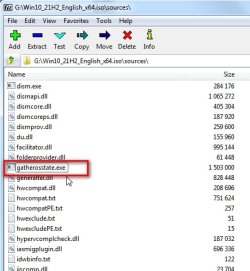
While win 7 is still installed, do the gatherosstate dance:

Copy gatherosstate.exe from the sources folder on win10/11 installation media onto something writeable, e.g. your win 7 desktop.

This little fellow:

gatherosstate.jpg


Run it from within win7 and in a few seconds it creates a file called genuineticket.xml.

Either make a backup image of the current win7 in case something goes awry, or install win10/11 to a separate partition.

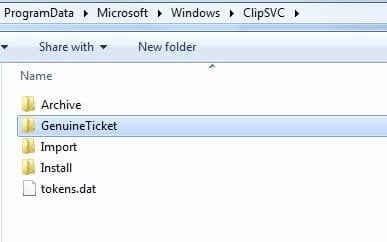
After installing win10/11:

copy the genuineticket.xml into the programdata\microsoft\windows\clipsvc\genuine ticket folder on the win10/11 partition.

clipsvc.jpg

- - - Updated - - -

Hi,
Initially I hadn’t realised the Product Key would be under the battery so I ran Jelly Bean on it and interestingly it came up with a different Product Key.

Not unexpected. Mass producers like dell used something called slp activation so they didn't have to insert a different product key into every installation and could use a single image which is deployed to millions of hard disks.

A separate key is stickered onto the laptop somewhere which can be used if reinstalling win7 from scratch using non dell supplied media, ( e.g the standard ms win7 installation iso file.)
 
Last edited:

My Computers My Computers

  • At a glance

    7 X64i5 84002x8gb 3200mhz
    Computer type
    PC/Desktop
    OS
    7 X64
    CPU
    i5 8400
    Motherboard
    gigabyte b365m ds3h
    Memory
    2x8gb 3200mhz
    Hard Drives
    various
    PSU
    pure power 11 400w cm
    Case
    Coolermaster
    Cooling
    cryorig m9i
  • At a glance

    7x64g54008gb ddr4 2400
    Computer type
    PC/Desktop
    OS
    7x64
    CPU
    g5400
    Motherboard
    ga b365m ds3h
    Memory
    8gb ddr4 2400
    PSU
    xfx pro 450w
W7 - W10 update fails...

Thanks for all the replies, if I don’t acknowledge each one individually rest assured I have read them all…!

Torchwood – >>>i suspect jellybean came back with a product code ending RMV82 - nothing wrong with that key <<<

You’re quite right – that’s the one! Couple of minutes Googling and I had the whole key – and it confirmed that I was inputting the correct characters. Now Windows confirms I am running Home Premium and the product key is for Home Premium but the software wouldn’t accept it. SO would that be because I had the incorrect disc? I can’t remember where I got this disc from but I’m pretty certain it didn’t come with the Inspiron.

A bit of background. In the last few weeks the Inspiron had slowed right down to a crawl with the hard drive activity light on almost constantly. I tried everything over a period of a few days to sort it. Now realistically the old laptop is probably worth £50 so as I conveniently had a Windows 7 Home Premium disc in the drawer I decided on a clean install (I think I should have been able to recover via a recovery partition but for some reason that would not work). After the re-install the machine worked as it should – but it wouldn’t accept the Product Key (ending in RMV82) which I’d previously got courtesy of JellyBean. SO, I thought that installing W10 might get me out of the hole I’d dug for myself – instead the hole just got deeper !!!

I think I’d like to sort this out first before moving on to the W7 – W10 update…

Thanks again, I’ll address some of the other replies later.
 

My Computers My Computers

  • At a glance

    W7 Home PremiumAMD V120 2200 Mhz4 Gb
    Computer type
    Laptop
    Computer Manufacturer/Model Number
    Dell
    OS
    W7 Home Premium
    CPU
    AMD V120 2200 Mhz
    Memory
    4 Gb
    Hard Drives
    SSD
  • Computer type
    PC/Desktop
I am running Home Premium and the product key is for Home Premium

The slp key will not activate win10.

The slp key can activate win7 but only when accompanied by the OEM.xrm-ms file

When installing win7, skip entering the product key

After installation is complete and you are at the win7 desktop run as admin on the DELLSLP.cmd

View attachment DELL-OEM.zip

dell-slp.jpg
 

My Computers My Computers

  • At a glance

    7 X64i5 84002x8gb 3200mhz
    Computer type
    PC/Desktop
    OS
    7 X64
    CPU
    i5 8400
    Motherboard
    gigabyte b365m ds3h
    Memory
    2x8gb 3200mhz
    Hard Drives
    various
    PSU
    pure power 11 400w cm
    Case
    Coolermaster
    Cooling
    cryorig m9i
  • At a glance

    7x64g54008gb ddr4 2400
    Computer type
    PC/Desktop
    OS
    7x64
    CPU
    g5400
    Motherboard
    ga b365m ds3h
    Memory
    8gb ddr4 2400
    PSU
    xfx pro 450w
SIW3 - thanks for your reply:-

>>> The slp key will not activate win10.

The slp key can activate win7 but only when accompanied by the OEM.xrm-ms file
When installing win7, skip entering the product key
After installation is complete and you are at the win7 desktop run as admin on the DELLSLP.cmd <<<

Unfortunately it's all over my head, I'm not sure what the above should do...

Sorry...
 

My Computers My Computers

  • At a glance

    W7 Home PremiumAMD V120 2200 Mhz4 Gb
    Computer type
    Laptop
    Computer Manufacturer/Model Number
    Dell
    OS
    W7 Home Premium
    CPU
    AMD V120 2200 Mhz
    Memory
    4 Gb
    Hard Drives
    SSD
  • Computer type
    PC/Desktop
The key you found with jellybean is an slp key.

It does not work on its own.

It must be used together with an OEM.xrm-ms file.

I don't know how to explain it any more simply.
 

My Computers My Computers

  • At a glance

    7 X64i5 84002x8gb 3200mhz
    Computer type
    PC/Desktop
    OS
    7 X64
    CPU
    i5 8400
    Motherboard
    gigabyte b365m ds3h
    Memory
    2x8gb 3200mhz
    Hard Drives
    various
    PSU
    pure power 11 400w cm
    Case
    Coolermaster
    Cooling
    cryorig m9i
  • At a glance

    7x64g54008gb ddr4 2400
    Computer type
    PC/Desktop
    OS
    7x64
    CPU
    g5400
    Motherboard
    ga b365m ds3h
    Memory
    8gb ddr4 2400
    PSU
    xfx pro 450w

My Computer My Computer

At a glance

Windows 7 32-bitIntel Core i54GBnVidia 512MB shared
Computer Manufacturer/Model Number
Lenovo
OS
Windows 7 32-bit
CPU
Intel Core i5
Memory
4GB
Graphics Card(s)
nVidia 512MB shared
Monitor(s) Displays
Lenovo Laptop, Acer
Screen Resolution
1600 x 900
Case
ThinkPad
Keyboard
Lenovo Enhanced Performance Keyboard
Mouse
Microsoft Wireless Mouse 5000
Internet Speed
Fiber - Work
SIW2 - thanks for your input again...

>>> The key you found with jellybean is an slp key. It does not work on its own. It must be used together with an OEM.xrm-ms file.
I don't know how to explain it any more simply. <<<

I finally sorted it and Windows 7 is activated - apologies for my ignorance...

I initially installed W10 on this machine a few days ago, running 'set up' in the USB pen I had downloaded W10 to. After installation the laptop would start to boot, showing a Windows logo and the little thingy (roundell?) going round and round but after a second or two that would stop. I have read somewhere that in some updates there could be a problem with display drivers? Repeated retries always did the same. I then configured the BIOS for the machine to boot from the USB. Whilst W10 appeared to install, as soon as the install was presumably complete it would start installing over again - and I suspect go on indefinately... The old DELL is a fairly nice clean machine with a good battery so I thought perhaps there was still some life left in it but perhaps
it's not up to running W10.

Maybe the answer is to just run W7. Unfortunately MS Security Essentials won't update - presumably because updates are no longer available. I've tried installing some antivirus software without any luck. It has IE8 installed which won't run so
I've tried to install MS Edge - unsuccesfully. Firefox installs and runs perfectly.

Thanks again and thanks to all who tried to help, I may ask Santa for an abacus for Christmas!
 

My Computers My Computers

  • At a glance

    W7 Home PremiumAMD V120 2200 Mhz4 Gb
    Computer type
    Laptop
    Computer Manufacturer/Model Number
    Dell
    OS
    W7 Home Premium
    CPU
    AMD V120 2200 Mhz
    Memory
    4 Gb
    Hard Drives
    SSD
  • Computer type
    PC/Desktop
Unfortunately MS Security Essentials won't update - presumably because updates are no longer available. I've tried installing some antivirus software without any luck. It has IE8 installed which won't run so I've tried to install MS Edge - unsuccesfully.

Install KB3138612, KB4474419 and KB4490628 to get this stuff going.
 

My Computer My Computer

At a glance

Windows 7 Home Premium
Computer type
PC/Desktop
OS
Windows 7 Home Premium
Back
Top