W7 to W7 - home network - full rights: access but can't save

ChrisPbass

New member
Member
VIP
Local time
12:38 PM
Messages
317
Location
Fairfax, VA
Hello all

2 W7 PCs, Ultimate and Pro. The pro PC hosts work documents. I work on Ultimate and access/save on the Pro machine.

I had full access to everything at one point but upgraded the Ult to W10 and then back to W7 and now :cry:

My admin user name is on my PC and the Pro machine. Same exact name and password (checked it MULTIPLE times to be sure). User is admin on both PCs.

I have saved out the entire drive I'm trying to access with full rights and I've gone into the security tab and given as much rights as possible as well.

It just doesn't work correctly. I can print to pdf in certain directories and I can browse close to the entire drive but certain folders are inaccessible (no permission, contact admin) and some I can browse but can't save "would you like to save to your User folder instead?"

Yesterday, I deleted my user on the Pro PC, rebooted. I deleted the old User folders in explorer, rebooted I went into the shares and deleted the lingering 'unknown' user accounts, rebooted. I deleted all shares to my user name in computer management, rebooted, and simply shared the 2 drives I wanted to access and then added security rights, rebooted.

Thank God for SSDs cuz that's alot of rebooting!
 

My Computer My Computer

At a glance

7 Ultimate 64 bit2x4Gb DDR3-SDRAMt750
Computer type
PC/Desktop
Computer Manufacturer/Model Number
need to update!
OS
7 Ultimate 64 bit
Memory
2x4Gb DDR3-SDRAM
Graphics Card(s)
t750
Monitor(s) Displays
AOC 24" yee haw and Dell 19"
Screen Resolution
1680 x 1050 @60hz
Hard Drives
Samsung 840EVO
Internet Speed
100/20
Antivirus
MSE
Browser
Firefox
You can browse but not write?

- Are you sharing with Read/Write permission? Both NTFS permissions (Security tab) and Share permissions have to allow write.
- Network and Sharing Center - Advanced Sharing Settings - Password Protected Sharing On (then restart both PCs)
- See if you get read/write access now
 

My Computer My Computer

At a glance

Windows 7 Ultimate x64 SP1AMD Phenom 2 1090T2x8GB Kingston HyperX Fury Black 1600Mhz Unga...MSI GTX 970 Gaming 4G
Computer type
PC/Desktop
Computer Manufacturer/Model Number
Custom Build
OS
Windows 7 Ultimate x64 SP1
CPU
AMD Phenom 2 1090T
Motherboard
Gigabyte GA-890FXA-UD5
Memory
2x8GB Kingston HyperX Fury Black 1600Mhz Unganged
Graphics Card(s)
MSI GTX 970 Gaming 4G
Sound Card
Realtek On-Board HD 7.1 Audio / Logitech G35
Monitor(s) Displays
3xAcer GD245HQ
Screen Resolution
1920x1080
Hard Drives
Samsung 850 Pro 512GB SSD - OS /
WD Caviar Black SATA 3 - 1 TBx2 - Dynamic RAID 0 /
WD Caviar Green SATA 2 - 640GBx2 - Dynamic RAID 0 /
WD Caviar Green SATA 2 - 640GB - Internal Backup /
Seagate Barracude SATA 3 - 3TB - External Backup/ Sync
PSU
HighPower 1000W
Case
Cooler Master HAF 932
Cooling
Noctua NH-D14
Keyboard
Logitech G19
Mouse
Logitech G500
Internet Speed
100/4 Mbit Cable (100GB quota)
Antivirus
ZoneAlarm Extreme Security / MBAM Pro / MBAE Free / SAS Free
Browser
IE 11 - Firefox - Chrome
Other Info
Logitech F710/ G27/ G940/ Z5500 // TrackIR 5 // Nvidia 3D Surround Vision
Hmm. I've gone back and forth multiple times sharing and unsharing but when I went back in and looked I had not actually shared either drive, I only had security permissions. Bizarre because I *know* I had them shared out. I guess I forgot to add myself the 10th time I did it.
Nevertheless, it's working now. Thank you for the help.
 

My Computer My Computer

At a glance

7 Ultimate 64 bit2x4Gb DDR3-SDRAMt750
Computer type
PC/Desktop
Computer Manufacturer/Model Number
need to update!
OS
7 Ultimate 64 bit
Memory
2x4Gb DDR3-SDRAM
Graphics Card(s)
t750
Monitor(s) Displays
AOC 24" yee haw and Dell 19"
Screen Resolution
1680 x 1050 @60hz
Hard Drives
Samsung 840EVO
Internet Speed
100/20
Antivirus
MSE
Browser
Firefox
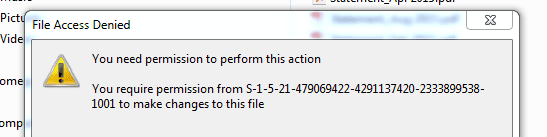
Well it worked for a while! Didn't do a thing differently but I do not have permission. No one but me would change anything and I didn't....

Got this when trying to edit a file name.
 

Attachments

  • Capture.PNG
    Capture.PNG
    6.3 KB · Views: 17

My Computer My Computer

At a glance

7 Ultimate 64 bit2x4Gb DDR3-SDRAMt750
Computer type
PC/Desktop
Computer Manufacturer/Model Number
need to update!
OS
7 Ultimate 64 bit
Memory
2x4Gb DDR3-SDRAM
Graphics Card(s)
t750
Monitor(s) Displays
AOC 24" yee haw and Dell 19"
Screen Resolution
1680 x 1050 @60hz
Hard Drives
Samsung 840EVO
Internet Speed
100/20
Antivirus
MSE
Browser
Firefox
That looks messed up. :) The SID is not recognized lead me to believe the files/folders were created on another PC.
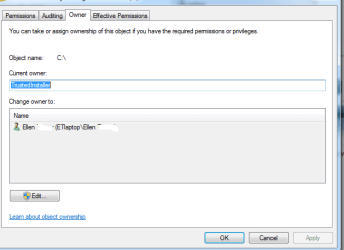
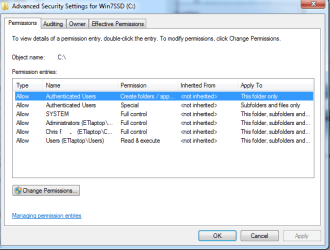
Is this an external drive?
Check the security tab and also click advanced in it. Check owner too.

Perhaps post screenshots of:
- security tab
- advanced security window
- owner
 

My Computer My Computer

At a glance

Windows 7 Ultimate x64 SP1AMD Phenom 2 1090T2x8GB Kingston HyperX Fury Black 1600Mhz Unga...MSI GTX 970 Gaming 4G
Computer type
PC/Desktop
Computer Manufacturer/Model Number
Custom Build
OS
Windows 7 Ultimate x64 SP1
CPU
AMD Phenom 2 1090T
Motherboard
Gigabyte GA-890FXA-UD5
Memory
2x8GB Kingston HyperX Fury Black 1600Mhz Unganged
Graphics Card(s)
MSI GTX 970 Gaming 4G
Sound Card
Realtek On-Board HD 7.1 Audio / Logitech G35
Monitor(s) Displays
3xAcer GD245HQ
Screen Resolution
1920x1080
Hard Drives
Samsung 850 Pro 512GB SSD - OS /
WD Caviar Black SATA 3 - 1 TBx2 - Dynamic RAID 0 /
WD Caviar Green SATA 2 - 640GBx2 - Dynamic RAID 0 /
WD Caviar Green SATA 2 - 640GB - Internal Backup /
Seagate Barracude SATA 3 - 3TB - External Backup/ Sync
PSU
HighPower 1000W
Case
Cooler Master HAF 932
Cooling
Noctua NH-D14
Keyboard
Logitech G19
Mouse
Logitech G500
Internet Speed
100/4 Mbit Cable (100GB quota)
Antivirus
ZoneAlarm Extreme Security / MBAM Pro / MBAE Free / SAS Free
Browser
IE 11 - Firefox - Chrome
Other Info
Logitech F710/ G27/ G940/ Z5500 // TrackIR 5 // Nvidia 3D Surround Vision
That looks messed up. :) The SID is not recognized lead me to believe the files/folders were created on another PC.
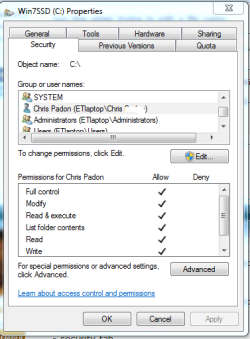
Is this an external drive?
Check the security tab and also click advanced in it. Check owner too.

Perhaps post screenshots of:
- security tab
- advanced security window
- owner

Can't mess with it anymore right now but I went in and changed some things.
Previously I had multiple folders shared out, rather than just the C/F drives, so I went in looking at security and there were multiple 'unknown accounts'. I deleted all but one of them as I have to disable inheritable rights from parent. I DID that and windows got pissed and wouldn't let me access the folder as I was not the owner, which I AM. I got rights back but cannot delete the last unknown account.

I thought that maybe the multiple unknown accounts were conflicting with my latest user account.

This PC has had problems in the past. Sometimes the user goes to save something on the F drive and she will get 'can't save there, save in my dox'. I set up a shortcut in my dox that leads back to the folder on the F drive. Essentially, she couldn't save directly to the folder, she had to go all the way around or use the shortcut. Couldn't figure out why so we developed a work-around and forgot about it.

Both drives are internal. I will mess with it later. Thanks for your help.
 

My Computer My Computer

At a glance

7 Ultimate 64 bit2x4Gb DDR3-SDRAMt750
Computer type
PC/Desktop
Computer Manufacturer/Model Number
need to update!
OS
7 Ultimate 64 bit
Memory
2x4Gb DDR3-SDRAM
Graphics Card(s)
t750
Monitor(s) Displays
AOC 24" yee haw and Dell 19"
Screen Resolution
1680 x 1050 @60hz
Hard Drives
Samsung 840EVO
Internet Speed
100/20
Antivirus
MSE
Browser
Firefox
That looks messed up. :) The SID is not recognized lead me to believe the files/folders were created on another PC.

Is this an external drive?
Check the security tab and also click advanced in it. Check owner too.

Perhaps post screenshots of:
- security tab
- advanced security window
- owner

This is the ROOT of the laptop's main drive which is an intel msata SSD. Here are the requested pics.
 

Attachments

  • ET c advanced owner .PNG
    ET c advanced owner .PNG
    8.6 KB · Views: 13
  • ET c advanced security.PNG
    ET c advanced security.PNG
    15.8 KB · Views: 13
  • ET c security.PNG
    ET c security.PNG
    16.2 KB · Views: 13

My Computer My Computer

At a glance

7 Ultimate 64 bit2x4Gb DDR3-SDRAMt750
Computer type
PC/Desktop
Computer Manufacturer/Model Number
need to update!
OS
7 Ultimate 64 bit
Memory
2x4Gb DDR3-SDRAM
Graphics Card(s)
t750
Monitor(s) Displays
AOC 24" yee haw and Dell 19"
Screen Resolution
1680 x 1050 @60hz
Hard Drives
Samsung 840EVO
Internet Speed
100/20
Antivirus
MSE
Browser
Firefox
What on Earth is this???
 

Attachments

  • unknown contact.PNG
    unknown contact.PNG
    1.3 KB · Views: 13

My Computer My Computer

At a glance

7 Ultimate 64 bit2x4Gb DDR3-SDRAMt750
Computer type
PC/Desktop
Computer Manufacturer/Model Number
need to update!
OS
7 Ultimate 64 bit
Memory
2x4Gb DDR3-SDRAM
Graphics Card(s)
t750
Monitor(s) Displays
AOC 24" yee haw and Dell 19"
Screen Resolution
1680 x 1050 @60hz
Hard Drives
Samsung 840EVO
Internet Speed
100/20
Antivirus
MSE
Browser
Firefox
No idea what unkown contact is.
Can you check which user has a session open while browsing from the other PC? Computer - properties - Shared Folders - Sessions
Also while in same place - Local Users and Groups - check your account group memberships - see if it is listed as "User" as well and delete it if so. It should be Administrators and HomeGroupUsers (if there is one).
 

My Computer My Computer

At a glance

Windows 7 Ultimate x64 SP1AMD Phenom 2 1090T2x8GB Kingston HyperX Fury Black 1600Mhz Unga...MSI GTX 970 Gaming 4G
Computer type
PC/Desktop
Computer Manufacturer/Model Number
Custom Build
OS
Windows 7 Ultimate x64 SP1
CPU
AMD Phenom 2 1090T
Motherboard
Gigabyte GA-890FXA-UD5
Memory
2x8GB Kingston HyperX Fury Black 1600Mhz Unganged
Graphics Card(s)
MSI GTX 970 Gaming 4G
Sound Card
Realtek On-Board HD 7.1 Audio / Logitech G35
Monitor(s) Displays
3xAcer GD245HQ
Screen Resolution
1920x1080
Hard Drives
Samsung 850 Pro 512GB SSD - OS /
WD Caviar Black SATA 3 - 1 TBx2 - Dynamic RAID 0 /
WD Caviar Green SATA 2 - 640GBx2 - Dynamic RAID 0 /
WD Caviar Green SATA 2 - 640GB - Internal Backup /
Seagate Barracude SATA 3 - 3TB - External Backup/ Sync
PSU
HighPower 1000W
Case
Cooler Master HAF 932
Cooling
Noctua NH-D14
Keyboard
Logitech G19
Mouse
Logitech G500
Internet Speed
100/4 Mbit Cable (100GB quota)
Antivirus
ZoneAlarm Extreme Security / MBAM Pro / MBAE Free / SAS Free
Browser
IE 11 - Firefox - Chrome
Other Info
Logitech F710/ G27/ G940/ Z5500 // TrackIR 5 // Nvidia 3D Surround Vision
Back
Top