w7 unusable after install

Marabou

New member
Local time
8:06 AM
Messages
13
Hi Im new here and Ive got a problem.

I upgraded my main computer from vista 64 to w7 64 few days ago. I did perfect clean install everything went like in the guide given in these forums, although it was kinda slow process like 1-2 hours. I have clean installed w7 few times after, it always installs fine but slowish.

The problem:

Starting the computer and entering the desktop takes about 10 minutes. When on desktop clicking anything causes freezing for 100s of seconds (!!!), finally it does my command though. But I cant open any program, folder or internet because it will just lag and say "not responding". I can do pretty much nothing. When ctrl+alt+del I get screen saying: "Failure to display security and shut down options. The logon process was unable to display security and logon options when CTRL+ALT+DEL was pressed. If the operation system doesnt respond press ESC or restart the computer by using the power switch." So Im stuck at step 19. because its impossible to install drivers and stuff.

It is like the processor would run 99,9-100% all the time. It is unusable. Theres no outer devices connected except P/S2 keyboard. It doesnt make a difference whether internet is plugged or not. I gave it time over because I thought it was maybe loading something, but no difference there in the morning. After many restarts the problem still occurs. Vista ran perfectly before btw, cant be a hardware problem.(?) Got Packard Bell iPOWER x2.0= i7, nVidia GT230, 8Mb DDR3 or something like that.

Any helpful suggestions are appreciated Im really outta clue here. Gosh I just payed +100 euros for making my computer from fully functional to completely unusable.
 

My Computer

OS
w7
CPU
i7 920
Graphics Card(s)
nvidia GT 230

My Computer

Computer Manufacturer/Model Number
HP M9077c
OS
Windows 7 Home Premium 64bit
CPU
Intel(R)Core(TM)2 quad [email protected] 2.39GHz
Motherboard
ASUSeK
Memory
6GB DDR2 6400
Graphics Card(s)
GeForce 8500/512MB
Sound Card
Realtek High Def Audio
Monitor(s) Displays
HP w2408 LCD 24" widescreen
Screen Resolution
1920x1200
Cooling
6 pack of Bud
Keyboard
MS wireless Inteli
Mouse
MS wireless Inteli
Hello Marabou, welcome to Seven Forums!


If you are doing clean install(s) and there is nothing else on the Hard Disk Drive (HDD) that you don't want to lose, have a look at the tutorial at the link below; if there is data on the HDD you want to keep don't do this as it over-writes everything on the HDD and makes it un-recoverable; it would be a good option to try as it'll give you a perfectly clean slate to install Windows to and may solve the issues.
Be sure to post back with updates.


SSD / HDD : Optimize for Windows Reinstallation
 

My Computer

Computer Manufacturer/Model Number
* BFK Customs *
OS
W 7 64-bit Ultimate
CPU
Intel Q9550 Yorkfield
Motherboard
ASUS P5Q Pro
Memory
8GB Dominator 8500C5D
Graphics Card(s)
ATI : XFX 5870
Sound Card
Realtek HD Audio 7-1
Monitor(s) Displays
1x 47" LCD HDMI & 3x 26" LCD HDMI
Screen Resolution
1920x1080P & 1920x1200
Hard Drives
1x 80GB Intel X25-M G2 SSD : 1x 500GB & 1x 640GB WD Caviar Black(s)
PSU
Corsair 620HX
Case
Cooler Master RC-690
Cooling
Tuniq Tower 120, 2x 140mm and 3x 120mm case fans
Keyboard
Microsoft 500
Mouse
Razer Diamondback 3G
Internet Speed
14 Mb/s
Other Info
1x Koutech 3Gb/s SATA HDD Hot Swap Rack

My Computer

Computer Manufacturer/Model Number
SALEON model 2.2b
OS
win7 ultimate 32bit
CPU
core2 Extreme QX6850-OCd to 3.15 GHz
Motherboard
ASUS P5G41-M LE
Memory
4 GB
Graphics Card(s)
NVidia 8600 GT
Monitor(s) Displays
23" acer
Hard Drives
one SATA 250GB partitioned equally in half
one SATA 160GB-internal storage
PSU
500W Thermaltake
Case
mini tower
Thank you very much for help

But its still the same problem. The Bare Foot kids advice was probably the best as I already had done quite few clean installs. So I followed his guide with method two cleaning HD to 0Mb and then clean installing w7 from my USB-stick. No difference though, the same problem started over again, when I put my name and set clock and stuff the painful waiting started. (untill that it went smooth) I managed to get to desktop, but still the same problem.

So I whiped my USB-stick clean and loaded new ISO 64 w7 file from Microsoft (with my laptop) and installed it into USB again (so the problems not there?) -> then I followed BFK´s guide second time, whiped HD -> clean install -> smoothness untill I had to put my name and stuff. I also let desktop be 24h open after that in case of loading or processing files, dont know was that vice...

Ask me questions and Ill answer I dont know what I should tell.

Then theres this 1 thing, I am pretty sure my vista was 64-bit version, there was program files 64 folder and I was told it was 64, Im starting to question my own memory here :confused:. But anyways the thing is when I tried enter safe mode there came this white text on black screen for a sec that said something about loading drivers32, many times different drivers all drivers32. Ive never had 32 OS how in hell I have 32-bit drivers? Thats the problem?? But should It even matter what OS I had if I whiped HDD?
 

My Computer

OS
w7
CPU
i7 920
Graphics Card(s)
nvidia GT 230
Hello again.


If you have an Optical Disk Drive (ODD) CD/DVD burner try burning the ISO to a disk, use the program at the link below at 4x speed burn with a verify to complete the process; then see if installing from a DVD will sort the issue.
Be sure to keep us updated.


ImgBurm Free ISO Burning Software
 

My Computer

Computer Manufacturer/Model Number
* BFK Customs *
OS
W 7 64-bit Ultimate
CPU
Intel Q9550 Yorkfield
Motherboard
ASUS P5Q Pro
Memory
8GB Dominator 8500C5D
Graphics Card(s)
ATI : XFX 5870
Sound Card
Realtek HD Audio 7-1
Monitor(s) Displays
1x 47" LCD HDMI & 3x 26" LCD HDMI
Screen Resolution
1920x1080P & 1920x1200
Hard Drives
1x 80GB Intel X25-M G2 SSD : 1x 500GB & 1x 640GB WD Caviar Black(s)
PSU
Corsair 620HX
Case
Cooler Master RC-690
Cooling
Tuniq Tower 120, 2x 140mm and 3x 120mm case fans
Keyboard
Microsoft 500
Mouse
Razer Diamondback 3G
Internet Speed
14 Mb/s
Other Info
1x Koutech 3Gb/s SATA HDD Hot Swap Rack
Hello again.


If you have an Optical Disk Drive (ODD) CD/DVD burner try burning the ISO to a disk, use the program at the link below at 4x speed burn with a verify to complete the process; then see if installing from a DVD will sort the issue.
Be sure to keep us updated.


ImgBurm Free ISO Burning Software

That was my thought exactly, but you type faster:p
 

My Computer

Computer Manufacturer/Model Number
Dell XPS 730
OS
Windows 7 Home Premium 64 bit
CPU
Intel Core 2 quad Extreme Q9770 @ 3.2 GHz
Memory
4x2 GB Muskin 1600 MHz ram
Graphics Card(s)
NVidia GTX 250
Sound Card
Soundblaster X-Fi Fatality Champion
Monitor(s) Displays
2 Dell 2007WFP Ultrascans
Screen Resolution
3360 x 1050
Hard Drives
WD Black 1TB sata, 2-WD Black 500 sata, 2-Seagate 500 Go external
PSU
1000 Watt
Cooling
air
Keyboard
MS Natrual Keyboard Pro
Mouse
Logitech Wireless Trackball
Internet Speed
DSL Elite
I pecked slower....My thought too!
 

My Computer

Computer Manufacturer/Model Number
HP M9077c
OS
Windows 7 Home Premium 64bit
CPU
Intel(R)Core(TM)2 quad [email protected] 2.39GHz
Motherboard
ASUSeK
Memory
6GB DDR2 6400
Graphics Card(s)
GeForce 8500/512MB
Sound Card
Realtek High Def Audio
Monitor(s) Displays
HP w2408 LCD 24" widescreen
Screen Resolution
1920x1200
Cooling
6 pack of Bud
Keyboard
MS wireless Inteli
Mouse
MS wireless Inteli
I only use 2 fingers! :confused:
 

My Computer

Computer Manufacturer/Model Number
* BFK Customs *
OS
W 7 64-bit Ultimate
CPU
Intel Q9550 Yorkfield
Motherboard
ASUS P5Q Pro
Memory
8GB Dominator 8500C5D
Graphics Card(s)
ATI : XFX 5870
Sound Card
Realtek HD Audio 7-1
Monitor(s) Displays
1x 47" LCD HDMI & 3x 26" LCD HDMI
Screen Resolution
1920x1080P & 1920x1200
Hard Drives
1x 80GB Intel X25-M G2 SSD : 1x 500GB & 1x 640GB WD Caviar Black(s)
PSU
Corsair 620HX
Case
Cooler Master RC-690
Cooling
Tuniq Tower 120, 2x 140mm and 3x 120mm case fans
Keyboard
Microsoft 500
Mouse
Razer Diamondback 3G
Internet Speed
14 Mb/s
Other Info
1x Koutech 3Gb/s SATA HDD Hot Swap Rack
I use 10 but might as well be useing 2:cry:
 

My Computer

Computer Manufacturer/Model Number
Dell XPS 730
OS
Windows 7 Home Premium 64 bit
CPU
Intel Core 2 quad Extreme Q9770 @ 3.2 GHz
Memory
4x2 GB Muskin 1600 MHz ram
Graphics Card(s)
NVidia GTX 250
Sound Card
Soundblaster X-Fi Fatality Champion
Monitor(s) Displays
2 Dell 2007WFP Ultrascans
Screen Resolution
3360 x 1050
Hard Drives
WD Black 1TB sata, 2-WD Black 500 sata, 2-Seagate 500 Go external
PSU
1000 Watt
Cooling
air
Keyboard
MS Natrual Keyboard Pro
Mouse
Logitech Wireless Trackball
Internet Speed
DSL Elite
I am all thumbs!:o
 

My Computer

Computer Manufacturer/Model Number
HP M9077c
OS
Windows 7 Home Premium 64bit
CPU
Intel(R)Core(TM)2 quad [email protected] 2.39GHz
Motherboard
ASUSeK
Memory
6GB DDR2 6400
Graphics Card(s)
GeForce 8500/512MB
Sound Card
Realtek High Def Audio
Monitor(s) Displays
HP w2408 LCD 24" widescreen
Screen Resolution
1920x1200
Cooling
6 pack of Bud
Keyboard
MS wireless Inteli
Mouse
MS wireless Inteli
You guys are fast :)

Ok downloaded that, and will whipe the HDD once again.

Tomorrow I buy some DVD to burn on, got only some shitty 700MB cd´s atm.

Till tomorrow
 

My Computer

OS
w7
CPU
i7 920
Graphics Card(s)
nvidia GT 230
Do remember to keep us posted.
 

My Computer

Computer Manufacturer/Model Number
* BFK Customs *
OS
W 7 64-bit Ultimate
CPU
Intel Q9550 Yorkfield
Motherboard
ASUS P5Q Pro
Memory
8GB Dominator 8500C5D
Graphics Card(s)
ATI : XFX 5870
Sound Card
Realtek HD Audio 7-1
Monitor(s) Displays
1x 47" LCD HDMI & 3x 26" LCD HDMI
Screen Resolution
1920x1080P & 1920x1200
Hard Drives
1x 80GB Intel X25-M G2 SSD : 1x 500GB & 1x 640GB WD Caviar Black(s)
PSU
Corsair 620HX
Case
Cooler Master RC-690
Cooling
Tuniq Tower 120, 2x 140mm and 3x 120mm case fans
Keyboard
Microsoft 500
Mouse
Razer Diamondback 3G
Internet Speed
14 Mb/s
Other Info
1x Koutech 3Gb/s SATA HDD Hot Swap Rack
Are you changing out any drivers given by the Win7 installer, and checking optional Windows Updates immediately after install for newer drivers?

If there are any drivers missing then in Device Manager, find them on the Support Downloads webpage for you Computer or Device model.

If there are still performance problems try changing out the chipset first from the Support Downloads webpage for your model computer or mobo. Be prepared to roll it back if it doesn't improve performance. While there, check for newer Display driver to try that as well.

Google text and ID number of repeat errors in the Event Viewer>Admin view to find how others have solved them. Click through WEI score at Computer>Properties to Advanced Tools to work through errors in Performance Log, Generate a System Health Report and look for errors cued at top of Adv. Tools page.

Report back.
 
Ok now I got DVD's.

I got a good feeling about this... The HD is now whiped and ready. The problem is now burning the recovery disk with windows xp. That Macrium seems to be good in burning images, but how can I burn an ISO-file onto DVD with it? It just makes some Linux and Bart PE recovery CD, and doesnt that require that that spesific OS is already installed onto PC that I use in making the disk? Did that make sense?

I mean Im failing at making the disk atm :(

Found this guide: http://www.sevenforums.com/tutorials/548-burn-disc-image-iso-img-file.html?filter[2]=General Tips
Is that any use? If it is where can I download this "Windows disk image burner" -program? Is it only in Vista?

Until now I have used Windows 7 USB DVD Download Tool, it doesnt allow set burning speed or anything. I think this is the problem as you have pointed out.

Guide the blind
 

My Computer

OS
w7
CPU
i7 920
Graphics Card(s)
nvidia GT 230
Hello again.


If you have an Optical Disk Drive (ODD) CD/DVD burner try burning the ISO to a disk, use the program at the link below at 4x speed burn with a verify to complete the process; then see if installing from a DVD will sort the issue.
Be sure to keep us updated.


ImgBurm Free ISO Burning Software


Hello again.


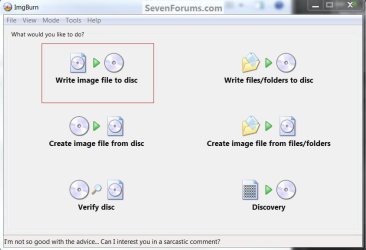
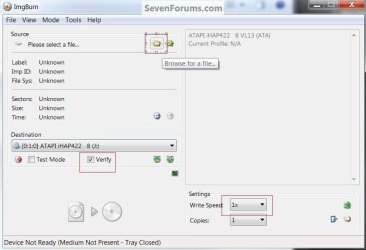
I meant for you to use this program to burn the Windows 7 ISO image to a DVD and try the install from the DVD instead of the USB stick to see if that makes a difference. Look at the images below to get an idea how to go about it.


click to enlarge-first-->browse for the ISO file, select the burn speed and select verify to start.
ImgBurn.jpgImgBurn2.jpg
 

My Computer

Computer Manufacturer/Model Number
* BFK Customs *
OS
W 7 64-bit Ultimate
CPU
Intel Q9550 Yorkfield
Motherboard
ASUS P5Q Pro
Memory
8GB Dominator 8500C5D
Graphics Card(s)
ATI : XFX 5870
Sound Card
Realtek HD Audio 7-1
Monitor(s) Displays
1x 47" LCD HDMI & 3x 26" LCD HDMI
Screen Resolution
1920x1080P & 1920x1200
Hard Drives
1x 80GB Intel X25-M G2 SSD : 1x 500GB & 1x 640GB WD Caviar Black(s)
PSU
Corsair 620HX
Case
Cooler Master RC-690
Cooling
Tuniq Tower 120, 2x 140mm and 3x 120mm case fans
Keyboard
Microsoft 500
Mouse
Razer Diamondback 3G
Internet Speed
14 Mb/s
Other Info
1x Koutech 3Gb/s SATA HDD Hot Swap Rack
Ty again BFK, that was very well explained and I got it now. I could swear, that last time I pressed your link it took me a site that guided to download some Macrium program, thats why I was confused. Guess I wasnt sober enough.

Anyway now I installed w7 with 4x speed burned DVD (ImgBurned) to whiped HD and everything went fine just like many times before.

BUT the problem is still the same. I can get to desktop but its like CPU would run 100%.

When I tried to launch solitaire, just trying to get anything work, a screen came up saying "Hardware acceleration is either disabled or not supported by your video card driver, which could slow game performance. Make sure you have latest video card driver installed and that hardware acceleration is turned on."

So that is the problem? Video card driver or even all drivers ***ked up?

How am I able to load new drivers or adjust them when I cant do pretty much anything with PC?

Should I like install ubuntu, update drivers, install and dualboot w7 and delete ubuntu or something like that or what?

Im so lost here
 

My Computer

OS
w7
CPU
i7 920
Graphics Card(s)
nvidia GT 230
Try booting into Safe Mode to install the Chipset and Display drivers from the Support Downloads webpage for your computer model.

Then try booting normally into Win7, check optional Windows Updates for any newer drivers that have been delivered to install, then check Device Manager for any missing drivers or other errors signified by an (!) exclamation point next to the Device. Provide those drivers also from your manufacturer's Support Downloads webpage for your model.

Next work through the repeat errors in your Event Viewer using steps given in my last post.
 
I will do that if Im able to do.

Anyway trying will take some time = Im not dead if I wont post
 

My Computer

OS
w7
CPU
i7 920
Graphics Card(s)
nvidia GT 230
Ive done the following:

In safe mode:
- I tried to run Windows Update, failed in that two times (it like did the update, but it still said that Windows Update has never been ran) and then I didnt try anymore.
- In device manager there was only 1 (!) and it was standard vga graphix adapter. Actually there was two standard vga graphix adapters but only one had (!) in front. (Maybe because I have 2 nVidia 230 GT cards)
-Then I tried to download new driver from nVidia (Packard Bell support downloads center had only audio (=not the problem because in safe mode audio is disabled and PC gives same performance in safe mode and normal mode?), LAN (no use?) and chipset ( I will try to load this) drivers) because this was shown in device manager and I thought if I could load it problems would be solved. This installation process went fine untill the Installwizard program or w/e said: " The system has not been modified. To install program at a later time run the installation program again."

All that above took 9 HOURS.

Soo am I close to victory here? How do I modify system? (plz be specific)

Im trying to perform Windows Update again atm.
 

My Computer

OS
w7
CPU
i7 920
Graphics Card(s)
nvidia GT 230
Back
Top