
Hi,
Below, see XP virtual machine configuration Error Msg. indicating: "User does not have sufficient access rights".
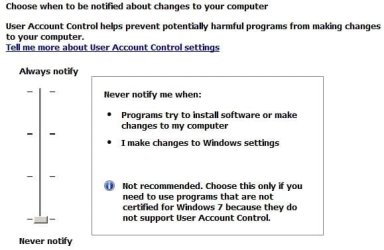
Yet the next image: "Never notify me when", indicated I am at the lowest UAC level. Or are the lower levels represented by Easter Eggs?
Also, note the Windows XP mode is installed, but because of the XP virtual machine configuration msg above, I can't go further.
I have Googled this situation to no avail. Found a few vague postings but they have lead to dead ends.
Any help, suggestions will be much appreciated.
cheers,
klxdrt
cant config virtual machine error 2.jpg
usr acct settings.jpg
xp mode is installed.jpg
Below, see XP virtual machine configuration Error Msg. indicating: "User does not have sufficient access rights".
Yet the next image: "Never notify me when", indicated I am at the lowest UAC level. Or are the lower levels represented by Easter Eggs?
Also, note the Windows XP mode is installed, but because of the XP virtual machine configuration msg above, I can't go further.
I have Googled this situation to no avail. Found a few vague postings but they have lead to dead ends.
Any help, suggestions will be much appreciated.
cheers,
klxdrt
cant config virtual machine error 2.jpg
usr acct settings.jpg
xp mode is installed.jpg
Attachments


My Computer
- Computer type
- PC/Desktop
- Computer Manufacturer/Model Number
- locally made
- OS
- w7 pro 32 bit w/XP virt enabled.
- CPU
- AMD A6-3650
- Motherboard
- ASUS F1A55-M CSM
- Memory
- 4 GB DDR3 RAM
- Graphics Card(s)
- NVIDIA GeForce 210
- Sound Card
- NVIDIA High Definition Audio
- Monitor(s) Displays
- 28" HD monitor
- Screen Resolution
- 1680 x 1050 x 32 bits (4294967296 colors) @ 59 Hz
- Hard Drives
- 2 x 500 GB Western Digital Blue Hard Drive
- PSU
- ?
- Case
- ?
- Cooling
- 3-4 fans
- Keyboard
- big yellow keys
- Mouse
- logitec
- Internet Speed
- 60 mb
- Antivirus
- panda
- Browser
- ff
- Other Info
- scanner, webcam, bw printer, fax modem, cd/dvd burner, PC usb ports: 2 usb3, 6 usb2 plus 7 port usb hub, 2 tb usb3, 1 Tb usb3, 500Mb usb2, 120Mb USB2 portable drives, asst of flash drives 250 Mb to 32 Gb. backup PC, office
