Hi .....
i thought you might like to see what ''W7'' brings to the table!!
Kernel.
Windows 7 will feature an evolved kernel and underpinnings when compared to its previous-generation predecessors, Windows Vista with Service Pack 1 (SP1) and Windows Server 2008. While it's unclear whether the "MinWin" kernel that Microsoft demonstrated in 2007 will be included with Windows 7, it is quite likely that the OS will include parallel processing capabilities, which will be implemented as .NET Framework 4.0 APIs.
Virtualization.
With Windows Server 2008 now shipping with hypervisor-based virtualization capabilities, it's obvious that this technology will be making its way to the Windows client as well. Will it happen in time for Windows 7? Yes, it probably will. But Windows 7 will natively support the VHD virtual hard drive format utilized by Virtual PC and Hyper-V regardless.
Sensors.
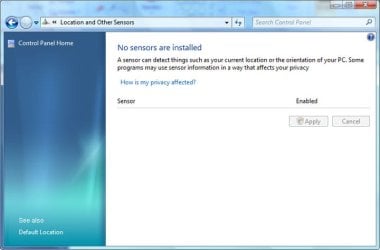
Windows 7 will include context-aware application support via a new "sensors" facility. One example: A location sensor can tell "where" your PC is and compatible applications can act accordingly. Applications can use sensor information to offer customized and enhanced services, according to Microsoft's documentation. Because of the privacy implications of sensors, this feature is opt-in and highly configurable
User Account Control improvements.
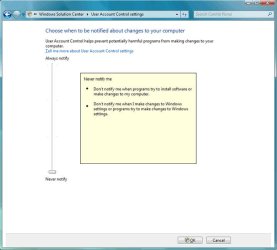
Windows Vista's most reviled feature is being completely overhauled to be more customizable. Four settings will be available:
1. Never notify (least secure). The user is not notified when a program tries to install software or make changes to the computer. The user is not notified when they make changes to Windows settings or when programs try to do so.
2. Only notify me when programs try to make changes to my computer.
The user is not notified when a program tries to install software or make changes to the computer. The user is not notified when they make changes to Windows settings. However, the user is notified when programs try to make changes to the computer, including Windows settings.
3. Always notify me.
The user is notified when a program tries to install software or make changes to the computer. The user is also notified when they make changes to Windows settings or when programs try to do so.
4. Always notify me and wait for my response (most secure).
The user is notified when a program tries to install software or make changes to the computer. The user is also notified when they make changes to Windows settings or when programs try to do so.
Improved "Day One Experience."
Microsoft wants Windows 7 to be useable and exciting "out of the box," and it's improving the experiencing of running this new OS for the first time. This will include an even more streamlined Setup routine and a thoroughly overhauled user interface.
Scenic application user interface.
Microsoft has created a new application UI, codenamed Scenic, that will give Windows 7 applications a new and consistent, but customizable, look and feel.
Libraries.
Special shell folders (Documents, Pictures, Music, and so on) are being renamed to Libraries. Note, however, that WinFS will not be implemented in Windows 7 and these locations will still occur within the normal shell namespace.
Tweaked Explorer.
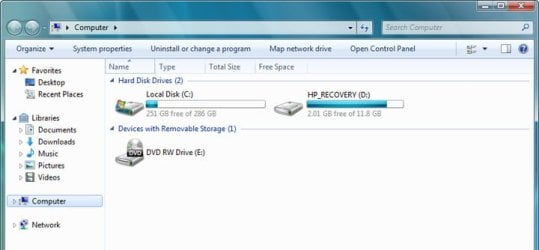
Windows Explorer is being updated again with a number of new features, including a resizable search box, a simpler new toolbar (with none of the color-coding found in Windows Vista), and a new icon view style called Content. This Content view style is most likely a preview mode for images and other rich content.
Accelerators for Windows.
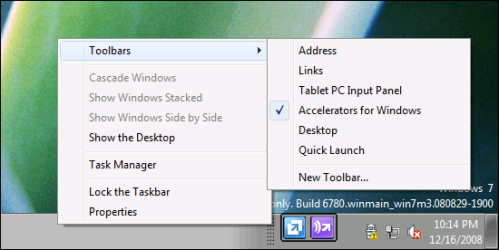
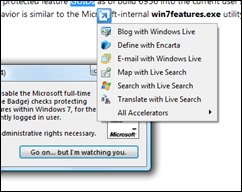
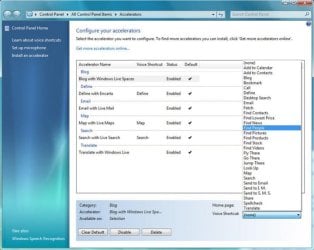
Based on the Accelerators feature from Internet Explorer 8, Windows 7 Accelerators provide a way for learning more about selected text, optionally using voice control. Here's how it works: Anywhere in the Windows 7 UI, you can select text and speak commands through a microphone, or, right-click and choose from a list of options. Supported Accelerators include "Blog with Windows Live Spaces," "Define with Encarta," "Email with Live Mail," "Map with Live Maps," "Search with Live Search," and "Translate with Windows Live." Default voice shortcuts include such things as "Add to Calendar," "Blog," "Email," "Find People," "Go There," "Search," "Share," and many others.
Multi-touch.
Windows 7 will include integrated support for multi-touch displays and support the "Surface" multi-touch technologies. This is an evolution of the Tablet PC and touch technologies supported by previous Windows versions.
Fewer bundled applications, more control over those applications that are installed. Thanks to antitrust lawsuits from around the world, Microsoft is moving more applications out of Windows and making them optional installs through the Windows Live service. Windows 7 will no longer include Windows Mail, Windows Photo Gallery, or Windows Movie Maker. However, Microsoft is also adding end-user (and admin) support for full system customization, so you can control which applications are and are not installed in the OS. Finally.
No more Sidebar.
Microsoft is removing Windows Sidebar from Windows 7, but the Windows Gadgets infrastructure remains and will be expanded. In Windows 7, Gadgets can only be viewed on the desktop. As such, the Gadget Gallery found in Windows Sidebar will be globally available and renamed to Desktop Gadget Gallery.
Windows Solution Center.
Microsoft is replacing Windows Security Center with a new utility called Windows Solution Center. In addition to monitoring Windows Firewall, Automatic Updating, virus and spyware protection, Internet security settings, and User Account Control, Windows Solution Center will also monitor PC maintenance, backup, troubleshooting, Network Access Protection (NAP), and more.

HomeGroup networking.
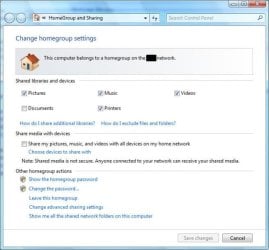
Microsoft had tried to get its "Castle" networking scheme into Windows Vista, but the feature will finally appear in Windows 7 as HomeGroup. Essentially a combination of workgroup networking with file and media sharing, HomeGroup makes it easier to create a home network where PCs share pictures, music, videos, documents, printers, and other resources with each other.
 SK
SK
i thought you might like to see what ''W7'' brings to the table!!
Kernel.
Windows 7 will feature an evolved kernel and underpinnings when compared to its previous-generation predecessors, Windows Vista with Service Pack 1 (SP1) and Windows Server 2008. While it's unclear whether the "MinWin" kernel that Microsoft demonstrated in 2007 will be included with Windows 7, it is quite likely that the OS will include parallel processing capabilities, which will be implemented as .NET Framework 4.0 APIs.
Virtualization.
With Windows Server 2008 now shipping with hypervisor-based virtualization capabilities, it's obvious that this technology will be making its way to the Windows client as well. Will it happen in time for Windows 7? Yes, it probably will. But Windows 7 will natively support the VHD virtual hard drive format utilized by Virtual PC and Hyper-V regardless.
Sensors.
Windows 7 will include context-aware application support via a new "sensors" facility. One example: A location sensor can tell "where" your PC is and compatible applications can act accordingly. Applications can use sensor information to offer customized and enhanced services, according to Microsoft's documentation. Because of the privacy implications of sensors, this feature is opt-in and highly configurable
User Account Control improvements.
Windows Vista's most reviled feature is being completely overhauled to be more customizable. Four settings will be available:
1. Never notify (least secure). The user is not notified when a program tries to install software or make changes to the computer. The user is not notified when they make changes to Windows settings or when programs try to do so.
2. Only notify me when programs try to make changes to my computer.
The user is not notified when a program tries to install software or make changes to the computer. The user is not notified when they make changes to Windows settings. However, the user is notified when programs try to make changes to the computer, including Windows settings.
3. Always notify me.
The user is notified when a program tries to install software or make changes to the computer. The user is also notified when they make changes to Windows settings or when programs try to do so.
4. Always notify me and wait for my response (most secure).
The user is notified when a program tries to install software or make changes to the computer. The user is also notified when they make changes to Windows settings or when programs try to do so.
Improved "Day One Experience."
Microsoft wants Windows 7 to be useable and exciting "out of the box," and it's improving the experiencing of running this new OS for the first time. This will include an even more streamlined Setup routine and a thoroughly overhauled user interface.
Scenic application user interface.
Microsoft has created a new application UI, codenamed Scenic, that will give Windows 7 applications a new and consistent, but customizable, look and feel.
Libraries.
Special shell folders (Documents, Pictures, Music, and so on) are being renamed to Libraries. Note, however, that WinFS will not be implemented in Windows 7 and these locations will still occur within the normal shell namespace.
Tweaked Explorer.
Windows Explorer is being updated again with a number of new features, including a resizable search box, a simpler new toolbar (with none of the color-coding found in Windows Vista), and a new icon view style called Content. This Content view style is most likely a preview mode for images and other rich content.
Accelerators for Windows.
Based on the Accelerators feature from Internet Explorer 8, Windows 7 Accelerators provide a way for learning more about selected text, optionally using voice control. Here's how it works: Anywhere in the Windows 7 UI, you can select text and speak commands through a microphone, or, right-click and choose from a list of options. Supported Accelerators include "Blog with Windows Live Spaces," "Define with Encarta," "Email with Live Mail," "Map with Live Maps," "Search with Live Search," and "Translate with Windows Live." Default voice shortcuts include such things as "Add to Calendar," "Blog," "Email," "Find People," "Go There," "Search," "Share," and many others.
Multi-touch.
Windows 7 will include integrated support for multi-touch displays and support the "Surface" multi-touch technologies. This is an evolution of the Tablet PC and touch technologies supported by previous Windows versions.
Fewer bundled applications, more control over those applications that are installed. Thanks to antitrust lawsuits from around the world, Microsoft is moving more applications out of Windows and making them optional installs through the Windows Live service. Windows 7 will no longer include Windows Mail, Windows Photo Gallery, or Windows Movie Maker. However, Microsoft is also adding end-user (and admin) support for full system customization, so you can control which applications are and are not installed in the OS. Finally.
No more Sidebar.
Microsoft is removing Windows Sidebar from Windows 7, but the Windows Gadgets infrastructure remains and will be expanded. In Windows 7, Gadgets can only be viewed on the desktop. As such, the Gadget Gallery found in Windows Sidebar will be globally available and renamed to Desktop Gadget Gallery.
Windows Solution Center.
Microsoft is replacing Windows Security Center with a new utility called Windows Solution Center. In addition to monitoring Windows Firewall, Automatic Updating, virus and spyware protection, Internet security settings, and User Account Control, Windows Solution Center will also monitor PC maintenance, backup, troubleshooting, Network Access Protection (NAP), and more.
HomeGroup networking.
Microsoft had tried to get its "Castle" networking scheme into Windows Vista, but the feature will finally appear in Windows 7 as HomeGroup. Essentially a combination of workgroup networking with file and media sharing, HomeGroup makes it easier to create a home network where PCs share pictures, music, videos, documents, printers, and other resources with each other.
SKMy Computer
- Computer Manufacturer/Model Number
- myself
- OS
- SEVEN x64
- CPU
- Q9450 @ 3.6GHZ 1.34v
- Motherboard
- ASUS P5K PREMIUM P35
- Memory
- 8GB 1066 buffalo firestix @ 1152mhz CL5
- Graphics Card(s)
- Sapphire HD 5970 + GTX260 (physX)
- Sound Card
- Creative X-FI Xtreme Gamer
- Monitor(s) Displays
- SAMSUNG 20'' & SAMSUNG 23'' (dual screens)
- Screen Resolution
- 2048x1152 & 1680x1050
- Hard Drives
- 1x seagate 160gb IDE & 1x seagate 160gb SATA
- PSU
- XCILIO 850w (78A)
- Case
- CM590 1x 120x38mm & 2x92x38mm / 4x 120x25mm
- Cooling
- AC7 PRO @ 92x38mm blower, Lamptron military bus bay controll
- Keyboard
- LOGITECH E110
- Mouse
- logitech NX5
- Internet Speed
- 2MB
- Other Info
- its a continual ''work in progress''....