Solved Waay too many problems since I started using Windows 7

@greg, I guess I re-enabled because I 'thought' (my bad) I'd read that they 'shouldn't' be marked as disabled during uninstall & my memory is about 2 seconds long so was afraid I'd forget while I went in search of info on some that I didn't understand. Actually, I don't think I did uncheck all just for that same reason.

And yes you're right, I need to slow down, focus in one or two areas at a time & start bombarding the board with questions.
 

My Computer My Computer

Computer type
PC/Desktop
Computer Manufacturer/Model Number
emachines
OS
Microsoft Windows 7 Home Premium 64-bit 7601 Multiprocessor Free Service Pack 1
CPU
AMD Athlon(tm) II X2 220 Processor
Motherboard
eMachines EL1358G
Memory
3.00 GB
Graphics Card(s)
NVIDIA GeForce 6150SE nForce 430
Sound Card
Realtek High Definition Audio
Screen Resolution
1280 x 1024 x 32 bits (4294967296 colors) @ 60 Hz
Hard Drives
(1) WDC WD10 EADX-22TDHB0 SCSI Disk Device (2) Generic- Multi-Card USB Device
Keyboard
came with PC
Mouse
came with PC
Antivirus
Avast
Browser
IE 9
Other Info
don't know how to get info for the other 5 areas

If IE9 is slow to open web pages, then it could be WOT ... This 'add-on' is intended to inspect a web page for malicious code.

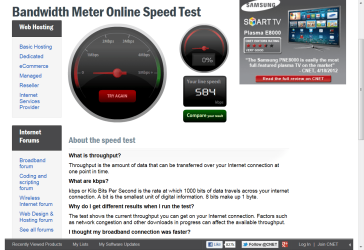
Your ISP could be another reason for slowness. Test your Bandwidth http://reviews.cnet.com/internet-speed-test/

Thank you Jacee, I should have been more courteous & followed thru with this right away. I did make a screen shot after I read your post, and again just a few mins. ago. I don't know why they're different, they're from the same place.
 

Attachments

  • 2012-05-22_163740._ Speedtest.net.png
    2012-05-22_163740._ Speedtest.net.png
    21.1 KB · Views: 5
  • 2012-05-24_163836 _speed test at 4.30pm.png
    2012-05-24_163836 _speed test at 4.30pm.png
    99.4 KB · Views: 9

My Computer My Computer

Computer type
PC/Desktop
Computer Manufacturer/Model Number
emachines
OS
Microsoft Windows 7 Home Premium 64-bit 7601 Multiprocessor Free Service Pack 1
CPU
AMD Athlon(tm) II X2 220 Processor
Motherboard
eMachines EL1358G
Memory
3.00 GB
Graphics Card(s)
NVIDIA GeForce 6150SE nForce 430
Sound Card
Realtek High Definition Audio
Screen Resolution
1280 x 1024 x 32 bits (4294967296 colors) @ 60 Hz
Hard Drives
(1) WDC WD10 EADX-22TDHB0 SCSI Disk Device (2) Generic- Multi-Card USB Device
Keyboard
came with PC
Mouse
came with PC
Antivirus
Avast
Browser
IE 9
Other Info
don't know how to get info for the other 5 areas
Just a couple of remarks regarding earlier points:

1. You absolutely should have an external disk (at least 500GB). A PC without an external disk is pretty useless. The day you get into trouble (and that day will come) you will have no good way to get yourself out of the tight spot unless you have images. And image often - I make an image 3 times per week so that I don't lose a lot when I have to reset the system.

Here is the best free imaging program I know: http://www.sevenforums.com/tutorials/73828-imaging-free-macrium.html?ltr=I

2. As far as the startups go, you can disable ALL of them except for your AV program and those that you may have started yourself - e.g. sidebar (gadgets).

3. In Start > All Programs > Accessories > System Tools there is an IE (no add-ons). Run that for a test and see whether that is slow too. If yes, there is probably a wrong setting in your AV program.

Thank you whs, should I do #'s 2 & 3 at the same time or test them seperately?

And can you give me some help about external disks please. I live in a very small town with only one store to buy such an item so I'm probably better off shopping online & wouldn't know what to look for.
 

My Computer My Computer

Computer type
PC/Desktop
Computer Manufacturer/Model Number
emachines
OS
Microsoft Windows 7 Home Premium 64-bit 7601 Multiprocessor Free Service Pack 1
CPU
AMD Athlon(tm) II X2 220 Processor
Motherboard
eMachines EL1358G
Memory
3.00 GB
Graphics Card(s)
NVIDIA GeForce 6150SE nForce 430
Sound Card
Realtek High Definition Audio
Screen Resolution
1280 x 1024 x 32 bits (4294967296 colors) @ 60 Hz
Hard Drives
(1) WDC WD10 EADX-22TDHB0 SCSI Disk Device (2) Generic- Multi-Card USB Device
Keyboard
came with PC
Mouse
came with PC
Antivirus
Avast
Browser
IE 9
Other Info
don't know how to get info for the other 5 areas
Why did you re-enable startups you had turned off in msconfig? Did you have problems? You say it got speedier. You can indeed uninstall programs listed there that you don't want, but you should still leave them disabled so they don't leave any remnants running at the time of uninstall.

Instead of bemoaning how little you know in every post, why not spend the energy asking a few questions so you learn more?

Just a couple of remarks regarding earlier points:

1. You absolutely should have an external disk (at least 500GB). A PC without an external disk is pretty useless. The day you get into trouble (and that day will come) you will have no good way to get yourself out of the tight spot unless you have images. And image often - I make an image 3 times per week so that I don't lose a lot when I have to reset the system.

Here is the best free imaging program I know: http://www.sevenforums.com/tutorials/73828-imaging-free-macrium.html?ltr=I

2. As far as the startups go, you can disable ALL of them except for your AV program and those that you may have started yourself - e.g. sidebar (gadgets).

3. In Start > All Programs > Accessories > System Tools there is an IE (no add-ons). Run that for a test and see whether that is slow too. If yes, there is probably a wrong setting in your AV program.

Thank you whs, should I do #'s 2 & 3 at the same time or test them seperately?

And can you give me some help about external disks please. I live in a very small town with only one store to buy such an item so I'm probably better off shopping online & wouldn't know what to look for.

I would expect whs (and gregrocker) is saying to do #2 and then see how well IE does when you follow #3. Don't undo #2 until you can make a determination in how IE responds. If IE performance improves your problem was likely due to one of the startups that you disabled in #2, if not it may be a setting in your AV causing you problems (remember you left your AV enabled in step #2).

You might check with your ISP to see if the internet speed you got from jacee test corresponds with what you pay for. It looks slow, but I don't know what you pay for. Report back on what you find to help continue troubleshooting.
 

My Computer My Computer

OS
Windows 7 Ultimate x64
grits,

Your internet speed is very slow. It should get the task complete, but if you are wondering about internet speed, that is it. The more add-ons you disable, the faster it will be as well. WOT does take a lot of time, but if you prefer it over speed, that is your choice. It is a very good program. A lot of this discussion has been about IE, but how has the computer (apart from IE) performed?

Have you checked your computer for viruses lately?

You have 3GB RAM with a 64bit OS, which may slow things down due to the low amount of RAM. Understandably I wouldn't myself go out and buy a bunch of new stuff because of this. Try otimizing the computer (safe and download free): http://www.sevenforums.com/tutorials/11728-optimize-windows-7-a.html - by Brink
 

My Computer My Computer

Computer type
PC/Desktop
Computer Manufacturer/Model Number
Custom Asus Build
OS
Microsoft Windows 8.1 Pro 64-bit
CPU
Intel(R) Core(TM) i3-4130 CPU @ 3.40GHz
Motherboard
B85M-E
Memory
8.00 GB
Graphics Card(s)
None
Sound Card
Realtek High Definition Audio
Monitor(s) Displays
Asus 23.6" Monitor
Screen Resolution
1920 x 1080 x 32 bits (4294967296 colors) @ 60 Hz
Hard Drives
INTEL SSDSC2BW180A4
Samsung SSD 840 PRO Series
PSU
Seasonic S12II-380Bronze
Case
Lian Li
Cooling
Fan, Passive
Keyboard
Logitech K120
Mouse
Microsoft Touch Mouse
Internet Speed
4ms Ping, 19.0 Mbps Download, 19.0 Mbps Upload
Antivirus
Eset Endpoint
Browser
Internet Explorer, Chrome
The first issue is that you bought an eMachines system, which was already mentioned. The second was, I assume, that you left the default Windows install on there. OEM systems always run like crap out of the box. That's why, for many of us, the very first thing we do is to wipe the system clean and reinstall Windows 7 ourselves. The end result is a much faster, more efficient system.

Man isn't that the truth. Factory built OEM machines are typically built with inferior components and cheap china made hardware, No offence intended here to anyone. As if that isn't bad enough they purposely install bloatware to make sure the machine runs as poorly as possible. I just don't get that. They say it keeps the cost down but is that really worth the trouble and head aches it causes people? Bottom line is that Windows 7 simply is NOT the problem. :confused:

Of course anyone who knows anything about PC'S would have also built their own machine for much less money and with much better components without the bloatware. Factory warranty's are not a good enough reason to purchase OEM machines. Lack of knowledge on how to build your own machine is the only valid reason for not doing so.

My last dual core machine cost me 200 bucks to build but I already had the dual core CPU, already had the 8800GT and the hard drive. Asus board 50 bucks, 8GB GSkill DDR3 memory 50 bucks, Roswell power supply 50 bucks, Roswell case...you guessed it 50 bucks. And that machine just flies.

Here is a tip for the OP, Windows updates has many drivers and other fixes that are catered exactly for your machine. Most slowness problems can be fixed by just going to Windows updates and removing all OEM bloatware.
 

My Computer My Computer

Computer type
PC/Desktop
Computer Manufacturer/Model Number
Home built
OS
Windows 7 Ult, Windows 8.1 Pro,
CPU
Q9650-4.275GHz, E8600 4.5GHz, E6750-3.8GHz
Motherboard
Evga 780i FTW
Memory
G.Skill PC2 9600 1200Mhz 5 5 5 15 2T
Graphics Card(s)
GTX480
Sound Card
Asus Xonar D2
Monitor(s) Displays
HannsG
Screen Resolution
1680X1050
Hard Drives
GSkill Phoenix Pro 120GB SSD
PSU
ThermalTake Toughpower 1000Watt modular
Case
ThermalTake XaserV
Cooling
Xigmatek S1283
Keyboard
Logitech G15
Mouse
Logitech G9
Internet Speed
T1
Of course anyone who knows anything about PC'S would have also built their own machine for much less money and with much better components without the bloatware. Factory warranty's are not a good enough reason to purchase OEM machines. Lack of knowledge on how to build your own machine is the only valid reason for not doing so.

With eMachines you could get quality stock parts assembled competently for less than the cheapest retail price of all the parts. This was the principal behind the company when it was founded and carried it until Gateway bought it and plunged it deeper into the bargain basement, same as Acer appears to be doing now.

There are many people on these forums who are not hardware oriented but do just fine helping with Win7 - heck, that's even what they named the forums! ;)

The vast majority of users can look in the Sunday ads and buy everything they'd possibly need in a PC for just a little more than the cost of the full version OS.

Then they can come here and learn how to Clean Up Factory Bloatware or Clean Reinstall - Factory OEM Windows 7 and have a system that performs every bit as good for them as a hardware hobbyist's does for him/her.
 
With eMachines you could get quality stock parts assembled competently for less than the cheapest retail price of all the parts. This was the principal behind the company when it was founded and carried it until Gateway bought it and plunged it deeper into the bargain basement, same as Acer appears to be doing now.

There are many people on these forums who are not hardware oriented but do just fine helping with Win7 - heck, that's even what they named the forums! ;)

The vast majority of users can look in the Sunday ads and buy everything they'd possibly need in a PC for just a little more than the cost of the full version OS.

Then they can come here and learn how to Clean Up Factory Bloatware or Clean Reinstall - Factory OEM Windows 7 and have a system that performs every bit as good for them as a hardware hobbyist's does for him/her.

+1 for that! The vast majority of users aren't worried about squeezing every last bit out of it such that they need a stopwatch in order to measure performance. On top of that, as far as parts quality is concerned, these folks often have equipment that's years old. Just cleaned up another very old machine, someone's 2002 Dell machine complete with one of the bad capacitor motherboards. But everything still works on it, HD included. Ten plus years old now! Been telling them for a couple years that they're gonna have to upgrade (XP). They'll probably hang on to it until just before 4-2014 or that HD or motherboard finally dies.
 

My Computer My Computer

OS
Windows 7 Ultimate x64
Just a couple of remarks regarding earlier points:

1. You absolutely should have an external disk (at least 500GB). A PC without an external disk is pretty useless. The day you get into trouble (and that day will come) you will have no good way to get yourself out of the tight spot unless you have images. And image often - I make an image 3 times per week so that I don't lose a lot when I have to reset the system.

Here is the best free imaging program I know: http://www.sevenforums.com/tutorials/73828-imaging-free-macrium.html?ltr=I

2. As far as the startups go, you can disable ALL of them except for your AV program and those that you may have started yourself - e.g. sidebar (gadgets).

3. In Start > All Programs > Accessories > System Tools there is an IE (no add-ons). Run that for a test and see whether that is slow too. If yes, there is probably a wrong setting in your AV program.

Thank you whs, should I do #'s 2 & 3 at the same time or test them seperately?

And can you give me some help about external disks please. I live in a very small town with only one store to buy such an item so I'm probably better off shopping online & wouldn't know what to look for.

I would do #2 asap. There is really no need for those startups to linger around.

#3 is just a test. You can do that any time. It is relatively independent of the effects of #2.

For buying any hardware, I would go to Newegg.com or Tigerdirect.com. Get yourself on their email list than you will get news about their sales which come nearly daily. I buy everything at Newegg. They are very helpful in case you have to return something. Top company. Here are some examples: Newegg.com - 500gb external hdd
 

My Computer My Computer

Computer Manufacturer/Model Number
HP, Dell, Gateway, Toshiba - 4 laptops and 2 desktops
OS
Vista, Windows7, Mint Mate, Zorin, Windows 8
CPU
from 1.6GHz Duo to i7
Monitor(s) Displays
2x HP w2207
Hard Drives
5x HDD, 7x SSD, 12x Externals
Keyboard
with trackball - no mices
Mouse
Trackball mice
Internet Speed
DSL 6000
I apologize for my slow response, I'm still trying to work my way thru' the other suggestions as time permits. Some of it will require more study. I do have the startups disabled.

I'm not sure at this point if I should 'rep' anyone or not since I'm not done.
 

My Computer My Computer

Computer type
PC/Desktop
Computer Manufacturer/Model Number
emachines
OS
Microsoft Windows 7 Home Premium 64-bit 7601 Multiprocessor Free Service Pack 1
CPU
AMD Athlon(tm) II X2 220 Processor
Motherboard
eMachines EL1358G
Memory
3.00 GB
Graphics Card(s)
NVIDIA GeForce 6150SE nForce 430
Sound Card
Realtek High Definition Audio
Screen Resolution
1280 x 1024 x 32 bits (4294967296 colors) @ 60 Hz
Hard Drives
(1) WDC WD10 EADX-22TDHB0 SCSI Disk Device (2) Generic- Multi-Card USB Device
Keyboard
came with PC
Mouse
came with PC
Antivirus
Avast
Browser
IE 9
Other Info
don't know how to get info for the other 5 areas
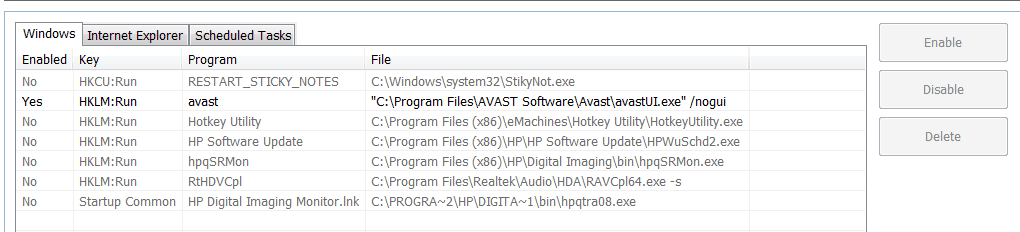
Startup lists in CCleaner

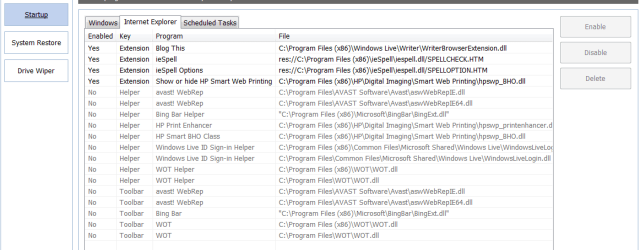
Even though it may slow down IE, I miss having WOT but don't know which of the several in my list that I should re-enable to get it back. I need suggestion please.
 

Attachments

  • 2012-05-27_160303 _ CCleaner Startup --Windows.png
    2012-05-27_160303 _ CCleaner Startup --Windows.png
    10.7 KB · Views: 12
  • 2012-05-27_160545 _ CCleaner Startup -- IE.png
    2012-05-27_160545 _ CCleaner Startup -- IE.png
    16.8 KB · Views: 11

My Computer My Computer

Computer type
PC/Desktop
Computer Manufacturer/Model Number
emachines
OS
Microsoft Windows 7 Home Premium 64-bit 7601 Multiprocessor Free Service Pack 1
CPU
AMD Athlon(tm) II X2 220 Processor
Motherboard
eMachines EL1358G
Memory
3.00 GB
Graphics Card(s)
NVIDIA GeForce 6150SE nForce 430
Sound Card
Realtek High Definition Audio
Screen Resolution
1280 x 1024 x 32 bits (4294967296 colors) @ 60 Hz
Hard Drives
(1) WDC WD10 EADX-22TDHB0 SCSI Disk Device (2) Generic- Multi-Card USB Device
Keyboard
came with PC
Mouse
came with PC
Antivirus
Avast
Browser
IE 9
Other Info
don't know how to get info for the other 5 areas
Just Enable the two WOT listings shown in Startup list if you need them.

Make sure anything else that's Enabled is actually needed to start up with the computer because you can't wait to click on the program to run it.
 
Grits,
Under the Internet Explorer tab, enable all of the WOT items.

Might be better, for your next problem, to start a new thread stating the problem.

Only by accident did it see this, since when I see that a post has 30+ answers then I think really the problem has been solved and the users are just chewing the fat. That's just my reaction.
 

My Computer My Computer

Computer Manufacturer/Model Number
Toshiba Satellite S875D-S7239 laptop
OS
MS Windows 7 Ultimate SP1 64-bit
CPU
AMD A10-4600M
Motherboard
AMD Pumori (Socket FT1)
Memory
6.00 GB Dual-Channel DDR3 @ 798MHz (11-11-12-28)
Graphics Card(s)
AMD Radeon HD 7660G
Sound Card
High Definition Audio Device
Monitor(s) Displays
Generic PnP Monitor (1600x900@60Hz)
Screen Resolution
1600x900@60Hz
Hard Drives
SSD 119GB Corsair CSSD-V128GB2 ATA Device
Keyboard
Standard PS/2 Keyboard
Mouse
HP Wireless Optical Mobile Mouse Model FHA-3410
Internet Speed
What the local pub, local coffee shop offers.
Other Info
Optical Drive:MATSHITA BD-CMB UJ160B ATA Device


Also have an Asus ha1002xp netbook with Win 7 Ultimate installed.
I dont know what emachines you guys are talking about, maybe the cheap ones, but the normal priced ones, dont have any bloatware installed, almost 99% clean, I mean, uninstall norton whatever is preinstalled and they're good to go.
 

My Computer My Computer

Computer type
PC/Desktop
OS
Microsoft Windows 10 Professional / Windows 7 Professional
CPU
Intel i5-3570
Motherboard
Lenovo Mahobay
Memory
16GB DDR3
Graphics Card(s)
AMD Radeon HD 7850 2GB
Sound Card
(1) Realtek HD Audio (2) AMD HD Audio
Monitor(s) Displays
LG LS192WS
Screen Resolution
1440 x 900 @ 32bit color
Hard Drives
(1) SUV300S37A/120G (2) ST3500413AS SATA Disk Device AHCI mode enabled.
PSU
Corsair HX620
Case
Thermaltake V4 Black Edition
Cooling
Cooler Master Hyper 212 + Artic Silver 5 on CPU/GPU
Keyboard
Dell SK-8115
Mouse
Razer Copperhead with MAPED mat (awesome!)
Internet Speed
100 Mbps up/down
Browser
Chrome
Just Enable the two WOT listings shown in Startup list if you need them.

Make sure anything else that's Enabled is actually needed to start up with the computer because you can't wait to click on the program to run it.

I see four listings & I don't understand your 2nd paragraph.
 

My Computer My Computer

Computer type
PC/Desktop
Computer Manufacturer/Model Number
emachines
OS
Microsoft Windows 7 Home Premium 64-bit 7601 Multiprocessor Free Service Pack 1
CPU
AMD Athlon(tm) II X2 220 Processor
Motherboard
eMachines EL1358G
Memory
3.00 GB
Graphics Card(s)
NVIDIA GeForce 6150SE nForce 430
Sound Card
Realtek High Definition Audio
Screen Resolution
1280 x 1024 x 32 bits (4294967296 colors) @ 60 Hz
Hard Drives
(1) WDC WD10 EADX-22TDHB0 SCSI Disk Device (2) Generic- Multi-Card USB Device
Keyboard
came with PC
Mouse
came with PC
Antivirus
Avast
Browser
IE 9
Other Info
don't know how to get info for the other 5 areas
Grits,
Follow the procedure I gave and let us know the results.
 

My Computer My Computer

Computer Manufacturer/Model Number
Toshiba Satellite S875D-S7239 laptop
OS
MS Windows 7 Ultimate SP1 64-bit
CPU
AMD A10-4600M
Motherboard
AMD Pumori (Socket FT1)
Memory
6.00 GB Dual-Channel DDR3 @ 798MHz (11-11-12-28)
Graphics Card(s)
AMD Radeon HD 7660G
Sound Card
High Definition Audio Device
Monitor(s) Displays
Generic PnP Monitor (1600x900@60Hz)
Screen Resolution
1600x900@60Hz
Hard Drives
SSD 119GB Corsair CSSD-V128GB2 ATA Device
Keyboard
Standard PS/2 Keyboard
Mouse
HP Wireless Optical Mobile Mouse Model FHA-3410
Internet Speed
What the local pub, local coffee shop offers.
Other Info
Optical Drive:MATSHITA BD-CMB UJ160B ATA Device


Also have an Asus ha1002xp netbook with Win 7 Ultimate installed.
Grits,
Under the Internet Explorer tab, enable all of the WOT items.

Might be better, for your next problem, to start a new thread stating the problem.

Only by accident did it see this, since when I see that a post has 30+ answers then I think really the problem has been solved and the users are just chewing the fat. That's just my reaction.

I did debate whether to post that one here or start new. Guess I made wrong choice.

Thanks, will try to be more careful next time. If a Mod wants to move it, I have no objection.
 

My Computer My Computer

Computer type
PC/Desktop
Computer Manufacturer/Model Number
emachines
OS
Microsoft Windows 7 Home Premium 64-bit 7601 Multiprocessor Free Service Pack 1
CPU
AMD Athlon(tm) II X2 220 Processor
Motherboard
eMachines EL1358G
Memory
3.00 GB
Graphics Card(s)
NVIDIA GeForce 6150SE nForce 430
Sound Card
Realtek High Definition Audio
Screen Resolution
1280 x 1024 x 32 bits (4294967296 colors) @ 60 Hz
Hard Drives
(1) WDC WD10 EADX-22TDHB0 SCSI Disk Device (2) Generic- Multi-Card USB Device
Keyboard
came with PC
Mouse
came with PC
Antivirus
Avast
Browser
IE 9
Other Info
don't know how to get info for the other 5 areas
Be sure and don't add any more "problems" to this thread please, start a fresh thread for your next problem. Thanks, karl
 

My Computer My Computer

Computer Manufacturer/Model Number
Toshiba Satellite S875D-S7239 laptop
OS
MS Windows 7 Ultimate SP1 64-bit
CPU
AMD A10-4600M
Motherboard
AMD Pumori (Socket FT1)
Memory
6.00 GB Dual-Channel DDR3 @ 798MHz (11-11-12-28)
Graphics Card(s)
AMD Radeon HD 7660G
Sound Card
High Definition Audio Device
Monitor(s) Displays
Generic PnP Monitor (1600x900@60Hz)
Screen Resolution
1600x900@60Hz
Hard Drives
SSD 119GB Corsair CSSD-V128GB2 ATA Device
Keyboard
Standard PS/2 Keyboard
Mouse
HP Wireless Optical Mobile Mouse Model FHA-3410
Internet Speed
What the local pub, local coffee shop offers.
Other Info
Optical Drive:MATSHITA BD-CMB UJ160B ATA Device


Also have an Asus ha1002xp netbook with Win 7 Ultimate installed.
Grits,
Follow the procedure I gave and let us know the results.

I did enable all 4 WOT but don't have anything to report as yet.

Yes, this thread has gotten a little messy. Besides mine, :busted:, there's also what IMHO are unnecessary posts bad mouthing my choice of machine & if I was smart enough to build my own, would I be here asking dumb questions? I'm referring to post #'s 3, 11, 26, 28.

I'm going to mark it solved.
 

My Computer My Computer

Computer type
PC/Desktop
Computer Manufacturer/Model Number
emachines
OS
Microsoft Windows 7 Home Premium 64-bit 7601 Multiprocessor Free Service Pack 1
CPU
AMD Athlon(tm) II X2 220 Processor
Motherboard
eMachines EL1358G
Memory
3.00 GB
Graphics Card(s)
NVIDIA GeForce 6150SE nForce 430
Sound Card
Realtek High Definition Audio
Screen Resolution
1280 x 1024 x 32 bits (4294967296 colors) @ 60 Hz
Hard Drives
(1) WDC WD10 EADX-22TDHB0 SCSI Disk Device (2) Generic- Multi-Card USB Device
Keyboard
came with PC
Mouse
came with PC
Antivirus
Avast
Browser
IE 9
Other Info
don't know how to get info for the other 5 areas
Hey grits, I don't see as the subject about WOT is so far removed from the original topic as to warrent a new thread. We were discussing disabling addons to speed things up, but you don't want wot removed. Thats perfectly ok.

If you are still having trouble, you might just uninstall it and install it again here: Safe Browsing Tool | WOT (Web of Trust) - Should automatically set itself up again.

Despite our coarser nature, I hope you've had a good experience at Sevenforums :)
Take care! We can be opinionated, me more so than anyone else ;)
 

My Computer My Computer

Computer type
PC/Desktop
Computer Manufacturer/Model Number
Custom Asus Build
OS
Microsoft Windows 8.1 Pro 64-bit
CPU
Intel(R) Core(TM) i3-4130 CPU @ 3.40GHz
Motherboard
B85M-E
Memory
8.00 GB
Graphics Card(s)
None
Sound Card
Realtek High Definition Audio
Monitor(s) Displays
Asus 23.6" Monitor
Screen Resolution
1920 x 1080 x 32 bits (4294967296 colors) @ 60 Hz
Hard Drives
INTEL SSDSC2BW180A4
Samsung SSD 840 PRO Series
PSU
Seasonic S12II-380Bronze
Case
Lian Li
Cooling
Fan, Passive
Keyboard
Logitech K120
Mouse
Microsoft Touch Mouse
Internet Speed
4ms Ping, 19.0 Mbps Download, 19.0 Mbps Upload
Antivirus
Eset Endpoint
Browser
Internet Explorer, Chrome
Back
Top