
Wacom Intuos and Windows 7

mary copsey

New member
Local time
7:13 PM
Messages
3
Wacom Intuos and Windows 7
Having taken the plunge and bought a new whizzy Windows 7 computer I am having real problems getting it to recognise my Wacom Intuos tablet.
The tablet is old but works perfectly well and I really don’t want to buy another one if I can help it.

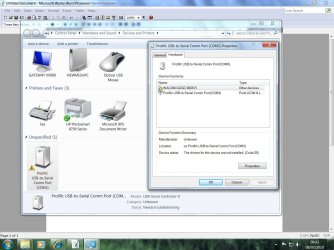
So far I have done all sorts to get the serial port to connect to a USB such that the tablet appears as a device as per attachment.


However, no matter how many times I install the driver from Wacom, the computer continually tells me that the driver cannot be found. I have tried reviewing the security settings of the folder the tablet is installed to, reverting back to windows Vista drivers etc. all to no avail.

Any suggestions would be really appreciated.

I also have an old scanner with a USB connection that no driver is available for Windows 7 for - are there any work arounds that I might use that might get this to connect to Windows 7?


Attachments
  • wacom and windows.jpg
    wacom and windows.jpg
    167.2 KB · Views: 218

My Computer My Computer

OS
Windows 7
Please post your complete system specs and we can help you more that way.


Steve
 

My Computer My Computer

Computer Manufacturer/Model Number
Over Clockers Ultima Viper 2.80Ghz
OS
Windows 7 Ultimate 64 - OEM Service Pack 1
CPU
Intel Core i7 930 2.80Ghz Bloomfield Socket LGA 1366
Motherboard
Gigabyte GA-X58A-UD3R Intel X58 Socket 1366 DDR3
Memory
Patriot Viper 6GB 3x2GB DDR3 PC3-1200C9 1600Mhz Tri Channel
Graphics Card(s)
Asus ATI Radeon HD 5770 CuCore 1024MB GDDR5 PCI Express
Sound Card
Realtek ALC889 @ Intel 82801JB ICH10 - High Definition Audio
Monitor(s) Displays
Samsung SyncMaster 920N 19"
Screen Resolution
1280*1024
Hard Drives
1 x OCZ Vertex2 Series 120GB 2.5" SATA-II SSD
1 x Seagate Barracuda 7200.12 1TB SATA-II 32MB Cache
1 x Western Digital Caviar Green 2TB SATA-II 64 MB Cache
PSU
Corsair TX 650W ATX SLi
Case
Antec 902 Ultimate Gaming Case Black
Cooling
Prolimatech Megahalems Rev B CPU Cooler Socket 775/1156/1366
Keyboard
Microsoft Comfort Curve Keyboard
Mouse
Microsoft Optical USB
Internet Speed
ADSL24 FTTC 34.2 Mbps Down 7.1Mbps Up
Other Info
OcUK 22x DVDSATA ReWriter Black
Akasa AK-FN058 Apache Black Super Silent 120mm Fan
Printer Epson Stylus Photo R300
Scanner Canon Canoscan 8000F
Uninstall all drivers for your tablet. Disconnecting all cords and make sure it disappears from your device manager. Then install these drivers: Wacom Hardware Driver Detail followed by a restart then plug the tablet in and let windows install the drivers. Report back with your findings.
 

My Computer My Computer

Computer Manufacturer/Model Number
Barebones
OS
Windows 7 Home Premium 64bit
CPU
AMD Phenom II X6 1090T Black Edition Thuban 3.2GHz
Motherboard
MSI NF980-G65 AM3 NVIDIA nForce 980a SLI
Memory
G.SKILL Ripjaws Series 8GB (4 x 2GB) DDR3 (PC3 12800)
Graphics Card(s)
SLI GeForce GTX 480 (Fermi) 1536MB 384-bit GDDR5
Sound Card
onboard
Monitor(s) Displays
Toshiba TV 42'' or 27.5'' widescreen monitor
Screen Resolution
1920x1080 60hz
Hard Drives
2x SAMSUNG Spinpoint F3 HD103SJ 1TB 7200 RPM 32MB Cache SATA 3.0Gb/
PSU
Antec TPQ-1200 1200W Continuous Power with PowerCache
Case
COOLER MASTER HAF 932 RC-932-KKN1-GP Black Steel ATX Full To
Cooling
1 x 140mm rear fan, 3x 230mm Fans (front, top, side)
Keyboard
Logitech G15
Mouse
Logitech MX 518
Internet Speed
13 mb/s down 5.5 mb/s up
Other Info
Main system.. other system is slightly different
There are more than a few Intuos models and as stevepressman has posted please fill out your specs a bit more completely including the full model on your Intuos since there are Windows 7 drivers in both 32 and 64 bit, my Wacom Bamboo Fun works splendidly with Windows 7 64 Ultimate.
 

My Computer My Computer

Computer Manufacturer/Model Number
DELL XPS Studio 435T
OS
Vista 64 Ultimate, Windows 7 64 Ultimate, Ubuntu 9.10
CPU
i7 975 3.3 GHz Extreme (Factory OC'd to 3.6 GHz)
Motherboard
DELL provided
Memory
18 Gb Tri-Channel 1066
Graphics Card(s)
ATI 5970 2048 Mb
Sound Card
X-Fi Extreme Gamer
Monitor(s) Displays
Vizio 37" HD-TV
Screen Resolution
1920 x 1080
Hard Drives
1.5 Tb HDD
1.5 Tb HDD
2.0 Tb Network Drive
512 Gb Crucial SSD
PSU
DELL Provided 475 watts
Case
DELL
Cooling
3 fans
Keyboard
Logitech Performance K350 Wireless
Mouse
Logitech Performance MX Wireless
Internet Speed
3 Mb up 750 Kb down
Other Info
Bamboo Fun Tablet, Belkin N+ Wireless router, Pioneer Dolby System Wireless Headphones, Bose 5.1 Dolby Surround Sound System, LifeCam VX 3000 Webcam, Blu-Ray/Hi Def DVD +RW combo and Blu-ray +RW,l 15 in 1 media card reader, Logitech Rumblepad 2, Hauppauge 2250 DTV Tuner with MS Media Center Remote

Laptop:Alienware M17x, Q9100 CPU, 8Gb RAM, 1920x1200 WUXGA LCD driven by 4870's in CrossFireX, Bl
I had similar problems with my wacom tablet. My mistake was not checking the driver version carefully. Follow the advise above and make sure you have the correct driver, it should work brilliantly. One thing that I did note, if the screen is not operating in it's native resolution, that did throw up a few issues.

John
 

My Computer My Computer

OS
Windows 7 (64bit)
CPU
Intel i7 930
Motherboard
AsusP6X58D-E
Memory
12 gig
Graphics Card(s)
Radion HD 5770
Sound Card
On board
Monitor(s) Displays
Iiyama 24in HD Widescreen
Hard Drives
2 X 1Tb Western Digital Caviar Black
PSU
800 w
thanks for your replies

I am a bit new to this but I think the system specs are:

Windows 7 Home Premium
AMD Phenom II x4 945 processor 3.00 Ghz
4GB RAM
64 bit operating system

The USB to serial connector is a Prolific USB-to-Serial Comm Port (COM3)

The tablet is a Wacom Intuous GD 0608 R

Davidxtux - I tried the approach you suggested but have only got back to the same point - the device comes up as per my original post but the driver cannot be found.

I also did a work around in the registry editor based on a work around to get the system to pick up the device as per this link

Windows7 and Intuos Wacom serial tablet - no driver support?

thanks for all your help
 

My Computer My Computer

OS
Windows 7
I have had my Intuos3 working since I got my new Studio1558 laptop and managed to update the driver successfully. I get partial mouse and pen action; what does not work (and would not install) is the software for programming. I contacted Wacom and they said there is no upgrade to the software, even for purchase, for W7. They said buy a new tablet. Well my tablet is still "perfectly" functional. I'm stubborn enough not to spend another $350 just to get new software, but I'm not happy that I can't program the mouse or tablet buttons. Please tell me I don't have to eat crow and buy a new tablet.
 

My Computer My Computer

Computer Manufacturer/Model Number
Dell Studio 1558
OS
Windows 7 64bit
CPU
Intel i5 M430 @ 2.27
Memory
4GB
I read this on another technical forum where the OP there was having the same issues as the OP posting here, this was their solution:

1. Add the following to the registry:
view source
print?

1[HKEY_LOCAL_MACHINE\SOFTWARE\Tablet]
2"PnPTablets"=",COM7"


2.Create a file called tablet.dat containing the below and place it in your system32 folder:
view source
print?

01PrefsFileVersion 4
02DriverOn1Off0 1
03DriverLanguage 0
04LeftHandedMouse 0
05FunkyButtonMode 0
06NoStartWarnings 0
07HowManyTablets 1
08TabletType 0
09TabletModel 203
10CommPort COM2
11TabletOn1Off0 1
12TabletPhysicallyOn 1
13TabletFlags 0
14HowManyTransducers 0
 

My Computer My Computer

Computer Manufacturer/Model Number
DELL XPS Studio 435T
OS
Vista 64 Ultimate, Windows 7 64 Ultimate, Ubuntu 9.10
CPU
i7 975 3.3 GHz Extreme (Factory OC'd to 3.6 GHz)
Motherboard
DELL provided
Memory
18 Gb Tri-Channel 1066
Graphics Card(s)
ATI 5970 2048 Mb
Sound Card
X-Fi Extreme Gamer
Monitor(s) Displays
Vizio 37" HD-TV
Screen Resolution
1920 x 1080
Hard Drives
1.5 Tb HDD
1.5 Tb HDD
2.0 Tb Network Drive
512 Gb Crucial SSD
PSU
DELL Provided 475 watts
Case
DELL
Cooling
3 fans
Keyboard
Logitech Performance K350 Wireless
Mouse
Logitech Performance MX Wireless
Internet Speed
3 Mb up 750 Kb down
Other Info
Bamboo Fun Tablet, Belkin N+ Wireless router, Pioneer Dolby System Wireless Headphones, Bose 5.1 Dolby Surround Sound System, LifeCam VX 3000 Webcam, Blu-Ray/Hi Def DVD +RW combo and Blu-ray +RW,l 15 in 1 media card reader, Logitech Rumblepad 2, Hauppauge 2250 DTV Tuner with MS Media Center Remote

Laptop:Alienware M17x, Q9100 CPU, 8Gb RAM, 1920x1200 WUXGA LCD driven by 4870's in CrossFireX, Bl
Dear All

Thanks for all your helpful advice - I have tried adding the code above etc. My USB to serial converter appears as COM3 so i have edited line 10 of teh code to say COM3. However still to no avail.

I have also manually found a microsoft driver on the system which now gives an error message the device cannot start (code 10). Probably not helpful but at least it makes a change to have a different error!

Any other hints would be much appreciated. Otherwise I will be starting a thread soon about how to revert back to windows XP!
 

My Computer My Computer

OS
Windows 7
I noticed that the Prolific USB-to-serial common port IS showing ! mark which means that the driver for Prolific USB-to-serial common port IS NOT WORKING properly, so the tablet will not transfer it's serial signal through it.
You should better check the driver for Prolific USB-to-serial common port.
Maybe the device manager also show that USB serial port in "port(COM & LPT)" or Universal Serial Bus Controller IS NOT WORKING PROPERLY.

So, first of all, you must fix the driver for Prolific USB-to-serial common port.
Then,
for GD 0608 R, get the driver WacomTablet_612-5.exe.

Shut down PC and hook GD 0608 R with DC power supply up to Prolific USB-to-serial common port .

Now, after power up PC again, right click to change the property of the driver's compatibility to "Windows2000" and run it as Administrator so that the "serial driver" will be installed for your GD 0608 R.
Then reboot your PC again, and try to use tablet pen so that you will find the tablet IS NOW ACTIVE but there is no "WACOM Tablet property"
As for installing "WACOM Tablet property" to adjust pen force, you should re-install the driver with the property of "Windows Vista" compatibility, and reboot PC again.

After the final reboot of your PC, the "WACOM Tablet property" is now available.

You can now use GD 0608 R in Windows 7 64bit through Prolific USB-to-serial common port.

Hope this helps you and other people.
 

My Computer My Computer

Computer type
PC/Desktop
OS
Windows 7 Ultimate x64
Back
Top