Wake On Lan doesn't work

zer0ne

New member
Yes, I know that there are similar threads on this problem but none has the solution for mine.

Basically, I cannot use Remote Desktop to connect to my PC which runs Windows 7 x64 Ultimate when the PC is in sleep mode. The problem didn't exist when I used Win 7 x32 before.

Here's some information that could be helpful for you in detecting the problem.

- My PC is connected to the internet through a wireless router. The IP address is fixed (through TCP/IPv4 property). Note that I can use RD when this PC is on.

- The wireless adapter is Dell Wireless 1505 WLAN mini-card. In the device manager/Power Management, I have all 3 options ("Allow the Computer to turn off this device", "Allow this device to turn the computer", and "Only allow a magic packet") checked. I have tried all combination of these options but none works.
 

My Computer

OS
Windows 7 Ultimate x64
Welcome!

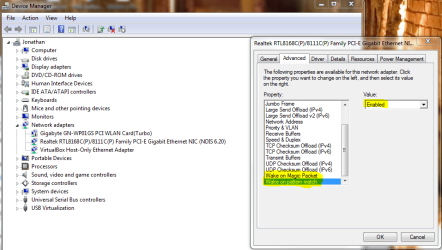
Make sure these settings are also enabled.

Capture.PNG

If you do not have those settings, try looking for a network adapter driver update.
 

My Computer

Computer Manufacturer/Model Number
Custom
OS
Windows 7 Professional x64
CPU
Intel i7 2600K OC'd @ 4620 MHz
Motherboard
Asus P8Z68-V Pro
Memory
16GB GSkill Sniper 2133 Mhz (4x4GB)
Graphics Card(s)
EVGA GeForce GTX 480 SuperClocked+
Sound Card
Realtek High Definition Audio
Monitor(s) Displays
2x Acer S273HLbmii 27"
Screen Resolution
2 x 1920x1080
Hard Drives
64GB Crucial M4 SSD

Storage: Hitachi 1TB 5400RPM, Samsung 1.5TB 5400RPM
PSU
Corsair HW Series 750w (modular)
Case
Cooler Master HAF 932 Advanced Blue Edition
Cooling
CM Hyper 212+ CPU cooler, 3x 230mm + 1x 140mm case fans
Keyboard
Logitech MK320 (wireless)
Mouse
Logitech MK320 (wireless)
Internet Speed
30 Mb/s : 2 Mb/s
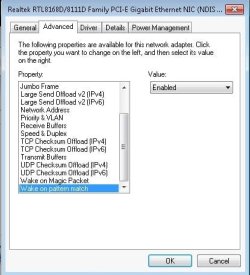
Hmm, I don't see that option in the Advanced tab. I'm currently using the latest driver available.

I don't remember if I had that option when I used Win 7 x86.
 

My Computer

OS
Windows 7 Ultimate x64
Your best bet is to keep looking for drivers. It certainly looks like WoL is not supported by the Windows 7 x64 drivers.
 

My Computer

Computer Manufacturer/Model Number
Custom
OS
Windows 7 Professional x64
CPU
Intel i7 2600K OC'd @ 4620 MHz
Motherboard
Asus P8Z68-V Pro
Memory
16GB GSkill Sniper 2133 Mhz (4x4GB)
Graphics Card(s)
EVGA GeForce GTX 480 SuperClocked+
Sound Card
Realtek High Definition Audio
Monitor(s) Displays
2x Acer S273HLbmii 27"
Screen Resolution
2 x 1920x1080
Hard Drives
64GB Crucial M4 SSD

Storage: Hitachi 1TB 5400RPM, Samsung 1.5TB 5400RPM
PSU
Corsair HW Series 750w (modular)
Case
Cooler Master HAF 932 Advanced Blue Edition
Cooling
CM Hyper 212+ CPU cooler, 3x 230mm + 1x 140mm case fans
Keyboard
Logitech MK320 (wireless)
Mouse
Logitech MK320 (wireless)
Internet Speed
30 Mb/s : 2 Mb/s
I have a computer at home running the win7 x86 32bit, i have enabled the option, but when i put my computer on sleep, i could not WOL.
 

Attachments

  • Untitled.jpg
    Untitled.jpg
    62 KB · Views: 46
  • Untitled1.jpg
    Untitled1.jpg
    61.3 KB · Views: 50
  • Untitled2.jpg
    Untitled2.jpg
    62.3 KB · Views: 42

My Computer

Computer Manufacturer/Model Number
Acer Aspire 4730Z
OS
Windows 7 Ultimate 32-bit
CPU
Intel Pentium @2.00GHz Merom 65nm Technology
Motherboard
Acer Aspire 4730Z (uPGA-478)
Memory
4.0 Dual-Channel DDR2 @ 332MHz 5-5-5-15
Graphics Card(s)
Mobile Intel(R) 4 Series Express Chipset Family
Monitor(s) Displays
Generic PnP Monitor
Screen Resolution
1280x800
Hard Drives
160GB Hitachi
Make sure that the setting is also enabled in your BIOS, if possible.

Also, what WoL client are you using?
 

My Computer

Computer Manufacturer/Model Number
Custom
OS
Windows 7 Professional x64
CPU
Intel i7 2600K OC'd @ 4620 MHz
Motherboard
Asus P8Z68-V Pro
Memory
16GB GSkill Sniper 2133 Mhz (4x4GB)
Graphics Card(s)
EVGA GeForce GTX 480 SuperClocked+
Sound Card
Realtek High Definition Audio
Monitor(s) Displays
2x Acer S273HLbmii 27"
Screen Resolution
2 x 1920x1080
Hard Drives
64GB Crucial M4 SSD

Storage: Hitachi 1TB 5400RPM, Samsung 1.5TB 5400RPM
PSU
Corsair HW Series 750w (modular)
Case
Cooler Master HAF 932 Advanced Blue Edition
Cooling
CM Hyper 212+ CPU cooler, 3x 230mm + 1x 140mm case fans
Keyboard
Logitech MK320 (wireless)
Mouse
Logitech MK320 (wireless)
Internet Speed
30 Mb/s : 2 Mb/s
I am using solarwinds wol. I see...so i suppose i did not turn it on in the Bios then. Just a silly question, is there any other way i could turn it on remotely?
 

My Computer

Computer Manufacturer/Model Number
Acer Aspire 4730Z
OS
Windows 7 Ultimate 32-bit
CPU
Intel Pentium @2.00GHz Merom 65nm Technology
Motherboard
Acer Aspire 4730Z (uPGA-478)
Memory
4.0 Dual-Channel DDR2 @ 332MHz 5-5-5-15
Graphics Card(s)
Mobile Intel(R) 4 Series Express Chipset Family
Monitor(s) Displays
Generic PnP Monitor
Screen Resolution
1280x800
Hard Drives
160GB Hitachi
No way to turn it on remotely...

Try using this WoL client: Depicus

You need your network card's MAC address, your IP address, and keep in mind, the subnet mask needs to be 255.255.255.255.

Be sure to forward whatever port you want to use (I use the default port 7) to your computer in your router.
 

My Computer

Computer Manufacturer/Model Number
Custom
OS
Windows 7 Professional x64
CPU
Intel i7 2600K OC'd @ 4620 MHz
Motherboard
Asus P8Z68-V Pro
Memory
16GB GSkill Sniper 2133 Mhz (4x4GB)
Graphics Card(s)
EVGA GeForce GTX 480 SuperClocked+
Sound Card
Realtek High Definition Audio
Monitor(s) Displays
2x Acer S273HLbmii 27"
Screen Resolution
2 x 1920x1080
Hard Drives
64GB Crucial M4 SSD

Storage: Hitachi 1TB 5400RPM, Samsung 1.5TB 5400RPM
PSU
Corsair HW Series 750w (modular)
Case
Cooler Master HAF 932 Advanced Blue Edition
Cooling
CM Hyper 212+ CPU cooler, 3x 230mm + 1x 140mm case fans
Keyboard
Logitech MK320 (wireless)
Mouse
Logitech MK320 (wireless)
Internet Speed
30 Mb/s : 2 Mb/s
Yes, I know that there are similar threads on this problem but none has the solution for mine.

Basically, I cannot use Remote Desktop to connect to my PC which runs Windows 7 x64 Ultimate when the PC is in sleep mode. The problem didn't exist when I used Win 7 x32 before.

Here's some information that could be helpful for you in detecting the problem.

- My PC is connected to the internet through a wireless router. The IP address is fixed (through TCP/IPv4 property). Note that I can use RD when this PC is on.

- The wireless adapter is Dell Wireless 1505 WLAN mini-card. In the device manager/Power Management, I have all 3 options ("Allow the Computer to turn off this device", "Allow this device to turn the computer", and "Only allow a magic packet") checked. I have tried all combination of these options but none works.

Ok... now... is the PC you are trying to access on a wirless or wired connection?

Wireless devices turn off their radios when the computer goes to sleep... this breaks the connection preventing them from using "Wake on Lan" features, even if they are listed in the adaptors settings.

If the PC is wired... Johnathan is on the right track... but you may also have to enable the Wake on lan features in your computer's bios.
 

My Computer

Computer Manufacturer/Model Number
Homebrew
OS
XP Pro SP3 X86 / Win7 Pro X86
CPU
Amd 64 x2 4200 (2.4ghz)
Motherboard
Asus M2N-MX SE Plus
Memory
Kingston DDR2 800 2gb
Graphics Card(s)
Nvidia GF-8400
Sound Card
Realtek on Motherboard
Monitor(s) Displays
Acer x-193bw
Screen Resolution
1440 x 900
Hard Drives
Western Digital 500g
PSU
350watt In-Win
Case
In-Win
Cooling
Air
Keyboard
yes
Mouse
yes
Internet Speed
5mpbs
Other Info
Also ASRock ION 330 as HTPC (on XP).
Acer Aspire as GP netbook (on XP).
Ok... now... is the PC you are trying to access on a wirless or wired connection?

Wireless devices turn off their radios when the computer goes to sleep... this breaks the connection preventing them from using "Wake on Lan" features, even if they are listed in the adaptors settings.

If the PC is wired... Johnathan is on the right track... but you may also have to enable the Wake on lan features in your computer's bios.
It's wireless connection but well, I was able to WOL before I upgraded to Win 7 x64.
 

My Computer

OS
Windows 7 Ultimate x64
Try looking for a network card driver update. Perhaps your current one is giving you issues.
 

My Computer

Computer Manufacturer/Model Number
Custom
OS
Windows 7 Professional x64
CPU
Intel i7 2600K OC'd @ 4620 MHz
Motherboard
Asus P8Z68-V Pro
Memory
16GB GSkill Sniper 2133 Mhz (4x4GB)
Graphics Card(s)
EVGA GeForce GTX 480 SuperClocked+
Sound Card
Realtek High Definition Audio
Monitor(s) Displays
2x Acer S273HLbmii 27"
Screen Resolution
2 x 1920x1080
Hard Drives
64GB Crucial M4 SSD

Storage: Hitachi 1TB 5400RPM, Samsung 1.5TB 5400RPM
PSU
Corsair HW Series 750w (modular)
Case
Cooler Master HAF 932 Advanced Blue Edition
Cooling
CM Hyper 212+ CPU cooler, 3x 230mm + 1x 140mm case fans
Keyboard
Logitech MK320 (wireless)
Mouse
Logitech MK320 (wireless)
Internet Speed
30 Mb/s : 2 Mb/s
Back
Top