Wake up tools

natri23

New member
Power User
Local time
9:29 PM
Messages
80
Location
Sweden
Which program do you use to wake up your computers from Sleep mode???
 
Last edited by a moderator:

My Computer

Computer Manufacturer/Model Number
Thinkpad T60
OS
Windows 7 build 6956
CPU
Core Duo 2Ghz
Memory
2GB
Graphics Card(s)
ATI Mobility x1400
Monitor(s) Displays
15''
Internet Speed
20 - 100megabyte/s
I would sure love to find out the answer to this question :p
 

My Computer

Computer Manufacturer/Model Number
Custom Build
OS
Windows 7 Build 7048 x64
CPU
Athlon 64 X2 Dual Core 4600+
Motherboard
EMX-AMD750G-PRO
Memory
4 x 1GB Kingston 400MHz 6-6-6-18 (800MHz)
Graphics Card(s)
ATI Radeon 3650
Sound Card
Realtek HD Audio
Monitor(s) Displays
22" AOC 2216Vw
Screen Resolution
1680x1050
Cooling
Arctic Cooling Freezer 64 Pro PWM
Keyboard
Generic Enhanced Natural Keyboard
Mouse
Logitech VX Nano
Other Info
Edifier M1550
The program you use is to not use sleep mode. :p
 

My Computer

Computer type
PC/Desktop
Computer Manufacturer/Model Number
Airbot 2.0
OS
Windows 7 Ultimate x64 SP1
CPU
Core i7 920 (D0) @ 4Ghz, *26c idle *65c full load on air
Motherboard
Asus P6X58D Premium - Sata 6Gb/s - USB 3.0
Memory
12GB DDR3 Corsair Dominator -CMD12GX3M6A1600C8 at 1600MHz
Graphics Card(s)
Zotac Geforce GTX 770
Sound Card
ASUS Xonar D2X
Monitor(s) Displays
1 LG 24" Flatron W2453V-PF 1 Samsung 24" P2450H both 2ms RT
Screen Resolution
1920x1080@60hz
Hard Drives
1 Samsung 250GB 840 Evo SSD
1 OCZ Vertex2 180GB SSD
1 TB Samsung Spinpoint F1 7200RPM 32MB cache
2 500GB WD Caviar Blacks 7200RPM 32MB cache (WD5001AALS)

Pioneer DVD Burner DVR-S18M
PSU
Corsair HX1000W
Case
Cooler Master HAF 932
Cooling
Case Fans *3 230mm, *1 140mm/CPU - *Tuniq Tower 120 Extreme
Keyboard
Logitech Wireless MK700
Mouse
Logitech Wireless MK700
Internet Speed
DL 15 Mbps UL 0.98 Mbps
Antivirus
None
Browser
Firefox Nightly
Other Info
Processor-7.7 *RAM- 7.9 *Graphics-7.9 *Gaming Graphics- 7.9 *SSD- 7.8 W.E.I final score= 7.7
*Phone- LG Nexus 5
I would sure love to find out the answer to this question :p

I apologize for the above post. I meant no harm. I just find the question a bit odd.

Oh, well, since you asked, I use the keyboard and mouse as my primary tool to wake up my computer from sleep. (The regulars would probably be laughing now at this. I swear! I meant no harm.)

If you wanted to wake your computer up automatically at specified intervals, that's a different story. I've used BIOS settings to automatically wake up the computer.

Hope I'm in the ball park in answering your question ;)
 

My Computer

Computer Manufacturer/Model Number
Custom Build
OS
Windows 7 Build 7048 x64
CPU
Athlon 64 X2 Dual Core 4600+
Motherboard
EMX-AMD750G-PRO
Memory
4 x 1GB Kingston 400MHz 6-6-6-18 (800MHz)
Graphics Card(s)
ATI Radeon 3650
Sound Card
Realtek HD Audio
Monitor(s) Displays
22" AOC 2216Vw
Screen Resolution
1680x1050
Cooling
Arctic Cooling Freezer 64 Pro PWM
Keyboard
Generic Enhanced Natural Keyboard
Mouse
Logitech VX Nano
Other Info
Edifier M1550
Which program do you use to wake up your computers from Sleep mode???

Ok. Seriously.

Here's a free software that wakes up the computer for you at specified intervals, WakeUpOnStandBy by Dennis Babkin.

The features are pretty impressive if I might add.

Cheers ;)
 

My Computer

Computer Manufacturer/Model Number
Custom Build
OS
Windows 7 Build 7048 x64
CPU
Athlon 64 X2 Dual Core 4600+
Motherboard
EMX-AMD750G-PRO
Memory
4 x 1GB Kingston 400MHz 6-6-6-18 (800MHz)
Graphics Card(s)
ATI Radeon 3650
Sound Card
Realtek HD Audio
Monitor(s) Displays
22" AOC 2216Vw
Screen Resolution
1680x1050
Cooling
Arctic Cooling Freezer 64 Pro PWM
Keyboard
Generic Enhanced Natural Keyboard
Mouse
Logitech VX Nano
Other Info
Edifier M1550
@NosferatuX: I did try Task Schedule and the WakeUpOnStandBy but didnt get any results...My PC is still sleeping...
 

My Computer

Computer Manufacturer/Model Number
Thinkpad T60
OS
Windows 7 build 6956
CPU
Core Duo 2Ghz
Memory
2GB
Graphics Card(s)
ATI Mobility x1400
Monitor(s) Displays
15''
Internet Speed
20 - 100megabyte/s
natri23,

Is it that your computer is going into sleep mode and you don't want it to? Or that you want to use sleep mode and it won't wake up like it should?
 

My Computer

Computer type
PC/Desktop
Computer Manufacturer/Model Number
Airbot 2.0
OS
Windows 7 Ultimate x64 SP1
CPU
Core i7 920 (D0) @ 4Ghz, *26c idle *65c full load on air
Motherboard
Asus P6X58D Premium - Sata 6Gb/s - USB 3.0
Memory
12GB DDR3 Corsair Dominator -CMD12GX3M6A1600C8 at 1600MHz
Graphics Card(s)
Zotac Geforce GTX 770
Sound Card
ASUS Xonar D2X
Monitor(s) Displays
1 LG 24" Flatron W2453V-PF 1 Samsung 24" P2450H both 2ms RT
Screen Resolution
1920x1080@60hz
Hard Drives
1 Samsung 250GB 840 Evo SSD
1 OCZ Vertex2 180GB SSD
1 TB Samsung Spinpoint F1 7200RPM 32MB cache
2 500GB WD Caviar Blacks 7200RPM 32MB cache (WD5001AALS)

Pioneer DVD Burner DVR-S18M
PSU
Corsair HX1000W
Case
Cooler Master HAF 932
Cooling
Case Fans *3 230mm, *1 140mm/CPU - *Tuniq Tower 120 Extreme
Keyboard
Logitech Wireless MK700
Mouse
Logitech Wireless MK700
Internet Speed
DL 15 Mbps UL 0.98 Mbps
Antivirus
None
Browser
Firefox Nightly
Other Info
Processor-7.7 *RAM- 7.9 *Graphics-7.9 *Gaming Graphics- 7.9 *SSD- 7.8 W.E.I final score= 7.7
*Phone- LG Nexus 5
No no...I want to wake it up in a specific time like 7AM to run some alarm music
 

My Computer

Computer Manufacturer/Model Number
Thinkpad T60
OS
Windows 7 build 6956
CPU
Core Duo 2Ghz
Memory
2GB
Graphics Card(s)
ATI Mobility x1400
Monitor(s) Displays
15''
Internet Speed
20 - 100megabyte/s
No no...I want to wake it up in a specific time like 7AM to run some alarm music

hello natri

your hardware has to have to support for wake on event....

if there is one it can be in the BIOS (i have this is my intel server i can specify what time of the day it can wake up...)

but it seem you want more than that...
it looks to me that you want to wake on event which means that when a certain trigger (i.e time) it triggers the event (i.e the comp turns on and makes a noise...:p)
if task scheduler wasnt able to start it up then i believe your computer dosent support wake on events....:(

i can be wrong of course this isnt set in stone
but this leads to believe that your comp does not support it...
 

My Computer

Computer Manufacturer/Model Number
Tx2500z Tablet Pc/Homemade Server
OS
Windows 7 Ult x64(x2), HomePrem x32(x4), Server 08 (+VM), 08 R2 (VM) , SuSe 11.2 (VM), XP 32 (VM)
CPU
Turion X2 ultra (oh well came with laptop)/P4 @3.2 (yes P4)
Motherboard
IDK HP Motherboard / Intel DG965SS
Memory
OCZ Dual Channel 4GB kit/ 1gb Dual Channel
Graphics Card(s)
HD 3200 graphics /GMA x3100 (yay for intergrated!!)
Sound Card
Realtek HD Audio(mic working, well sort of)/Siig IC-70012
Monitor(s) Displays
built-in Hp 12" laptop screen/ Acer 19"
Screen Resolution
1280x800 /1440x900
Cooling
All Air Cooled
Mouse
Logi MX Rev. /MS Wheel Optical 1.1A /Logitech Optical Mouse
Internet Speed
College baby but its still routed through vpn to 1536k...
Other Info
love my wacom pen and pressure sensitivity...
wished it worked in 7, SUSE for that matter though
Thank you darkassain, I just want my comp to wake up and other programs like the task scheduler will do the rest (play the music) Since my comp is a laptop (Thinkpad T60) and I cant find any kind of options in the BIOS then your comment might be true.
 

My Computer

Computer Manufacturer/Model Number
Thinkpad T60
OS
Windows 7 build 6956
CPU
Core Duo 2Ghz
Memory
2GB
Graphics Card(s)
ATI Mobility x1400
Monitor(s) Displays
15''
Internet Speed
20 - 100megabyte/s
Please update your drivers and software from here, its a direct link to your computer's download page.

Most notable to check is your BIOS and ACPI updates that could address why you're laptop is stuck in dreamland ;) I've also dug in your models functionality and it does not support any wake on BIOS settings. So your best bet would be to update the BIOS and ACPI in the hopes that WakeOnStandBy will be able to utilize this and wakes your computer from within Windows.

Let us know how this turns out for yah ;)
 

My Computer

Computer Manufacturer/Model Number
Custom Build
OS
Windows 7 Build 7048 x64
CPU
Athlon 64 X2 Dual Core 4600+
Motherboard
EMX-AMD750G-PRO
Memory
4 x 1GB Kingston 400MHz 6-6-6-18 (800MHz)
Graphics Card(s)
ATI Radeon 3650
Sound Card
Realtek HD Audio
Monitor(s) Displays
22" AOC 2216Vw
Screen Resolution
1680x1050
Cooling
Arctic Cooling Freezer 64 Pro PWM
Keyboard
Generic Enhanced Natural Keyboard
Mouse
Logitech VX Nano
Other Info
Edifier M1550
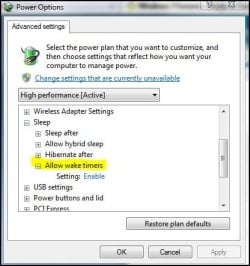
And you might want to check to see if you have this setting and enable it.

wake timers.JPG
 
Last edited:

My Computer

Computer type
PC/Desktop
Computer Manufacturer/Model Number
Airbot 2.0
OS
Windows 7 Ultimate x64 SP1
CPU
Core i7 920 (D0) @ 4Ghz, *26c idle *65c full load on air
Motherboard
Asus P6X58D Premium - Sata 6Gb/s - USB 3.0
Memory
12GB DDR3 Corsair Dominator -CMD12GX3M6A1600C8 at 1600MHz
Graphics Card(s)
Zotac Geforce GTX 770
Sound Card
ASUS Xonar D2X
Monitor(s) Displays
1 LG 24" Flatron W2453V-PF 1 Samsung 24" P2450H both 2ms RT
Screen Resolution
1920x1080@60hz
Hard Drives
1 Samsung 250GB 840 Evo SSD
1 OCZ Vertex2 180GB SSD
1 TB Samsung Spinpoint F1 7200RPM 32MB cache
2 500GB WD Caviar Blacks 7200RPM 32MB cache (WD5001AALS)

Pioneer DVD Burner DVR-S18M
PSU
Corsair HX1000W
Case
Cooler Master HAF 932
Cooling
Case Fans *3 230mm, *1 140mm/CPU - *Tuniq Tower 120 Extreme
Keyboard
Logitech Wireless MK700
Mouse
Logitech Wireless MK700
Internet Speed
DL 15 Mbps UL 0.98 Mbps
Antivirus
None
Browser
Firefox Nightly
Other Info
Processor-7.7 *RAM- 7.9 *Graphics-7.9 *Gaming Graphics- 7.9 *SSD- 7.8 W.E.I final score= 7.7
*Phone- LG Nexus 5
@Airbot: This is exactly what I need...Thank you very much, now my comp can Wake up with any programs
 

My Computer

Computer Manufacturer/Model Number
Thinkpad T60
OS
Windows 7 build 6956
CPU
Core Duo 2Ghz
Memory
2GB
Graphics Card(s)
ATI Mobility x1400
Monitor(s) Displays
15''
Internet Speed
20 - 100megabyte/s
Glad we could help natri23. ;)
 

My Computer

Computer type
PC/Desktop
Computer Manufacturer/Model Number
Airbot 2.0
OS
Windows 7 Ultimate x64 SP1
CPU
Core i7 920 (D0) @ 4Ghz, *26c idle *65c full load on air
Motherboard
Asus P6X58D Premium - Sata 6Gb/s - USB 3.0
Memory
12GB DDR3 Corsair Dominator -CMD12GX3M6A1600C8 at 1600MHz
Graphics Card(s)
Zotac Geforce GTX 770
Sound Card
ASUS Xonar D2X
Monitor(s) Displays
1 LG 24" Flatron W2453V-PF 1 Samsung 24" P2450H both 2ms RT
Screen Resolution
1920x1080@60hz
Hard Drives
1 Samsung 250GB 840 Evo SSD
1 OCZ Vertex2 180GB SSD
1 TB Samsung Spinpoint F1 7200RPM 32MB cache
2 500GB WD Caviar Blacks 7200RPM 32MB cache (WD5001AALS)

Pioneer DVD Burner DVR-S18M
PSU
Corsair HX1000W
Case
Cooler Master HAF 932
Cooling
Case Fans *3 230mm, *1 140mm/CPU - *Tuniq Tower 120 Extreme
Keyboard
Logitech Wireless MK700
Mouse
Logitech Wireless MK700
Internet Speed
DL 15 Mbps UL 0.98 Mbps
Antivirus
None
Browser
Firefox Nightly
Other Info
Processor-7.7 *RAM- 7.9 *Graphics-7.9 *Gaming Graphics- 7.9 *SSD- 7.8 W.E.I final score= 7.7
*Phone- LG Nexus 5
Back
Top