waking from suspend for unknown reason

feh

New member
Local time
1:39 AM
Messages
13
Hi folks.

I'm using Win7 exclusively for its media center capabilities. As such, the machine is usually sleeping.

When I leave for work in the morning, the machine is suspended (S3), but when I come home in late afternoon, it has resumed and is running at full power.

Anybody know why this would happen? How can I determine what's causing this?

Thanks!
 

My Computer

OS
Windows 7 RC 7100
CPU
AMD Athlon 5200
Motherboard
ASUS M3N78-VM
Memory
2 GB
Graphics Card(s)
onboard Nvidia GeForce 8200
Monitor(s) Displays
HDTV
Hello Feh,

The items listed in the tutorial below may be able to help you determine what is waking up your computer. A usual cause of this is the "Allow to Wake computer" option checked for the Network Adapted (STEP SIX), or the Multimedia settings -> When sharing media is not set to "Allow the computer to sleep" (STEP TWO).

Power Options and Sleep Mode Problems - Vista Forums

Hope this helps,
Shawn
 

My Computer

Computer type
PC/Desktop
Computer Manufacturer/Model Number
Self built custom
OS
64-bit Windows 11 Pro for Workstations
CPU
Intel i7-8700K OC'd to 5 GHz
Motherboard
ASUS ROG Maximus XI Formula Z390
Memory
64 GB (4x16GB) G.SKILL TridentZ RGB DDR4 3600 MHz
Graphics Card(s)
ASUS ROG-STRIX-GTX1080TI-O11G-GAMING
Sound Card
Integrated
Monitor(s) Displays
2 x Samsung Odyssey G7 27"
Screen Resolution
2560x1440
Hard Drives
1TB Samsung 990 PRO M.2,
4TB Samsung 990 PRO PRO M.2,
TerraMaster F8 SSD Plus NAS
PSU
Seasonic Prime Titanium 850W
Case
Thermaltake Core P3
Cooling
Corsair Hydro H115i
Keyboard
Logitech wireless K800
Mouse
Logitech MX Master 4
Internet Speed
2 Gb/s Download and 100 Mb/s Upload
Antivirus
Malwarebyte Anti-Malware Premium
Browser
Google Chrome
Other Info
Logitech Z625 speaker system,
Logitech BRIO 4K Pro webcam,
HP Color LaserJet Pro MFP M477fdn,
APC SMART-UPS RT 1000 XL - SURT1000XLI,
Galaxy S23 Plus phone
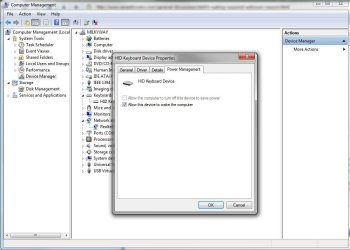
If what Shawn suggested about the Media sharing doesn't work, some easy things to look at are the drivers for the NIC, KB, and Mouse in the device manager. You can unceck the power management options safely and see if that helps.
 

Attachments

  • NIC.JPG
    NIC.JPG
    82.2 KB · Views: 230
  • KB.JPG
    KB.JPG
    72.8 KB · Views: 363

My Computer

Computer Manufacturer/Model Number
Built Myself
OS
Windows 7 7600.16384 x64
CPU
Intel Core i7 OC'd to 3.20 GHz
Motherboard
Gigabyte
Memory
6GB GSkillz Triple Channel DDR3 OC'd to 1600 MHz
Graphics Card(s)
Nvidia GTX 280
Sound Card
X-Fi Platinum
Monitor(s) Displays
Dual 2001FWP
Screen Resolution
1680x1050 x 2
Hard Drives
System - Dual 150GB Raptors Raid0
Doc Storage - 1TB SATA 32MB cache Samsung
TV Recordings - 1TB SATA 32MB cache Samsung
PSU
Gigawatt Antec
Case
Antec 900
Keyboard
Saitek
Mouse
logitech MX 10000
Internet Speed
30 mb/s
Thanks for the replies.

I've already verified the NIC is not allowed to wake the machine. I'm using a wireless keyboard/mouse, and I'd like the kb to wake the machine on a key press.

I've used the same kb/mouse w/ a Vista machine, and it didn't wake up like this, so I doubt that's the problem.

When I get home, I'll go through the doc previously posted.
 

My Computer

OS
Windows 7 RC 7100
CPU
AMD Athlon 5200
Motherboard
ASUS M3N78-VM
Memory
2 GB
Graphics Card(s)
onboard Nvidia GeForce 8200
Monitor(s) Displays
HDTV
Have you checked what woke the computer yet using the below command?

Code:
powercfg -LASTWAKE

Here is an example output

G:\Users\mikinho>powercfg -LASTWAKE
Wake History Count - 1
Wake History [0]
Wake Source Count - 1
Wake Source [0]
Type: Device
Instance Path: USB\VID_05AC&PID_020B\6&2a3dde78&0&3
Friendly Name:
Description: USB Composite Device
Manufacturer: (Standard USB Host Controller)
 

My Computer

Computer Manufacturer/Model Number
My HTPC
OS
6x W2K8 R2 (x64), 6x W7 7600 (x64), 2x Gentoo (x64), 1x Ubuntu 9.04 (x64), 1x pfSense (FreeBSD)
CPU
Core2 Duo E8400 3.0Ghz
Motherboard
ASUS P5E-VM
Memory
Corsair DDR-800 4GB RAM
Graphics Card(s)
EVGA NVidia GeForce GT240
Screen Resolution
1080p
Hard Drives
OCZ Vertex 60GB (C:\D: System\Apps)
WD 1TB x1 (G: Temp\Recorded TV)
WD 2TB x8 (On Server)
PSU
Corsair HX520w
Case
Antec Fusion Max
Cooling
Passive Thermalright HR-1 CPU Heatsink w/ Nexus Fan
Have you checked what woke the computer yet using the below command?

Code:
powercfg -LASTWAKE
Here is an example output

Nope. That's the first thing I'll do tonight.
 

My Computer

OS
Windows 7 RC 7100
CPU
AMD Athlon 5200
Motherboard
ASUS M3N78-VM
Memory
2 GB
Graphics Card(s)
onboard Nvidia GeForce 8200
Monitor(s) Displays
HDTV
Do you have a cat? My cat used to wake my PC via Space Bar all the time. RIP Baby Mama.
 

My Computer

Computer Manufacturer/Model Number
Built Myself
OS
Windows 7 7600.16384 x64
CPU
Intel Core i7 OC'd to 3.20 GHz
Motherboard
Gigabyte
Memory
6GB GSkillz Triple Channel DDR3 OC'd to 1600 MHz
Graphics Card(s)
Nvidia GTX 280
Sound Card
X-Fi Platinum
Monitor(s) Displays
Dual 2001FWP
Screen Resolution
1680x1050 x 2
Hard Drives
System - Dual 150GB Raptors Raid0
Doc Storage - 1TB SATA 32MB cache Samsung
TV Recordings - 1TB SATA 32MB cache Samsung
PSU
Gigawatt Antec
Case
Antec 900
Keyboard
Saitek
Mouse
logitech MX 10000
Internet Speed
30 mb/s
btw, the command to show all devices that can wake the system is:

POWERCFG -DEVICEQUERY wake_from_any

For wake from S3 use

POWERCFG -DEVICEQUERY wake_from_S3_supported

Hope it helps
 

My Computer

Computer Manufacturer/Model Number
My HTPC
OS
6x W2K8 R2 (x64), 6x W7 7600 (x64), 2x Gentoo (x64), 1x Ubuntu 9.04 (x64), 1x pfSense (FreeBSD)
CPU
Core2 Duo E8400 3.0Ghz
Motherboard
ASUS P5E-VM
Memory
Corsair DDR-800 4GB RAM
Graphics Card(s)
EVGA NVidia GeForce GT240
Screen Resolution
1080p
Hard Drives
OCZ Vertex 60GB (C:\D: System\Apps)
WD 1TB x1 (G: Temp\Recorded TV)
WD 2TB x8 (On Server)
PSU
Corsair HX520w
Case
Antec Fusion Max
Cooling
Passive Thermalright HR-1 CPU Heatsink w/ Nexus Fan

My Computer

Computer Manufacturer/Model Number
Self built PC
OS
Windows 7 x64 RTM
CPU
AMD Phenom II X4 965 Black Edition
Motherboard
MSI 790FX-GD70
Memory
OCZ Gold (3 x 2GB)
Graphics Card(s)
Powercolor AX 5970 2GB
Sound Card
Auzen XFi Prelude 7.1
Monitor(s) Displays
Asus VK191T 19"
Screen Resolution
1440x900 75HZ
Hard Drives
2x 1TB WD Black SATA
PSU
HEC XP1080 1080W
Case
Old but reliable Chieftec
Cooling
6 fans
Keyboard
Logitech EX100 Keyboard
Mouse
Logitech EX100 Mouse
Internet Speed
Crappy DSL connection :P
Other Info
www.tipidpc.com
powercfg -wake_armed

after that disarm all devices listed, usually its mouse and keyboard

powercfg -DEVICEDISABLEWAKE devicename

personally i soldered a extension wire to the powerbutton on the motherboard and put a little pushbutton on my desk.

I've set powerbutton to Sleep. So when i leave my desk i push the button, after i return i push it again.
 

My Computer

Computer Manufacturer/Model Number
me and myself
OS
vista x64/ win 7 x64
CPU
phenom 9950 BE
Motherboard
ASUS M2A-VM HDMI
Memory
8 gb
Graphics Card(s)
nvidia gts 250
Sound Card
realtek HD onboard
Monitor(s) Displays
dual hd 19" tft
Screen Resolution
1440x900
Hard Drives
2 x 500 gb WDC
1 x 500 gb Seagate
1 x 1000 gb Seagate
1 80 gb raptor
1 usb 160 gb
Cooling
standard issue
Keyboard
logitech g11
Mouse
usb wireless MS laser 6000
Internet Speed
18 mb (according to my provider :)
It turns out that the program mcupdate_scheduled is what's waking the machine. Is that the process that downloads the program guide, or something else?

I would think the machine would resuming sleeping after that task, but apparently not. Anybody know what I need to configure to get the machine to sleep after that task completes?

Thanks.
 

My Computer

OS
Windows 7 RC 7100
CPU
AMD Athlon 5200
Motherboard
ASUS M3N78-VM
Memory
2 GB
Graphics Card(s)
onboard Nvidia GeForce 8200
Monitor(s) Displays
HDTV
It turns out that the program mcupdate_scheduled is what's waking the machine. Is that the process that downloads the program guide, or something else?

I would think the machine would resuming sleeping after that task, but apparently not. Anybody know what I need to configure to get the machine to sleep after that task completes?

Thanks.

change the schedule of the updater to update during a time you usually use the computer.
or you can set a task in taskscheduler. Set it to force sleep at a certain hour.
 

My Computer

Computer Manufacturer/Model Number
me and myself
OS
vista x64/ win 7 x64
CPU
phenom 9950 BE
Motherboard
ASUS M2A-VM HDMI
Memory
8 gb
Graphics Card(s)
nvidia gts 250
Sound Card
realtek HD onboard
Monitor(s) Displays
dual hd 19" tft
Screen Resolution
1440x900
Hard Drives
2 x 500 gb WDC
1 x 500 gb Seagate
1 x 1000 gb Seagate
1 80 gb raptor
1 usb 160 gb
Cooling
standard issue
Keyboard
logitech g11
Mouse
usb wireless MS laser 6000
Internet Speed
18 mb (according to my provider :)
Last thing to check, and probably the least, is see if your BIOS is set to wake at an alarm time. This is probably not it, but wanted to throw it out there. Just something to check.
 

My Computer

Computer Manufacturer/Model Number
Built Myself
OS
Windows 7 7600.16384 x64
CPU
Intel Core i7 OC'd to 3.20 GHz
Motherboard
Gigabyte
Memory
6GB GSkillz Triple Channel DDR3 OC'd to 1600 MHz
Graphics Card(s)
Nvidia GTX 280
Sound Card
X-Fi Platinum
Monitor(s) Displays
Dual 2001FWP
Screen Resolution
1680x1050 x 2
Hard Drives
System - Dual 150GB Raptors Raid0
Doc Storage - 1TB SATA 32MB cache Samsung
TV Recordings - 1TB SATA 32MB cache Samsung
PSU
Gigawatt Antec
Case
Antec 900
Keyboard
Saitek
Mouse
logitech MX 10000
Internet Speed
30 mb/s
change the schedule of the updater to update during a time you usually use the computer.
or you can set a task in taskscheduler. Set it to force sleep at a certain hour.

Yeah, I can do that, as a workaround.

But, this seems to be a bug. The machine should go back to sleep after updating the schedule (if that's what it's doing).

Is this a MS-sponsored board? Are there MS engineers reading this? If so - please fix this.
 

My Computer

OS
Windows 7 RC 7100
CPU
AMD Athlon 5200
Motherboard
ASUS M3N78-VM
Memory
2 GB
Graphics Card(s)
onboard Nvidia GeForce 8200
Monitor(s) Displays
HDTV
It's an issue since way back. it seems it's too much work to really fix and is not high on the annoyance list.
I have a lot of tasks which close other tasks and put the computer back to sleep. When i do the computer cleaning at nite. If not my wife wakes up, and just pulls the plug :sleepy:
 

My Computer

Computer Manufacturer/Model Number
me and myself
OS
vista x64/ win 7 x64
CPU
phenom 9950 BE
Motherboard
ASUS M2A-VM HDMI
Memory
8 gb
Graphics Card(s)
nvidia gts 250
Sound Card
realtek HD onboard
Monitor(s) Displays
dual hd 19" tft
Screen Resolution
1440x900
Hard Drives
2 x 500 gb WDC
1 x 500 gb Seagate
1 x 1000 gb Seagate
1 80 gb raptor
1 usb 160 gb
Cooling
standard issue
Keyboard
logitech g11
Mouse
usb wireless MS laser 6000
Internet Speed
18 mb (according to my provider :)
It turns out that the program mcupdate_scheduled is what's waking the machine. Is that the process that downloads the program guide, or something else?

I would think the machine would resuming sleeping after that task, but apparently not. Anybody know what I need to configure to get the machine to sleep after that task completes?

Thanks.


This is for the ehome service right? For media center? I have media center setup on my TV, main PC, and home theater. My sleeps fine on all 3 of my machines. If you do not use the Media Center service you can always stop it from starting, but it should be sleeping after it updates. If you do use the media center, maybe check the box to "run optimizations" in the media center options, forcing it to refresh it's services at a specific time?

What you have going on is not normal, nor have I ever experienced it on Windows Media Center 2005, Vista, Or Windows 7, and that is how I have been watching TV since. My machine has never woken up to update, only to record, then if it saw it had a network connection it would update.
 

My Computer

Computer Manufacturer/Model Number
Built Myself
OS
Windows 7 7600.16384 x64
CPU
Intel Core i7 OC'd to 3.20 GHz
Motherboard
Gigabyte
Memory
6GB GSkillz Triple Channel DDR3 OC'd to 1600 MHz
Graphics Card(s)
Nvidia GTX 280
Sound Card
X-Fi Platinum
Monitor(s) Displays
Dual 2001FWP
Screen Resolution
1680x1050 x 2
Hard Drives
System - Dual 150GB Raptors Raid0
Doc Storage - 1TB SATA 32MB cache Samsung
TV Recordings - 1TB SATA 32MB cache Samsung
PSU
Gigawatt Antec
Case
Antec 900
Keyboard
Saitek
Mouse
logitech MX 10000
Internet Speed
30 mb/s
Back
Top