Wallpaper quality

wegtet

New member
Local time
10:31 AM
Messages
29
I realized today, when I cleaned up all the crap on my desktop, that my wallpaper was filled with jpeg-like artifacts. Funny, considering the source file is practically flawless and a png. I tested fill, fit, and stretch by pasting a screencap into Photoshop. All 3 are identical in quality (or lack thereof). I also tried saving the source file as a bmp, because maybe Windows can't handle PNG directly? No dice - just as artifacted.

How do I fix this? I want the images scaled, but without the artifacting. The source files I'm using are bigger than my desktop's resolution, btw.
 

My Computer

Computer type
PC/Desktop
Hello dondon, I have done a lot of testing with this issue, Windows 7, I know for a fact re-samples images when you right click an image and choose 'set as desktop background' even if its already a jpeg Windows 7 re-samples it and the image quality is bad.

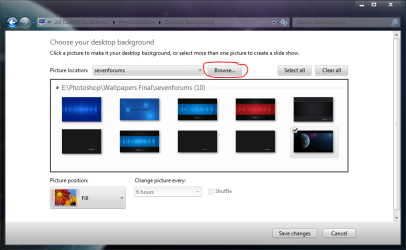
The best I have come up with is to put the images in a folder and use that folder go to Control Panel\All Control Panel Items\Personalization\Desktop Background and where it says picture location click browse and choose your folder you made.

The best image Quality I get is when saving files in Photoshop as jpegs then moving to your new folder.

Try it!! you will see the image quality is better right away!!
 

My Computer

Computer type
PC/Desktop
Computer Manufacturer/Model Number
Self Build
OS
MS Windows 7 Professional 64-bit SP1
CPU
AMD FX(tm)-6100 Six-Core Processor Socket AM3+ (942)
Motherboard
ASUSTeK COMPUTER INC. SABERTOOTH 990FX (AM3r2)
Memory
8.00 GB Dual-Channel DDR3 @ 802MHz (11-11-11-36) 1.5Volts
Graphics Card(s)
NVIDIA GeForce GTX 560 Ti
Sound Card
Onboard Realtek HD
Monitor(s) Displays
shimian (1920x1080@60Hz)
Screen Resolution
1920*1080
Hard Drives
OCZ-AGIL ITY3 SATA Disk Device 120GB
PSU
Corsair TX 750
Case
Corsair
Cooling
WaterCooled
Keyboard
Microsoft Wired
Mouse
Logitech USB Optical TiltWheel Mouse
Internet Speed
Realtek PCIe GBE Family Controller 20MB*1MB
Antivirus
Avast
Browser
Firefox
Other Info
150GB Internal Hard Drive for Backing Up Important Files -
Hauppauge Nova-DT Dual DVB-T Tuner Device (+IR) -
USB PC Camera with Mic (SN9C105)
Hello Anthony, and thank you for your reply.

I have the wallpaper(s) I am using saved locally. I selected it from the Desktop Background window. I tried multiple wallpapers and they all suffer noticeable quality losses when used as a background.

I tried saving it as a jpeg so I could maximize the image quality (disabled color resampling, 100 quality level; I used IrfanView because it has finer control than photoshop). Unfortunately the quality was no better than what Windows does when you give it a non-jpeg background to use.

I guess what I am asking is if I can make Windows display background images in their native format (png, for example), rather than converting to a jpeg.
 

My Computer

Computer type
PC/Desktop
How about opening them with paint then in paint save it as png?
I have had several backgrounds (jpeg) that I opened them in paint and saved it as png and worked fine for me.
 

My Computer

Computer Manufacturer/Model Number
HP M9077c
OS
Windows 7 Home Premium 64bit
CPU
Intel(R)Core(TM)2 quad [email protected] 2.39GHz
Motherboard
ASUSeK
Memory
6GB DDR2 6400
Graphics Card(s)
GeForce 8500/512MB
Sound Card
Realtek High Def Audio
Monitor(s) Displays
HP w2408 LCD 24" widescreen
Screen Resolution
1920x1200
Cooling
6 pack of Bud
Keyboard
MS wireless Inteli
Mouse
MS wireless Inteli
They're already in png.
 

My Computer

Computer type
PC/Desktop
Sorry I missed that as I was watching the football game at the same time.:o
 

My Computer

Computer Manufacturer/Model Number
HP M9077c
OS
Windows 7 Home Premium 64bit
CPU
Intel(R)Core(TM)2 quad [email protected] 2.39GHz
Motherboard
ASUSeK
Memory
6GB DDR2 6400
Graphics Card(s)
GeForce 8500/512MB
Sound Card
Realtek High Def Audio
Monitor(s) Displays
HP w2408 LCD 24" widescreen
Screen Resolution
1920x1200
Cooling
6 pack of Bud
Keyboard
MS wireless Inteli
Mouse
MS wireless Inteli
I personally use Irfanview to set my wallpaper.

Irfanview

(also look at the available plugins on the left column)

Open Irfanview. In menu at top choose Options, then Set As Wallpaper (I then use centered).

A Guy
 

My Computer

Computer type
PC/Desktop
OS
Windows 10 Home x64
CPU
INTEL Core i5-750 Quad-Core 3.37GHz
Motherboard
ASUS P7P55D
Memory
HyperX Fury Black Series 8GB (2 x 4GB) 1866Mhz
Graphics Card(s)
EVGA GeForce GTX 750 Superclocked 1GB 128-Bit GDDR5
Monitor(s) Displays
LG 32MA68HY 32" IPS
Screen Resolution
1920 x 1080
Hard Drives
Samsung 840 Evo 120GB, SEAGATE 500GB Barracuda® 7200.12, SATA 3 Gb/s, 7200 RPM, 16MB cache
PSU
ANTEC TruePower New TP-550, 80 PLUS, 550W
Case
ANTEC Three Hundred Illusion
Cooling
COOLER MASTER Hyper 212 Plus, 4 x 120mm 1 x 140mm Noctua's
Internet Speed
85 + Mbps
Antivirus
Avast
Browser
Vivaldi
Hello Anthony, and thank you for your reply.

I have the wallpaper(s) I am using saved locally. I selected it from the Desktop Background window. I tried multiple wallpapers and they all suffer noticeable quality losses when used as a background.

I tried saving it as a jpeg so I could maximize the image quality (disabled color resampling, 100 quality level; I used IrfanView because it has finer control than photoshop). Unfortunately the quality was no better than what Windows does when you give it a non-jpeg background to use.

I guess what I am asking is if I can make Windows display background images in their native format (png, for example), rather than converting to a jpeg.

I think you misunderstood what I was saying.

Put your images in a folder on your desktop, can be any format jpeg bmp png etc...

Now right click desktop / personalize / click desktop background...
At the top click browse, when it pops up with browse for folder, find the one on your desk top that you created.

Now your images will show on your desktop without Windows converting them to jpeg!! (original file format)

If you still have problems after doing this, then something else is amiss!!
 

Attachments

  • wallpaper folder.PNG
    wallpaper folder.PNG
    43.8 KB · Views: 72

My Computer

Computer type
PC/Desktop
Computer Manufacturer/Model Number
Self Build
OS
MS Windows 7 Professional 64-bit SP1
CPU
AMD FX(tm)-6100 Six-Core Processor Socket AM3+ (942)
Motherboard
ASUSTeK COMPUTER INC. SABERTOOTH 990FX (AM3r2)
Memory
8.00 GB Dual-Channel DDR3 @ 802MHz (11-11-11-36) 1.5Volts
Graphics Card(s)
NVIDIA GeForce GTX 560 Ti
Sound Card
Onboard Realtek HD
Monitor(s) Displays
shimian (1920x1080@60Hz)
Screen Resolution
1920*1080
Hard Drives
OCZ-AGIL ITY3 SATA Disk Device 120GB
PSU
Corsair TX 750
Case
Corsair
Cooling
WaterCooled
Keyboard
Microsoft Wired
Mouse
Logitech USB Optical TiltWheel Mouse
Internet Speed
Realtek PCIe GBE Family Controller 20MB*1MB
Antivirus
Avast
Browser
Firefox
Other Info
150GB Internal Hard Drive for Backing Up Important Files -
Hauppauge Nova-DT Dual DVB-T Tuner Device (+IR) -
USB PC Camera with Mic (SN9C105)
have you tried resizing the original image to your screen resolution?
 

My Computer

Computer Manufacturer/Model Number
HP dv6519tx
OS
Windows 7 Ultimate x64
CPU
1.80 GHz Intel Core 2 Duo processor T7100
Memory
3 gig ddr2
Graphics Card(s)
NVIDIA GeForce 8400M GS
Sound Card
Realtek High Definition Audio
Monitor(s) Displays
15.4” WXGA High Definition BrightView Widescreen
Screen Resolution
1280 x 800
Hard Drives
Hitachi 320 GB (5400 rpm)
PSU
90 W AC Power Adapter
Cooling
Kitchen plate under the lappy
Keyboard
101 key compatible
Mouse
Touch Pad with On/Off button and dedicated vertical Scroll
Internet Speed
Three Wireless internet prepaid using E160G USB dongle
Back
Top