Wallpaper subdirectories

selflysis

New member
Member
Local time
5:51 PM
Messages
15
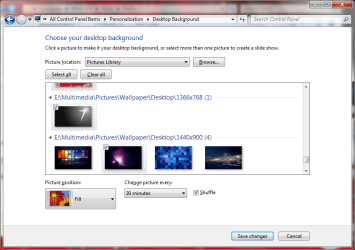
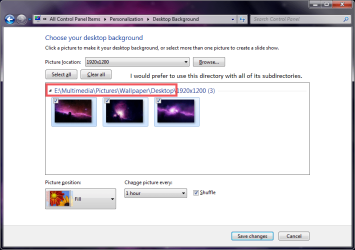
Hello all, I recently signed up because I just switched from 7 Home Premium to Ultimate. I encountered a problem with wallpaper selection that I'm not sure if I encountered with Home Premium or if I had to tweak something to fix it. I know I was able to select multiple folders. Whenever I go to select a folder it doesn't show the pictures in the subdirectories. Any help would be appreciated.
 

Attachments
  • Untitled.png
    Untitled.png
    38.2 KB · Views: 69
Last edited by a moderator:

My Computer

OS
Windows 7 Ultimate
CPU
P4E Prescott
Motherboard
Intel D915PBL
Memory
3 GB
Graphics Card(s)
Radeon X800XL
Hello all, I recently signed up because I just switched from 7 Home Premium to Ultimate. I encountered a problem with wallpaper selection that I'm not sure if I encountered with Home Premium or if I had to tweak something to fix it. I know I was able to select multiple folders. Whenever I go to select a folder it doesn't show the pictures in the subdirectories. Any help would be appreciated.
You mean so you can get wallpapers from different folders, to be in slideshow, without having to put them all i one folder? :huh:
 
Last edited by a moderator:
Yes, what you have to do is change your Public pictures from its default location under %systemdrive%\Users\Public to your My pictures folder (in my case E:\Multimedia\Pictures) and you can select any number of photos in your folder by holding CTRL + left click. I find it easiest to collapse all folders (right click folder header and hit Collapse all groups), then expanding the folders I wanna use one-by-one and CTRL+Left mouse click. I just changed my Public Picture folder and solved my own problem... woot!

Anyway. This should become a tutorial. I can make pictures and write a better description if anybody is interested?


Multiple Folder Slideshow via My Pictures or CHANGE default wallpaper picture location!
 

Attachments

  • Untitled.png
    Untitled.png
    48 KB · Views: 84

My Computer

OS
Windows 7 Ultimate
CPU
P4E Prescott
Motherboard
Intel D915PBL
Memory
3 GB
Graphics Card(s)
Radeon X800XL
Yes, what you have to do is change your Public pictures from its default location under %systemdrive%\Users\Public to your My pictures folder (in my case E:\Multimedia\Pictures) and you can select any number of photos in your folder by holding CTRL + left click. I find it easiest to collapse all folders (right click folder header and hit Collapse all groups), then expanding the folders I wanna use one-by-one and CTRL+Left mouse click. I just changed my Public Picture folder and solved my own problem... woot!

Anyway. This should become a tutorial. I can make pictures and write a better description if anybody is interested?


Multiple Folder Slideshow via My Pictures or CHANGE default wallpaper picture location!
Well if you arent writing it, i will be happy to do it for you :)
 
It's worth making a tutorial? What should we call it? I suppose we can both make pictures for it... since all I have is Paint at the moment. I can't tell you how long I googled this today/last night and found zero information about it. Such a simple fix, all I had to do was change my public picture folder!
 

My Computer

OS
Windows 7 Ultimate
CPU
P4E Prescott
Motherboard
Intel D915PBL
Memory
3 GB
Graphics Card(s)
Radeon X800XL
It's worth making a tutorial? What should we call it? I suppose we can both make pictures for it... since all I have is Paint at the moment. I can't tell you how long I googled this today/last night and found zero information about it. Such a simple fix, all I had to do was change my public picture folder!
How about: Wallpaper rotation from multiple folders ;)
 
Another way to do this is just create a shortcut to whatever directory you want included in your wallpapers in the Public Pictures Directory.

In other words, if I had an Image Directory with a subdirectory Wallpapers, i could create a shortcut to Wallpapers and place it in the public Image folder. Worked for me.
 

My Computer

OS
Windows 7 Enterprise
To have them included with all the other standard wallpapers that are available on the Personalize screen, they need to be put in the C:\windows\web\wallpaper folder.
 

My Computer

Computer Manufacturer/Model Number
Cheap $399.00 E-Machine
OS
Windows 7 Pro & Vista Home Premium
CPU
Athlon 64 3800+ (Orleans) 2.40GHz
Motherboard
Winfast
Memory
2GB DDR2 RAM DIMM
Graphics Card(s)
NVIDIA GeForce 8500 GT 512 MB memory HDMI out
Sound Card
creative X-Fi Exteme 7..1 channel
Monitor(s) Displays
Acer V223W 22" widescreen DVI
Screen Resolution
1680x1050
Hard Drives
WDC WD5 500GB
WDC WD25 250GB
PSU
OCZ 550 watt
Case
Gateway
Cooling
2 fans
Keyboard
Dell
Mouse
Sony Vaio
Internet Speed
18MB/s down - .72MB /s up
Back
Top