
You are using an out of date browser. It may not display this or other websites correctly.
You should upgrade or use an alternative browser.
You should upgrade or use an alternative browser.
Solved wallpaper theme
- Thread starter Rose1
- Start date

Hi,
Best thing to do is to use Paint to create a blank white canvas with the dimentions of your resolution. Once you save it you can use it as your wallpaper.
OS
Best thing to do is to use Paint to create a blank white canvas with the dimentions of your resolution. Once you save it you can use it as your wallpaper.
OS
My Computer
- Computer Manufacturer/Model Number
- Compaq Desktop
- OS
- Windows 7 Ultimate x64
- CPU
- AMD Sempron Dual Core
- Memory
- 3GB
- Graphics Card(s)
- NVIDIA GeForce 6150SE nForce 430
- Screen Resolution
- 1024x768
- Hard Drives
- 150GB Sata
Or you can use this



It's only a small size but will do exactly what you want
It's only a small size but will do exactly what you want
My Computer
- Computer Manufacturer/Model Number
- Compaq Desktop
- OS
- Windows 7 Ultimate x64
- CPU
- AMD Sempron Dual Core
- Memory
- 3GB
- Graphics Card(s)
- NVIDIA GeForce 6150SE nForce 430
- Screen Resolution
- 1024x768
- Hard Drives
- 150GB Sata
You can disable 'Desktop Composition' which will give it an XP look & feel
Start -> right-click Computer -> Properties -> Advances system settings -> Performance (settings)
Start -> right-click Computer -> Properties -> Advances system settings -> Performance (settings)
My Computer
- Computer Manufacturer/Model Number
- Compaq Desktop
- OS
- Windows 7 Ultimate x64
- CPU
- AMD Sempron Dual Core
- Memory
- 3GB
- Graphics Card(s)
- NVIDIA GeForce 6150SE nForce 430
- Screen Resolution
- 1024x768
- Hard Drives
- 150GB Sata
Let's start from the beginning...
When you say you don't want a theme do you mean that you don't want 'Transparency', 'Fancy Icons', 'Picture Wallpaper', 'Screensaver' and 'Sounds'?
When you say you don't want a theme do you mean that you don't want 'Transparency', 'Fancy Icons', 'Picture Wallpaper', 'Screensaver' and 'Sounds'?
My Computer
- Computer Manufacturer/Model Number
- Compaq Desktop
- OS
- Windows 7 Ultimate x64
- CPU
- AMD Sempron Dual Core
- Memory
- 3GB
- Graphics Card(s)
- NVIDIA GeForce 6150SE nForce 430
- Screen Resolution
- 1024x768
- Hard Drives
- 150GB Sata

Hello Rose,
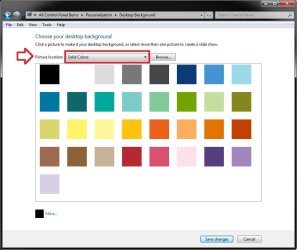
If you meant that you want a solid color for the background, then while changing your background wallpaper, be sure to select Solid Colors from the Picture Location drop down menu like below. You will then be able to select a color to be a blank wallpaper.
In additition, you could check the Remove background images (where available) box in the Ease of Access Center using the tutorial below to force nothing but a solid color background to be available.
http://www.sevenforums.com/tutorials/67200-remove-background-images-where-available.html
Hope this helps,
Shawn
If you meant that you want a solid color for the background, then while changing your background wallpaper, be sure to select Solid Colors from the Picture Location drop down menu like below. You will then be able to select a color to be a blank wallpaper.
In additition, you could check the Remove background images (where available) box in the Ease of Access Center using the tutorial below to force nothing but a solid color background to be available.
http://www.sevenforums.com/tutorials/67200-remove-background-images-where-available.html
Hope this helps,
Shawn
My Computer
- Computer type
- PC/Desktop
- Computer Manufacturer/Model Number
- Self built custom
- OS
- 64-bit Windows 11 Pro for Workstations
- CPU
- Intel i7-8700K OC'd to 5 GHz
- Motherboard
- ASUS ROG Maximus XI Formula Z390
- Memory
- 64 GB (4x16GB) G.SKILL TridentZ RGB DDR4 3600 MHz
- Graphics Card(s)
- ASUS ROG-STRIX-GTX1080TI-O11G-GAMING
- Sound Card
- Integrated
- Monitor(s) Displays
- 2 x Samsung Odyssey G7 27"
- Screen Resolution
- 2560x1440
- Hard Drives
- 1TB Samsung 990 PRO M.2,
4TB Samsung 990 PRO PRO M.2,
TerraMaster F8 SSD Plus NAS
- PSU
- Seasonic Prime Titanium 850W
- Case
- Thermaltake Core P3
- Cooling
- Corsair Hydro H115i
- Keyboard
- Logitech wireless K800
- Mouse
- Logitech MX Master 4
- Internet Speed
- 2 Gb/s Download and 100 Mb/s Upload
- Antivirus
- Malwarebyte Anti-Malware Premium
- Browser
- Google Chrome
- Other Info
- Logitech Z625 speaker system,
Logitech BRIO 4K Pro webcam,
HP Color LaserJet Pro MFP M477fdn,
APC SMART-UPS RT 1000 XL - SURT1000XLI,
Galaxy S23 Plus phone
That's great news. 
My Computer
- Computer type
- PC/Desktop
- Computer Manufacturer/Model Number
- Self built custom
- OS
- 64-bit Windows 11 Pro for Workstations
- CPU
- Intel i7-8700K OC'd to 5 GHz
- Motherboard
- ASUS ROG Maximus XI Formula Z390
- Memory
- 64 GB (4x16GB) G.SKILL TridentZ RGB DDR4 3600 MHz
- Graphics Card(s)
- ASUS ROG-STRIX-GTX1080TI-O11G-GAMING
- Sound Card
- Integrated
- Monitor(s) Displays
- 2 x Samsung Odyssey G7 27"
- Screen Resolution
- 2560x1440
- Hard Drives
- 1TB Samsung 990 PRO M.2,
4TB Samsung 990 PRO PRO M.2,
TerraMaster F8 SSD Plus NAS
- PSU
- Seasonic Prime Titanium 850W
- Case
- Thermaltake Core P3
- Cooling
- Corsair Hydro H115i
- Keyboard
- Logitech wireless K800
- Mouse
- Logitech MX Master 4
- Internet Speed
- 2 Gb/s Download and 100 Mb/s Upload
- Antivirus
- Malwarebyte Anti-Malware Premium
- Browser
- Google Chrome
- Other Info
- Logitech Z625 speaker system,
Logitech BRIO 4K Pro webcam,
HP Color LaserJet Pro MFP M477fdn,
APC SMART-UPS RT 1000 XL - SURT1000XLI,
Galaxy S23 Plus phone
Good work Shawn, that was almost what I was trying to get at in the first place
My Computer
- Computer Manufacturer/Model Number
- Compaq Desktop
- OS
- Windows 7 Ultimate x64
- CPU
- AMD Sempron Dual Core
- Memory
- 3GB
- Graphics Card(s)
- NVIDIA GeForce 6150SE nForce 430
- Screen Resolution
- 1024x768
- Hard Drives
- 150GB Sata

I don't want picture wallpaper.
Hello Rose,
I am going to take a wild guess here.
You have a pcture on your desktop but just want the back ground colour.
Can you post a picture of what you have on your desktop?
My Computer
- Computer type
- PC/Desktop
- Computer Manufacturer/Model Number
- Custom Build
- OS
- Windows 7 Ultimate x64
- Motherboard
- Gigabyte EX58-UD5
- Memory
- Installed Physical Memory (RAM) 12.0 GB
- Graphics Card(s)
- ATI Radeon HD 5800 Series
- Hard Drives
- 1.36 TB
59.6 GB solid State
- Antivirus
- McAffee
- Browser
- Google Chrome; Firefox, IE 10
Hello JD, and welcome to Seven Forums.
This thread is already solved.
This thread is already solved.
My Computer
- Computer type
- PC/Desktop
- Computer Manufacturer/Model Number
- Self built custom
- OS
- 64-bit Windows 11 Pro for Workstations
- CPU
- Intel i7-8700K OC'd to 5 GHz
- Motherboard
- ASUS ROG Maximus XI Formula Z390
- Memory
- 64 GB (4x16GB) G.SKILL TridentZ RGB DDR4 3600 MHz
- Graphics Card(s)
- ASUS ROG-STRIX-GTX1080TI-O11G-GAMING
- Sound Card
- Integrated
- Monitor(s) Displays
- 2 x Samsung Odyssey G7 27"
- Screen Resolution
- 2560x1440
- Hard Drives
- 1TB Samsung 990 PRO M.2,
4TB Samsung 990 PRO PRO M.2,
TerraMaster F8 SSD Plus NAS
- PSU
- Seasonic Prime Titanium 850W
- Case
- Thermaltake Core P3
- Cooling
- Corsair Hydro H115i
- Keyboard
- Logitech wireless K800
- Mouse
- Logitech MX Master 4
- Internet Speed
- 2 Gb/s Download and 100 Mb/s Upload
- Antivirus
- Malwarebyte Anti-Malware Premium
- Browser
- Google Chrome
- Other Info
- Logitech Z625 speaker system,
Logitech BRIO 4K Pro webcam,
HP Color LaserJet Pro MFP M477fdn,
APC SMART-UPS RT 1000 XL - SURT1000XLI,
Galaxy S23 Plus phone
Thanks
Yes when I posted page 2 appeared ... my bad
Yes when I posted page 2 appeared ... my bad
My Computer
- Computer type
- PC/Desktop
- Computer Manufacturer/Model Number
- Custom Build
- OS
- Windows 7 Ultimate x64
- Motherboard
- Gigabyte EX58-UD5
- Memory
- Installed Physical Memory (RAM) 12.0 GB
- Graphics Card(s)
- ATI Radeon HD 5800 Series
- Hard Drives
- 1.36 TB
59.6 GB solid State
- Antivirus
- McAffee
- Browser
- Google Chrome; Firefox, IE 10