WAMP server on W7 anyone

jimbo45

New member
Guru
Gold Member
VIP
Local time
9:17 AM
Messages
5,941
Location
Hafnarfjörður IS
Hi all
Anybody using W7 and WAMP (Windowa Apache MySQL Php)

Seems a nice idea.

Install PHP 5 Apache MySQL on Windows : WampServer

Thinking of converting my Access DB for music, films, photos etc to MySQL which I would also be able to access easily over the net.

Eventually I'll want to stream some stuff --

For me MySQL has always performed excellently under Linux (LAMP) - never tried with windows and the SQL is easy enough. I don't need Enterprise features of something like Postgre or Ms SQL. I don't also need to run a full blown Internet Sever so I'm not bothering with IIS etc.


Apache is fine under Linux as well -- first time I'm trying this stuff on Windows -- any body tried it. PHP itself should also be "OS neutral".

In the Mysql DB I'm storing the URL (directory) links to the multimedia - not the actual files themselves.

Could be a fun project.

jimbo.
 

My Computer My Computer

Computer type
PC/Desktop
Computer Manufacturer/Model Number
Custom built, several laptops HP/ASUS
OS
Linux CENTOS 7 / various Windows OS'es and servers
CPU
Intel i7 Intel i5
Memory
8GB, 16GB
Graphics Card(s)
On Motherboard
Sound Card
Realtek HD audio
Monitor(s) Displays
Apple Cinema display, Samsung LCD
Screen Resolution
1920 X 1080
Hard Drives
4 X 1TB SATA
Mouse
Toshiba wireless laser
Internet Speed
> 20MB up
I'm using it curently, it works perfect! Mostly used for file server and testing web sites at home ;)
 

My Computer My Computer

OS
Windows Se7en Ultimate + Windows XP SP3
CPU
AMD Athlon64 X2 5200+
Motherboard
Gigabyte GA-MA770-DS3
Memory
CORSAIR DOMINATOR TWIN2X2048-8500C5D 2 GB
Graphics Card(s)
Ati Radeon HD3870
Monitor(s) Displays
Sony KDL32V4500
Screen Resolution
1920X1080X60Hz
Hard Drives
HITACHI 320GB SATA
HITACHI 80GB ATA
PSU
Point Of View 450 Watts
Internet Speed
20Mbits Cable Internet
I installed WAMPSERVER on my machine. It looks like the webserver is running. But, when I mouse over the icon, it says "server-offline". Any ideas?
 

My Computer My Computer

OS
windows 7
I'd just as soon setup a virtual machine and run Linux on it (saving on windows license costs), and then install these pieces. But I have run these on Windows before and they do work and are nice for people without any Linux experience.
 

My Computer My Computer

Computer Manufacturer/Model Number
Self-Built in July 2009
OS
Windows 7 Ultimate x64
CPU
Intel Q9550 2.83Ghz OC'd to 3.40Ghz
Motherboard
Gigabyte GA-EP45-UD3R rev. 1.1, F12 BIOS
Memory
8GB G.Skill PI DDR2-800, 4-4-4-12 timings
Graphics Card(s)
EVGA 1280MB Nvidia GeForce GTX570
Sound Card
Realtek ALC899A 8 channel onboard audio
Monitor(s) Displays
23" Acer x233H
Screen Resolution
1920x1080
Hard Drives
Intel X25-M 80GB Gen 2 SSD
Western Digital 1TB Caviar Black, 32MB cache. WD1001FALS
PSU
Corsair 620HX modular
Case
Antec P182
Cooling
stock
Keyboard
ABS M1 Mechanical
Mouse
Logitech G9 Laser Mouse
Internet Speed
15/2 cable modem
Other Info
Windows and Linux enthusiast. Logitech G35 Headset.
I'd just as soon setup a virtual machine and run Linux on it (saving on windows license costs), and then install these pieces. But I have run these on Windows before and they do work and are nice for people without any Linux experience.

Hi there
the reason I want to run this on Windows is that being a technet suscriber I've downloaded Windows 2008 server and would like to try this on the Windows server.

It as you say works FLAWLESSLY on Linux -- I currently have a Linux SUSE machine running this but I'm trying to upgrade a W2003 SERVER to W2008 server and thought why not "standardize" the whole hog on W2008 server.

I still think W2003 server was MS's BEST and slickest OS EVER although I Do like W7 - but it's time to move on. W2003 R2 server really IS lightning fast W2008 looks good too.

I'm running a Windows 2003 server also as a VM and it looks almost like W7 - themes and all - but you need to do a lot of fiddling to get a Server OS to behave like a workstation OS -- however if you have access to server software and still need XP for legacy apps this is a great way of using a great OS - and it beats the XP system HANDS DOWN.

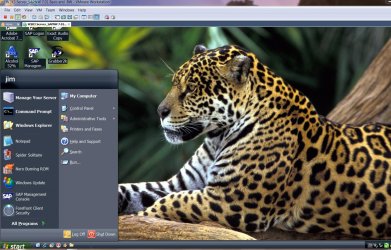
Here's a pic of my W2003 server Virtual machine with the nice Jaguar (animal not the car) and other stuff filched from the Brazilian W7 regional theme pack.

Cheers
jimbo
 

Attachments

  • server.jpg
    server.jpg
    216.6 KB · Views: 811

My Computer My Computer

Computer type
PC/Desktop
Computer Manufacturer/Model Number
Custom built, several laptops HP/ASUS
OS
Linux CENTOS 7 / various Windows OS'es and servers
CPU
Intel i7 Intel i5
Memory
8GB, 16GB
Graphics Card(s)
On Motherboard
Sound Card
Realtek HD audio
Monitor(s) Displays
Apple Cinema display, Samsung LCD
Screen Resolution
1920 X 1080
Hard Drives
4 X 1TB SATA
Mouse
Toshiba wireless laser
Internet Speed
> 20MB up
Issue with WAMP on Win 7

Hi,

I tried using WAMP on Win 7 but have run into some issues.

Port 80 of localhost seems to be used by Microsoft-HTTPAPI/2.0

Using netstat command in cmd, I wasnt able to locate any service using the above port.

Some forums suggest that this is an effect of SQL server reporting services, however I have uninstalled SQL Server quite a while back.

Any idea what could be the problem? Or is there some other way to find the process using a particular port on localhost?

Hope you can answer.

Regards,
Shailesh
 

My Computer My Computer

OS
Vista Home Premium
Hi....Give me solution plz....
I'm using WONDOWS 7 Ultimate....and i want to install wampserver but i facing some problems afer installing...getting 404 error.
I had installed wampserver 2.0i.... which version will be suitable for browser and windows 7 Ultimate.
 

My Computer My Computer

OS
windows 7 ultimate
CPU
AMD ATHLON 2.66 Ghz
Motherboard
ASUS
Memory
2 GB
Hi,

I tried using WAMP on Win 7 but have run into some issues.

Port 80 of localhost seems to be used by Microsoft-HTTPAPI/2.0

Any idea what could be the problem? Or is there some other way to find the process using a particular port on localhost?

The answer is simple. Left click the WAMP Server icon, goto Apache -> httpd.conf

Find the line that says Listen 80 - change it to 81

Ctrl + S and close it. Left click WAMP and goto Restart All Services

Now visit http://localhost:81 - bam. :D
 

My Computer My Computer

OS
Windows 7 Ultimate 64
REALChaos I could not thank you enough thank you sooo much I wasted three days trying to figure this all out, I downloaded and installed wamp and xammp so many times its about time I find a solution
 

My Computer My Computer

OS
7 home premium 64bit
Sure thing! Glad to have helped!

Another thing to note that if you have Skype or any other background services running on port 80: I would recommend disabling it! I had to dig into the Skype settings and disable port 80. This will allow you to actually just type localhost into your browser and hit enter without having to use an alternate port in apache httpd.conf

If you run cmd as Administrator type in: netstat -ab

This will list all the executables and their ports. That was how I figured out Skype.exe was using port 80.
 

My Computer My Computer

OS
Windows 7 Ultimate 64
Back
Top