Want plug my win7's rj45 cable into different router and print

DonM123

New member
Member
VIP
Local time
4:55 PM
Messages
140
What makes a win7 computer blind to a router ?

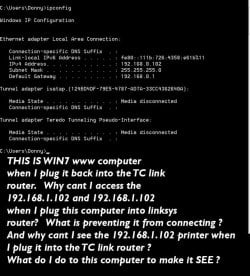
I have a www connected win7 it uses a TC LINK ROUTER. It cant find my linksys router on IP address 192.168.1.102 .

I would like to unplug from the TC link and plug into the linksys and print at times. But the www win7 computer is blind to the linksys router and the network printer that is connected to it.

I suppose I could change the Ip addresses on the linksys router and printer to be on the 169.254.2xx.xx
and try to assign them a new number with very last IP number to be different.

Or Maybe someone can shed light on my mind as to what I could do to my windows 7 that uses the TC-Link router (169.254) so It will also see the printer and linksys router.


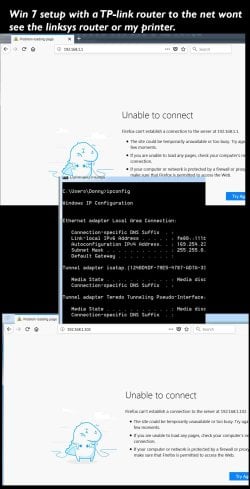
To explain these pictures- The picture on the right is what happens when I unplug the www win7 machine from its router and plug it into the lynksys router.... something makes it so it wont see the router or the printer. The picture on the left is a machine that will connect to the lynksys router probably because I have never connected it to the TC link router and surfed the web with it.

What happens to a win 7 s configuration that makes it so it wont see a different router. ?

I have read about IP addresses and networking a lot but its all just gobbly gook to me.

[/ATTACH][/ATTACH][/ATTACH]
 

Attachments

  • IPlessons.jpg
    IPlessons.jpg
    216.2 KB · Views: 0
  • IPlessons2.jpg
    IPlessons2.jpg
    120 KB · Views: 2
  • images (2).png
    images (2).png
    6.1 KB · Views: 15
Last edited:

My Computer My Computer

At a glance

win7proi716GTX 980 TI
Computer type
PC/Desktop
Computer Manufacturer/Model Number
Gigibyte Custom build
OS
win7pro
CPU
i7
Memory
16
Graphics Card(s)
GTX 980 TI
Hard Drives
ssd 4t 750gig
Antivirus
norton pain
Hi Don

The IP address you quote for the Internet connected PC 169.254.2xx.xx is actually a default used when the system cannot decipher the actual IP address in use, this is basically a place holder which will automatically be changed when you set-up the PC and router to talk to each other.

You currently have two routers, is there a practical reason for this? or is it just a result of the history of your network?

Connecting a single Router, all the PCs and the printer to the same Subnet, (a subnet is a set of IP addresses in a specific format eg 192.168.1.0 to 192.168.1.255), will give you full access between the PCs and the internet and Printer at the same time.

If you wish to specifically isolate the Graphics systems from the internet then this can be done using facilities in the routers to set up the routing allowed (you would basically connect all the PCs to the one router and the other router to the internet and the first router and only allow a specific system to actually reach the internet, this is a much more complex setup of course
 

My Computers My Computers

  • At a glance

    Windows 11 Pro x64 [Latest Release and Releas...Ryzen 9 5950X, 3.8 - 5.2 MHz64GB [2 x 32GB] DDR4 3200MHz4GB NVIDIA GEFORCE GTX 1650 Ti
    Computer type
    PC/Desktop
    Computer Manufacturer/Model Number
    ChillBlast - Custom to my design
    OS
    Windows 11 Pro x64 [Latest Release and Release Preview]
    CPU
    Ryzen 9 5950X, 3.8 - 5.2 MHz
    Motherboard
    Asus Prime X570-Pro
    Memory
    64GB [2 x 32GB] DDR4 3200MHz
    Graphics Card(s)
    4GB NVIDIA GEFORCE GTX 1650 Ti
    Sound Card
    On-board SPDIF to 5.1 System + HDMI [5.1 system]
    Monitor(s) Displays
    32" UHD 32 Bit HDR Monitor + 43" UHD 4K 32Bit HDR TV
    Screen Resolution
    2 x 3840 x 2160 @60Hz
    Hard Drives
    1TB M2 SSD OS, 500GB Fast Access SSD, 2 x 8TB Data + Various Externals from 1TB to 4TB, 10TB NAS
    PSU
    NZXT C750 80 PLUS Gold 750W Modular PSU
    Case
    Workstation Case [Matt Black]
    Cooling
    NZXT Kraken X63 280mm CPU Cooler +2x Quiet Case fans
    Keyboard
    Logitech Wireless MX Keys & K400 + others
    Mouse
    Logitech Wireless MX Master 3S
    Internet Speed
    920 MB Down 50 MB Up
    Antivirus
    BitDefender Total Security Pro
    Browser
    Chrome (always run latest Non-Beta)
    Other Info
    Also run ...
    Laptop - Quad 8GB - Windows 10 Pro x64
    Nexus 7 Android tablet x2
    Samsung 10.2" tablet
    Blackview TAB 8 4G Android Tablet c/w Keyboard
    Wacom Intuos Pro Medium Pen Pad
    Wacom Intuos Pro Small Pen Pad
    Wacom Expresskeys Remote
    Loopdeck+ Graphics Controller
    Shuttle Pro v2 Control
  • At a glance

    Windows 11 Pro x64 Latest RPIntel I7 10750H 5.0GHz32GB [2x16GB] DDR4 2933 MHznVidia GTX1650Ti 4 GB GDDR6
    Computer type
    Laptop
    System Manufacturer/Model Number
    Dell XPS 17 10750H
    OS
    Windows 11 Pro x64 Latest RP
    CPU
    Intel I7 10750H 5.0GHz
    Motherboard
    Dell XPS
    Memory
    32GB [2x16GB] DDR4 2933 MHz
    Graphics Card(s)
    nVidia GTX1650Ti 4 GB GDDR6
    Sound Card
    Stock [Realtek] 4 Speaker
    Monitor(s) Displays
    17" IPS UHD+ Infinity Edge Touchscreen
    Screen Resolution
    3840 x 2400
    Hard Drives
    2TB M2 NVMe, 4TB External + various 500GB & 1TB External NVMe (also have access to spinner HDD from
    PSU
    Stock
    Case
    Stock XPS Aluminium & Carbon Fibre
    Cooling
    Stock - Active Fan Control
    Keyboard
    Backlit + Various Logitech
    Mouse
    Stock Track Pad + Logitech MX Trackball
    Internet Speed
    72 MB Down 18MB Up
    Browser
    Chrome
    Other Info
    Also run ...
    Laptop - Quad 8GB - Windows 10 Pro x64
    Nexus 7 Android tablet x2
    10.2" tablet
    Sony Z3 Android Smartphone
    Wacom Intuos Pro Medium Pen Pad
    Wacom Intuos Pro Small Pen Pad
    Wacom Expresskeys Remote
    Loopdeck+ Graphics Controller
    Shuttle Pro v2 Control Pad
    10TB NAS
I will ask this question differently

Confused.jpg
 

My Computer My Computer

At a glance

win7proi716GTX 980 TI
Computer type
PC/Desktop
Computer Manufacturer/Model Number
Gigibyte Custom build
OS
win7pro
CPU
i7
Memory
16
Graphics Card(s)
GTX 980 TI
Hard Drives
ssd 4t 750gig
Antivirus
norton pain
192.168.1.102 is on a different network to 192.168.0.102 the ip you doesnt give the details of the dns were are you getting these ip from 2 different networks the .0 is one and .1 is another to have 2 routers the second one should have dhcp turned off and an ip in the same range as the main one
 

My Computer My Computer

At a glance

win 8 32 bit
Computer type
PC/Desktop
OS
win 8 32 bit
Just to clarify the way that "Dotted Decimal" notation works ...

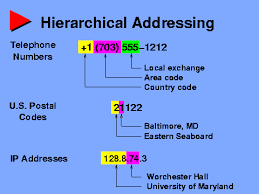
the first two numbers show that this network is in a range that is used for internal, (non internet) addresses - The third number is a set of 256 addresses, and the fourth group is the actual address of the device.

To have all devices "see" each other the first three number groups have to be the same and each device needs a unique number in the fourth group.

This is much simpler to do if you only use one router but should be possible with two

the normal way to assign the addresses on a home network is to allow the router to assign them automatically to all attached devices. (192.168.0.1-192.168.0.255)

without understanding the way that your TC-link, (TP-Link?), Router connects to the internet I cannot be certain how to get everything to work together - if however you set up all devices to obtain their addresses automatically set this router to assign addresses in the 192.168.0.1-20 range and the other router to assign addresses in the Range 192.168.0.21-255 this should work as long as you connect the two routers together by ethernet cable or if you move the cables between the routers manually as you need to
 

My Computers My Computers

  • At a glance

    Windows 11 Pro x64 [Latest Release and Releas...Ryzen 9 5950X, 3.8 - 5.2 MHz64GB [2 x 32GB] DDR4 3200MHz4GB NVIDIA GEFORCE GTX 1650 Ti
    Computer type
    PC/Desktop
    Computer Manufacturer/Model Number
    ChillBlast - Custom to my design
    OS
    Windows 11 Pro x64 [Latest Release and Release Preview]
    CPU
    Ryzen 9 5950X, 3.8 - 5.2 MHz
    Motherboard
    Asus Prime X570-Pro
    Memory
    64GB [2 x 32GB] DDR4 3200MHz
    Graphics Card(s)
    4GB NVIDIA GEFORCE GTX 1650 Ti
    Sound Card
    On-board SPDIF to 5.1 System + HDMI [5.1 system]
    Monitor(s) Displays
    32" UHD 32 Bit HDR Monitor + 43" UHD 4K 32Bit HDR TV
    Screen Resolution
    2 x 3840 x 2160 @60Hz
    Hard Drives
    1TB M2 SSD OS, 500GB Fast Access SSD, 2 x 8TB Data + Various Externals from 1TB to 4TB, 10TB NAS
    PSU
    NZXT C750 80 PLUS Gold 750W Modular PSU
    Case
    Workstation Case [Matt Black]
    Cooling
    NZXT Kraken X63 280mm CPU Cooler +2x Quiet Case fans
    Keyboard
    Logitech Wireless MX Keys & K400 + others
    Mouse
    Logitech Wireless MX Master 3S
    Internet Speed
    920 MB Down 50 MB Up
    Antivirus
    BitDefender Total Security Pro
    Browser
    Chrome (always run latest Non-Beta)
    Other Info
    Also run ...
    Laptop - Quad 8GB - Windows 10 Pro x64
    Nexus 7 Android tablet x2
    Samsung 10.2" tablet
    Blackview TAB 8 4G Android Tablet c/w Keyboard
    Wacom Intuos Pro Medium Pen Pad
    Wacom Intuos Pro Small Pen Pad
    Wacom Expresskeys Remote
    Loopdeck+ Graphics Controller
    Shuttle Pro v2 Control
  • At a glance

    Windows 11 Pro x64 Latest RPIntel I7 10750H 5.0GHz32GB [2x16GB] DDR4 2933 MHznVidia GTX1650Ti 4 GB GDDR6
    Computer type
    Laptop
    System Manufacturer/Model Number
    Dell XPS 17 10750H
    OS
    Windows 11 Pro x64 Latest RP
    CPU
    Intel I7 10750H 5.0GHz
    Motherboard
    Dell XPS
    Memory
    32GB [2x16GB] DDR4 2933 MHz
    Graphics Card(s)
    nVidia GTX1650Ti 4 GB GDDR6
    Sound Card
    Stock [Realtek] 4 Speaker
    Monitor(s) Displays
    17" IPS UHD+ Infinity Edge Touchscreen
    Screen Resolution
    3840 x 2400
    Hard Drives
    2TB M2 NVMe, 4TB External + various 500GB & 1TB External NVMe (also have access to spinner HDD from
    PSU
    Stock
    Case
    Stock XPS Aluminium & Carbon Fibre
    Cooling
    Stock - Active Fan Control
    Keyboard
    Backlit + Various Logitech
    Mouse
    Stock Track Pad + Logitech MX Trackball
    Internet Speed
    72 MB Down 18MB Up
    Browser
    Chrome
    Other Info
    Also run ...
    Laptop - Quad 8GB - Windows 10 Pro x64
    Nexus 7 Android tablet x2
    10.2" tablet
    Sony Z3 Android Smartphone
    Wacom Intuos Pro Medium Pen Pad
    Wacom Intuos Pro Small Pen Pad
    Wacom Expresskeys Remote
    Loopdeck+ Graphics Controller
    Shuttle Pro v2 Control Pad
    10TB NAS
Back
Top