
Solved want to change to old start menu like in windows xp

If someone buys a new operating system, in this case Windows 7. Why would they want it to work and look like there old system. Two choices that I can think of are 1. Put the old system back on your computer. 2. Take a little time to learn the new system and enjoy it. I choose number 2 and with the help I got here on this site it took a little time but went smoothly.
*** My new car doesn't look or work like my old car, well I hope not. You will get use to the new things and enjoy it.***

In any thread about "is there a way to make Win7 do something the old way because I liked it better", there is inevitably somebody saying "if you like the old OS that much don't switch to Win7". I'm sorry, but that's idiotic. I can respond with an equally idiotic reply - "If you like Win7 the way it is, what are you doing in a customization forum in the first place?" It's like going to a heavy metal concert and shouting - "Heavy metal is rubbish!"
And what would you say if in your new car you have to steer with your feet, accelerate by tilting your head forward, and the gears are in alphabetical order?

But now seriously - any new OS, or any new software, or any new product for that matter has pros and cons. Some are objective and some are subjective. Few random examples:
  • Win7 is faster than Vista - pro, objective
  • Win7 supports newer hardware than XP - pro, objective
  • The Win7 Aero theme looks better than XP Luna - pro, subjective
  • The old start menu has better usability than the new one - con, subjective
  • The details pane shows more details than the old status bar - pro, objective
  • The details pane doesn't show details for more than 15 files - con, objective
  • The new Explorer is buggier than the old one - con, objective
  • .....
You weigh in both pros and cons and then you decide if you want to upgrade or not. Or you look for solutions for the things you don't like - for example by asking in a forum like this one.
 

My Computer My Computer

At a glance

Windows 7 Home 64, Vista Ultimate 64
Computer Manufacturer/Model Number
Me :) I build all my PCs
OS
Windows 7 Home 64, Vista Ultimate 64
oh haha - I meant that link, it's been a while since I've bothered checking up on Classic Shell updates.

I noticed my Classic Start Menu is a bit out of date, maybe my classic shell is as well. By the looks of the beta release notes thought there were some bugs in newer versions and the version I have (1.03) has been exceptionally stable

What release are you using, is it seemless and on which Win7?

Here's all the releases to pick and choose from including 1.03

Browse Classic Shell Files on SourceForge.net

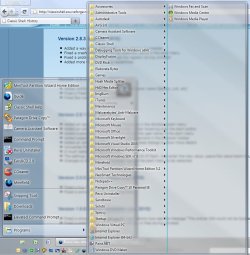
Im running the 2.8.3 version and it's rock solid. No errors, no bug so far that I have encountered and the "Shift-click" to see the default Start Menu works flawlessly.

What I really like, though, is the Classic Shell Explorer capabilities along with the Classic Start Menu capabilities.

Did I mention it's free? :)

Screenshot_1.jpg
 
Last edited:

My Computer My Computer

At a glance

Windows 7 Ultimate x64 SP1Core2 Duo4 GBGM965 on-board
Computer Manufacturer/Model Number
Toshiba L355D
OS
Windows 7 Ultimate x64 SP1
CPU
Core2 Duo
Motherboard
Intel
Memory
4 GB
Graphics Card(s)
GM965 on-board
Sound Card
RealTek on-board
Monitor(s) Displays
19"+17"(laptop)
Screen Resolution
1440x900 (x 2)
Hard Drives
500GB Ext. 200GB Internal
PSU
N/A
Case
N/A
Cooling
N/A
Well Ivo I'm sorry you though my opinion was idiotic.
 

My Computer My Computer

At a glance

Windows 10 Pro. 64/ version 1709 Windows 7 Pr...Intel i7-6800K @ 4.3Corsair Platinum 16 gig @2400EVGA GTX 1070 OC
Computer type
PC/Desktop
Computer Manufacturer/Model Number
Home made Desktop
OS
Windows 10 Pro. 64/ version 1709 Windows 7 Pro/64
CPU
Intel i7-6800K @ 4.3
Motherboard
ASUS X-99 Deluxe II
Memory
Corsair Platinum 16 gig @2400
Graphics Card(s)
EVGA GTX 1070 OC
Monitor(s) Displays
Asus 27" LED LCD/VE278Q
Screen Resolution
1920-1080 or 1280-720 HDMI
Hard Drives
INTEL SSD 730-240 Gb Sata 3.0/
PSU
EVGA Platium 1200W
Case
Phanteks Luxe Tempered Glass 8 fans/ one radiator
Cooling
XSPC/ Water Cooled CPU
Keyboard
Das 4 Professional
Mouse
Logitech M705/MX Anywhere 2-S
Internet Speed
100 mbits
Antivirus
Microsoft Security Essentials/ Malwarebytes Premium 3.0/ SAS
Browser
I.E. 11 default/Firefox/ ISP Time Warner Cable/Spectrum
Other Info
LG BluRay Burner/
Sound system-KLipsch-THX/
Icy Dock ssd Hot Swap bays.

My Computer My Computer

At a glance

Windows 7 Ultimate x64i3-350M2Intel HD
Computer Manufacturer/Model Number
Aspire 4741
OS
Windows 7 Ultimate x64
CPU
i3-350M
Memory
2
Graphics Card(s)
Intel HD
Screen Resolution
1366 x 768
Hard Drives
320GB 7200
Internet Speed
1 Mbps
Changing start menu in windows 7 to expand like xp.

Download Classic shell.exe from windows forum.
 

My Computer My Computer

At a glance

windows 7 ult x64
OS
windows 7 ult x64
I agree with garysgold
 

My Computer My Computer

At a glance

Windows 8.1 Pro x64Intel Core i3 (3.0 GHZ)4 GB GDDR3Sapphire ATI Radeon 7790 HD 1 GB GDDR5
Computer type
PC/Desktop
Computer Manufacturer/Model Number
Custom Build
OS
Windows 8.1 Pro x64
CPU
Intel Core i3 (3.0 GHZ)
Motherboard
Asus P7H55-M LX
Memory
4 GB GDDR3
Graphics Card(s)
Sapphire ATI Radeon 7790 HD 1 GB GDDR5
Sound Card
Builtin AMD Hight Defination Audio Controller
Monitor(s) Displays
ASUS MS228H 21.5" Wide LED Monitor
Screen Resolution
1920x1080
Hard Drives
1 TB SATA Seagate
PSU
500W
Case
Orange
Cooling
None
Keyboard
A4TECH
Mouse
Who Cares?
Internet Speed
1 MB Shared Wateen Wireless
Antivirus
Kaspersky Internet Security
Browser
Mozilla Firefox
So I joined this forum just to reply to this post.

I got to this forum after a Google search looking for ways to make Windows 7, not so much look like XP but make certain aspects of Windows 7 function like XP. What really annoys the crap out of me is when you click Start --> All Programs and you only get a small window in which to see all the programs. I also would like to see the Quick Start menu back instead of pinning programs to the task bar. And it is different.

Did the thought ever cross your mind that, like me, people have a work laptop that has been upgraded to Windows 7 from XP and they really didn't have a choice in the matter? Kind of an arrogant attitude. Personally I try to stay away from everything Windows and Microsoft I can. I'm a true UNIX (Solaris) guy and I only have a Windows machine at home because I have a non-technical wife and the kids.

How are you a mod & not know that Windows 7's start menu can't be changed? Are you a noob?

I never said I didn't know how to change it. I asked "Why would you want to, because there is nothing wrong with it".

My thinking behind that particular question was why go through all the trouble of upgrading to a new version of Windows, or beta testing a pre-release, if you are going to hack it to pieces to make it look and act like the previous versions of Windows?

And no, I'm not a noob.
 

My Computer My Computer

At a glance

Windows 7 32-bit
OS
Windows 7 32-bit
If someone buys a new operating system, in this case Windows 7. Why would they want it to work and look like there old system. Two choices that I can think of are 1. Put the old system back on your computer. 2. Take a little time to learn the new system and enjoy it. I choose number 2 and with the help I got here on this site it took a little time but went smoothly.
*** My new car doesn't look or work like my old car, well I hope not. You will get use to the new things and enjoy it.***

Hi,
1. If someone buys a new OS it may be for various reasons:
- he needs 64-bit version to addresss memory
- he needs drivers for his hardware
- he needs to run applications that are not supported on the old one
- the old OS has so many patches and workarounds accumulated that it is slow
- the old OS may be does not support some security standard/other standard imposed by his organization/coworkers...etc

there may be many such technical reasons

2. why not to get used to a new look

why yes ?
why should I human adapt to comupter ?
I understand you may begin with Windows 7 fresh, you like it and maybe you can now hardly understand what it feels being forced after 10 years of doing some activity, to do it (even more effectively) but different way - it costs a lot of energy often with no effect

3. funcional point:
in the old XP menu it did not force me to sort alphabetically the programs
I had many applications installed and always knew the order - which were the least ones because software producers did not choose always logical names for their apps

I cannot see any way how to look in the new menu - it shuffles all automatically. Of course there are good thigs I got used to, but let's imagine there are still people that really WANT to use the old style and I fully understand them.
 

My Computer My Computer

At a glance

Windows 7 64-bit
OS
Windows 7 64-bit
*** My new car doesn't look or work like my old car, well I hope not. You will get use to the new things and enjoy it.***

I would be delighted to see your driving skills if each new car you have had so different control elements. Please notice there is for years very same standard so that you can drive ANY car without much customuzations or geting used to. If I drive anyone's car, of course I have to get used to but I can sit and drive immediately. With windows 7 after XP ? impossible. and useless. This is very good comparison you mentioned. However, I would be happy if MS added features and changed functionality just under cover and left all the controls alone.
 

My Computer My Computer

At a glance

Windows 7 64-bit
OS
Windows 7 64-bit
Back
Top