Want to edit Bootmgr's directory path.

CaffeinatedSoul

New member
Local time
9:20 PM
Messages
4
Ok I use a program called Hirens to do all kinds of stuff at work, and we know we can put 1 OS into the root directory and it will start a install of that OS. What I want to do is have it set up so I can install any OS I have on my portable hard drive. I have the file system set up like this..
M:/installwindows In this folder I have listings for all the OS's I own.
M:/installwindows/windows7 Here is the files off of the Windows 7 install disk.

My Issue is When I got to launch the install it cant find "File /boot/bcd" the reason for that is the bootmgr is set to only work in a root folder so its not looking in /installwindows/windows7/boot for file BCD. I have read alot about using a hex editor to change this but can seem to get it to work. I normally dont post on forums, I tend to find the info for my self but I have been at this for about a week with no change in my issue. If any one has any idea please let me know.

PS I hope I put this in the correct section of the forum, if not I do apologize.
 
Last edited:

My Computer My Computer

Computer Manufacturer/Model Number
Custom
OS
Windows 7 Pro 64bit
CPU
Amd Phenom II X4 925
Motherboard
Gigabyte 890xa-ud3 REV. 1.0
Memory
2x 2Gb Gskill Pi series DDR3
Graphics Card(s)
ATI Radeon HD 6850
Sound Card
Onboard
Monitor(s) Displays
Asus 24"
Hard Drives
2 WD 320Gb drives in a raid 0
PSU
750 Watt CoolMax
Case
Antec DF-35
Cooling
Xigmatec Cooler
Cleanest method of multi-booting is via the BIOS by installing each OS with the other HD's unplugged, then setting preferred to boot first in BIOS setup, booting any others using the one-time BIOS Boot Menu keys. This keeps them independent to come and go as you please.

If you're going to interlock them with a WIndows-managed Dual Boot, use EasyBCD 2.02 to Add OS's as it is easy as a few clicks. It will even add Linux distros to avoid GRUB corruption of Win7 on the same HD.

Don't know if this answers your question sufficiently, but this is what 99% of users want to know.
 
Thanks for fast response.
Im not doing a multi boot, I work at a computer repair shop in my town and I am always doing a install of XP, vista, or 7 as well as using a program called Hirens to fix stuff. Want I want to do is take a portable hard drive and install Hirens to it, that will let me select what program to launch or in my case what version of windows to install. The only issue is if you do a install off usb it must be in the main folder (E: (windows install files)) it can't be E:folder/(windows install files)

The only way to make it work in separate folders is to change the bootmgr so when it starts to install it will look in E:folder/ and find its files. As of now bootmgr is set to only look in E: for files. I want to edit bootmgr to look where I tell it for the files.
 

My Computer My Computer

Computer Manufacturer/Model Number
Custom
OS
Windows 7 Pro 64bit
CPU
Amd Phenom II X4 925
Motherboard
Gigabyte 890xa-ud3 REV. 1.0
Memory
2x 2Gb Gskill Pi series DDR3
Graphics Card(s)
ATI Radeon HD 6850
Sound Card
Onboard
Monitor(s) Displays
Asus 24"
Hard Drives
2 WD 320Gb drives in a raid 0
PSU
750 Watt CoolMax
Case
Antec DF-35
Cooling
Xigmatec Cooler
This is the best tool I've found to write all Linux distros, boot disks, Windows installers, etc. to USB drive: Universal USB Installer – Easy as 1 2 3 | USB Pen Drive Linux

I formerly used UltraISO to write my Win7 and Vista installers to flash stick then add all of my tools into the root alongside them, until I found this all-in-one tool.

I solve the problem of the extracted installer files needing to be in the root by keeping them in a folder, then spilling them into the root when I need to install Win7 or Vista.

I have never used USB HD because I didnt' need more than 16gb to carry my tools and apps in pocket. I'm sure you could use a HD if you need more space, but to partition it and keep it bootable you need a boot manager on it.
 
To prevent confusion on what I am doing I have all of the other parts to this hammered out the only thing I need to know is how do I edit a bootmgr file to change where it looks for bcd file. My goal is to make this drive a one click its going deal, so I dont wanna move the files every time I need them. I have the drive set up and it works just fine I just dont want to have 5-6 partitions on 1 drive to get this to work how I want it. So the only thing I need to learn how to edit the bootmgr. If I am misunderstanding what your are saying for some reason I do apologize.
 

My Computer My Computer

Computer Manufacturer/Model Number
Custom
OS
Windows 7 Pro 64bit
CPU
Amd Phenom II X4 925
Motherboard
Gigabyte 890xa-ud3 REV. 1.0
Memory
2x 2Gb Gskill Pi series DDR3
Graphics Card(s)
ATI Radeon HD 6850
Sound Card
Onboard
Monitor(s) Displays
Asus 24"
Hard Drives
2 WD 320Gb drives in a raid 0
PSU
750 Watt CoolMax
Case
Antec DF-35
Cooling
Xigmatec Cooler
You can't use easybcd for this.

I assume you are trying something along these lines:

Changing the "\Boot\BCD" unicode text to "\what\BCD".

"bcdedit -store <path>\BCD {bootmgr} -set nointegritychecks Yes"

The difficulty you will have is I think - you need to replace with the same number of characters.

Changing "Boot" to "What" is ok - both use 4 characters.

Not sure you can change it to read installwindows\boot\bcd.

( If you find a way of doing that - let me know )

You are probably better putting the boot folder on the root of the drive - so bootmgr will find it.

Then change the bcd entry to point at the path to boot.wim.

If all the o/s you are wanting to install are windows - then presuming you have them in wim format , you can install any of them you like from boot.wim. Just use Imagex to do it. It's faster, too.

In my winpe , I have a cmd file to do it, uses the normal deployment method of imagex and creating boot files on active partition, also calling another cmd file (written by MS ) to set the o/s drive latter, and a usb service (written by funjian ) if I want to instal to usb connected HD.

My little cmd app. only works for nt6 o/s.

If you are wanting to install xp as well - I can point you to a number of apps. which will do xp and nt6 in a similar fashion.
 

My Computers My Computers

System One System Two

  • Computer type
    PC/Desktop
    OS
    7 X64
    CPU
    i5 8400
    Motherboard
    gigabyte b365m ds3h
    Memory
    2x8gb 3200mhz
    Hard Drives
    various
    PSU
    pure power 11 400w cm
    Case
    Coolermaster
    Cooling
    cryorig m9i
  • Computer type
    PC/Desktop
    OS
    7x64
    CPU
    g5400
    Motherboard
    ga b365m ds3h
    Memory
    8gb ddr4 2400
    PSU
    xfx pro 450w
Ok you sound alot more educated than I am at this so its sad for me to say this but can you break that down a bit so I get a better understanding as to what was said.
 

My Computer My Computer

Computer Manufacturer/Model Number
Custom
OS
Windows 7 Pro 64bit
CPU
Amd Phenom II X4 925
Motherboard
Gigabyte 890xa-ud3 REV. 1.0
Memory
2x 2Gb Gskill Pi series DDR3
Graphics Card(s)
ATI Radeon HD 6850
Sound Card
Onboard
Monitor(s) Displays
Asus 24"
Hard Drives
2 WD 320Gb drives in a raid 0
PSU
750 Watt CoolMax
Case
Antec DF-35
Cooling
Xigmatec Cooler
LOL.

1. As far as I know - you can only change the string ( in this case the path ) to one of the same length.

Because the path you want is "installwindows\boot\bcd" and the original string in bootmgr is "boot\bcd" - then it won't work .


2. The alternative is :

Put the "boot" folder directly on the root of the drive - so bootmgr will find it without any editing.

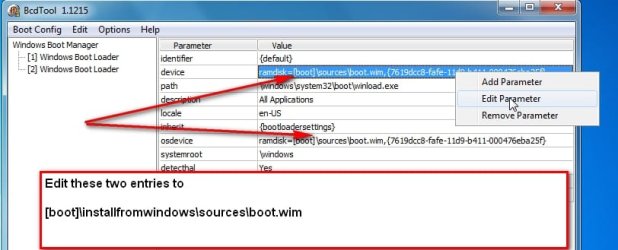
What you then need to do is edit the bcd entry - to point at "installwindows\sources\boot.wim"

Start bcdtool.exe , click Bootconfig>Open and browse to bcd in the boot folder you just moved to the root of the drive, then,

bcdtool-1.jpg

View attachment BcdTool.zip


Boot.wim will boot up fine.


3. You want to install one of several different windows operating systems ? - you can do that from boot.wim.

The way to do it is with imagex - put imagex in boot.wim - you can apply any image from any wim with imagex.

To make it easier - there are several installer programs which will give you a nice gui to do the job.

Put that program in boot.wim and it will do the installing for you.


4. How do you put the program in Boot.wim ?

Simple - you need to mount boot.wim - ( easier from windows 7 as you can use dism to mount it )

You can use this nice easy dismgui:

View attachment DISMGUI .zip


Copy the installer program into the mounted \windows \system32.

Unmount the boot.wim image with the commit switch.

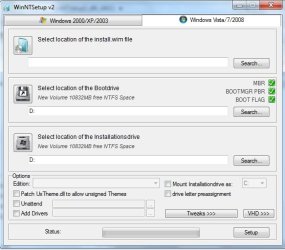
4. To run the program when boot.wim has booted - just type installerprogramname.exe in command prompt.

This will pop up - which is pretty self explanatory :

winntsetup.jpg


Will you be using 32 or 64 bit boot.wim for this?

Most people use 32 bit boot.wim- you can install 64 bit operating systems from it.

Does that make sense?

EDIT - I just looked back at your original post - the path you want is installwindows\windows7\boot\bcd

So use that instead of installwindows\boot\bcd everywhere above.
 
Last edited:

My Computers My Computers

System One System Two

  • Computer type
    PC/Desktop
    OS
    7 X64
    CPU
    i5 8400
    Motherboard
    gigabyte b365m ds3h
    Memory
    2x8gb 3200mhz
    Hard Drives
    various
    PSU
    pure power 11 400w cm
    Case
    Coolermaster
    Cooling
    cryorig m9i
  • Computer type
    PC/Desktop
    OS
    7x64
    CPU
    g5400
    Motherboard
    ga b365m ds3h
    Memory
    8gb ddr4 2400
    PSU
    xfx pro 450w
Back
Top