Want to install fresh version on my laptop..

No worries :). It will work.

Do not manually enter the key. The certificate also has to get in.
 
Last edited by a moderator:

My Computer My Computer

At a glance

Windows 7 Home Premium 32 bit
OS
Windows 7 Home Premium 32 bit
OK.. I'm back.. Installed the image downloaded in this thread.. Neither ABR, or Advanced Token Manager worked.. Most likely an error on my part.. I entered the key on the back of the computer, and it activated without a hitch..

It seems much snappier now..

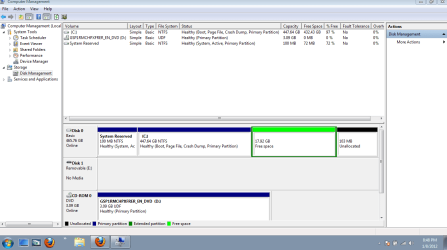
Only thing that is bugging me is that I seem to have leftover partitions, that I was unable to delete in the advanced part of the install, and did not see an option to format the entire disc.. Is there anyway to get rid of them and have a larger "C" drive? I made backups of the recovery files, and just wanted the space back.. Any ideas?

Thanks again for all the help..

 

My Computer My Computer

At a glance

Windows 7
OS
Windows 7
If you followed the steps I gave you to get a perfect reinstall of Win7 it shows how to delete any partitions not needed, create Partitions and install: Reinstalling Windows 7

To do it now: Please post back a screenshot of your maximized Disk mangement drive map with listings. Use the SNipping Tool in Start Menu. Screen Shots
 
Here ya go..

Capture.PNG
 

My Computer My Computer

At a glance

Windows 7
OS
Windows 7
In Disk Management rightclick on the Logical Free Space to Delete Volume, which should change it to Unallocated space: Partition or Volume - Delete

Then Extend C into its Space: Partition or Volume - Extend

If there is any problem with this use free Partition Wizard bootable CD to rightclick>Resize C into the Free and Unallocated Space since it regards them as both the same.


Just want to say thanks to all that helped, and guided me through this.. Made a few mistakes along the way, but managed to sort it all out, and learned a lot along the way..

Thanks again!
 

My Computer My Computer

At a glance

Windows 7
OS
Windows 7
Back
Top