A few questions
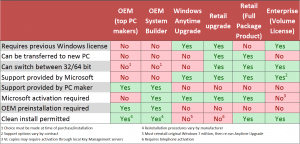
My xp pro, sp3,32 bit,desktop has lost files 3 times (one being boot ini ),I'm guessing the h/d is going.So I might as well upgrade to MS7 on new H/D.I would like to use MS7 pro. What is the difference between an OEM and a MS box version.From my understanding the OEM download (about $100 or less.teacher discount) can not be moved to another computer even if it fails ,as a full new box can(in theory). I am planning to reinstall xp pro image to new h/d and then install MS7(not sure if both will be on same disk or just get 2 new h/d). Is using MS multi boot better than Easy bcd boot or another third party boot.
My xp pro, sp3,32 bit,desktop has lost files 3 times (one being boot ini ),I'm guessing the h/d is going.So I might as well upgrade to MS7 on new H/D.I would like to use MS7 pro. What is the difference between an OEM and a MS box version.From my understanding the OEM download (about $100 or less.teacher discount) can not be moved to another computer even if it fails ,as a full new box can(in theory). I am planning to reinstall xp pro image to new h/d and then install MS7(not sure if both will be on same disk or just get 2 new h/d). Is using MS multi boot better than Easy bcd boot or another third party boot.
My Computer
At a glance
32bit now xp pro-want to install MS7 pro3.15 gigahertz intel pentium III2-2048 mb,ATI Radeon HD 4800 series
- Computer type
- PC/Desktop
- Computer Manufacturer/Model Number
- custom
- OS
- 32bit now xp pro-want to install MS7 pro
- CPU
- 3.15 gigahertz intel pentium III
- Motherboard
- Gigabyte EP45-UD3P
- Memory
- 2-2048 mb,
- Graphics Card(s)
- ATI Radeon HD 4800 series
- Hard Drives
- Seagate-St31000340As (loss a few files,might be failing,so might as well install ms7 on new h/D
Hitachi HDS721010KLA330
- Antivirus
- NIS
- Browser
- Fire Fox