Want to make new partition to install Win 2008 R2

askgupta

New member
Local time
3:09 PM
Messages
5
I've Toshiba Notebook and Win 7 Home Premium x64 OS installed on it. I want to have Win Server 2008 R2 x64 also in my PC. I tried two options:

1 - Made VHD and tried to install in that, but it didn't. Gave error that Win 2008 cannot be installed on VHD.
2 - Created new partition but got error message that you already have max number of partitions, so can't make new partitions.

What do I do? Is it the problem due to Home Premium edition? If yes, shall I first upgrade my primary OS to Ultimate or Professional? I've already checked my PC for upgrade compatibility by Microsoft Upgrade Advisory and it says that my PC can be upgraded to Win 7 Prof or Ultimate.

Please suggest what do I do?

My ultimate aim is to run Win Server 2008 R2 x64 on my laptop - either in VHD form or in hard disk. Please help.

Thanks much in advance!
 

My Computer My Computer

At a glance

Windows 7 Home Premium
OS
Windows 7 Home Premium
If you want to install it on a virtual machine, you may try vmware workstation 7. As far as I know (not 100% sure) it supports win server 2008.

If you want to dual boot windows 7 home premium and win server 2008, you need another partition, so please try with an empty one. If there is not an empty partition, to create a partition without formatting the machine you may try Acronis disc director suite 10. But I dont know actually how many partitions do you have.

Moreover, do you know "diskpart" command? It is helpful in creating partitions.
 

My Computer My Computer

At a glance

Microsoft Windows 10 Pro Insider Preview 64-bitIntel(R) Core(TM) i3-4130 CPU @ 3.40GHzCorsair Vengence 4GB x2 (8.00GB Dual-Channel ...2047MB GeForce GTS 450 (ZOTAC International)
Computer type
PC/Desktop
Computer Manufacturer/Model Number
Self Assembled
OS
Microsoft Windows 10 Pro Insider Preview 64-bit
CPU
Intel(R) Core(TM) i3-4130 CPU @ 3.40GHz
Motherboard
Gigabyte Technology Co., Ltd. B85M-D3H
Memory
Corsair Vengence 4GB x2 (8.00GB Dual-Channel DDR3 @ 798MHz)
Graphics Card(s)
2047MB GeForce GTS 450 (ZOTAC International)
Sound Card
Onboard (Realtek High Definition Audio)
Monitor(s) Displays
LG Flatron E2040T
Screen Resolution
1600x900
Hard Drives
Western Digital 1 TB
Seagate 500 GB
PSU
Corsair VS550
Case
Cooler Master K380
Cooling
Cooler Master Seidon 120V Plus
Keyboard
Logitech MK260r
Mouse
Logitech MK260r
Internet Speed
PMPL Broadband
Antivirus
Windows Defender + MBAM
Browser
Firefox
Other Info
Dell Studio 15" Laptop
Thanks! I have 4 partitions which came by default since purchase of laptop.
I have C: drive with 400 + GB but I am unable to make a new partition by shrinking the volume. When I create New Simple Volume, it says you already have max number of partitions. What do I do?

Please let me know.
Thanks again.
 

My Computer My Computer

At a glance

Windows 7 Home Premium
OS
Windows 7 Home Premium
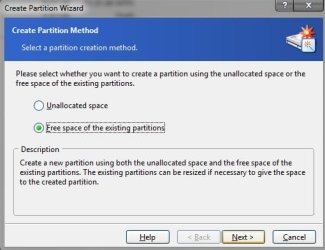
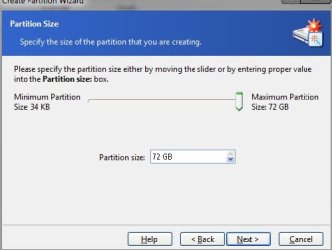
Perhaps you are trying the default disk management utility. I use Acronis Disk Director Suite and recommend it to you. Start Acronis in manual mode. In the top of the left pane, you will find Wizard. Click on Create partition. A Create partition window will pop up. Select free space of the existing partirion and proceed. Select partition c (as u want to create the partition out of it) and proceed. Give the desired size, then the wizard will do the job for you. As my system is restarting now, i am not able to post more screenshots of the next steps. have success. happy new year.
 

Attachments

  • Untitled.jpg
    Untitled.jpg
    21.8 KB · Views: 8
  • Untitled1.jpg
    Untitled1.jpg
    26.8 KB · Views: 26
  • Untitled2.jpg
    Untitled2.jpg
    19.7 KB · Views: 8

My Computer My Computer

At a glance

Microsoft Windows 10 Pro Insider Preview 64-bitIntel(R) Core(TM) i3-4130 CPU @ 3.40GHzCorsair Vengence 4GB x2 (8.00GB Dual-Channel ...2047MB GeForce GTS 450 (ZOTAC International)
Computer type
PC/Desktop
Computer Manufacturer/Model Number
Self Assembled
OS
Microsoft Windows 10 Pro Insider Preview 64-bit
CPU
Intel(R) Core(TM) i3-4130 CPU @ 3.40GHz
Motherboard
Gigabyte Technology Co., Ltd. B85M-D3H
Memory
Corsair Vengence 4GB x2 (8.00GB Dual-Channel DDR3 @ 798MHz)
Graphics Card(s)
2047MB GeForce GTS 450 (ZOTAC International)
Sound Card
Onboard (Realtek High Definition Audio)
Monitor(s) Displays
LG Flatron E2040T
Screen Resolution
1600x900
Hard Drives
Western Digital 1 TB
Seagate 500 GB
PSU
Corsair VS550
Case
Cooler Master K380
Cooling
Cooler Master Seidon 120V Plus
Keyboard
Logitech MK260r
Mouse
Logitech MK260r
Internet Speed
PMPL Broadband
Antivirus
Windows Defender + MBAM
Browser
Firefox
Other Info
Dell Studio 15" Laptop
Back
Top