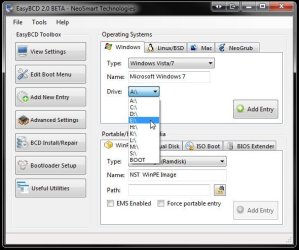
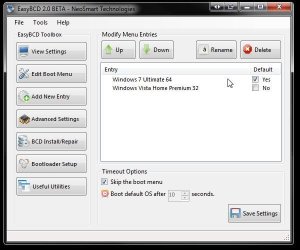
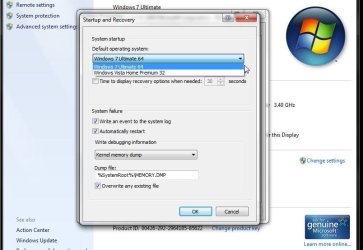
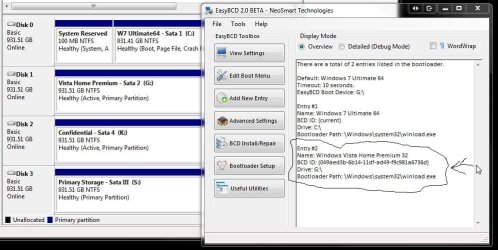
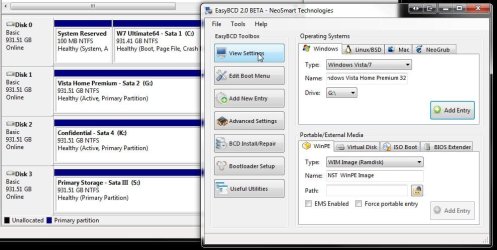
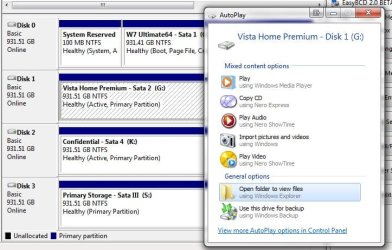
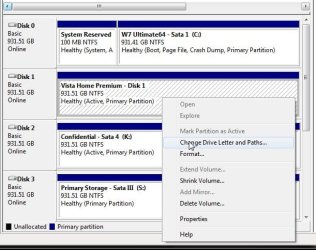
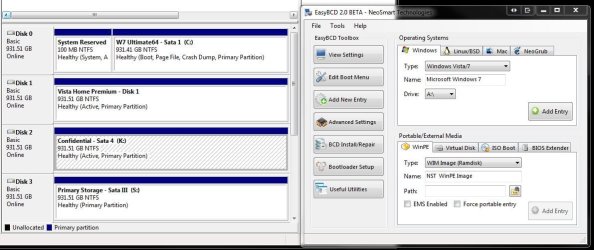
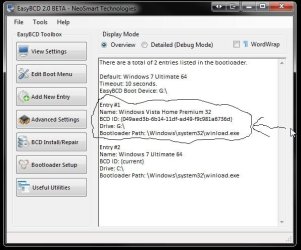
IF you performed a clean install of 7 without the Vista drive plugged in and saw 7 load up the drive is considered a bootable stand alone by itself. Different bios versions are used by each manufacturer where the arrangement of options can also be a bit different depending Award, Phoenix, AMI, or another bios used.
The user manuals are generally your best reference for going through the various options in the bios setup. Most boards often used by HP however are Asus models where the F4, F11, or F12 could be the choice. By going into the advanced section in the bios and disabling the HP brand logo screen the assigned keys should be displayed on the black post screen as you watch the memory total being counted and the drives being listed during the initial post tests.
On desktops with Asus boards F8 is generally the key assigned for bringing up the boot device menu that gives you the option for booting from a floppy, optical, or hard drive even usb flash drive on most newer bioses. Under hard drives all drives installed are listed. On the Gigabyte board in use here however once you select hard drive from the menu a second screen shows the hard drives installed.
In the bios for setting the default hard drive you will need to go through the boot order, Intergrated Periphals if seen, and possibly another section depending on the layout until you are in the onboard configuration area that also shows a hard drive item. When highlighted that should bring up the list of drives. The boot order is a different section entirely from the one you want.
The user manuals are generally your best reference for going through the various options in the bios setup. Most boards often used by HP however are Asus models where the F4, F11, or F12 could be the choice. By going into the advanced section in the bios and disabling the HP brand logo screen the assigned keys should be displayed on the black post screen as you watch the memory total being counted and the drives being listed during the initial post tests.
On desktops with Asus boards F8 is generally the key assigned for bringing up the boot device menu that gives you the option for booting from a floppy, optical, or hard drive even usb flash drive on most newer bioses. Under hard drives all drives installed are listed. On the Gigabyte board in use here however once you select hard drive from the menu a second screen shows the hard drives installed.
In the bios for setting the default hard drive you will need to go through the boot order, Intergrated Periphals if seen, and possibly another section depending on the layout until you are in the onboard configuration area that also shows a hard drive item. When highlighted that should bring up the list of drives. The boot order is a different section entirely from the one you want.
My Computers
-
At a glance
W7 Ultimate x64/W10 Pro x64/W11 Pro Triple Bo...AMD Phenom II X4 975 Deneb 3.6ghz - 965 2nd r...Kingston Hyper X DDR3 1600 1.5v 16gb - Hyper ...MSI HD Radeon 5750 1gb - MSI HD Radeon 6450 o...- Computer type
- PC/Desktop
- Computer Manufacturer/Model Number
- Custom builds = 2
- OS
- W7 Ultimate x64/W10 Pro x64/W11 Pro Triple Boot - Main PC W7 Remote PC Micro ATX W7 Pro x64/W11 Pro
- CPU
- AMD Phenom II X4 975 Deneb 3.6ghz - 965 2nd remote pc
- Motherboard
- Gigabyte GA-790XTA-UD4-Gigabyte GA-880GM-D2H remote pc
- Memory
- Kingston Hyper X DDR3 1600 1.5v 16gb - Hyper X Fury 8gb 2nd
- Graphics Card(s)
- MSI HD Radeon 5750 1gb - MSI HD Radeon 6450 on mini tower
- Sound Card
- Creative Labs X-Fi Xtreme Audio P - Realtek onooard 2nd case
- Monitor(s) Displays
- ASUS VW199T-P 19" HP 2082a Main-HP 2082a 20" remote pc
- Screen Resolution
- Asus 1440x900 - HP 1600x900
- Hard Drives
- WD Black 1TB HD per OS W7, W10, and pending W11 presently on 500gb OS Drive - Pending Triple 1TB HDs for Spanned Storage/backup volume
Single 2TB external USB enclosure, single 1TB System 7 Host/Boot drive, Pending 8TB external HD for system image b
- PSU
- Corsair 750TX - primary / Corsair CX600 - second
- Case
- Antec 900-2 - SSD compatible / NZXT Vulcan mini tower
- Cooling
- Zalman CNPS9900A
- Keyboard
- AZIO L70 Backlit Letters Gaming - ONN Cordless/USB
- Mouse
- MSI DS200 Programmable, Logitech Cordless
- Internet Speed
- 30mbps upgrade - primary hard wired - mini tower usb WiFi
- Antivirus
- GFI VIPRE Internet Security 2014 on W7 2016 beta on W10,
- Browser
- Cyberfox, WaterFox 64bit FF variants, FireFox x64, Pale Moon
- Other Info
- Accomdata fan cooled usb 2.0 PIDE/Sata II, III external enclosure.
Sambient usb/eSata PATA/Sata II, III external enclosure.
-
At a glance
W7 Pro x64/W11 ProAMD Deneb 3.6ghz - 965Kingston Hyper X Fury 8gbMSI HD Radeon 6450 DVI Output- Computer type
- PC/Desktop
- System Manufacturer/Model Number
- CUSTOM ASSEMBLY
- OS
- W7 Pro x64/W11 Pro
- CPU
- AMD Deneb 3.6ghz - 965
- Motherboard
- Gigabyte GA-880GM-D2H remote pc
- Memory
- Kingston Hyper X Fury 8gb
- Graphics Card(s)
- MSI HD Radeon 6450 DVI Output
- Sound Card
- Realtek onooard Creative or Other separate PENDING
- Monitor(s) Displays
- VIZIO 32" LCD TV Separate LCD Pending
- Screen Resolution
- 1600x1080
- Hard Drives
- WD 500GB OS Host/Boot WD Green 1TB Storage/Backup
- PSU
- Corsair 600W - THERMALTAKE 600W spare case
- Case
- NZXT Vulcan mini tower
- Cooling
- Twin 120mm Top Fans - 240mm Side Cover
- Keyboard
- ONN Cordless/USB Logitech Cordless
- Mouse
- ONN USB/Cordless - Logitech Cordless
- Internet Speed
- DSL 5G
- Browser
- MS Edge, FireFox, WaterFox x64, FireFox Nightly
- Other Info
- OS Testing-Remote Access to Main TeamViewer