Solved Want to migrate fresh install of W7 to old HDD but keep partitions

till I find the time and patience

Let us know when you have done it. . :-)
 

My Computers My Computers

  • At a glance

    7 X64i5 84002x8gb 3200mhz
    Computer type
    PC/Desktop
    OS
    7 X64
    CPU
    i5 8400
    Motherboard
    gigabyte b365m ds3h
    Memory
    2x8gb 3200mhz
    Hard Drives
    various
    PSU
    pure power 11 400w cm
    Case
    Coolermaster
    Cooling
    cryorig m9i
  • At a glance

    7x64g54008gb ddr4 2400
    Computer type
    PC/Desktop
    OS
    7x64
    CPU
    g5400
    Motherboard
    ga b365m ds3h
    Memory
    8gb ddr4 2400
    PSU
    xfx pro 450w
So, I did the migration with AOMEI on the 512GB disk OS. It asked for the drive letter so I picked F: (I don't think I could have done anything else when logged on the 512 GB OS with AOMEI open) for the system partition on the 1024 GB disk, and now it boots as F: even if only the 1024 GB drive is plugged in. I can't run any app because it says the path doesn't exist or something along the lines, and I can't load any software like MiniTool to change it back to C:.
To clarify: 1024 GB disk system loads, but says Windows 7 is not genuine, and in cmd if I do dir on F:\ all the files are listed, but they won't launch. I can't switch to C:, it says that drive isn't present (something along the lines).

What can I do to fix this?

512 GB disk partitions when using that system:
C:\ (System, Primary, Active)
D:\ (nothing, logical partition)
E:\ (nothing, logical partition)
1024 GB disk (when using 512 GB one):
F:\ (System, Primary, Active)
G:\ (nothing, logical partition)
E:\ (nothing, logical partition)

Trying to boot from 1024 GB disk makes 512 GB boot, and when I try to edit F:\boot\bcd with EasyBCD like that it says it's in use, but everything looks the same as if I booted from the 512 GB disk.
 

My Computer My Computer

At a glance

Windows 7 64 bit
Computer type
PC/Desktop
OS
Windows 7 64 bit
Get to another PC and create an Aomei Boot USB Pen drive, Choose either the Linux or Windows version depending on what you are most comfortable with, ( I think the Linux version will fit on a smaller USB which may decide this)

Boot from your Aomei boot USB you made and use the software to reset the F: drive to C: . You may need to use an unused intermediary Drive [Eg Z:] Letter to make these changes, [ie. change the C: to Z: then the F: to C: check working and then delete the Z: drive ], or you can simply delete the C: partition and reallocate the F: to C: (if you are happy that the F: drive is working correctly and it's backed up offline if possible).

I would myself create a Boot USB Stick from Minitool Partition Wizard - the free version is fine for this and is simpler to use for this task that Aomei
 

My Computers My Computers

  • At a glance

    Windows 11 Pro x64 [Latest Release and Releas...Ryzen 9 5950X, 3.8 - 5.2 MHz64GB [2 x 32GB] DDR4 3200MHz4GB NVIDIA GEFORCE GTX 1650 Ti
    Computer type
    PC/Desktop
    Computer Manufacturer/Model Number
    ChillBlast - Custom to my design
    OS
    Windows 11 Pro x64 [Latest Release and Release Preview]
    CPU
    Ryzen 9 5950X, 3.8 - 5.2 MHz
    Motherboard
    Asus Prime X570-Pro
    Memory
    64GB [2 x 32GB] DDR4 3200MHz
    Graphics Card(s)
    4GB NVIDIA GEFORCE GTX 1650 Ti
    Sound Card
    On-board SPDIF to 5.1 System + HDMI [5.1 system]
    Monitor(s) Displays
    32" UHD 32 Bit HDR Monitor + 43" UHD 4K 32Bit HDR TV
    Screen Resolution
    2 x 3840 x 2160 @60Hz
    Hard Drives
    1TB M2 SSD OS, 500GB Fast Access SSD, 2 x 8TB Data + Various Externals from 1TB to 4TB, 10TB NAS
    PSU
    NZXT C750 80 PLUS Gold 750W Modular PSU
    Case
    Workstation Case [Matt Black]
    Cooling
    NZXT Kraken X63 280mm CPU Cooler +2x Quiet Case fans
    Keyboard
    Logitech Wireless MX Keys & K400 + others
    Mouse
    Logitech Wireless MX Master 3S
    Internet Speed
    920 MB Down 50 MB Up
    Antivirus
    BitDefender Total Security Pro
    Browser
    Chrome (always run latest Non-Beta)
    Other Info
    Also run ...
    Laptop - Quad 8GB - Windows 10 Pro x64
    Nexus 7 Android tablet x2
    Samsung 10.2" tablet
    Blackview TAB 8 4G Android Tablet c/w Keyboard
    Wacom Intuos Pro Medium Pen Pad
    Wacom Intuos Pro Small Pen Pad
    Wacom Expresskeys Remote
    Loopdeck+ Graphics Controller
    Shuttle Pro v2 Control
  • At a glance

    Windows 11 Pro x64 Latest RPIntel I7 10750H 5.0GHz32GB [2x16GB] DDR4 2933 MHznVidia GTX1650Ti 4 GB GDDR6
    Computer type
    Laptop
    System Manufacturer/Model Number
    Dell XPS 17 10750H
    OS
    Windows 11 Pro x64 Latest RP
    CPU
    Intel I7 10750H 5.0GHz
    Motherboard
    Dell XPS
    Memory
    32GB [2x16GB] DDR4 2933 MHz
    Graphics Card(s)
    nVidia GTX1650Ti 4 GB GDDR6
    Sound Card
    Stock [Realtek] 4 Speaker
    Monitor(s) Displays
    17" IPS UHD+ Infinity Edge Touchscreen
    Screen Resolution
    3840 x 2400
    Hard Drives
    2TB M2 NVMe, 4TB External + various 500GB & 1TB External NVMe (also have access to spinner HDD from
    PSU
    Stock
    Case
    Stock XPS Aluminium & Carbon Fibre
    Cooling
    Stock - Active Fan Control
    Keyboard
    Backlit + Various Logitech
    Mouse
    Stock Track Pad + Logitech MX Trackball
    Internet Speed
    72 MB Down 18MB Up
    Browser
    Chrome
    Other Info
    Also run ...
    Laptop - Quad 8GB - Windows 10 Pro x64
    Nexus 7 Android tablet x2
    10.2" tablet
    Sony Z3 Android Smartphone
    Wacom Intuos Pro Medium Pen Pad
    Wacom Intuos Pro Small Pen Pad
    Wacom Expresskeys Remote
    Loopdeck+ Graphics Controller
    Shuttle Pro v2 Control Pad
    10TB NAS
I don't have a pen drive around unfortunately.
 

My Computer My Computer

At a glance

Windows 7 64 bit
Computer type
PC/Desktop
OS
Windows 7 64 bit
Ok only thing I can think of is physically disconnect the old C: drive [open the case and detach the power and or data cable from the drive], hopefully the Bios and windows should default to setting the current F: drive to C: as it will be the only active boot drive - this should then allow the system to find your programs correctly
 

My Computers My Computers

  • At a glance

    Windows 11 Pro x64 [Latest Release and Releas...Ryzen 9 5950X, 3.8 - 5.2 MHz64GB [2 x 32GB] DDR4 3200MHz4GB NVIDIA GEFORCE GTX 1650 Ti
    Computer type
    PC/Desktop
    Computer Manufacturer/Model Number
    ChillBlast - Custom to my design
    OS
    Windows 11 Pro x64 [Latest Release and Release Preview]
    CPU
    Ryzen 9 5950X, 3.8 - 5.2 MHz
    Motherboard
    Asus Prime X570-Pro
    Memory
    64GB [2 x 32GB] DDR4 3200MHz
    Graphics Card(s)
    4GB NVIDIA GEFORCE GTX 1650 Ti
    Sound Card
    On-board SPDIF to 5.1 System + HDMI [5.1 system]
    Monitor(s) Displays
    32" UHD 32 Bit HDR Monitor + 43" UHD 4K 32Bit HDR TV
    Screen Resolution
    2 x 3840 x 2160 @60Hz
    Hard Drives
    1TB M2 SSD OS, 500GB Fast Access SSD, 2 x 8TB Data + Various Externals from 1TB to 4TB, 10TB NAS
    PSU
    NZXT C750 80 PLUS Gold 750W Modular PSU
    Case
    Workstation Case [Matt Black]
    Cooling
    NZXT Kraken X63 280mm CPU Cooler +2x Quiet Case fans
    Keyboard
    Logitech Wireless MX Keys & K400 + others
    Mouse
    Logitech Wireless MX Master 3S
    Internet Speed
    920 MB Down 50 MB Up
    Antivirus
    BitDefender Total Security Pro
    Browser
    Chrome (always run latest Non-Beta)
    Other Info
    Also run ...
    Laptop - Quad 8GB - Windows 10 Pro x64
    Nexus 7 Android tablet x2
    Samsung 10.2" tablet
    Blackview TAB 8 4G Android Tablet c/w Keyboard
    Wacom Intuos Pro Medium Pen Pad
    Wacom Intuos Pro Small Pen Pad
    Wacom Expresskeys Remote
    Loopdeck+ Graphics Controller
    Shuttle Pro v2 Control
  • At a glance

    Windows 11 Pro x64 Latest RPIntel I7 10750H 5.0GHz32GB [2x16GB] DDR4 2933 MHznVidia GTX1650Ti 4 GB GDDR6
    Computer type
    Laptop
    System Manufacturer/Model Number
    Dell XPS 17 10750H
    OS
    Windows 11 Pro x64 Latest RP
    CPU
    Intel I7 10750H 5.0GHz
    Motherboard
    Dell XPS
    Memory
    32GB [2x16GB] DDR4 2933 MHz
    Graphics Card(s)
    nVidia GTX1650Ti 4 GB GDDR6
    Sound Card
    Stock [Realtek] 4 Speaker
    Monitor(s) Displays
    17" IPS UHD+ Infinity Edge Touchscreen
    Screen Resolution
    3840 x 2400
    Hard Drives
    2TB M2 NVMe, 4TB External + various 500GB & 1TB External NVMe (also have access to spinner HDD from
    PSU
    Stock
    Case
    Stock XPS Aluminium & Carbon Fibre
    Cooling
    Stock - Active Fan Control
    Keyboard
    Backlit + Various Logitech
    Mouse
    Stock Track Pad + Logitech MX Trackball
    Internet Speed
    72 MB Down 18MB Up
    Browser
    Chrome
    Other Info
    Also run ...
    Laptop - Quad 8GB - Windows 10 Pro x64
    Nexus 7 Android tablet x2
    10.2" tablet
    Sony Z3 Android Smartphone
    Wacom Intuos Pro Medium Pen Pad
    Wacom Intuos Pro Small Pen Pad
    Wacom Expresskeys Remote
    Loopdeck+ Graphics Controller
    Shuttle Pro v2 Control Pad
    10TB NAS
I already did that, and it booted with temporary settings, saying Windows is not genuine in the bottom right corner while the incorrect volume letters persisted. I attempted restoring BCD & MBR with bootrec.exe, which did not help. I also tried copying all the registry hives from C:\Windows\System32\config\Regback to *\config, which also did not help.
 

My Computer My Computer

At a glance

Windows 7 64 bit
Computer type
PC/Desktop
OS
Windows 7 64 bit
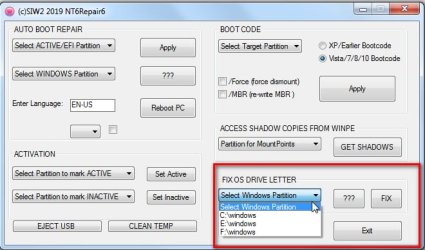
I dont know how you managed to do that, but it can be easily fixed.

Boot into your original installation i.e the source - according to your first post that is the one on your 512gb

Select the problem installation in the dropdown.

In your case it sounds like you need to select F:\windows


Click FIX

View attachment nt6repair9x86.zip

nt6repair6-FIXOSLETTER.jpg
 
Last edited:

My Computers My Computers

  • At a glance

    7 X64i5 84002x8gb 3200mhz
    Computer type
    PC/Desktop
    OS
    7 X64
    CPU
    i5 8400
    Motherboard
    gigabyte b365m ds3h
    Memory
    2x8gb 3200mhz
    Hard Drives
    various
    PSU
    pure power 11 400w cm
    Case
    Coolermaster
    Cooling
    cryorig m9i
  • At a glance

    7x64g54008gb ddr4 2400
    Computer type
    PC/Desktop
    OS
    7x64
    CPU
    g5400
    Motherboard
    ga b365m ds3h
    Memory
    8gb ddr4 2400
    PSU
    xfx pro 450w
I was on the 512 GB disk OS, running AOMEI. Disk 1 had C:, D:, E:, partitions, disk 2, F: (primary, active OS, XP, w/ */boot/bcd), G: (W7, dual-boot, secondary OS), H: (logical partition), showing in the GUI. Pretty simple from there on out, F: -> Unallocated, G: -> Unallocated, respectively. H: left intact to keep the data. So, that's 2 steps. Then, I scheduled creating F: partition, then G:, and finally to remove F: again to turn into unallocated space (I did it this way because first creating G: and then turning F: into a partition at the end would make letters appear out of order). 5 steps by now, I get unallocated space for the migration, for which AOMEI would later ask me to choose a letter, and all common sense advised me to pick F: for this. AOMEI reboots into PE resizes partition to be: Unallocated space, G:, H: left intact. AOMEI proceeds to migrate the OS, and does it with the previously mentioned quirk that makes it have the wrong letters and boot incorrectly.

What I noticed later running MiniTool on the 1024 GB disk is that the original 512 GB disk would have its C: partition marked as "*", which makes me believe I was supposed to choose "none" as the drive letter, but this is pure guesswork on my part. Either AOMEI is a sorry excuse for partitioning software or I wasn't given the right information.

I was completely dejected by that point, and since I did whatever housekeeping I could on the partition with the data, I decided to just run MiniTool migration since that was what I did during the last successful migration. As a final insult, MiniTool 12.3 informed me OS migration ceased to be a free feature, and that I had to pay, so I just pirated Partition Wizard 9.1. Scumbags. I ended up losing some of the data I wanted to sort out later because of all this horsecrap.

Overall, I'm utterly disappointed. I didn't expect another gruelling troubleshooting ordeal with ambiguous bits of information being thrown my way when trying to find any specifics on the subject. I wish Barman58 had provided a solution to what was seemingly a simple problem instead of some nonsense about pen drives, but I understand that not everyone can be a wish granting djinnie at the exactly right time.

I appreciate the program I couldn't find any directions to being pointed to when googling. Too late by now, but maybe somebody else will have it easier in the future.

I guess the major takeaway from this experience is to never take backups lightly. It's not worth the stress when you find yourself having your data at risk and following random advice on the internet is not exactly reliable. Could have gone better, but at least it's done and dusted by now. Whatever. God do I f*cking hate computer systems and electronics in general.

Oh and I'd like to emphasize again that I did boot into W7 disk mode since I had previously installed W7 from HDD, and it would let me dual-boot like that if I wished so. I did

bootrec.exe
bootrec.exe /fixmbr
bootrec.exe /fixboot
bootrec.exe /scanos (would say 0 installations found at first)
bootrec.exe /rebuildbcd

And afterwards

bcdedit /export C:\bcdbackup
attrib c:\boot\bcd -h -r -s
ren c:\boot\bcd bcd.old
bootrec /rebuildbcd (this detected OS)

This resulted in not fixing anything. So then I did:

1. Rename folders to *.old in C:\Windows\System32\config (Booting into W7 setup disk files displayed the partitions as C: D: E:)
SAM
SECURITY
SOFTWARE
DEFAULT
SYSTEM

Copied them again from C:\Windows\System32\Config\Regback back to *\Config

Reboot

And this fixed nothing, so I'm sure if this "nt6repair9x86.zip" would have help

 

My Computer My Computer

At a glance

Windows 7 64 bit
Computer type
PC/Desktop
OS
Windows 7 64 bit
I still dont know how you managed to mess up the volumevalue, but it doesn't matter.

Did you run the FIX?
 
Last edited:

My Computers My Computers

  • At a glance

    7 X64i5 84002x8gb 3200mhz
    Computer type
    PC/Desktop
    OS
    7 X64
    CPU
    i5 8400
    Motherboard
    gigabyte b365m ds3h
    Memory
    2x8gb 3200mhz
    Hard Drives
    various
    PSU
    pure power 11 400w cm
    Case
    Coolermaster
    Cooling
    cryorig m9i
  • At a glance

    7x64g54008gb ddr4 2400
    Computer type
    PC/Desktop
    OS
    7x64
    CPU
    g5400
    Motherboard
    ga b365m ds3h
    Memory
    8gb ddr4 2400
    PSU
    xfx pro 450w
(I did it this way because first creating G: and then turning F: into a partition at the end would make letters appear out of order).

It doesn't matter. You can change non os drive letters to anything you want, as often as you want. The one you cant change after the os has been installed is the os letter (C for most people)


You can find out what your os letter is by looking in HKEY_LOCAL_MACHINE\SOFTWARE\Microsoft\Windows NT\CurrentVersion where you can see the pathname.

pathname.jpg
 

My Computers My Computers

  • At a glance

    7 X64i5 84002x8gb 3200mhz
    Computer type
    PC/Desktop
    OS
    7 X64
    CPU
    i5 8400
    Motherboard
    gigabyte b365m ds3h
    Memory
    2x8gb 3200mhz
    Hard Drives
    various
    PSU
    pure power 11 400w cm
    Case
    Coolermaster
    Cooling
    cryorig m9i
  • At a glance

    7x64g54008gb ddr4 2400
    Computer type
    PC/Desktop
    OS
    7x64
    CPU
    g5400
    Motherboard
    ga b365m ds3h
    Memory
    8gb ddr4 2400
    PSU
    xfx pro 450w
I still dont know how you managed to mess up the volumevalue, but it doesn't matter.
By running AOMEI in a pretty orderly manner it would seem, which seems to indicate the software is a piece of dung.

Did you run the FIX?
Not sure what that is. "nt6repair9x86.zip" program of yours? But no, like I said in my previous post I went the MiniTool route and erased all the partitions, having ran out of options.

You seem very confused about what drive letters are.
My knowledge is full of gaping holes to say the least.

You can view them as an alias for the volume value, When you think windows is looking for something on C it is actually looking for something on a volume which is identified by a very long number.

Like this:

View attachment 413888

All of that info is in the system hive of the registry. If your os letter is C ( which it is for most people) then it must point at the long number which identifies the volume windows is actually currently on.

If it is pointing somewhere else ( e.g if the identifier it still for the volume it was previously on ), you get the symptoms you describe. Windows is looking for a volume that is no longer there ( if the source is no longer attached), or it is trying to load stuff from the original source volume ( if it is still attached)

This is going way over my head. Can you confirm for me that the bootrec.exe and registry replacement methods not working have nothing to do with your "nt6repair9x86.zip" program? I just don't get why a straight up copied volume from the old disk would have letter issues. Unless it's like you mentioned, due to the long number not matching, and not the letters.
Ultimately what grinds my gears is that MiniTool 9.1 erasing all the partitions and pasting the copy of the system partition works excellent, but AOMEI doing so to unallocated space with some other partitions already present gave me letter issues.
 

My Computer My Computer

At a glance

Windows 7 64 bit
Computer type
PC/Desktop
OS
Windows 7 64 bit
I can only guess that all this stuff

had C:, D:, E:, partitions, disk 2, F: (primary, active OS, XP, w/ */boot/bcd), G: (W7, dual-boot, secondary OS), H: (logical partition), showing in the GUI. Pretty simple from there on out, F: -> Unallocated, G: -> Unallocated, respectively. H: left intact to keep the data. So, that's 2 steps. Then, I scheduled creating F: partition, then G:, and finally to remove F: again to turn into unallocated space (I did it this way because first creating G: and then turning F: into a partition at the end would make letters appear out of order).


somehow managed to confuse aomei and it forgot to reset the volume value . It is much more robust than the others for cloning/ migrating etc. I haven't managed to wrongfoot it.

Others programs often get it wrong.That is why I included the FIX in my nt6repair


.
 

My Computers My Computers

  • At a glance

    7 X64i5 84002x8gb 3200mhz
    Computer type
    PC/Desktop
    OS
    7 X64
    CPU
    i5 8400
    Motherboard
    gigabyte b365m ds3h
    Memory
    2x8gb 3200mhz
    Hard Drives
    various
    PSU
    pure power 11 400w cm
    Case
    Coolermaster
    Cooling
    cryorig m9i
  • At a glance

    7x64g54008gb ddr4 2400
    Computer type
    PC/Desktop
    OS
    7x64
    CPU
    g5400
    Motherboard
    ga b365m ds3h
    Memory
    8gb ddr4 2400
    PSU
    xfx pro 450w
I just don't get why a straight up copied volume from the old disk would have letter issues.


Because windows is looking for a volume value, which is a long number made up of the disk signature and the partition offset.

Obviously if you move/copy it to a different place, that value will need to be changed or windows doesn't know where it is.

Aomei is very good at doing this. Other programs not so reliable. That is what the FIX in nt6repair is for.

I dont know how to explain it any more simply.
 

My Computers My Computers

  • At a glance

    7 X64i5 84002x8gb 3200mhz
    Computer type
    PC/Desktop
    OS
    7 X64
    CPU
    i5 8400
    Motherboard
    gigabyte b365m ds3h
    Memory
    2x8gb 3200mhz
    Hard Drives
    various
    PSU
    pure power 11 400w cm
    Case
    Coolermaster
    Cooling
    cryorig m9i
  • At a glance

    7x64g54008gb ddr4 2400
    Computer type
    PC/Desktop
    OS
    7x64
    CPU
    g5400
    Motherboard
    ga b365m ds3h
    Memory
    8gb ddr4 2400
    PSU
    xfx pro 450w
Just imagine you have a self driving car.

You tell it "home" and it automatically drives you to your home which is number 1 acacia avenue.

You move to number 10 yew street.

You tell your car "home" it tries to take you to 1 acacia avenue again.

So when you move your window installation, it goes looking for C.
But it thinks C is on the old disk at the old partition start sector.

If the old disk is no longer attached, you usually get stuck perpetually at "preparing desktop" with a spinning cicle as windows searches in vain for the absent volume.

If the old disk is still attached, windows can usually find it and load from the old volume to a desktop, but the activation mechanism doesnt like that, so you get the "not genuine" palaver.
 

My Computers My Computers

  • At a glance

    7 X64i5 84002x8gb 3200mhz
    Computer type
    PC/Desktop
    OS
    7 X64
    CPU
    i5 8400
    Motherboard
    gigabyte b365m ds3h
    Memory
    2x8gb 3200mhz
    Hard Drives
    various
    PSU
    pure power 11 400w cm
    Case
    Coolermaster
    Cooling
    cryorig m9i
  • At a glance

    7x64g54008gb ddr4 2400
    Computer type
    PC/Desktop
    OS
    7x64
    CPU
    g5400
    Motherboard
    ga b365m ds3h
    Memory
    8gb ddr4 2400
    PSU
    xfx pro 450w
SIW2

[Not hijacking the thread here]

Your comment above: "If the old disk is still attached, windows can usually find it and load from the old volume to a desktop, but the activation mechanism doesnt like that, so you get the "not genuine" palaver."

Thanks for that. I've experienced this several times and never understood it till now.
 

My Computer My Computer

At a glance

Windows 7 Pro x64Intel i5-8265U8gbIntel Iris Plus 655
Computer type
Laptop
Computer Manufacturer/Model Number
HP 250 G7
OS
Windows 7 Pro x64
CPU
Intel i5-8265U
Motherboard
Intel Coffee Lake
Memory
8gb
Graphics Card(s)
Intel Iris Plus 655
Sound Card
Realtek HDA
Monitor(s) Displays
Generic
Screen Resolution
1366 x 768
Hard Drives
Crucial P5 NVMe 1Tb internal
WD's 4Tb, 3Tb, 2 x 2Tb external
Mouse
Logi wireless
Internet Speed
45 Mbps
Antivirus
AVG
Browser
Firefox 88, Pale Moon 29, Brave 129
Other Info
Combination of i5-8265U with Crucial P5 achieves Crystal Bench scores > 5000

Iris Plus GPU (Whiskey Lake) driver from BioStar

HP 250 G7 is a budget machine
:-)
 

My Computers My Computers

  • At a glance

    7 X64i5 84002x8gb 3200mhz
    Computer type
    PC/Desktop
    OS
    7 X64
    CPU
    i5 8400
    Motherboard
    gigabyte b365m ds3h
    Memory
    2x8gb 3200mhz
    Hard Drives
    various
    PSU
    pure power 11 400w cm
    Case
    Coolermaster
    Cooling
    cryorig m9i
  • At a glance

    7x64g54008gb ddr4 2400
    Computer type
    PC/Desktop
    OS
    7x64
    CPU
    g5400
    Motherboard
    ga b365m ds3h
    Memory
    8gb ddr4 2400
    PSU
    xfx pro 450w
Yeah, I guess I understand that it's looking for the volume ID that doesn't correspond. What mystifies me is just what in god's name went wrong with AOMEI to cause this. I suppose I'll have to wait till I get another hard drive to make yet another clone to find out.

And btw, the temporary profile, with "not genuine" showing in the corner that I booted up does actually let you do some things, even access the internet - if you press Ctrl+Alt+Delete and launch explorer.exe to bypass the blank screen.

Like I said, I just wish you had the foresight to post the program for fixing letter volumes preemptively since it seems to be quite a common cloning issue. What's done is done though. Appreciate the help anyway. Should've been more patient with this, but then again I was quite thoroughly fed up. Oh well.
 

My Computer My Computer

At a glance

Windows 7 64 bit
Computer type
PC/Desktop
OS
Windows 7 64 bit
Back
Top